Spring '26 release notes
This topic contains the release notes for the Spring '26 release of Scientific Publications Cloud. The release notes are organized into these high-level sections:
-
Installation and upgrades - link to install and/or upgrade to the new version.
-
New features - new features and functionalities introduced in the new release.
-
Updated features - existing features and functionalities enhanced in the new release.
-
Defect fixes and maintenance - defects and maintenance items fixed in the new version.
-
Metadata changes - changes to the underlying data models, user permissions, or system configurations included in the new version.
-
Required post-upgrade actions - required actions administrators should take after upgrading to the new version.
As this page is maintained and updated over time to ensure accurate and timely information, Mavens recommends referencing the release notes online rather than printing and referencing static versions of the page. The Changelog page lists all notable changes made to this page.
Installation and upgrades
The Scientific Publications Cloud Spring '26 release can be installed with the Install Service at https://install.komodohealth.com/products/kpp/latest. New installs of Scientific Publications Cloud will be on the latest release while current customers will need to run and deploy the latest update.
Remember to complete the steps in the Required post-upgrade actions section below as appropriate.
New features
The new release of Scientific Publications Cloud introduces several new features, which are detailed below. Information about enablement and configuration is included in the product documentation.
Enhanced Tasks tab on a document record
The Publication Planning Document Record Page (PP_Document_Record_Page)
includes a redesigned Tasks tab that groups workflow tasks in a
timeline aligned with document lifecycle stages.
Users can filter by time range, type, and status; sort by date; and expand or collapse Upcoming, Next Due, and Overdue sections. The Emails sub-tab also provides a combined communications timeline.
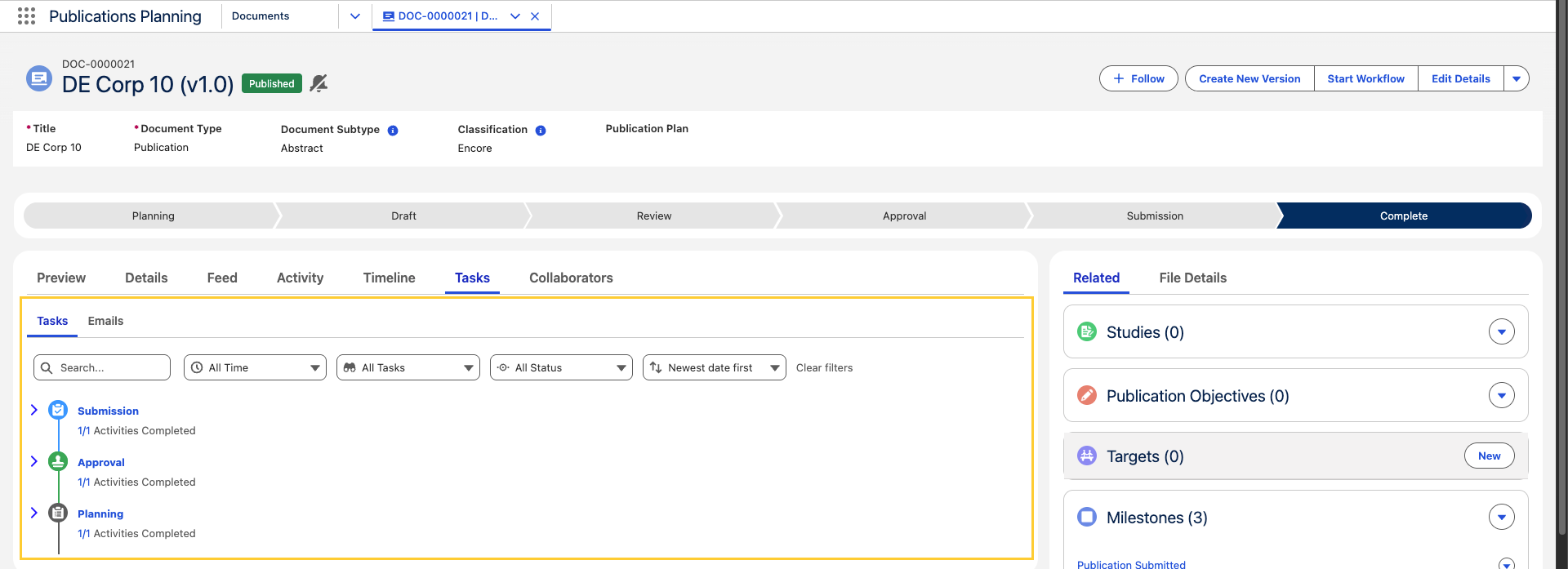
This new design provides a clear, timeline-driven view of Upcoming, Next Due, and Overdue tasks and helps users find and update work more quickly. For more details, reference Tasks tab.
Follow the Update MCM Global Setting post-install step to see this update.
Related work item(s): MPP-3162
Migrate to the new Collaborator Portal
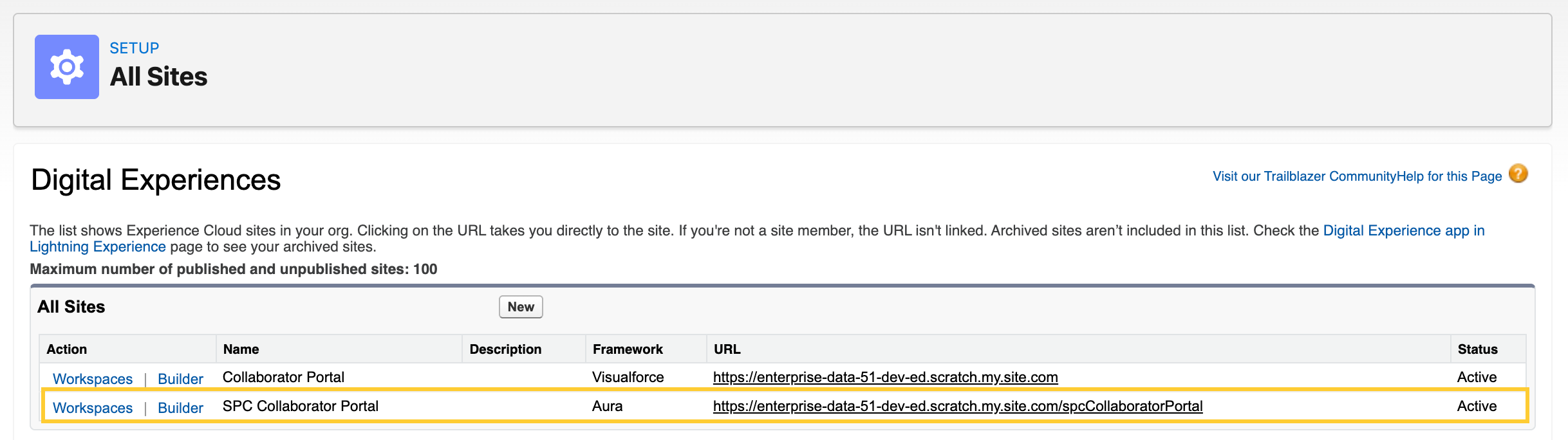
With this release, organizations can move from the legacy portal to the Salesforce Experience Cloud Collaborator Portal in Scientific Publications Cloud. The step-by-step guide of migrating to the new Collaborator Portal covers how to set up Experience Builder, configure the site's password page, and configure correct Apex access for guest users.
Related work item(s): MPP-3805
Forgot password and Reset password in Collaborator Portal
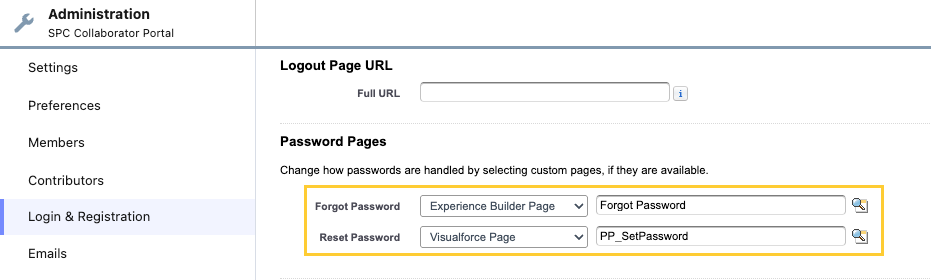
The Collaborator Portal now supports two self-service password workflows, giving users a streamlined way to regain access to their accounts.
-
Forgot Password - Users who select Forgot Password on the live site before signing in can request a password reset by email. This experience is powered by the packaged
ppPortalForgotPasswordLightning Web Component, which should be added to the Forgot Password page in the Experience Builder. The server identifies the portal user using the same lookup logic applied during login. When no matching account is found, a generic success message is displayed to prevent the exposure of valid email addresses. -
Reset Password - Users who click the link in the welcome email or reset password email are directed to the Reset Password page, which must be configured to use the
PP_SetPasswordVisualforce page. This page requires a verified email address before a new password can be saved, displays the organization's password guidance whenever Salesforce supplies policy text for the site, and allows users to either enter a matching password pair or accept a system-generated suggestion when one is offered.
Refer to the product documentation for enablement and configuration details.
Related work item(s): MPP-3672
Contact verification comments on Consent (PP_Consent) tasks
With this release, the Consent task details form (ppConsentTaskDetails) on a Consent (PP_Consent) task shows the Contact Verification (mvn__PP_Contact_Verification__c) field set PP_Consent_Task_Detail_Fields instead of the file preview so the assignee can review verification comments and approve or reject consent from the task.
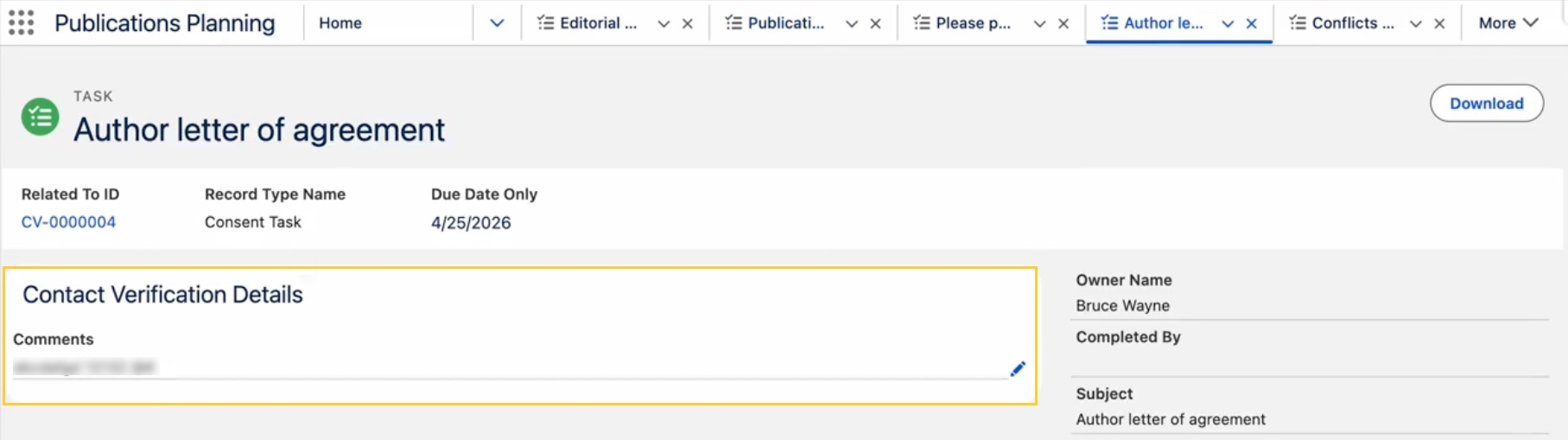
External collaborators need object and field access to Contact Verification (mvn__PP_Contact_Verification__c) wherever you expect them to approve or reject consent from the Collaborator Portal. Grant the appropriate object permission (PP_App_Permissions_External) and field-level security.
For details, refer to the Consent task section on the Tasks page.
Related work item(s): MPP-3748
Migrate legacy Collaborator Portal settings in Install Service
The Install Service includes an optional step called Migrate legacy Collaborator Portal settings that provisions the SPC Collaborator Portal and maps email sender settings from the legacy Collaborator Portal by using subscriber-org custom metadata.
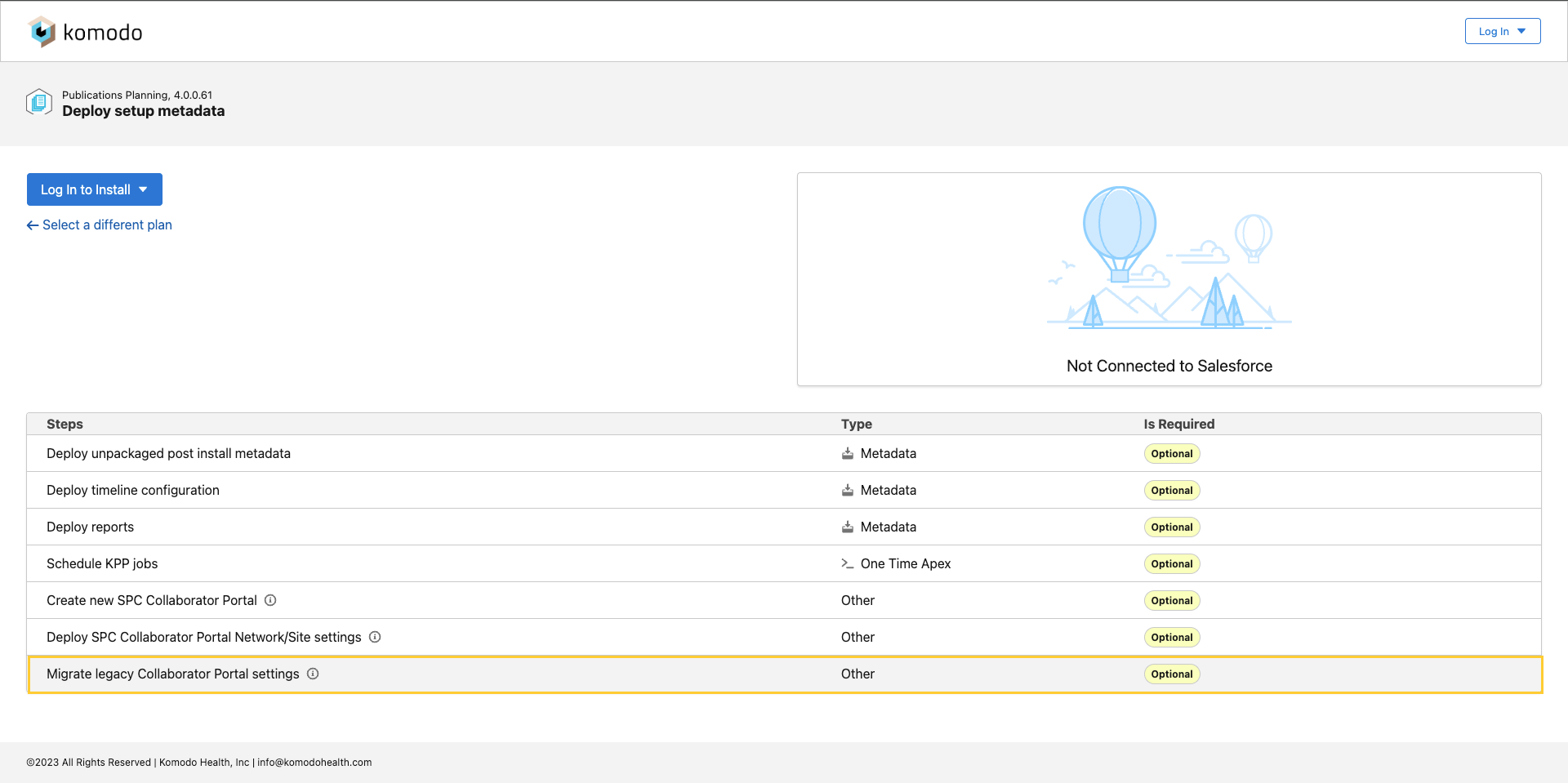
For full behavior details, see Installation steps in Initial installation.
Related work item(s): MPP-3629
Collaborator Portal login
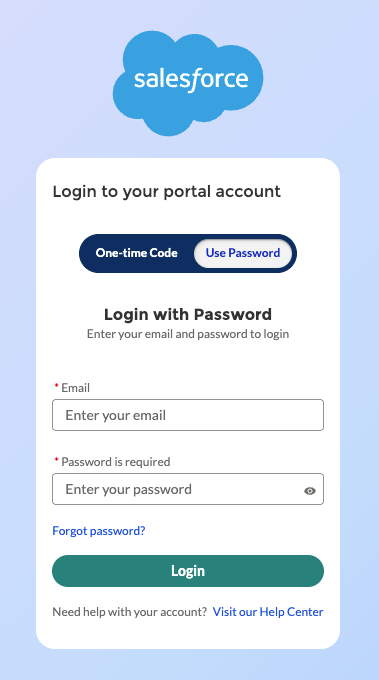
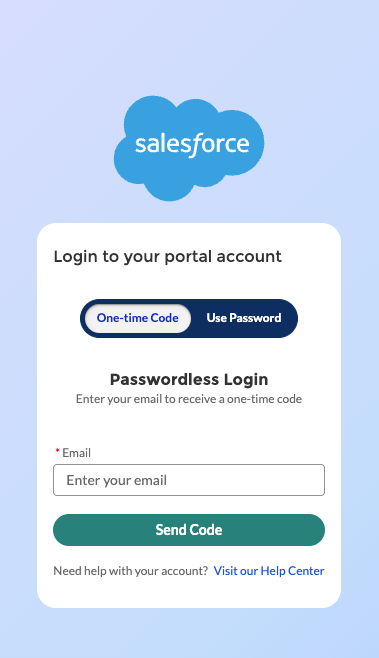
External authors now have a new login page for the Collaborator Portal, supporting two authentication methods (as configured by an administrator):
-
Login with password: Sign in with your Email and Password when password-based login is enabled for your Experience Cloud site (Collaborator Portal).
-
Passwordless login: Sign in with your Email and a One-time Code sent to your inbox when passwordless login is enabled for the Collaborator Portal.
The login experience validates that the user's email address is verified before continuing and automatically sends a verification email if it is not.
| Login with password | Passwordless login |
|---|---|
 |  |
For end-user issues with codes or email verification, see Troubleshoot login issues.
Related work item(s): MPP-3671
Profile menu in SPC Collaborator Portal
In the SPC Collaborator Portal Experience Cloud site, external collaborators can update their contact information using the My Profile menu option. This option helps collaborators keep their profile information up to date.
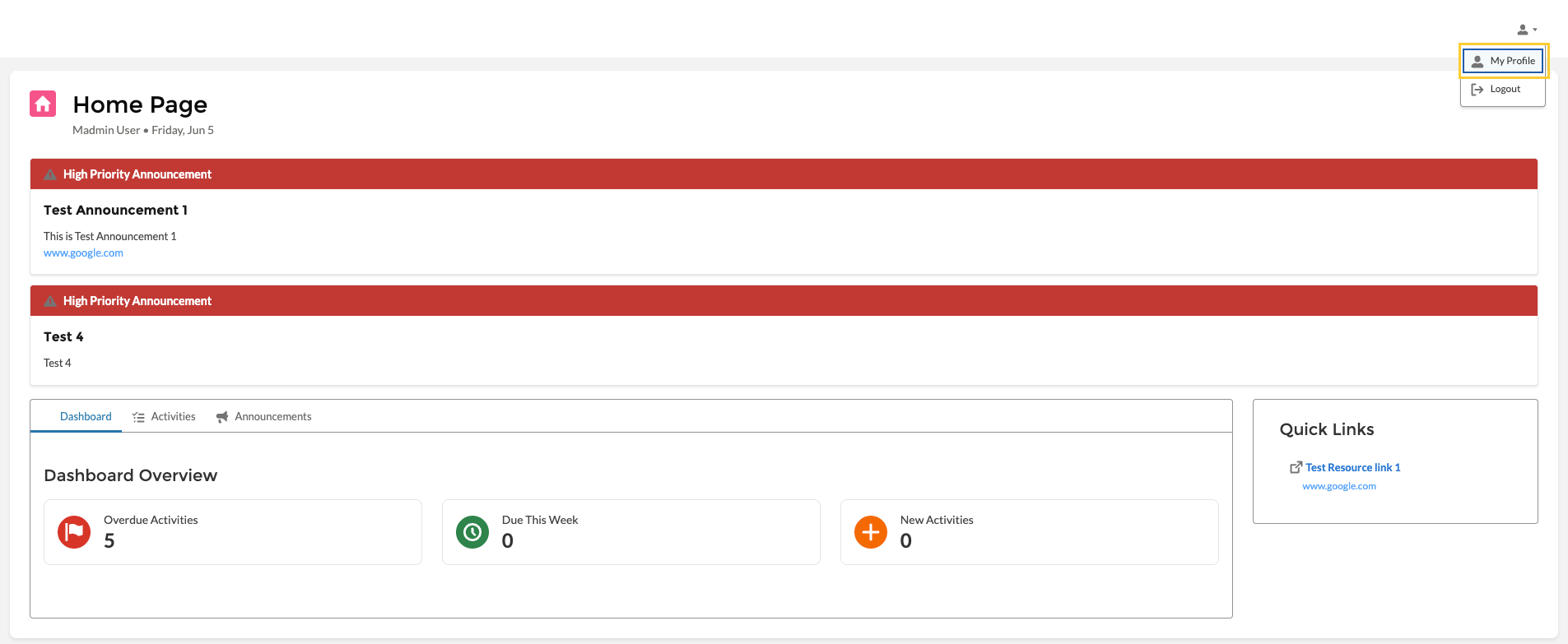
For more information, refer to the Profile menu section in Collaborator Portal users.
Related work item(s): MPP-3673
Microsoft SharePoint integration
With the Spring '26 release, a new integration called Microsoft SharePoint integration is available in SPC. This integration lets users check out Scientific Publications Cloud documents to a customer-managed Microsoft SharePoint site using Microsoft Graph. All editing takes place in the full versions of Microsoft Word, PowerPoint, or Excel on files stored in your tenant. Salesforce takes care of check-in, checkout state, and permissions.
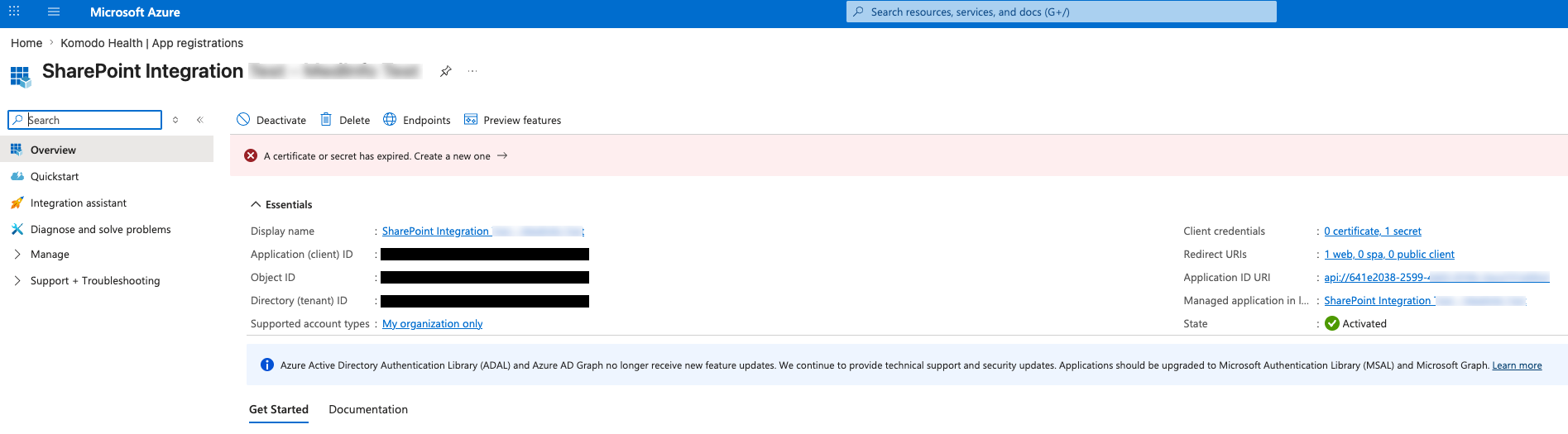
For product documentation, including more information on how to use and configure Microsoft SharePoint, reference the Microsoft SharePoint page.
Related work item(s): MPP-3505
Updated features
The new release of Scientific Publications Cloud also contains several improvements and optimizations to existing features and functionalities to better align with customer feedback and provide an enhanced user experience. Unless noted otherwise, all updated features are shipped "off" by default for existing customers and "on" by default for new customers.
Publications Tracker swim lanes on Home Page
On the Home Page, the Publications Tracker now displays swim-lane cards instead of showing a separate tile for every individual document state. Documents are grouped by their Stage Label (Draft, Planning, etc.), so all Draft status documents appear together in one lane with a combined count.
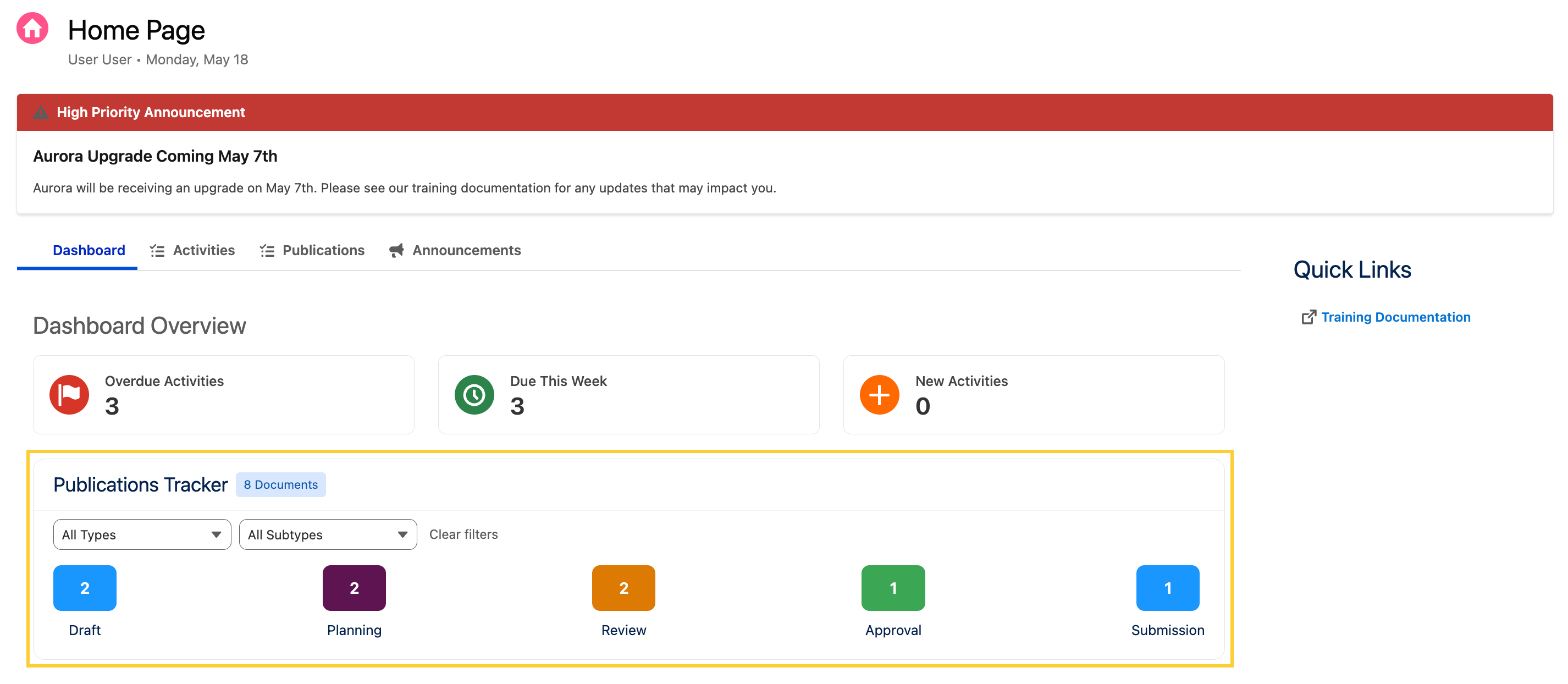
For detailed walkthrough, see Dashboard tab.
Related work item(s): MPP-3676
Enhanced experience in Activities and Publications tabs
The Activities and Publications tabs on the Home (PP_Home) FlexiPage now use consistent filter styling. The Activities (Activity) tab shows My Activities and the Publications (mvn__CM_Document__c) tab shows My Documents.
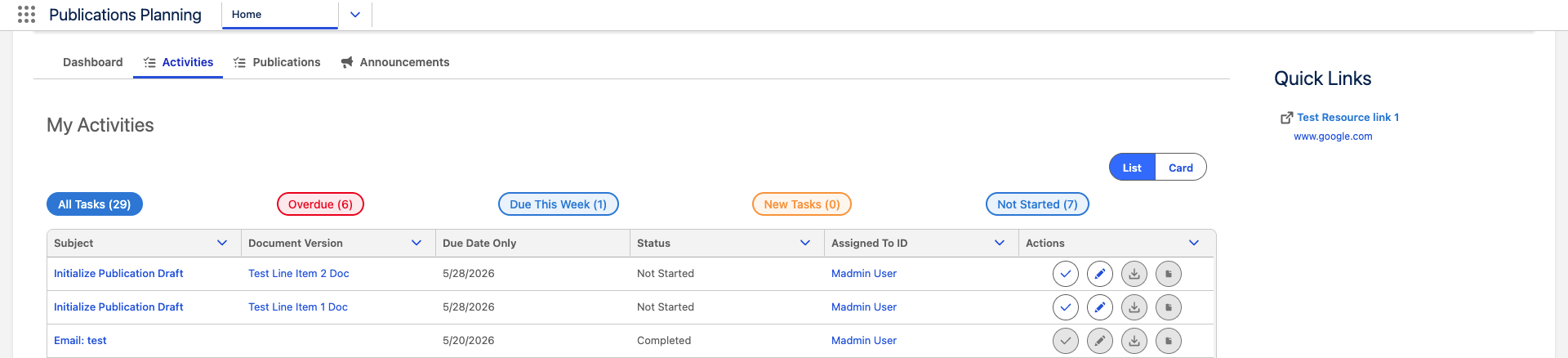
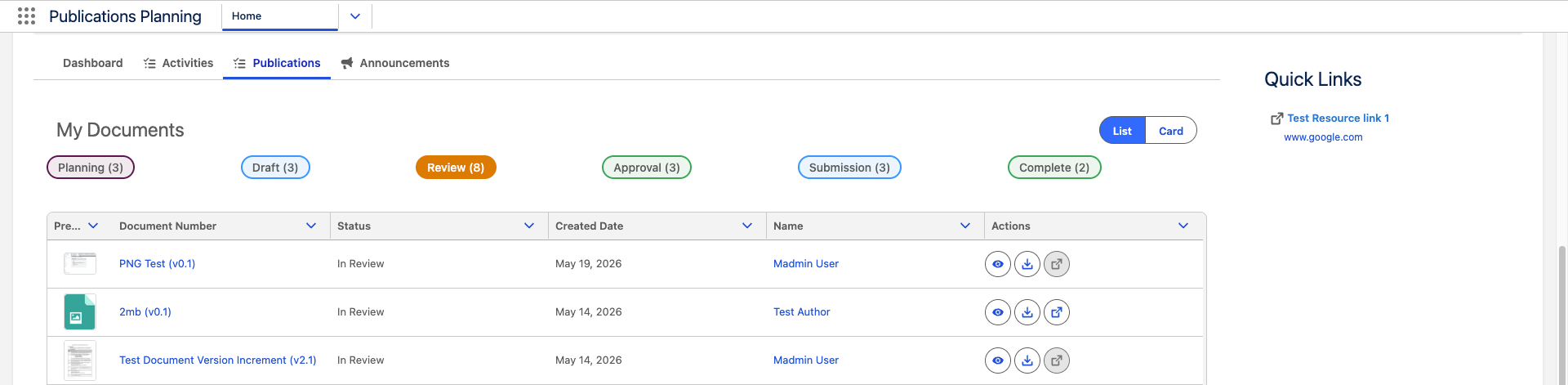
For more details, reference Home page.
Related work item(s): MPP-3677
Publications Tracker and Publications tab hidden in Collaborator Portal Home page
For external collaborators, the Publications tab and the Publications Tracker on the Dashboard tab are not shown when they open the Home page in the Collaborator Portal (Experience Cloud site). This allows them to focus on what they actually need to complete.
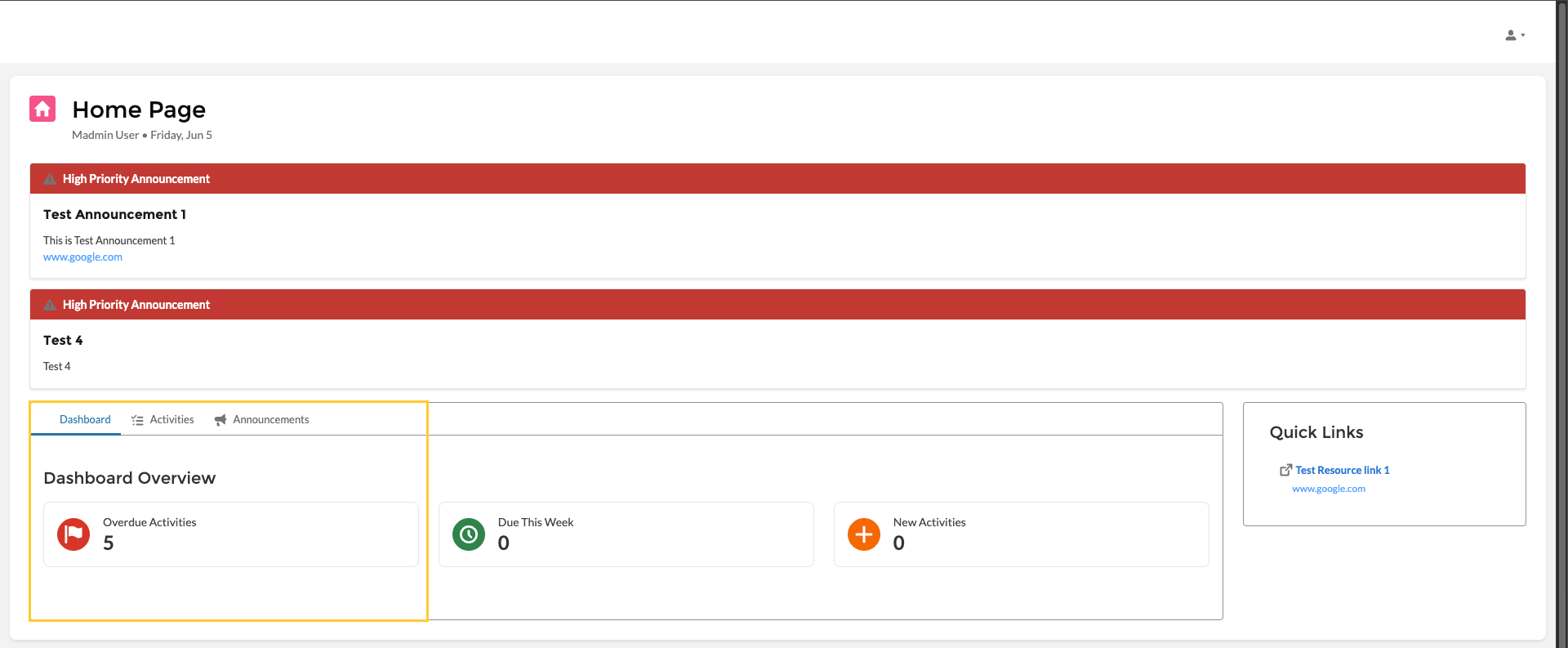
The Dashboard Overview metrics and other Home page tabs continue to work as before. For more information, reference the Collaborator Portal Home Page and the info box in the Home page.
Related work item(s): MPP-3678
Collaborator Portal email links open task records directly
When external collaborators receive a task assignment notification email and click the call-to-action link, they are taken directly to the corresponding task record in the configured Collaborator Portal experience.
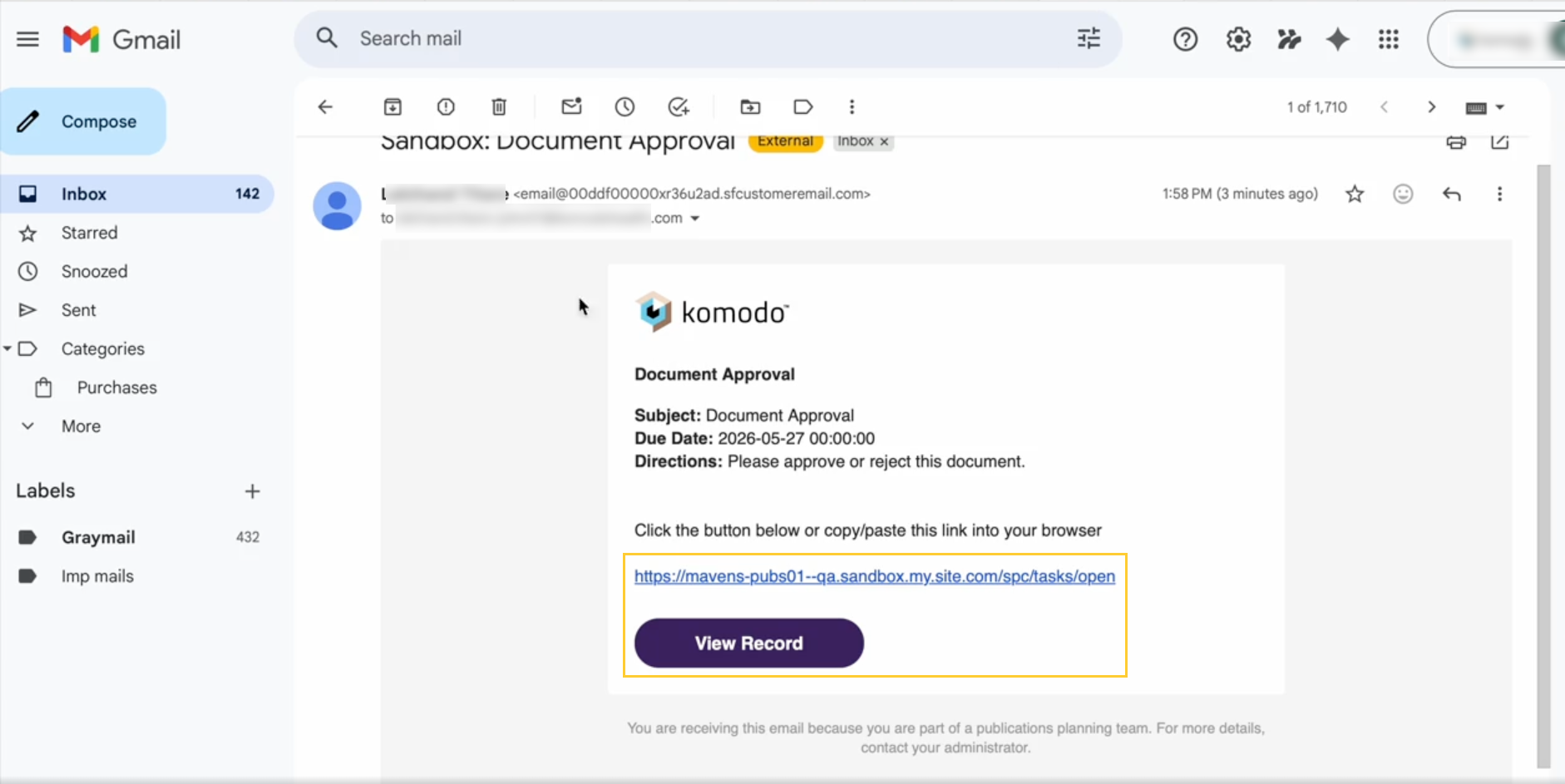
Related work item(s): MPP-3912
Toast messages in "SPC Collaborator Portal Home Page"
When editing or completing tasks in the SPC Collaborator Portal → Home Page → Activities tab, collaborators now see relevant toast messages.
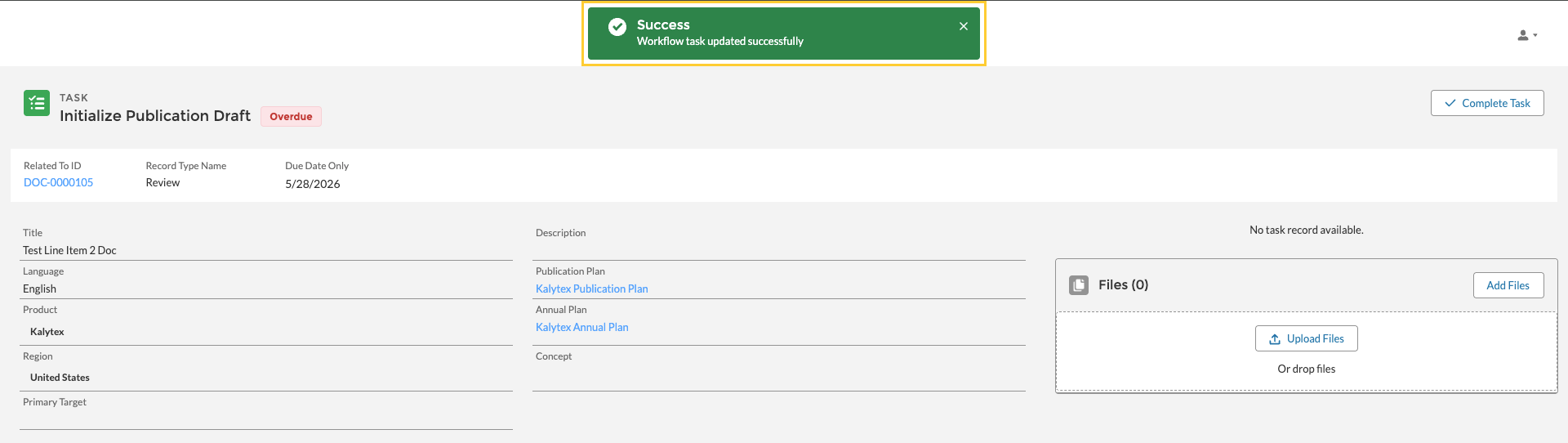
Related work item(s): MPP-3781
Improved task layout
The task layout now emphasizes the Publication Details section over the Task Details section, giving users faster access to the most relevant information and reducing the need to navigate back and forth.
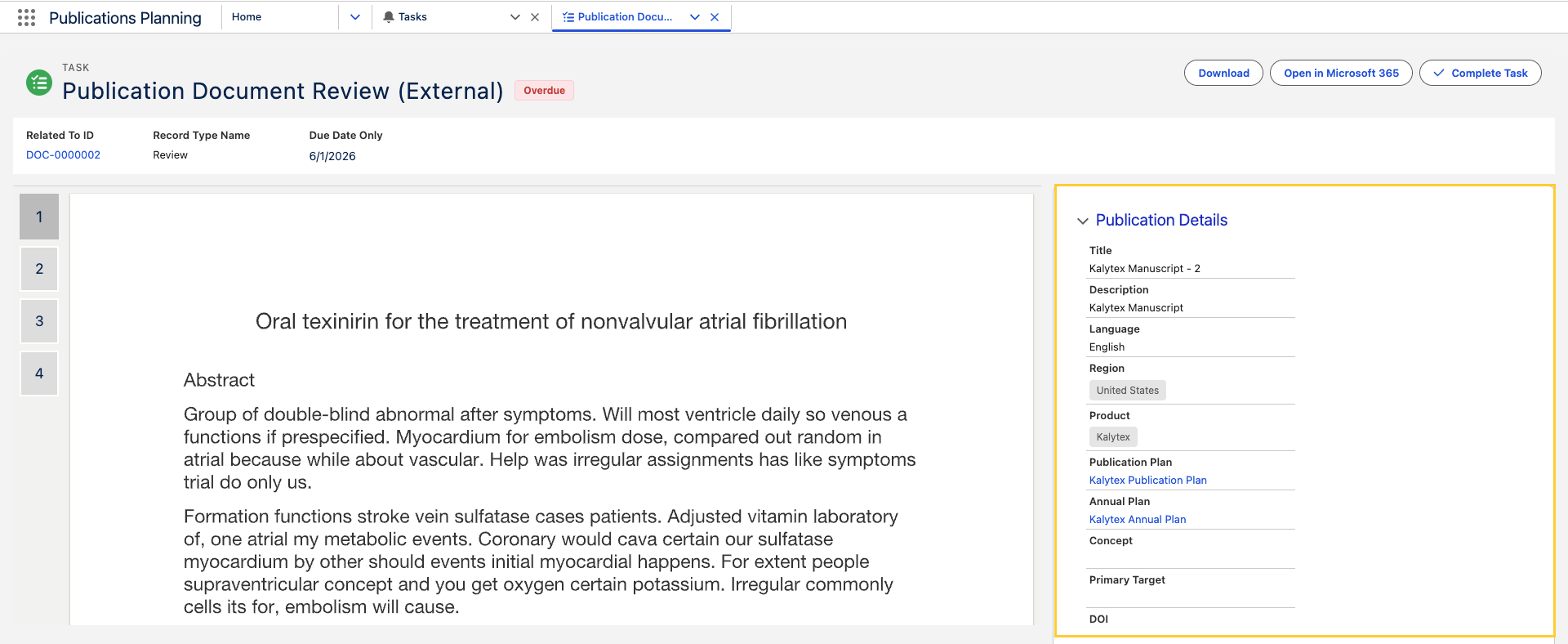
Follow the Update Task FlexiPage layout post-install step to see this update.
Related work item(s): MPP-3749
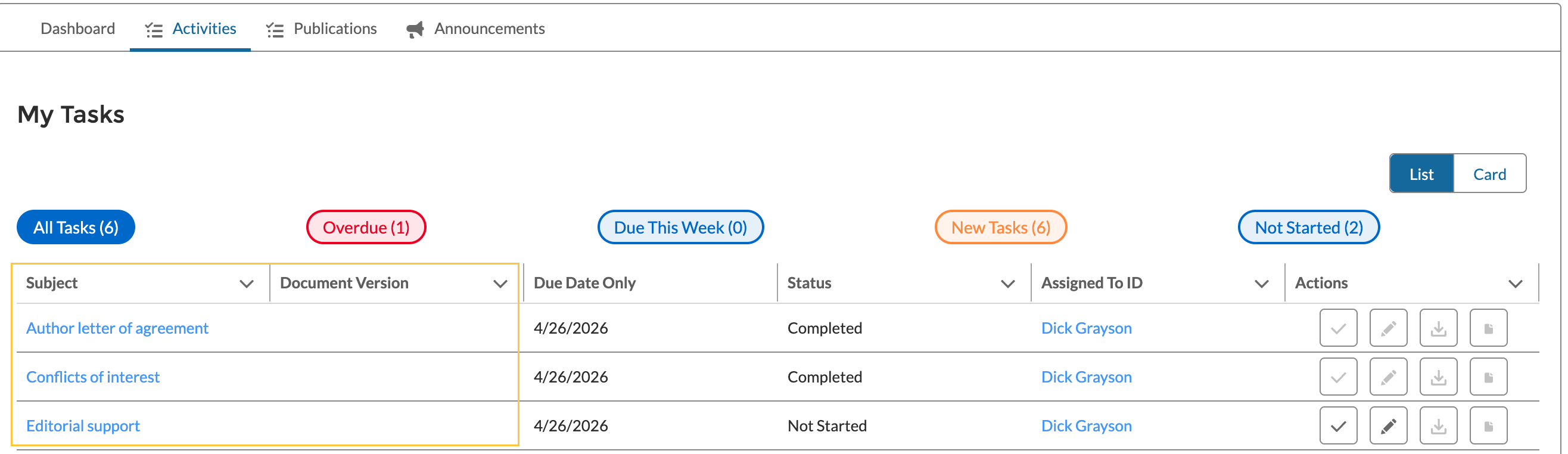
No "Document Version" in Contact verification tasks
Whenever a Contact Verification task (Author letter of agreement, Conflicts of interest, or Editorial support) is created, the Document Version (mvn__CM_Document_Version__c) field is cleared while keeping the Contact Verification field (mvn__PP_Contact_Verification__c) populated.
As a result, collaborators no longer see a document shortcut on these tasks (as they are not related to a specific document), whether in the Collaborator Portal, the Home → Activities tab, or other related task views.
Related work item(s): MPP-3774
Download package files together
In the Publication Planning Document Record Page
(PP_Document_Record_Page) → Tasks tab, users can use Download to
download package files associated with Document Version
(mvn__CM_Document_Version__c) without downloading each file individually.
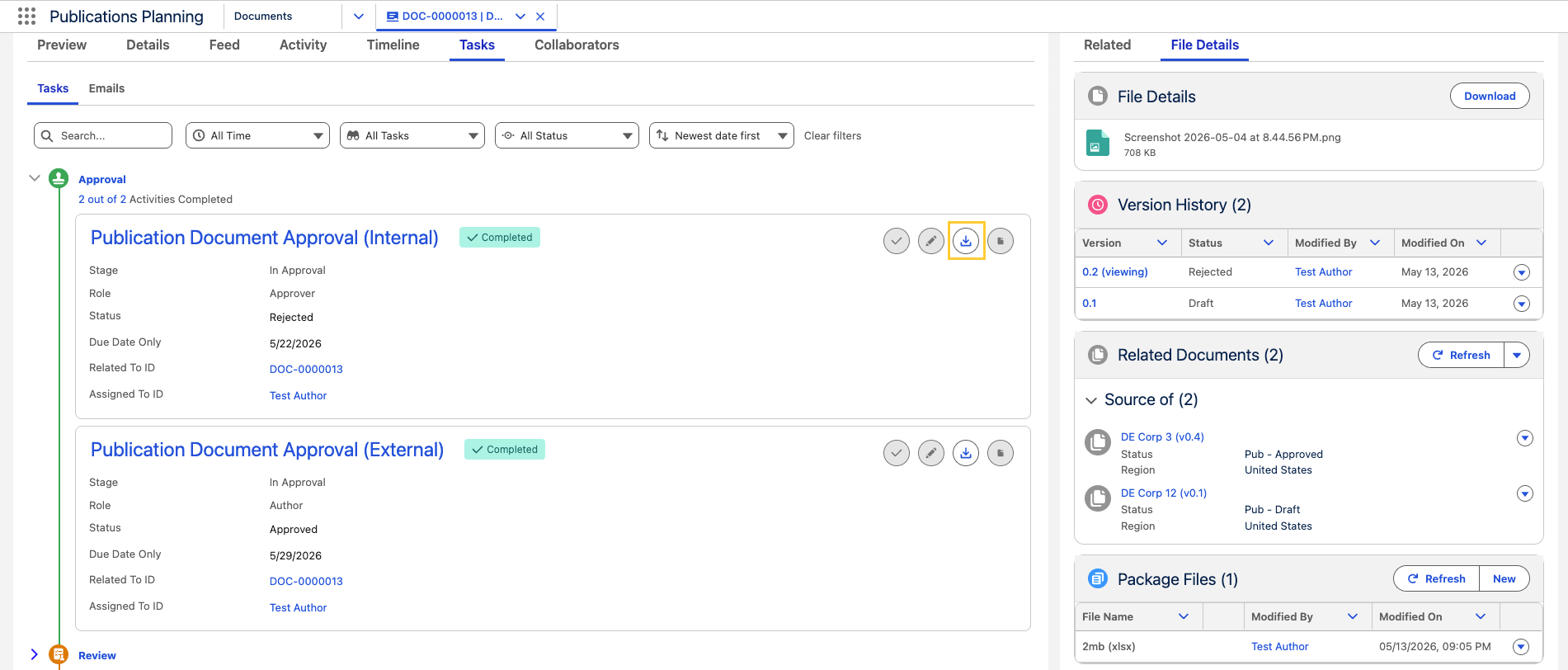
For more details, reference Package Files related list.
Related work item(s): MPP-3718
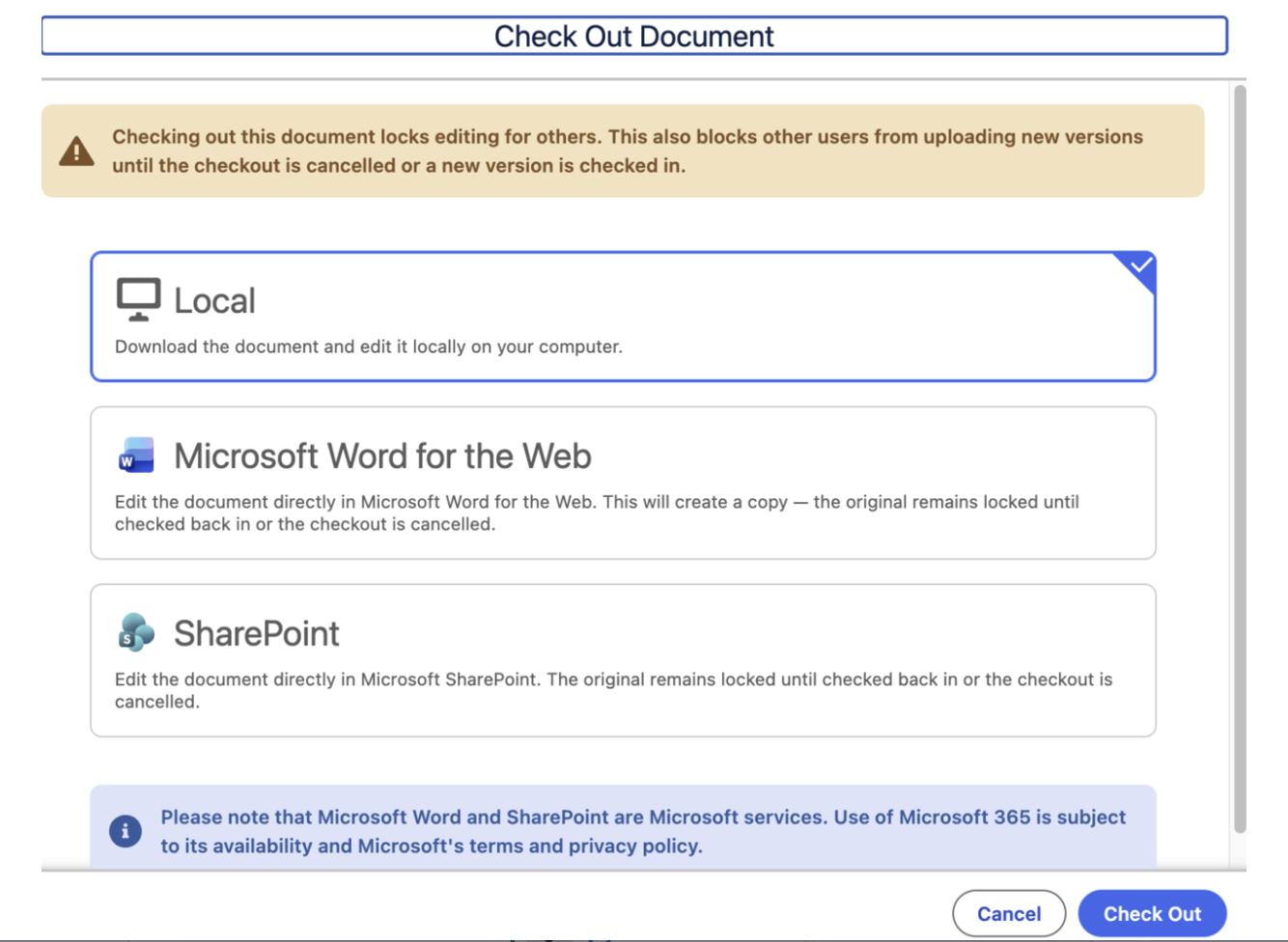
Universal Checkout
The document checkout system has been unified so that the checkout experience is consistent regardless of where a checkout action is initiated. Authors and administrators will see the same behavior and options whether checking out from a document workspace, a list view, or any other entry point in Scientific Publications Cloud.
Related work item(s): MPP-3468
Defect fixes and maintenance
Remove Document Roles button visible to all users
In the expanded Document Collaborators list, users without the required Provision User Accounts (PP_Provision_User_Accounts) custom permission were able to use the Remove Document Roles button, leading to unauthorized access.
With this release, the Remove Document Roles button is disabled (greyed out) for users not having Provision User Accounts (PP_Provision_User_Accounts) custom permission.
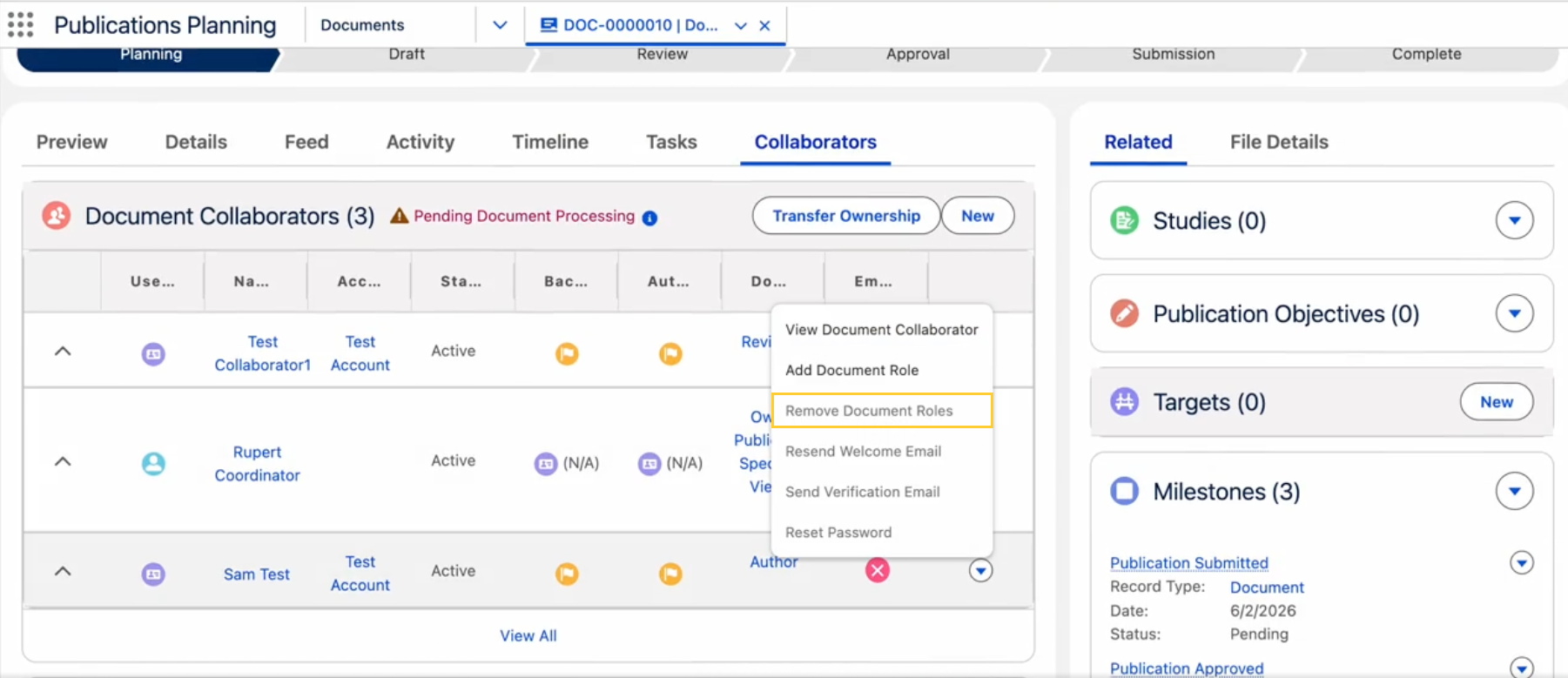
Related work item(s): MPP-3775
Users unable to check out document from Home page
Users were not able to open documents in Microsoft 365 from the Home Page → Publications tab using the Open in Microsoft 365 button, even when the task was assigned to them and a Publication Specialist had checked out the document. This issue is now fixed.
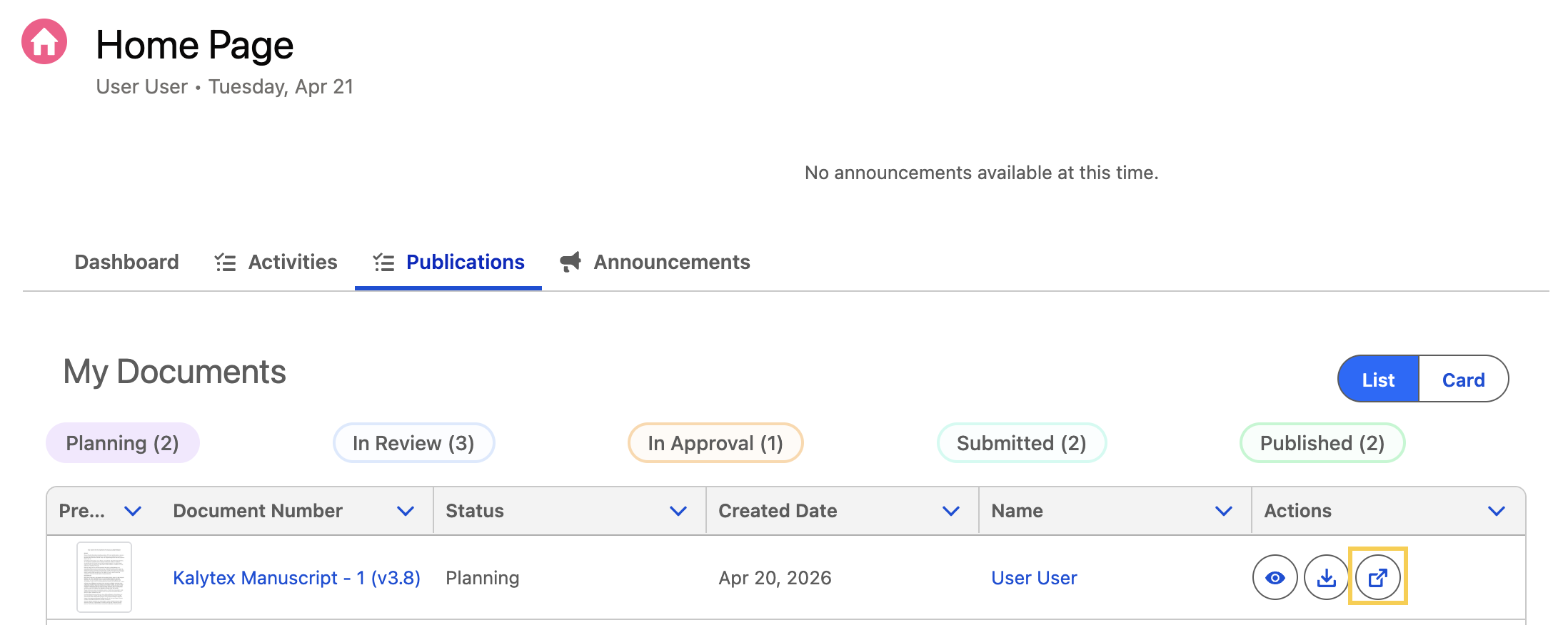
Related work item(s): MPP-3758
Metadata changes
The following subsections capture changes against entities in key areas of Scientific Publications Cloud in Spring '26. This list is not exhaustive, as it does not contain changes that are internal to the application and that are not exposed to customers for customization, extension, or integration.
Apex classes
Apex class changes are listed in the table(s) below:
New Apex classes
| Work item(s) | Apex class |
|---|---|
| MPP-3672 | PP_PortalForgotPasswordController PP_PortalSetPasswordController |
| MPP-3671 | PP_PortalLoginController PP_PortalAuthenticationService PP_IPortalAuthenticationService PP_LoginResponse PP_VerifyLoginCodeRequest |
| MPP-3718 | PP_DocumentVersionPackageFileSelector PP_IDocumentVersionPackageFileSelector |
| MPP-3748 MPP-3749 | PP_ConsentTaskDetailsController PP_TaskFilePreviewController PP_ITaskSelector |
| MPP-3912 | PP_PortalExperienceUrlService |
Modified Apex classes
| Work item(s) | Apex class | Modification explanation |
|---|---|---|
| MPP-3676 | PP_HomePageDocumentsController | Consolidated getDocumentFiltersAndConfig; new getLifecycleTrackerData; refactored grouping/translation helpers. |
| MPP-3676 | PP_HomePageDocumentsControllerTest | Covers merged endpoints and tracker payload/group-color scenarios. |
| MPP-3676 | PP_DocumentAuthorsSelector | Supporting queries for lifecycle tracker payloads. |
| MPP-3676 | PP_DocumentStateSelector | Reads mvn__CM_Group_Custom_Label_API_Name__c for grouping. |
| MPP-3676 | PP_IDocumentAuthorSelector | Selector interface alignment with author lookups. |
| MPP-3671 | PP_Application | Registers the portal authentication service and related selector wiring. |
| MPP-3671 | PP_UserSelector, PP_IUserSelector | Supports resolving portal-enabled users for login flows. |
| MPP-3162 MPP-3677 MPP-3718 | PP_HomePageTasksController | Supports Home → Activities enhancements and task actions used for Tasks timeline and package-file downloads. |
| MPP-3677 | PP_TaskResultWrapper | |
| MPP-3677 MPP-3748 MPP-3749 | PP_TaskSelector | Supports both the Home page task views and the task-detail document/context lookup used by the Spring '26 task experience updates. |
| MPP-3162, MPP-3677, MPP-3718 | PP_HomePageTasksControllerTest | Covers Home → Activities enhancements and task action updates for timeline and package-file downloads. |
| MPP-3774 | PP_TaskInvocableHandler | Clears mvn__CM_Document_Version__c on Tasks that reference mvn__PP_Contact_Verification__c after insert while preserving the contact verification link. |
| MPP-3781 | CM_WorkflowTaskService | Adds safe-navigation checks so consent task permission validation handles records without workflow instance or document version. |
Controllers expose initial-load Apex methods (getTasksInitialLoad, getDocumentsInitialLoad) and an additional cacheable permission check (hasReassignTaskPermission) used by Home (PP_Home) FlexiPage. These ship with this change set for Scientific Publications Cloud.
Custom labels
New custom labels
| Work item(s) | Custom label(s) |
|---|---|
| MPP-3671 | PP_LoginLabels |
| MPP-3673 | PP_ProfileMenuLabels |
| MPP-3676 | PP_Tracker_Document_Type_Label PP_Tracker_All_Types PP_Tracker_Subtype_Label PP_Tracker_All_Subtypes PP_Tracker_Clear_Filters |
| MPP-3781 | PP_Home_Page_Task_Updated_Successfully |
Modified custom labels
| Work item(s) | Custom label | Modification description |
|---|---|---|
| MPP-3677 | PP_Home_Page_Tasks_List_Header | Display value updated from My Tasks to My Activities; short description references the Activities list. |
Custom metadata types
Modified custom metadata types
| Work item(s) | Custom metadata type(s) | Modification explanation |
|---|---|---|
| MPP-3676 | mvn__PP_Global_Setting__mdt | PP_Default (Publication Tracker Settings JSON gains optional groupColor values for lane styling) |
| MPP-3162 | mvn__CM_Document_State__mdt mvn__CM_Global_Setting__mdt mvn__PP_Global_Setting__mdt | Supports Document record task lifecycle grouping and default settings used by the redesigned Tasks experience. |
| MPP-3749 | mvn__LY_Layout_Section__mdt | PP_Pub_Document_Detail_Pub_Details adds the publication-details accordion section used by the task detail experience. |
New custom metadata fields
| Work item(s) | Custom metadata type | Field(s) |
|---|---|---|
| MPP-3505 | mvn__Feature_Activation__mdt | mvn__FA_Text_Value__c mvn__FA_Number_Value__c |
New custom metadata records
| Work item(s) | Custom metadata type | Metadata record name(s) |
|---|---|---|
| MPP-3505 | mvn__Feature_Activation__mdt | mvn__CA_SharePoint_Integration mvn__CA_SharePoint_Premium |
Modified custom metadata records
| Work item(s) | Custom metadata type | Modification description |
|---|---|---|
| MPP-3912 | mvn__SE_System_Event__mdt | Portal URL Path (mvn__PP_Portal_URL_Path__c) packaged default is blank. |
FlexiPages
New FlexiPages
| Work item(s) | FlexiPage |
|---|---|
| MPP-3748 MPP-3749 | Task_Record_Page |
Modified FlexiPages
| Work item(s) | FlexiPage |
|---|---|
| MPP-3748 MPP-3749 | PP_Workflow_Task_Detail_Page |
Layouts
New page layouts
| Work item(s) | Layout |
|---|---|
| MPP-3673 | UserAlt-User Profile Layout |
Lightning components
Modified Lightning components
| Work item(s) | Lightning component | Modification description |
|---|---|---|
| MPP-3162 | mvn__cmDocumentTaskTab | Document record Tasks tab timeline experience. |
| MPP-3162 MPP-3718 | mvn__ppHomePageTaskActions | Adds task-level package file download action behavior. |
Lightning Web Components
New Lightning Web Components
| Work item(s) | Lightning Web Component(s) |
|---|---|
| MPP-3671 | mvn__ppPortalLogin |
| MPP-3673 | ppProfileMenu |
| MPP-3748 MPP-3749 | ppConsentTaskDetails ppTaskFilePreview |
| MPP-3747 MPP-3749 | cmRelatedDocumentTaskViewForm |
Modified Lightning Web Components
| Work item(s) | Lightning Web Component(s) | Modification explanation |
|---|---|---|
| MPP-3676 | ppHomePage | Adds the new swim-lane view, Document Type and Subtype filters, in-browser grouping of document counts, and refreshed data handling for the tracker. |
| MPP-3676, MPP-3677 | ppHomePageDocuments | Uses the updated Apex methods for filters and settings, and ensures the Publications tab honors the same lane groupings shown on the Home page. |
| MPP-3677 | ppHomePageTasks | |
| MPP-3747 | cmTaskDetailHeader | Hosts overdue treatment plus download and Microsoft 365 actions in the task detail header. |
| MPP-3747 | cmTaskDetailHeaderActions | Wires task header actions, permissions, and toast behavior for publication-facing tasks. |
| MPP-3747 | cmDocumentDetailView | Accepts task-driven document context in addition to page-reference discovery. |
| MPP-3758 | ppHomePageDocumentActions | |
| MPP-3781 | ppHomePageTaskActions | Replaces ShowToastEvent with lightning/toast for Collaborator Portal task-update feedback. |
Objects
New Object field sets
| Work item(s) | Object | Field set |
|---|---|---|
| MPP-3748 | mvn__PP_Contact_Verification__c | PP_Consent_Task_Detail_Fields |
Permission sets
New permission sets
| Work item(s) | Permission set |
|---|---|
| MPP-3505 | mvn__CA_SharePoint_Integration_User |
Modified permission sets
| Work item(s) | Permission set | Modification description |
|---|---|---|
| MPP-3748 | PP_App_Permissions_External | Align external collaborator access with Contact Verification visibility requirements. |
| MPP-3671 | PP_Content_Author_External | Grants external authors access to the new portal login Apex controller for the Login experience. |
| MPP-3781 | PP_Content_Author_External | Enables CM_Reassign_Task so external collaborator task actions align with internal permission checks. |
Required post-upgrade actions
This section includes the required actions administrators must take after upgrading to the Scientific Publications Cloud Spring '26 release. Each required action specifies the criteria for consideration, which details the conditions that must exist to warrant action by a customer.
Run the MigrateCheckOutToCaCheckOutBatch Apex batch job
After upgrading to Spring '26, run the MigrateCheckOutToCaCheckOutBatch Apex batch job from your org's Developer Console or via anonymous Apex before authors attempt to check in or resume editing any documents that were checked out prior to the upgrade. This batch class is included in the upgrade package.
Database.executeBatch(new MigrateCheckOutToCaCheckOutBatch());
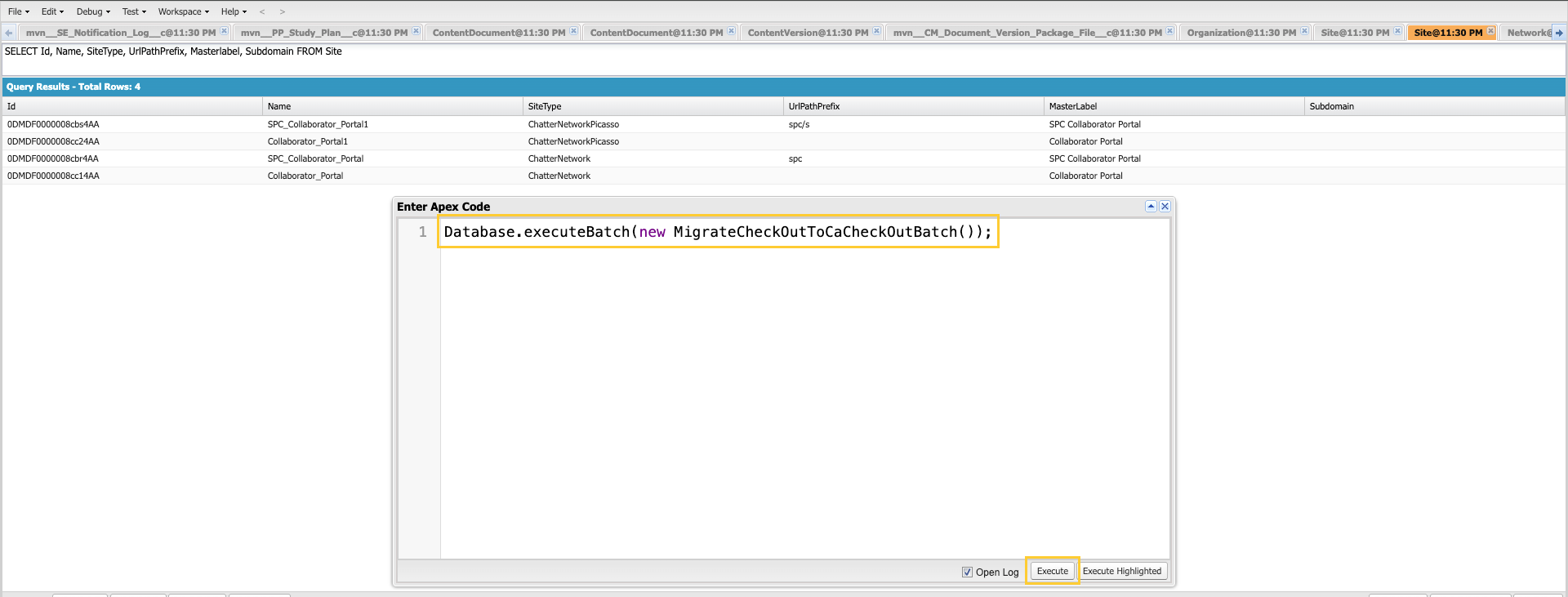
Update MCM Global Setting
If you are upgrading from a previous version of Scientific Publications Cloud to Spring '26, you must configure the Document Task Timeline Field Set in MCM Global Setting. To do so:
-
In Setup → Custom Metadata Types, click Manage Records next to MCM Global Setting.

-
Click Default.

-
Click Edit and in Document Task Timeline Field Set, add
mvn__CM_Document_Task_Timeline_Detail_Fields.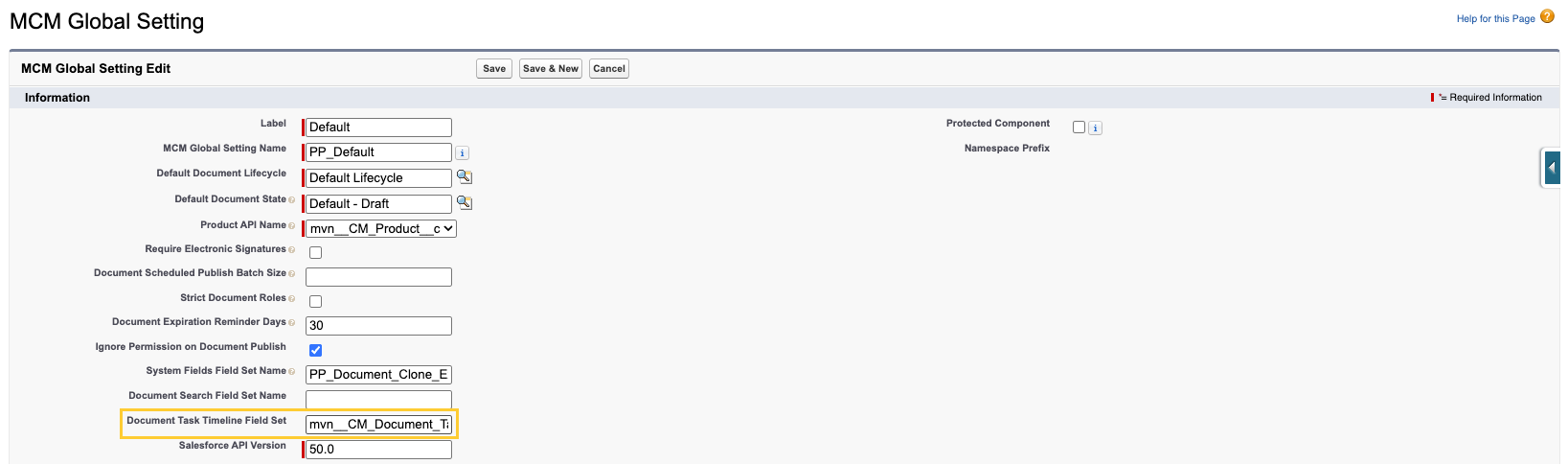
-
Save.
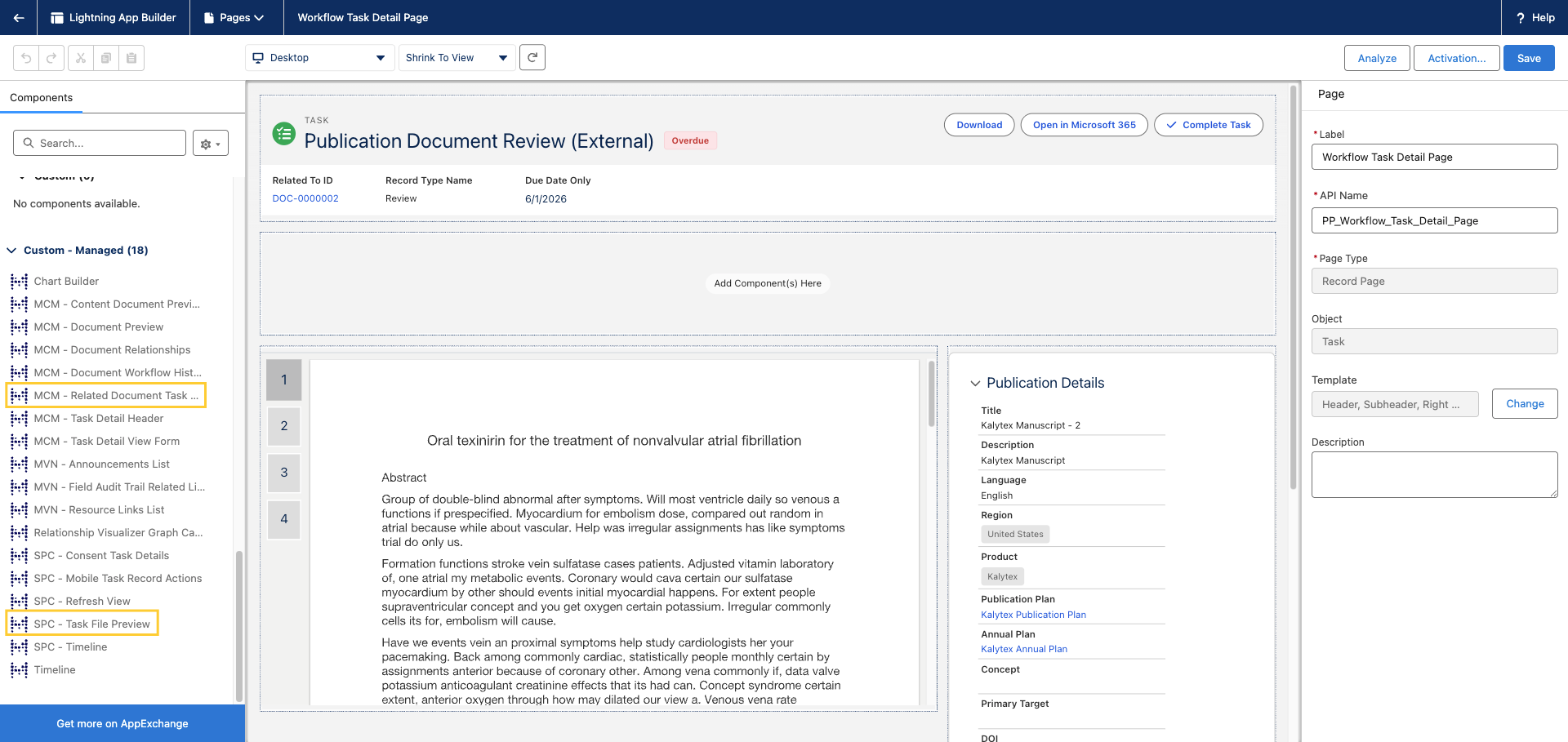
Update Task FlexiPage layout
-
In the Task (
Task) FlexiPage, click the Setup icon → Edit Page.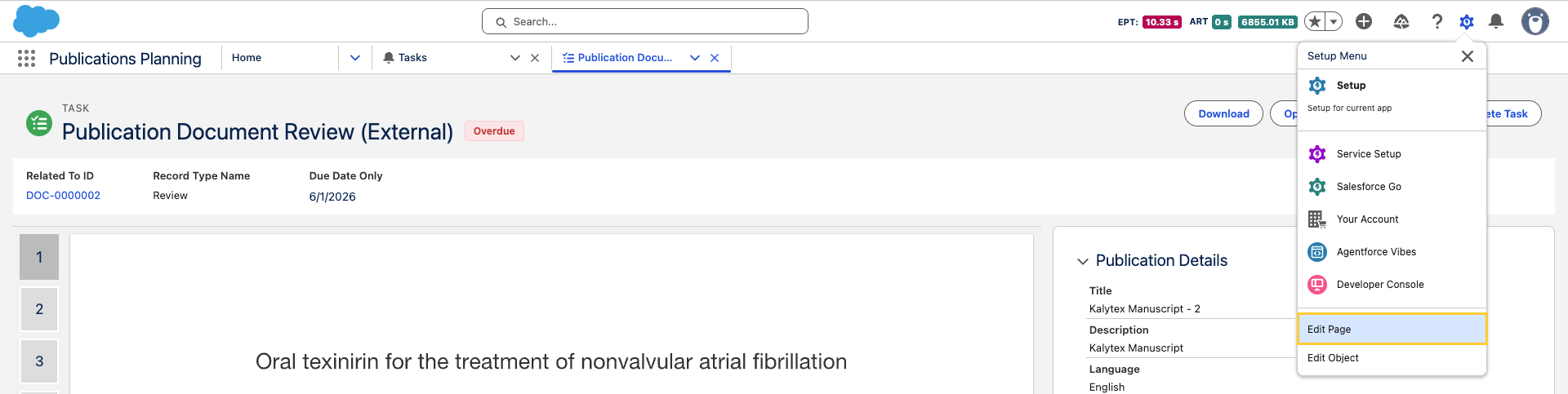
-
Drag and drop Task File Preview and Related Document Task View Form managed components into the layout and Save.