Products
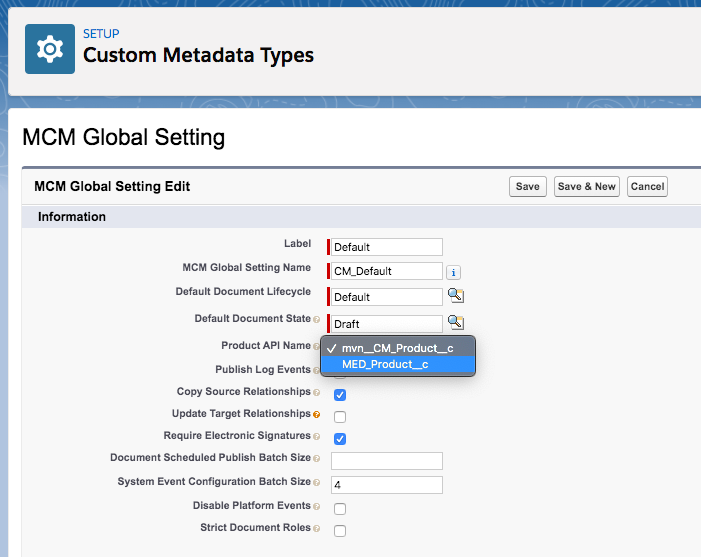
Product catalog configuration is performed by setting the
mvn__CM_Product_API_Name__c picklist on the PP_Default MCM Global
Setting custom metadata type record.
:::
 :::
:::
Product custom object
CM_Product__c is the default product repository for Scientific Publications Cloud. Relationships
between documents and products are stored on the
CM_Document_Relationship__c custom object with the
CM_Category__c``Product. Visit
Relationships.
Product is an internal system field and should not be modified in any way.
mvn__CM_Product__c schema
| Field Label | API Name | Data Type | Description |
|---|---|---|---|
| Active | mvn__CM_Active__c | Checkbox | Whether the Product is active. |
| Country | mvn__CM_Country__c | Picklist | Country associated to this Product. |
| External ID | mvn__CM_External_Id__c | Text(255) (External ID) (Unique Case Sensitive) | External ID for this Product. |
| Generic Name | mvn__CM_Generic_Name__c | Text(255) | Generic drug name. |
| Investigational Drug Name | mvn__CM_Investigational_Drug_Name__c | Text(255) | Investigational drug name. |
| Product Display Name | Name | Text(80) | Name of the Product. |
| Product Group | mvn__CM_Product_Group__c | Lookup(Product) | Product Group associated to this Product. |
| Therapeutic Area | mvn__CM_Therapeutic_Area__c | Picklist | Therapeutic Area associated to this Product. |
| Trade Name | mvn__CM_Trade_Name__c | Text(255) | This Product's Trade Name. |
Configure the product catalog
To configure the product catalog:
Some of the steps below may have been completed during the installation process.
-
In the Quick Find box in Setup, search for and select Custom Metadata Types.
-
In the MCM Global Setting row, click Manage Records.
-
In the PP_Default row, click Edit.
-
For Product API Name, lookup and select mvn__CM_Product__c.
-
Click Save.
Add Product field to a layout
When the Product field is added to a layout, a lookup field displays on the layout and enables you to search for a product by name.
To add the Product field to a layout, create a CM_Layout_Field__mdt
record that associates the Product field to a specific layout. Visit
Layout configuration.
Associate products to documents
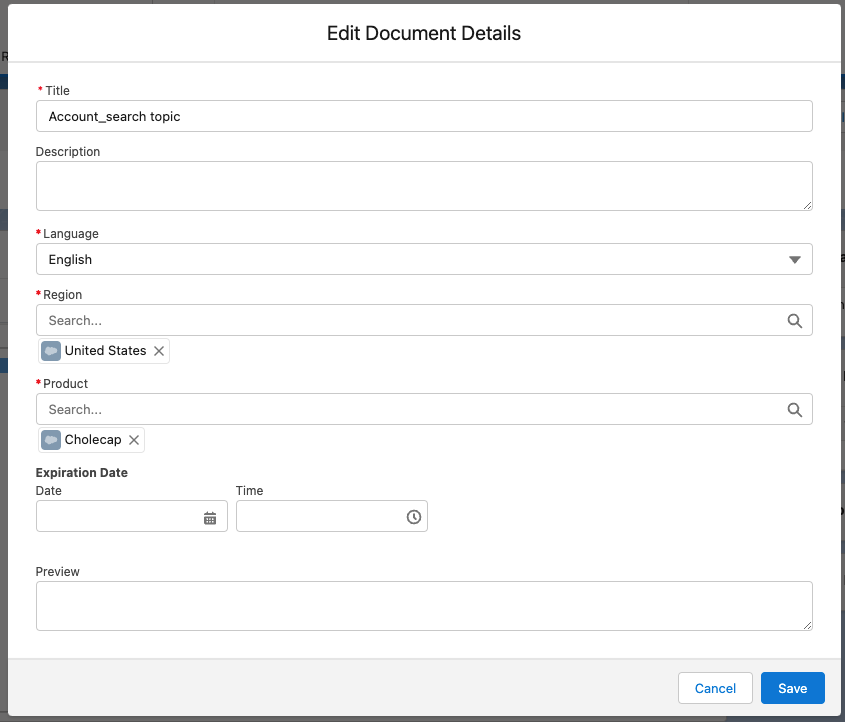
From a document layout, you can associate a document to one or many
products. Document/product relationships are stored on the
CM_Document_Relationship__c custom object with the CM_Category__c
and CM_Product__c fields. Visit
Relationships.
To associate products to documents, the Product field needs to be added to the appropriate document layouts. Visit Layout configuration.
:::
 :::
:::