
Fall '26 Minor Release 1 release notes
This topic contains the release notes for the Fall '26 Minor Release 1 of Scientific Publications Cloud. The release notes are organized into these high-level sections:
-
Installation and upgrades - link to install and/or upgrade to the new version.
-
New features - new features and functionalities introduced in the new release.
-
Updated features - existing features and functionalities enhanced in the new release.
-
Defect fixes and maintenance - defects and maintenance items fixed in the new version.
-
Hotfixes - defects identified in the original Fall '26 Minor Release 1 that were fixed via hotfix patches.
-
Metadata changes - changes to the underlying data models, user permissions, or system configurations included in the new version.
-
Deprecated and deleted items - items that are no longer recommended or no longer available.
-
Required post-upgrade actions - required actions administrators should take after upgrading to the new version.
-
Optional post-upgrade actions - optional actions administrators can take after upgrading to the new version.
As this page is maintained and updated over time to ensure accurate and timely information, Mavens recommends referencing the release notes online rather than printing and referencing static versions of the page. The Changelog page lists all notable changes made to this page.
Installation and upgrades
The Scientific Publications Cloud Fall '26 Minor Release 1 can be installed with the Install Service at https://install.mavens.com/products/spc/4.5.0.1. New installs of Scientific Publications Cloud will be on the latest release while current customers will need to run and deploy the latest update.
Remember to complete the steps in the Required post-upgrade actions sections below as appropriate.
New features
The new release of Scientific Publications Cloud introduces several new features, which are detailed below. Information about enablement and configuration is included in the product documentation.
Document clone enhancement
With the enhanced Clone Document feature, authors can clone a document and choose which related data to bring along in the same clone wizard through a background pipeline. Authors start a clone exactly as they do today. With the enhancement, the clone wizard adds a fourth step, where they choose what to bring along: Collaborators, Studies, Objectives, and Targets. Administrators set which checkboxes stay selected, and authors can change them before saving.
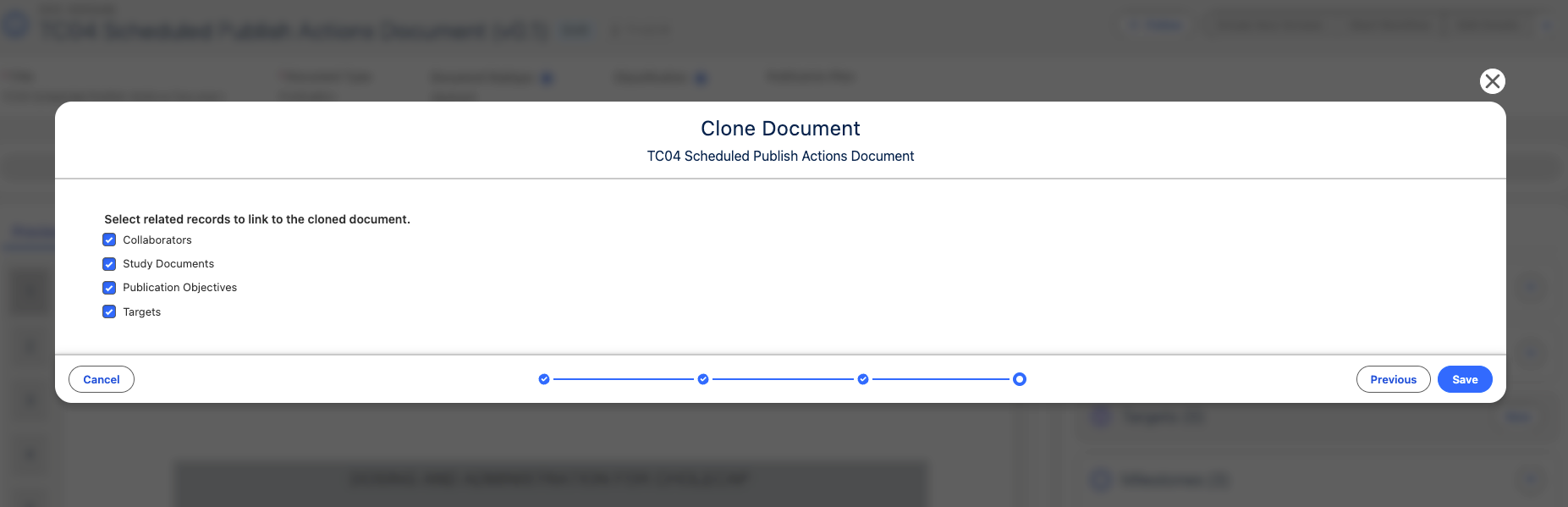
Once the author clicks Save, the wizard creates the cloned document first, then reports live progress for the document and for each selected related type. On success, the author lands on the new clone. On failure, the incomplete clone is deleted and the author returns to the source document, ready to retry. Authors no longer need the Delete permission on the Document (mvn__CM_Document__c) and Document Version (mvn__CM_Document_Version__c) objects for that cleanup to run.
For author steps, enablement, and field sets, reference Document clone framework.
Related work item(s): MPP-3840
Updated features
The new release of Scientific Publications Cloud also contains several improvements and optimizations to existing features and functionalities to better align with customer feedback and provide an enhanced user experience. Unless noted otherwise, all updated features are shipped off by default for existing customers and on by default for new customers.
Configurable columns in the Publications tab
Administrators can now build their own field set on the Document object instead of the packaged Home Page Documents Fields (mvn__PP_Home_Page_Documents_Fields) field set and point the Home (PP_Home) FlexiPage → Publications tab at it. Every field in that field set appears as a column on the Publications tab, in field-set order, using the field's own label as the header, and each column shows that field's value for the document in the row. Removing a field removes its column, and reordering the field set reorders the columns.
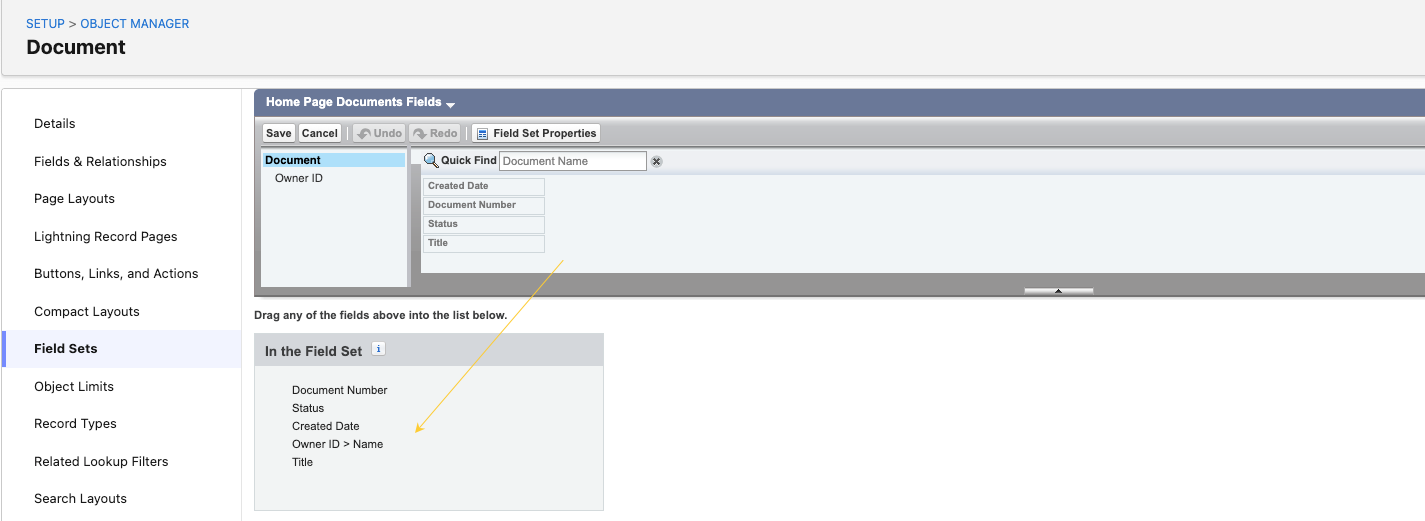
For the configuration steps and the supported field types, reference the Configure the Publications tab columns section in Home Page.
Related work item(s): MPP-4214
Translate Digital Science journal metric labels
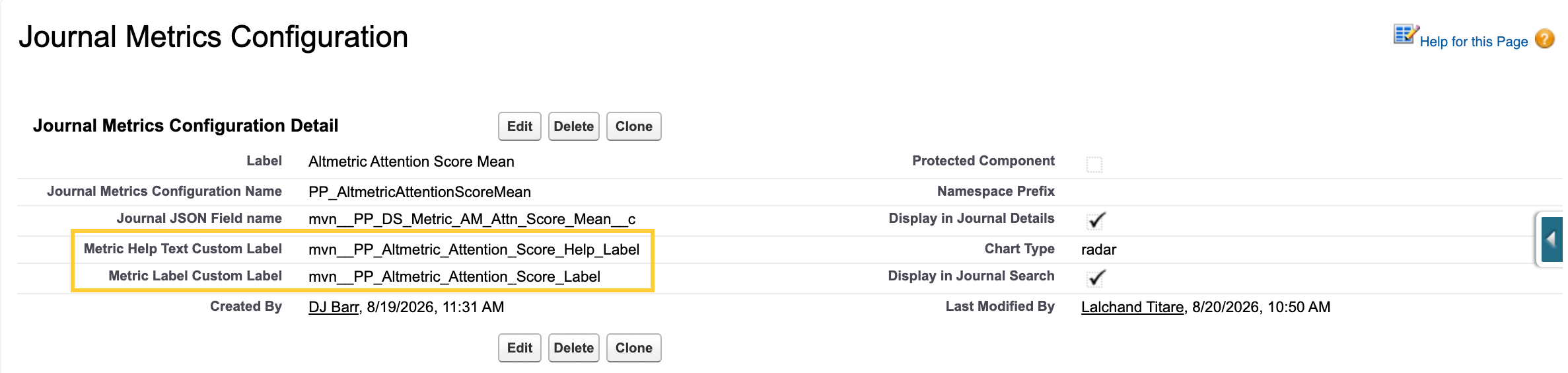
You can now rename and translate the metric labels and help text in the Digital Science Journal metrics UI shown on Journal record pages and target comparison screens using Custom Labels and the Translation Workbench.
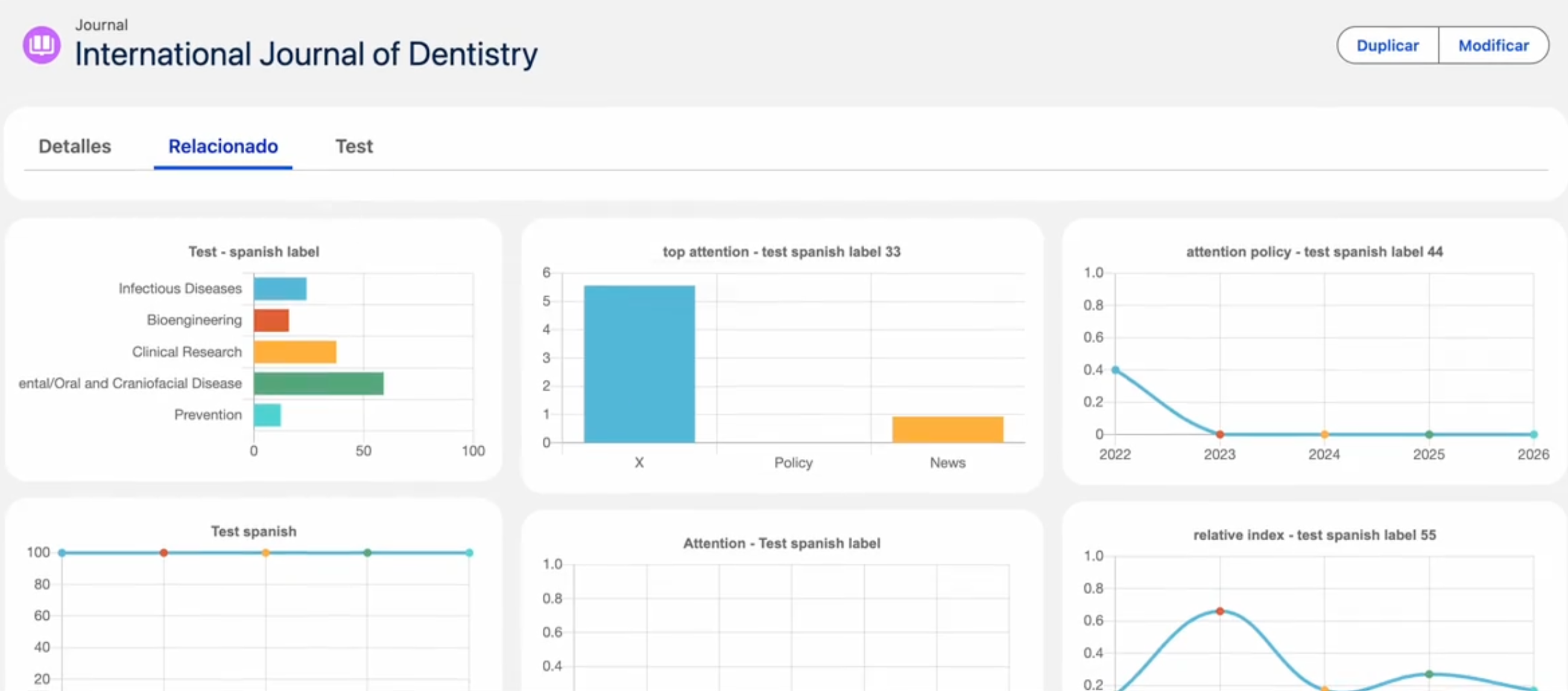
Each metric points to two custom labels through the Metric Label Custom Label and Metric Help Text Custom Label fields on the Journal Metrics Configuration (mvn__PP_Journal_Metrics_Configuration__mdt) custom metadata type.
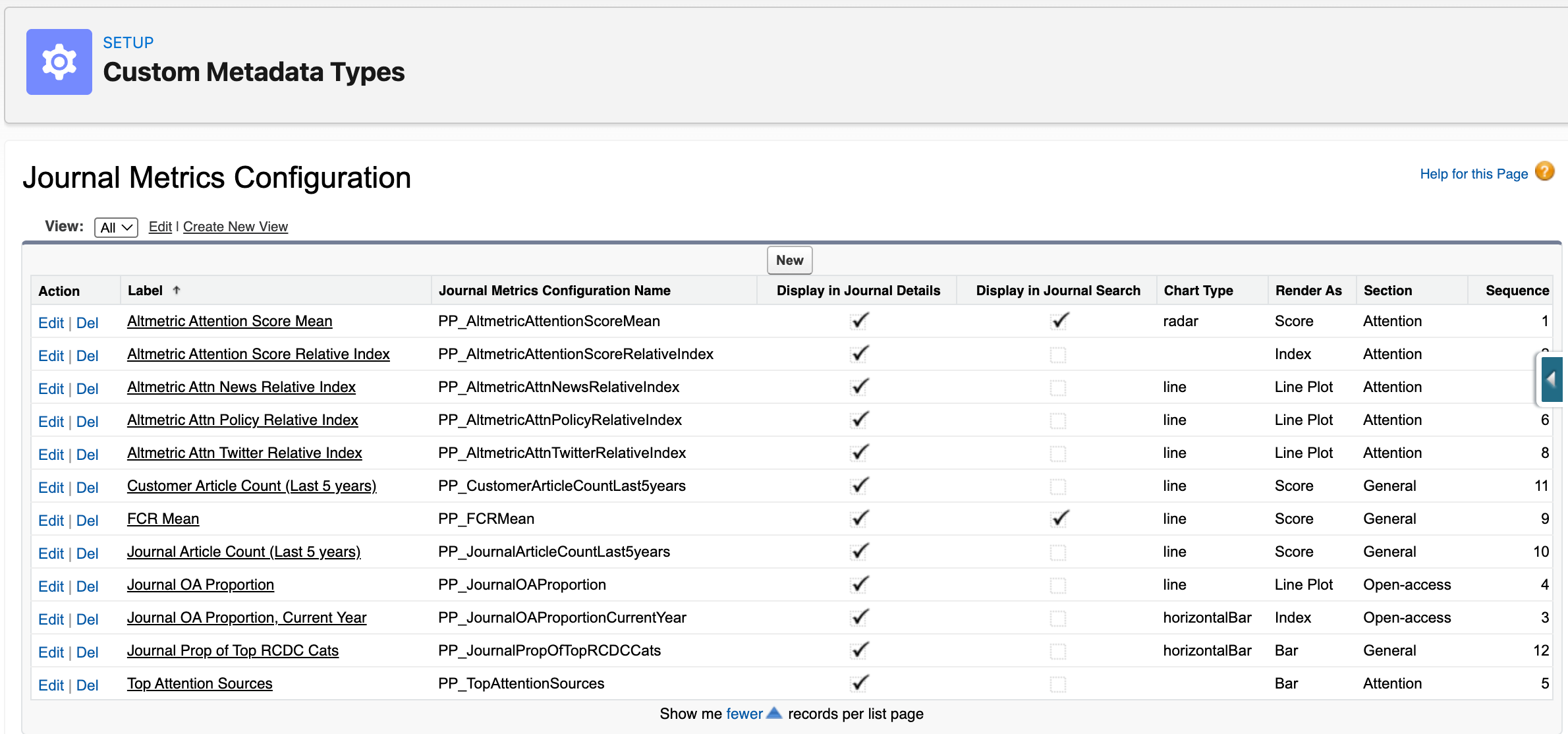
To customize display text, add translations to the referenced custom labels (for example, PP_Journal_OA_Proportion_Label). For general translation guidance, see Translation in Customization guidelines.
Related work item(s): MPP-3019
Advanced filters on the Document Tasks tab
On the Publication Planning Document Record Page (PP_Document_Record_Page), in addition to the enhanced Tasks tab introduced in Spring '26, Fall '26 adds five Advanced filters to the existing panel. Users can open Advanced filters to narrow the task timeline by the following:
| Filter | Behavior |
|---|---|
| Created Date | Range selection (from/to) |
| Due Date | Range selection (from/to) |
| Completed Date | Range selection (from/to) |
| Role | Single-select value |
| Task Owner | Select one or more users |
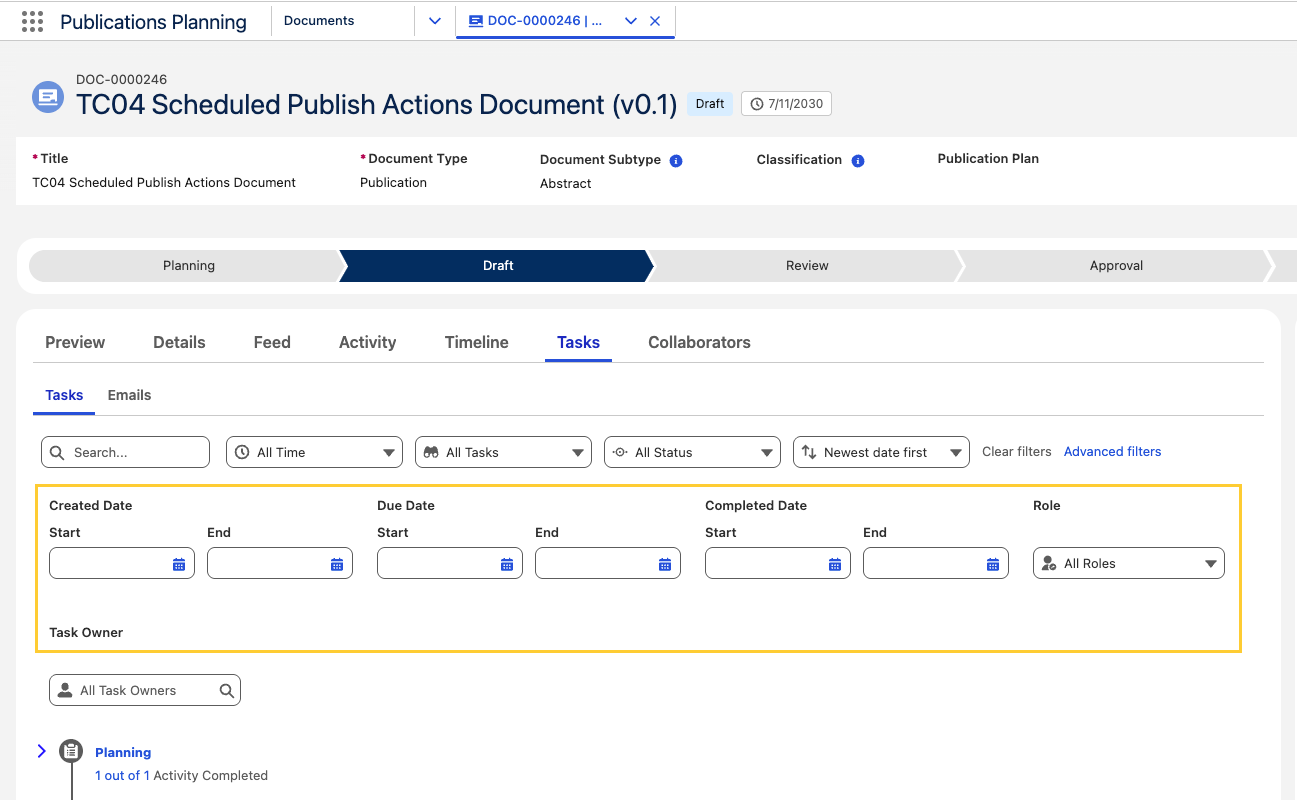
All five filters work individually or in combination, alongside the filters already on the tab, and across every task record type shown there. Selections persist while you remain on the tab and clear when you reset the panel.
Task Owner filters on the assigned owner, not the person who completed the task. When a task is completed on behalf of someone else, it still appears under its original owner.
For more details, reference the Tasks page.
Related work item(s): MPP-3938
Configure how users create documents
Administrators can now change how users start document creation at supported entry points without customizing the managed package. Each entry point is driven by its own Feature Activation (mvn__Feature_Activation__mdt) record. The JSON stored in the Long Value (mvn__FA_Long_Value__c) field lets you:
-
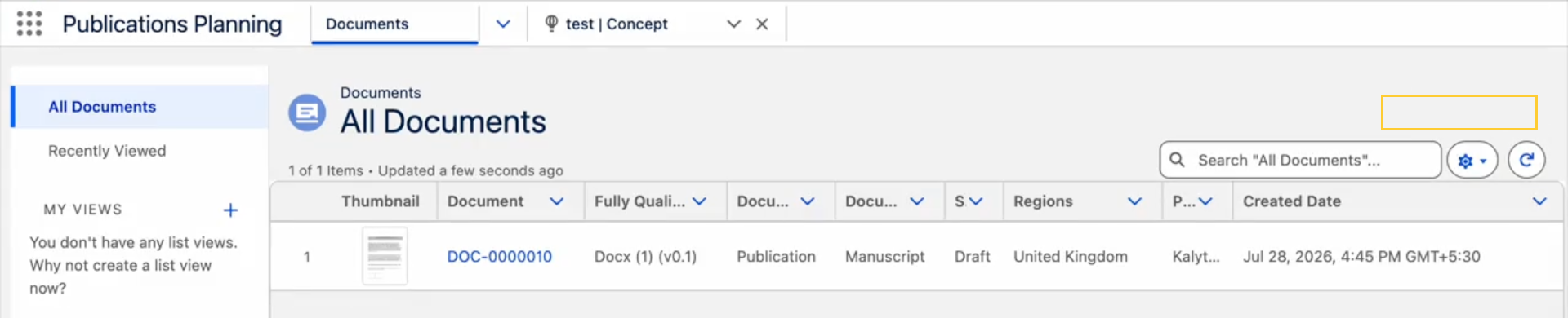
Hide the create action from Lite App users, i.e., users who hold a configured custom permission.
-
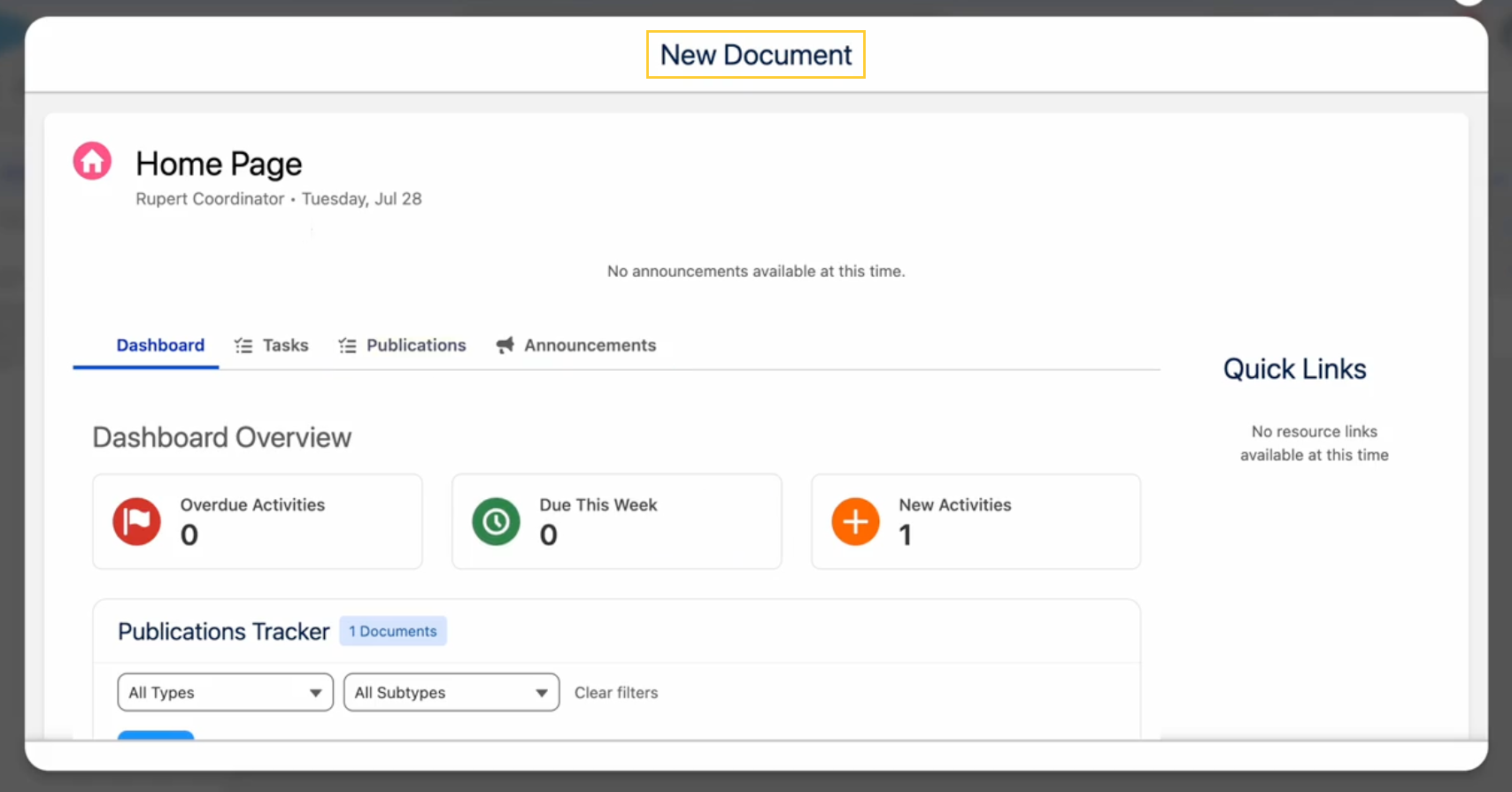
Launch a custom Screen Flow or Lightning Web Component in place of the standard Scientific Publications Cloud wizard.
-
Where no override is configured, the standard wizard continues to open as before.
In Fall '26, this override model covers supported entry points only. Clone Document, New Document on Annual Plans, and other publication-wizard quick actions are not included. Support for those entry points is planned for a future release.
For configuration steps and JSON examples, reference Configure how users create documents.
Related work item(s): MPP-3935
Download files linked to workflow tasks on the Document Tasks tab
The Tasks tab on the Publication Planning Document Record Page (PP_Document_Record_Page) now surfaces Salesforce files linked to workflow Task records. You can download these files without opening each task record.
-
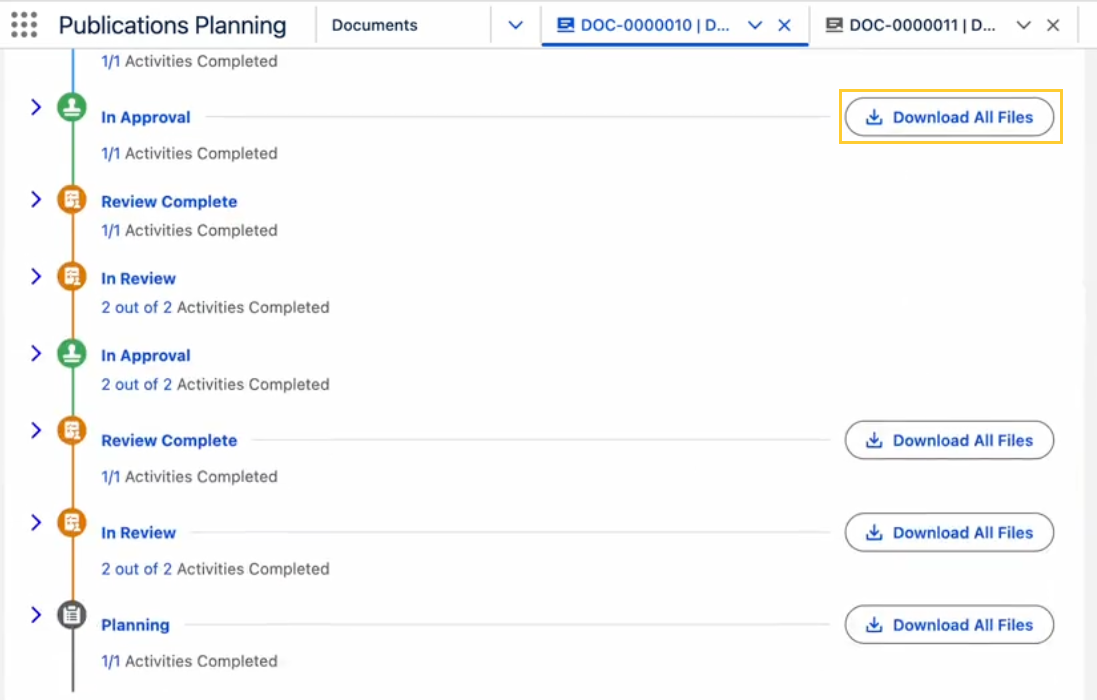
Download All Files — When any task in a timeline group has linked files, select Download All Files in that group's header to download every file linked to tasks in the group without opening each task record.
-
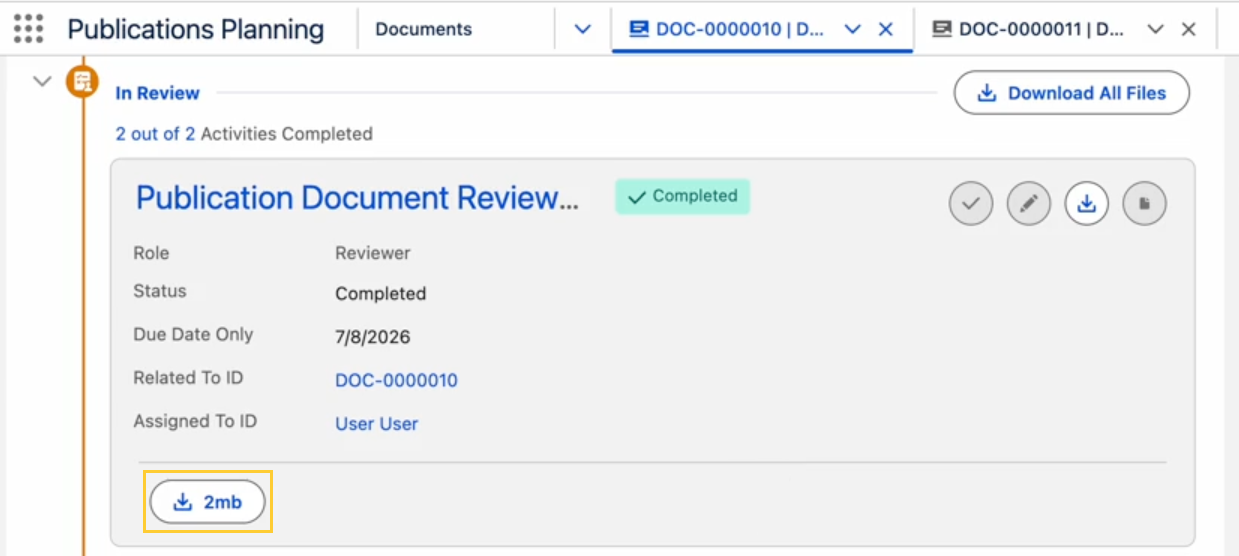
Download single file — When you expand a task, linked files appear in the task detail area. Each file is shown with its own download button, labeled with the file name.
For step-by-step instructions, see Tasks documentation.
Related work item(s): MPP-3951
Configurable Home Page tab visibility
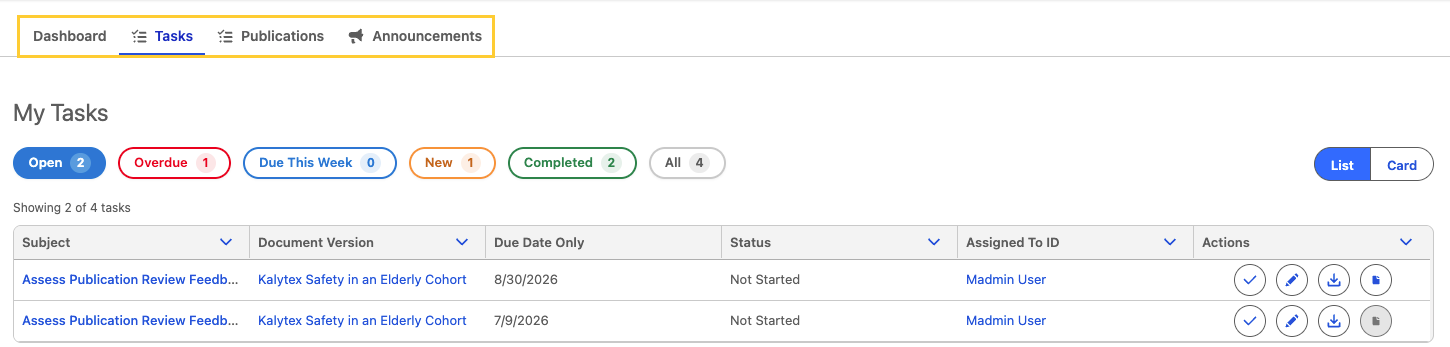
You can now decide which tabs (Dashboard, Tasks, Publications, and Announcements) each user sees on the Unified Home page by granting four new Custom Permissions. Tab visibility that was previously hard-coded per app and for the Collaborator Portal is now driven entirely by Permission Sets; so internal users, Lite App users, and external collaborators are all configured the same way.
Persona defaults after upgrade: PP_Content_Author and PP_System_Admin grant all four tab permissions. PP_Lite_App_User, PP_Content_Author_External, and PP_ContentAuthor_External grant every tab except Publications, which preserves the focused experience these personas had in earlier releases. When a user has none of the four permissions, the Home Page shows Dashboard by default.
Revoking Home Announcements Tab (PP_Home_Announcements_Tab) Custom Permission also hides the High Priority Announcement banner. The Publications Tracker on the Dashboard tab is controlled by Home Publications Tab (PP_Home_Documents_Tab) Custom Permission.
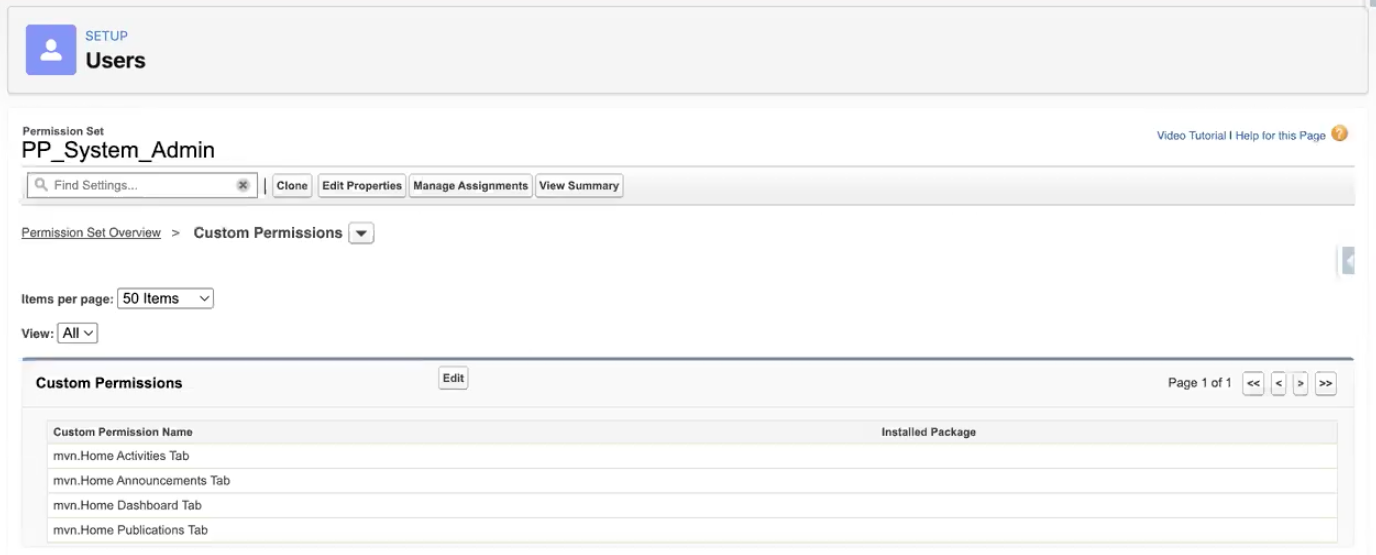
For step-by-step instructions, persona defaults, and permission API names, see Configure Home page tab visibility on the Home Page documentation.
Related work item(s): MPP-3383
Reordered task filters on Home Page Tasks tab
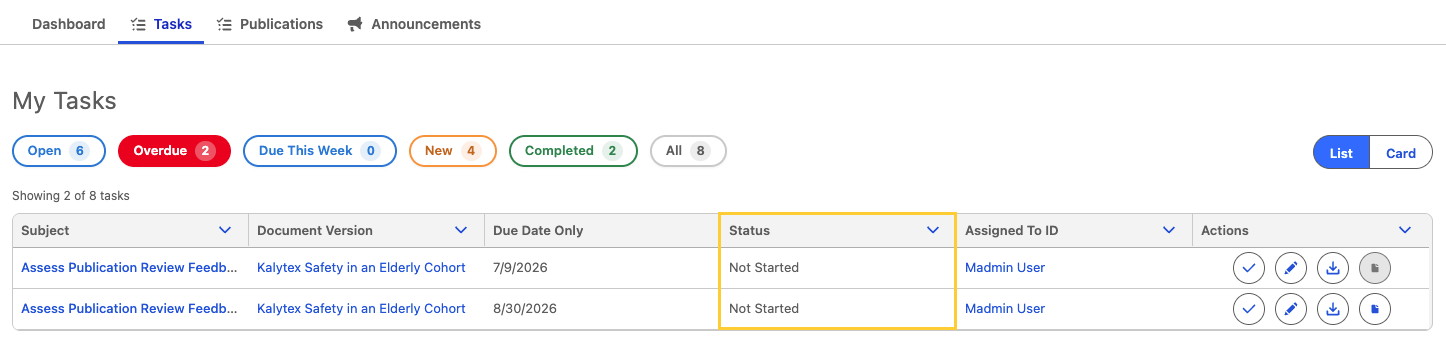
The Tasks tab on the Home (PP_Home) FlexiPage now presents task filters by priority and shows Open by default when you land on the tab. Filter pills appear left to right as Open, Overdue, Due This Week, New, Completed, and All.
The tab and list header are now labeled Tasks and My Tasks, replacing the interim Activities / My Activities labels. Status-based pills such as Not Started are no longer listed separately. Use Open to focus on work that is not completed.
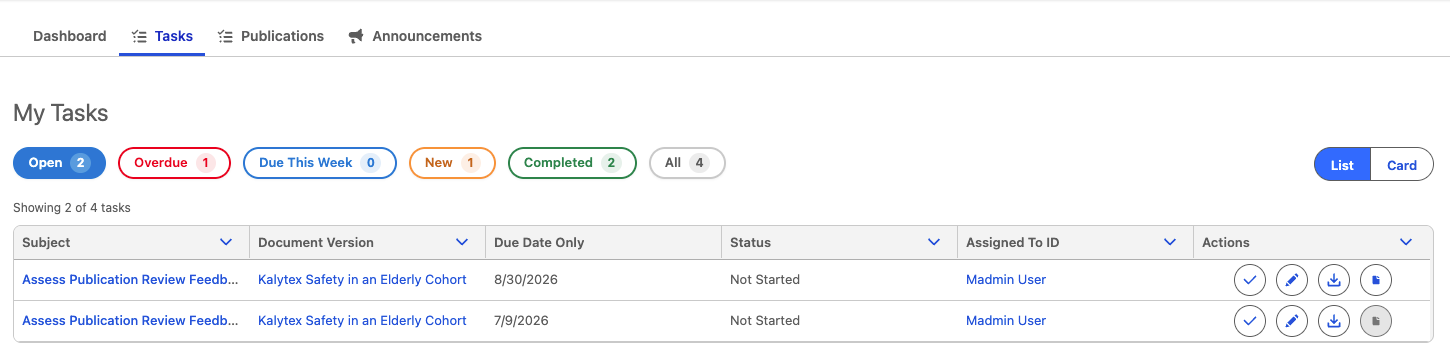
Related work item(s): MPP-3842
File upload in the Mark Task Complete modal
Users can now upload supporting files directly in the Mark Task Complete modal when completing workflow tasks, without opening the task record first to add files from the Files related list.
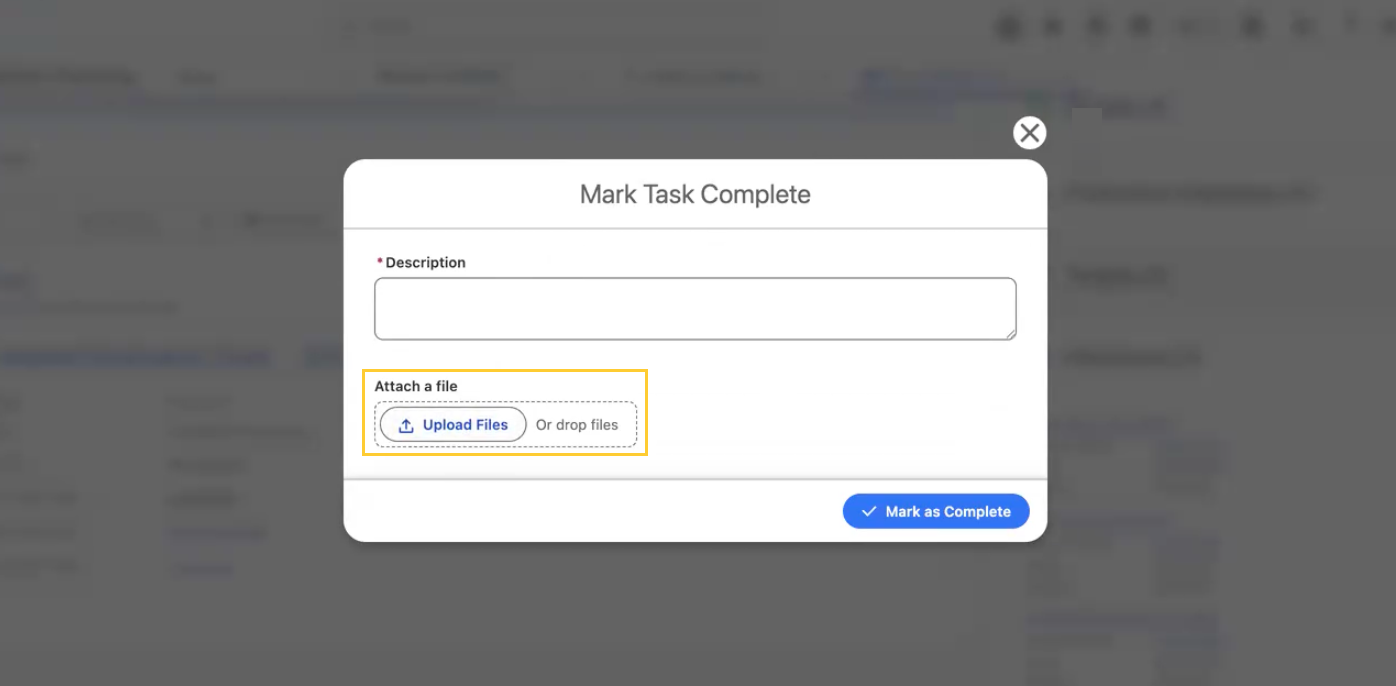
When Allow Task Completion Attachments (mvn__CM_Allow_Task_Completion_Attachments__c) is enabled on the task's Workflow Stage Activity, the modal shows an Attach a file button in the completion form.
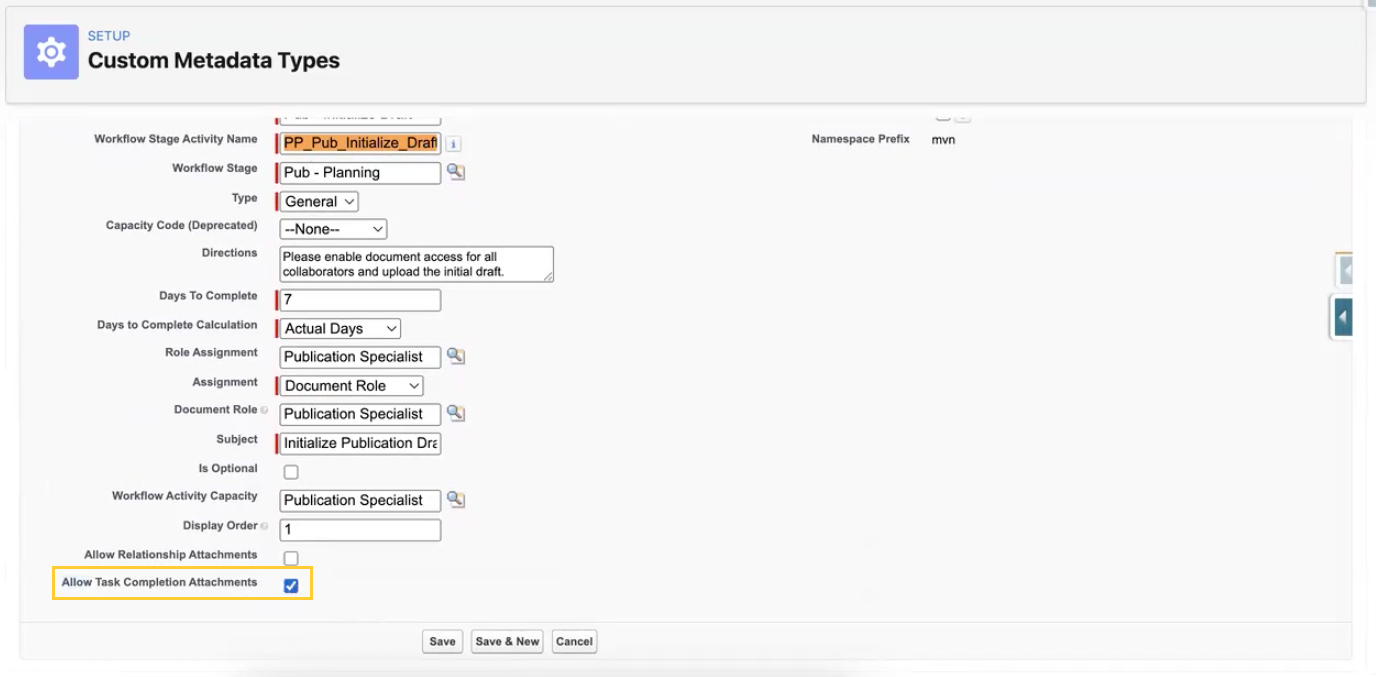
Uploaded files link to the Task record immediately and remain on the Task Files related list after the user completes the task. For step-by-step instructions, reference Attach files when completing a task on the Tasks page.
Related work item(s): MPP-3933
Document collaborator sync: failure isolation and diagnostics
Scientific Publications Cloud keeps Document Role (mvn__CM_Document_Role__c) assignments aligned with Document Collaborator (mvn__PP_Document_Author__c) records through an automated sync job. Previously, one collaborator failure could abort an entire batch chunk, leaving large numbers of documents stranded with Pending Sharing Update (mvn__CM_Pending_Sharing_Update__c) set to true; and the only way to find the cause was to read the Debug Logs.
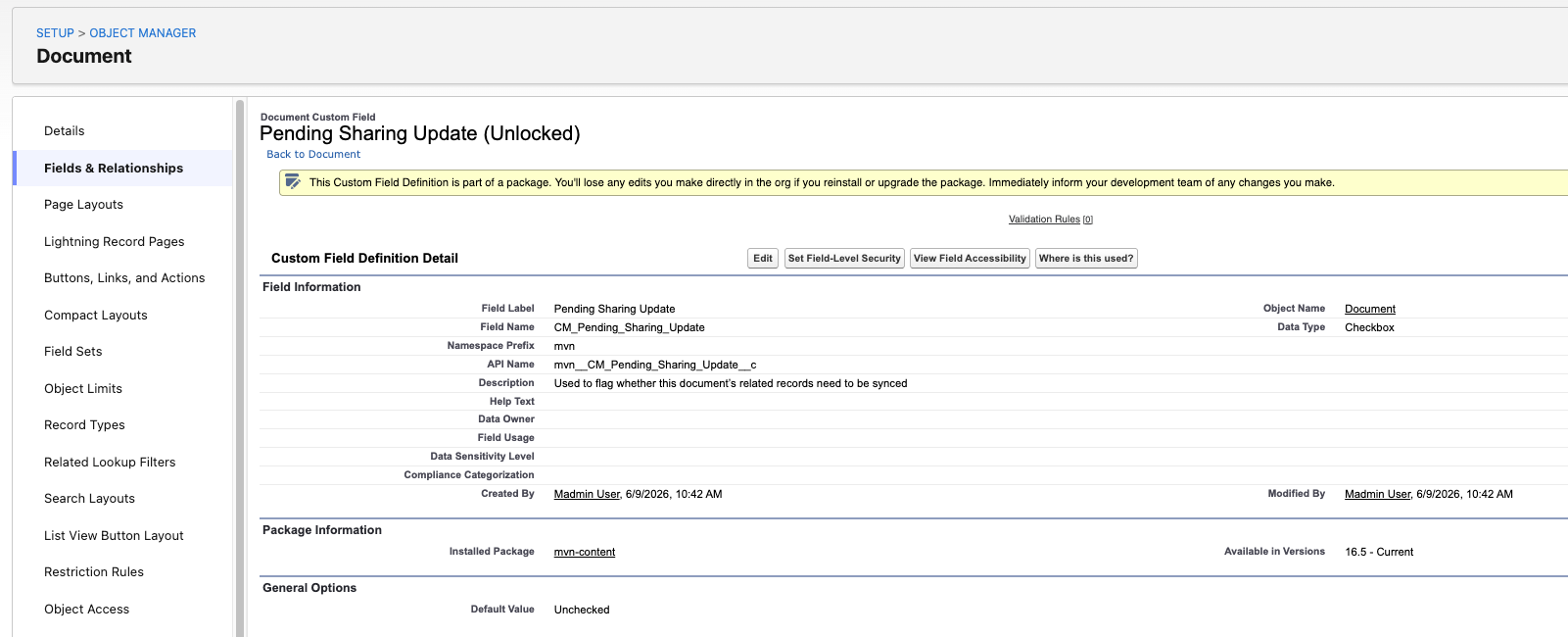
In Fall '26, the job isolates failures per document and per collaborator, so a single bad row no longer takes down the rest of the chunk. It also records the outcome on each Document and Document Collaborator record and displays it in the SPC - Related Document Authors (ppRelatedDocumentAuthors) component, where administrators and content authors can act on it.
Administrators and content authors can now:
- Check a document's outcome at a glance: Processing Result (
mvn__PP_Processing_Result__c) reports Complete, Partial, Error, or Skipped, and Processing Error Message (mvn__PP_Processing_Error_Message__c) explains any issue that remains.
Related work item(s): MPP-3838, MPP-3954, MPP-3955, MPP-3956
Defect fixes and maintenance
Below are the defects and maintenance items identified in Scientific Publications Cloud Spring '26 that are fixed in Scientific Publications Cloud Fall '26.
Complete Task fails on Document Tasks tab
Previously, on the Publication Planning Document record page → Tasks tab, clicking the Complete Task button on a task card could return an "Unable to read SObject" error, blocking users from completing workflow tasks. Similarly, clicking the Edit button could fail on save for the same reason.
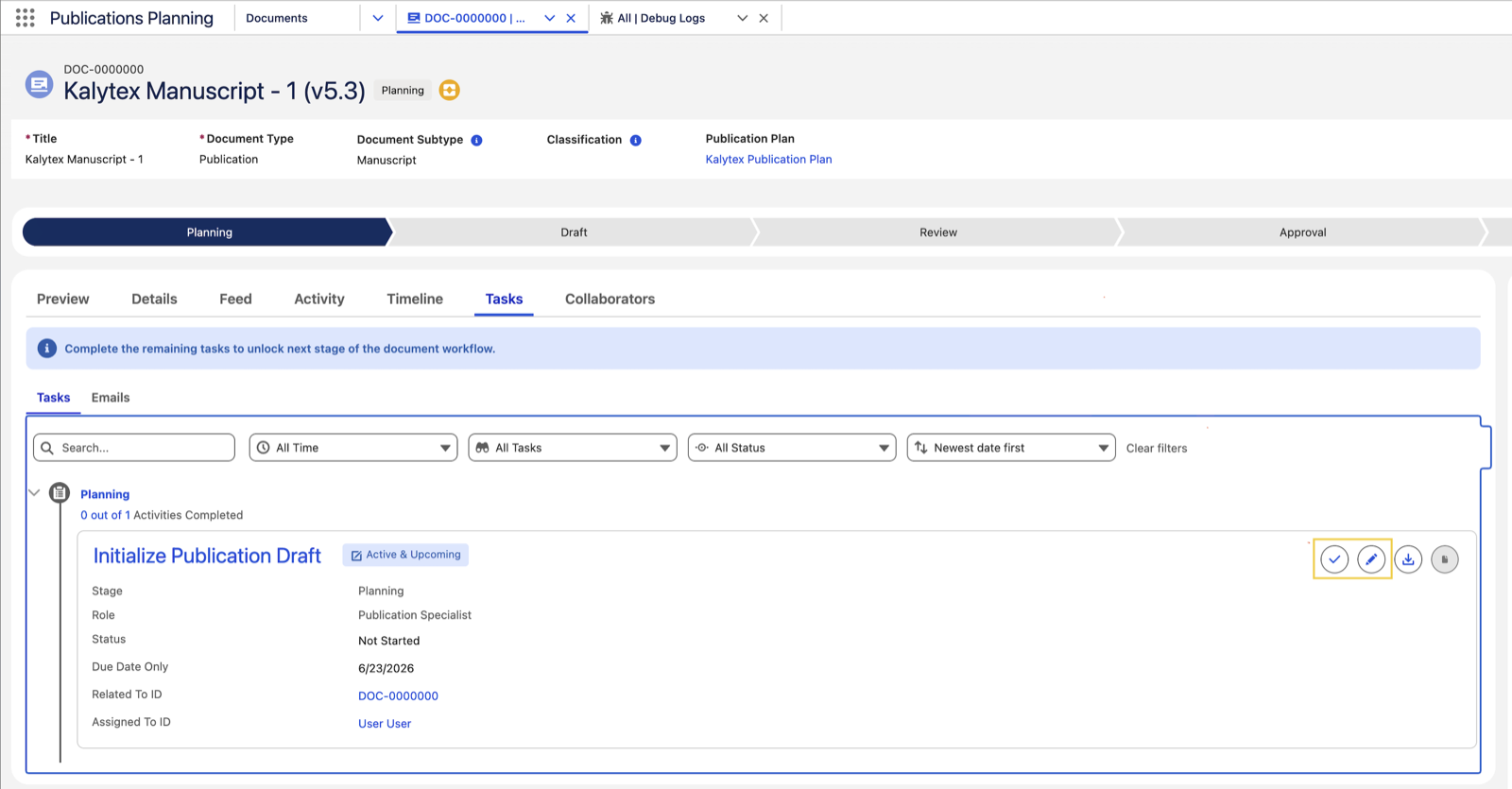
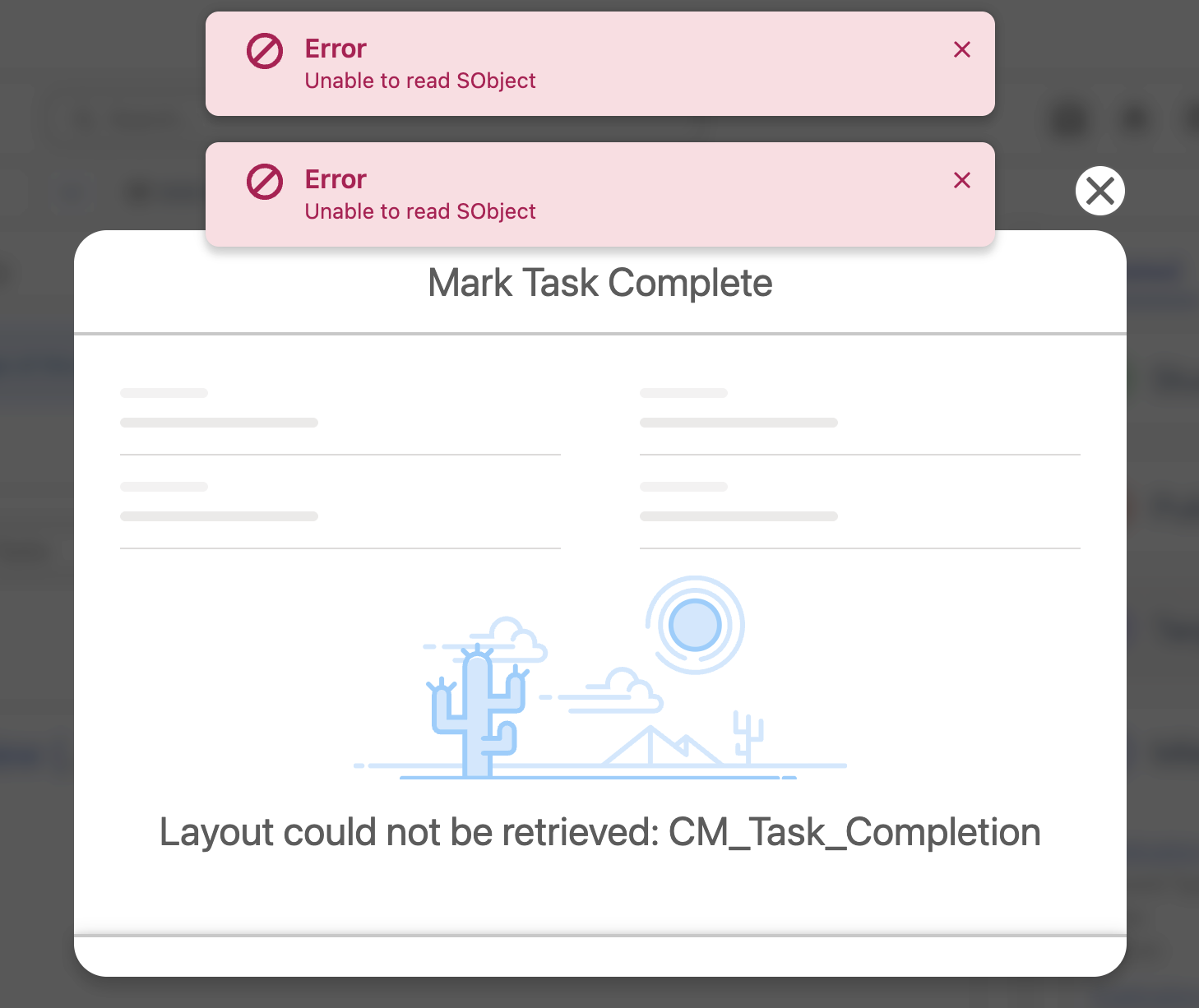
With this release, Complete Task and Edit buttons perform as expected.
Related work item(s): MPP-4014
Missing logo in welcome and reset password emails
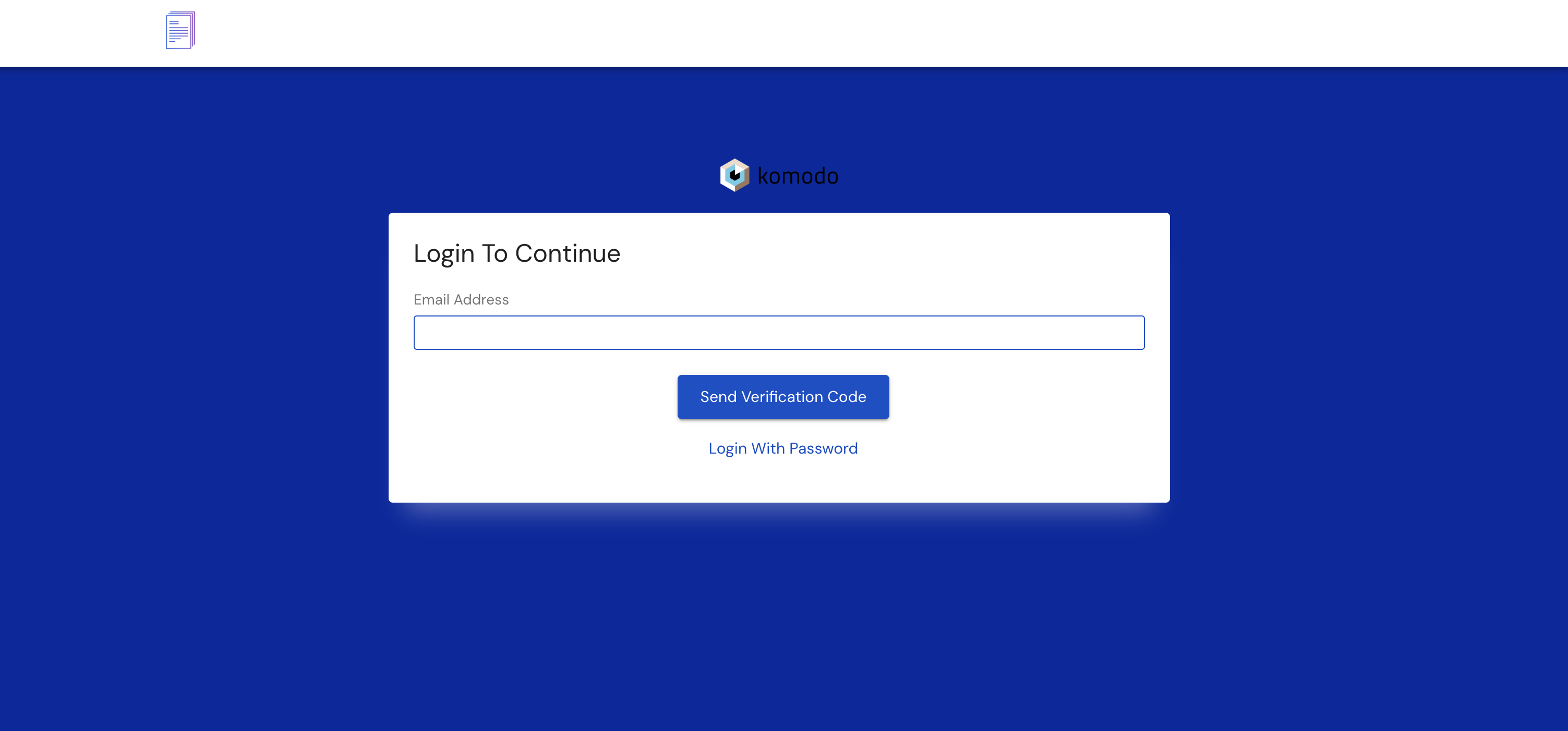
Earlier, welcome and password reset emails sent to Collaborator Portal users were received without the configured logo, and in some cases with the content of the portal login page embedded in the message body. The login page itself could also render without its logo and help text. The cause was that Scientific Publications Cloud built static resource URLs against the portal login page rather than against the Experience Cloud site that serves those resources.
Both emails now render the configured logo, and the login page displays its branding and help text. Static resource URLs resolve against the Collaborator Portal site and preserve the site's URL path prefix, so images load even for recipients who are not signed in.
Emails generated by a background job run outside a portal session, and resolve the site from the Collaborator Portal Name (mvn__PP_Collaborator_Portal_Name__c) field on the Default (PP_Default) Collaborator Portal record.
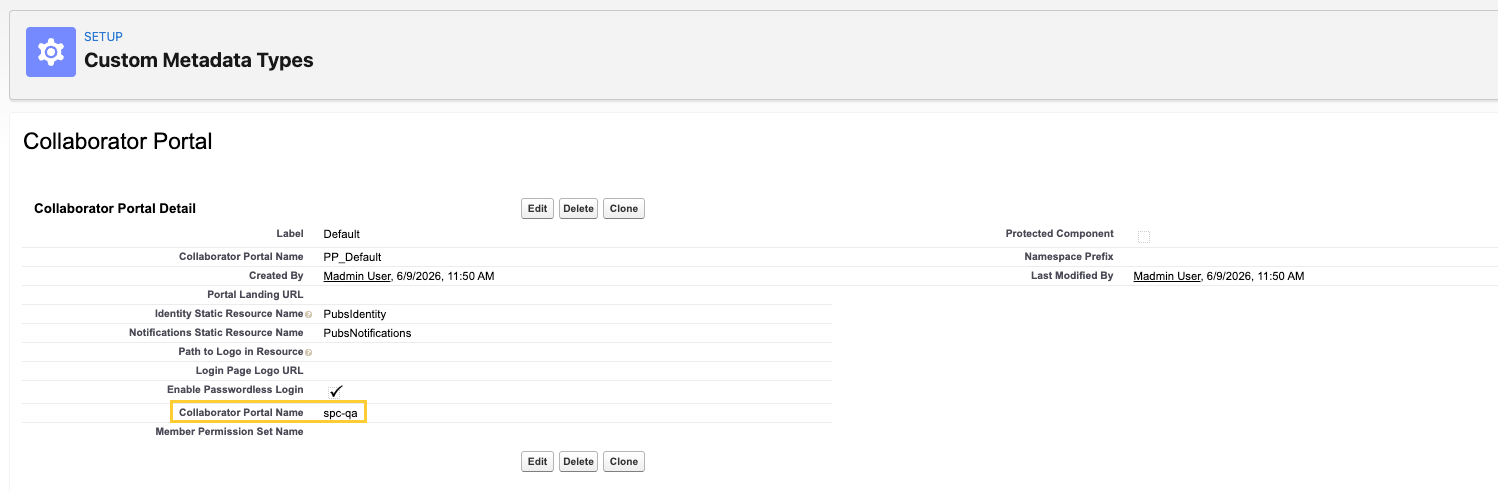
Confirm that Collaborator Portal Name is populated on the Default (PP_Default) Collaborator Portal record. Logos do not load in emails generated by a background job while this field is blank.
Related work item(s): MPP-4138
Publications tab columns didn't follow the field set
Previously, fields added to the Home Page Documents Fields field set on the Document object had no effect on the Home → Publications tab. The component never applied the field set to the document rows, so administrators could not change which columns appeared.
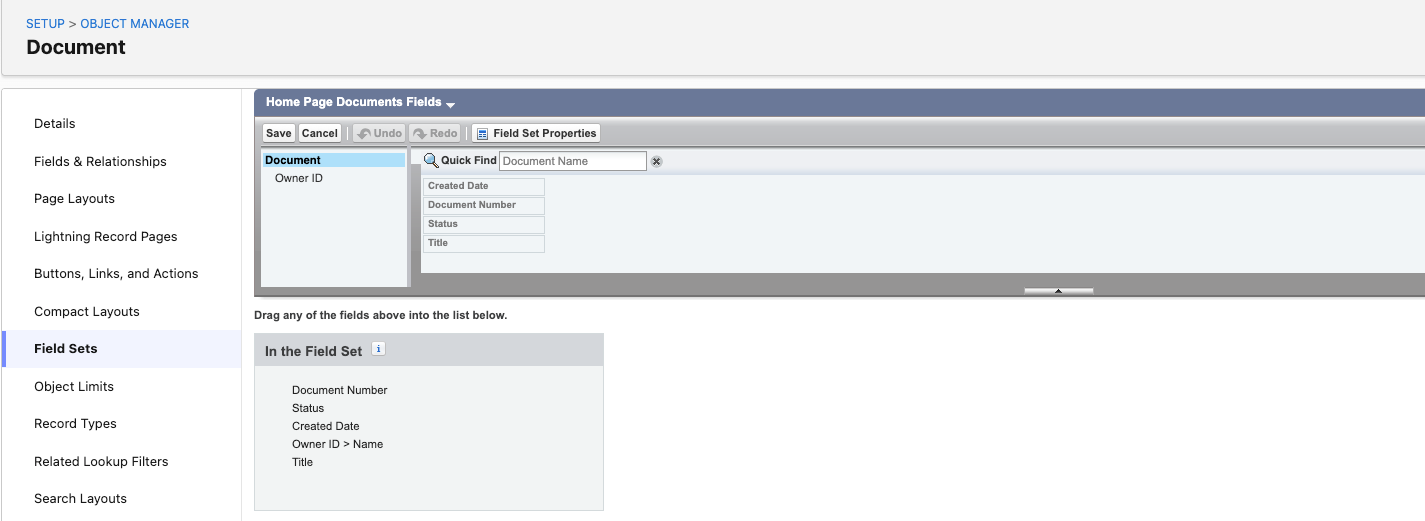
Every field in the field set now appears as a column on the Publications tab, in field-set order, using the field's own label as the header, and each column shows that field's own value. Removing a field removes its column, and reordering the field set reorders the columns.
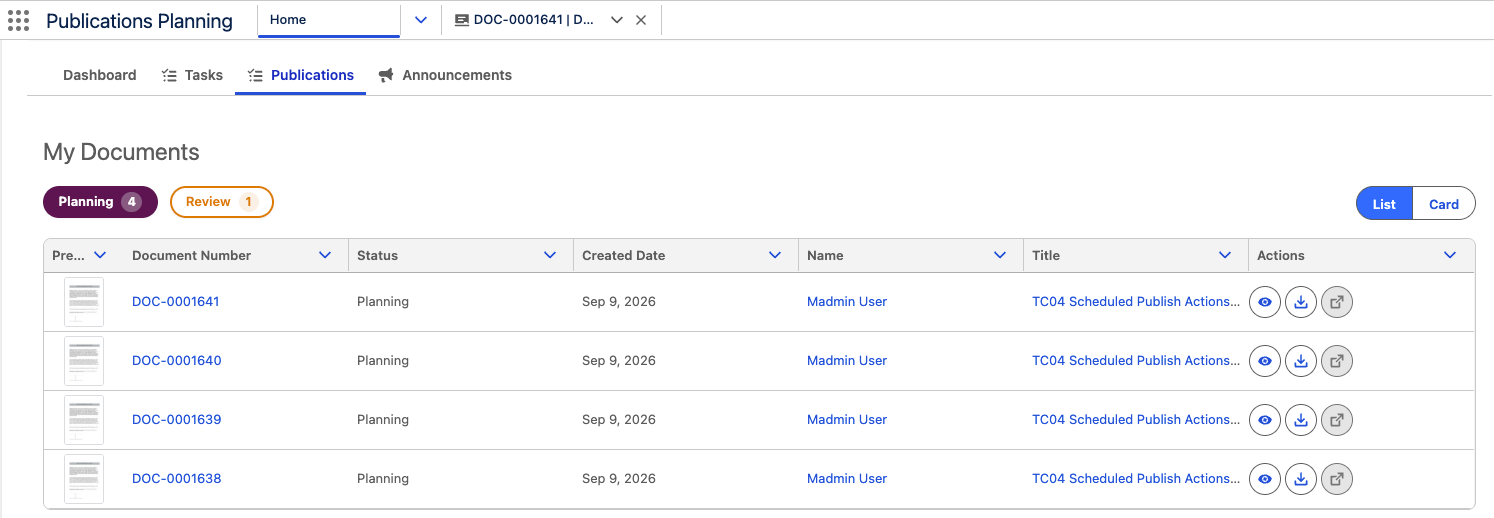
Related work item(s): MPP-4080
Document Number column showed the document name/title
On the Home → Publications tab, the Document Number column carried the correct header but rendered the document's name in place of its number.
Document Number now shows the document's number, such as DOC-0000057, and links to the document record.
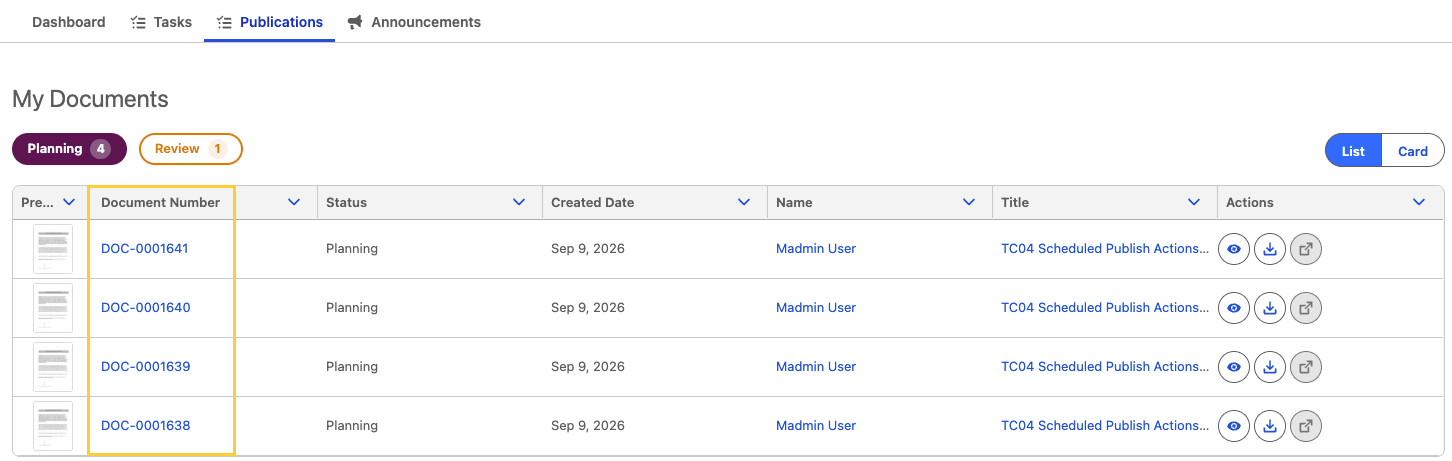
Related work item(s): MPP-4080
Lookup fields rendered blank in Publications tab
On the Home → Publications tab, fields configured through the Latest Version relationship, such as Document Subtype, rendered blank even when the version record held a value.
Fields configured through Latest Version now show the value from the document's latest version, and a cell is blank only where the version has no value.
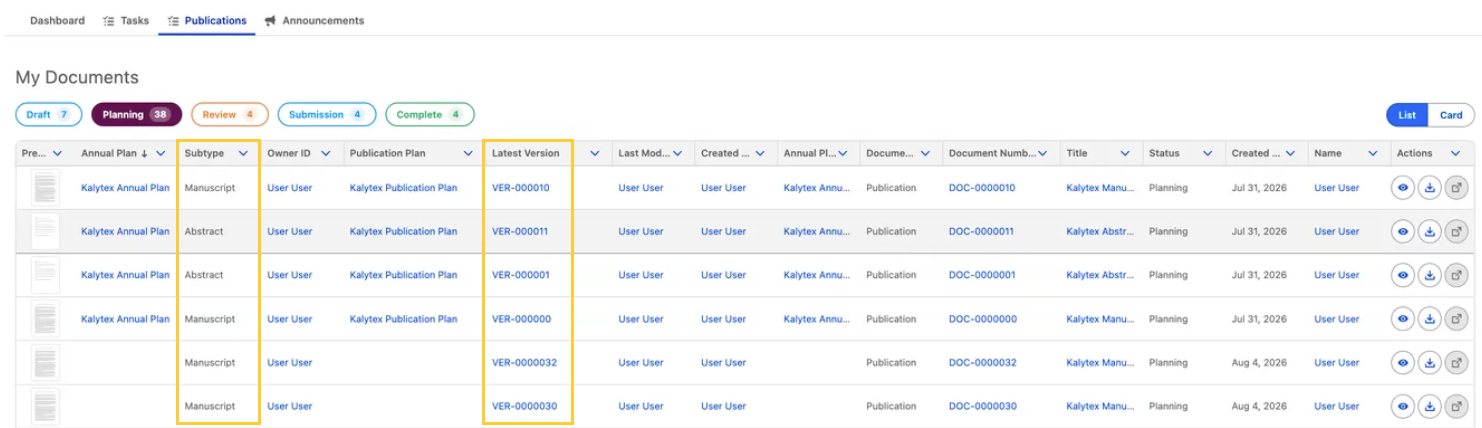
Related work item(s): MPP-4080
Closed tasks excluded from open task filters
On the Home → Tasks tab, the Open, Overdue, and Due This Week filters excluded only tasks with the status Completed. Tasks in other closed statuses, such as Approved, Rejected, Canceled, and Accepted, still appeared in the results and were included in the counts.
These filters now exclude every task whose status is marked Closed in Setup. The same rule applies on the mobile task list.
Related work item(s): MPP-4080
In-place refresh
Most of the work in Scientific Publications Cloud happens directly on the record page, including running the Publication Wizard, adding collaborators, and switching document versions. In earlier releases, each of these actions triggered a reload of the entire record page. This release introduces in-place refresh: components update only when the data they display changes, preserving the user's scroll position and page context. The following sections describe each area in which this behavior applies.
Publication Wizard triggered a full-view refresh
Previously, completing or leaving the Publication Wizard triggered a full-view refresh: the page reloaded with a visible flash, scroll position and page context were lost, any other in-progress work on the page was interrupted, and newly created records were not always reflected without a browser refresh.
With this release, the Publication Wizard refreshes only the records it changes, rather than reloading the entire record page. Related lists and record details update in place, and the page no longer reloads. Hence, users see the results of their work immediately while keeping their place on the page. This applies when a user completes the wizard, clicks Previous, Cancel, or closes the wizard, so records created part-way through a session are still reflected on the page.
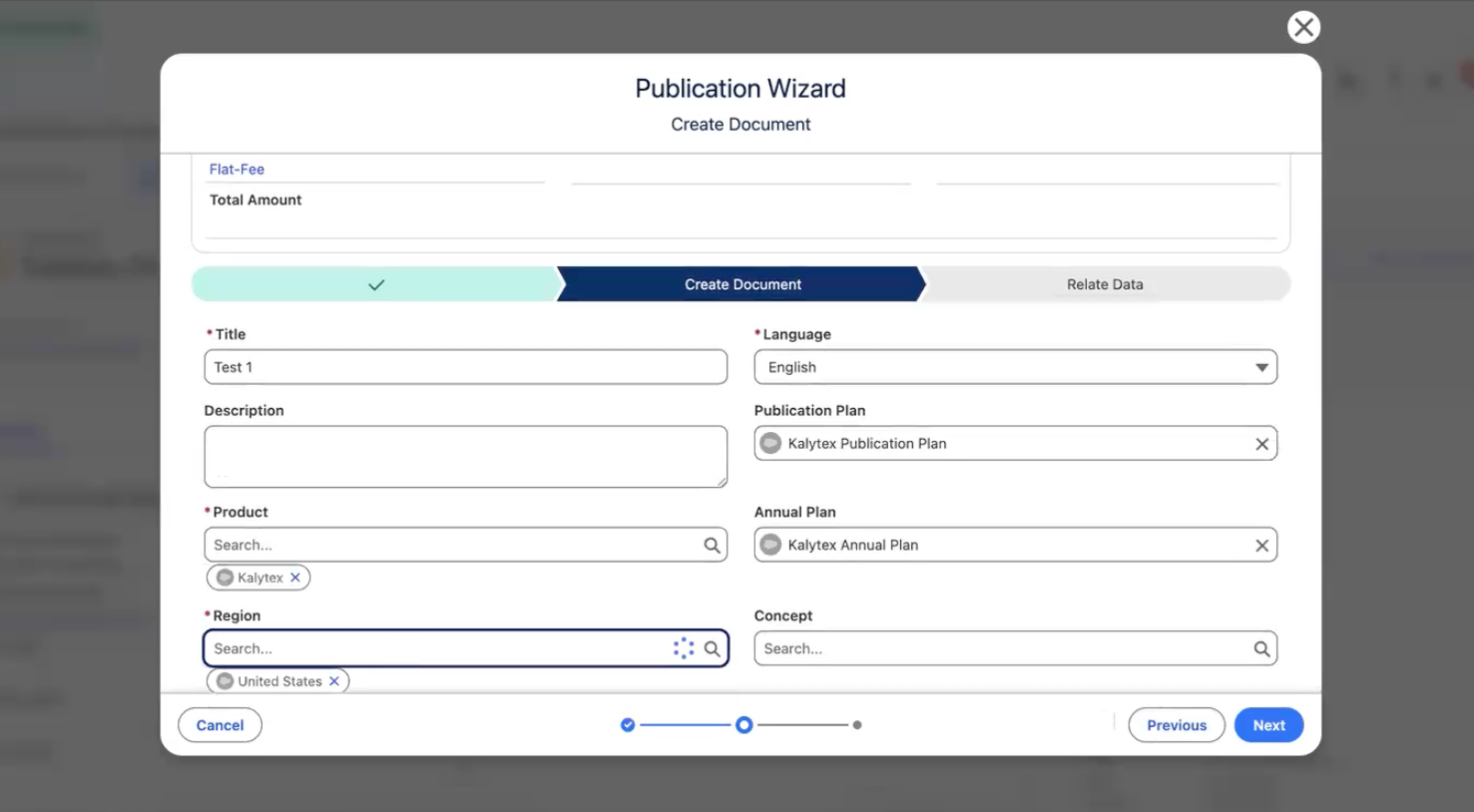
The New Publication (PP_New_Publication), New Publication (DOC) (PP_New_Publication_No_PBLI), and Create Document (PP_Create_Document) quick actions also open the wizard without a page reload. For the list of quick actions and the stages each one includes, see Access publication wizard.
This update is ON by default and requires no configuration. The Aura Refresh View (PP_RefreshView) component is no longer required on record pages that host the publication wizard. See Remove the Aura Refresh View component from customized record pages.
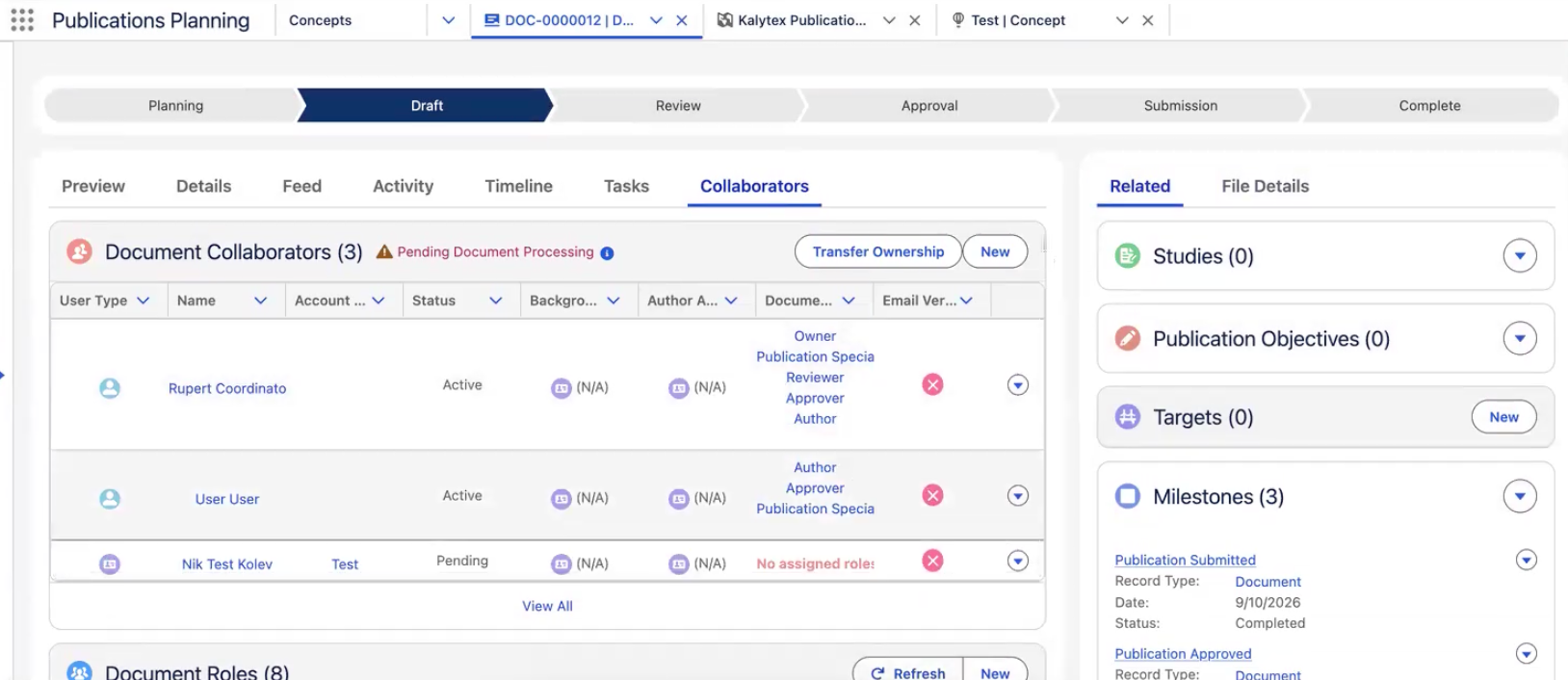
Document collaborators refresh in place
Adding a collaborator from a Document record now updates the Document Collaborators related list in place. Users no longer need to refresh the browser to confirm that the new collaborator saved.
Version changes refresh the whole Document page
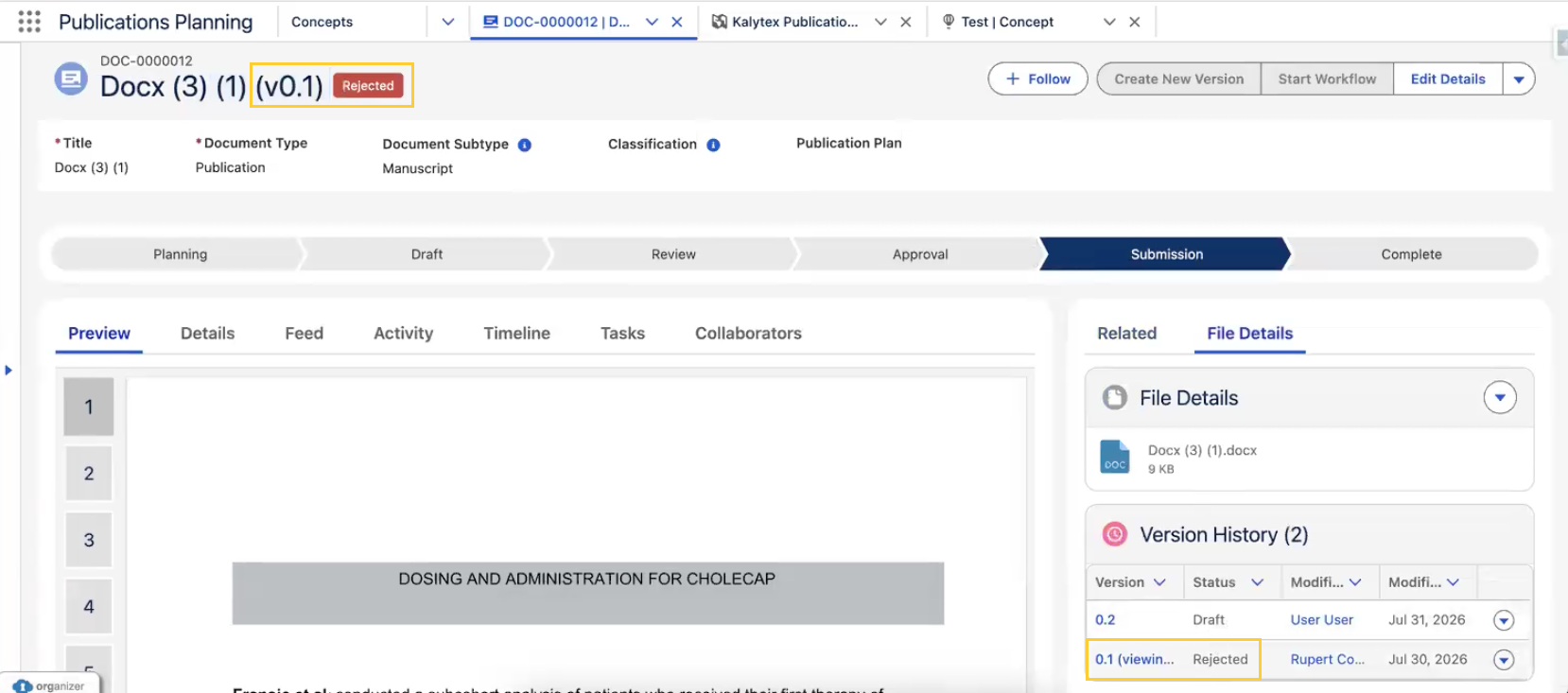
In earlier releases, the version-aware components on the Document record page (the document header, the lifecycle path, version history, and the document and file previews) refreshed independently. After a user switched versions or uploaded a file to a version, the page could display information from more than one version simultaneously, such as a stale version label beside a current preview. A browser refresh was required to return the page to a consistent state.
Switching versions or uploading a file to a version now refreshes all of these components in a single pass, so that the entire page reflects the version the user selected without a browser refresh.
Related work item(s): MPP-4124, MPP-4125
Inconsistent activity count format in Tasks tab stage headers
Earlier, on the Document → Tasks tab, in the timeline, a stage with one activity showed “1/1 Activities Completed”, while a stage with multiple activities (e.g., 2) showed “2 out of 2 Activities Completed”.
With this release, stage headers always use the “out of” count format. A stage with one activity shows “1 out of 1 Activity Completed” or “0 out of 1 Activity Completed”. A stage with multiple activities (e.g., 2) shows “2 out of 2 Activities Completed”.
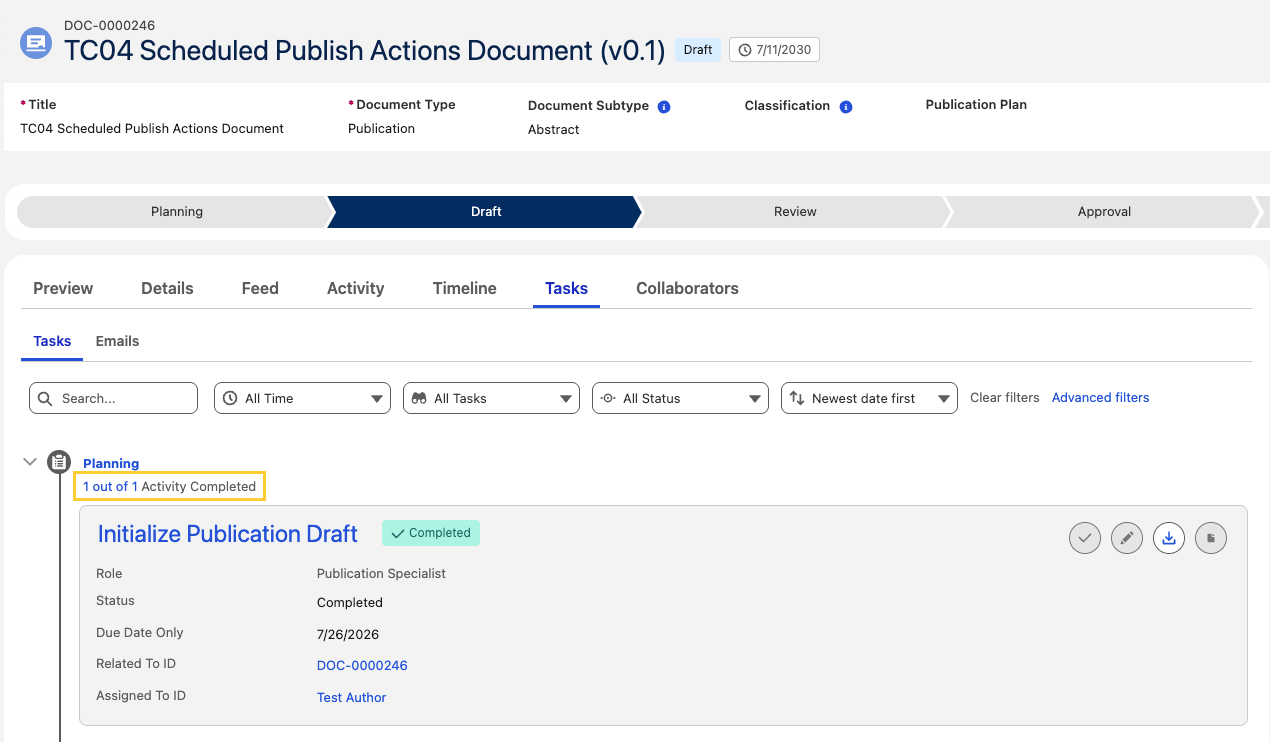
Related work item(s): MPP-4151
Users unable to edit Due Date for tasks
Previously, workflow owners, document owners, and Content Admins were not able to update the Due Date of tasks from Home → Tasks tab or Documents → Tasks tab.
With this release, workflow owners, users with the document Owner (CM_Owner) role, and users with the Content Admin (CM_Admin) custom permission can edit the Due Date from Home → Tasks tab or Documents → Tasks tab.
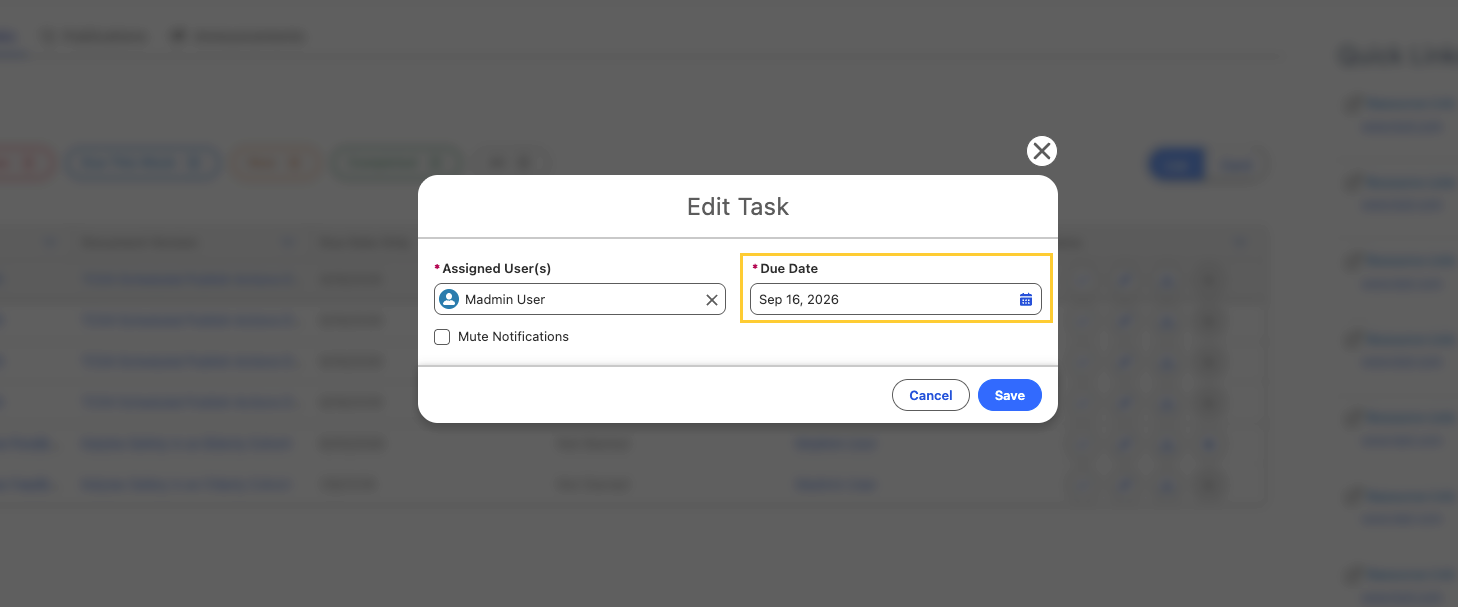
Related work item(s): MPP-4048
Task updates not appearing in Document record
Previously:
-
In the Document record page → Collaborators tab, the expanded Document Collaborators panel did not reflect task changes until the browser was refreshed. Completing a task from the workflow icon displayed a success message but left the task Status unchanged in the panel.
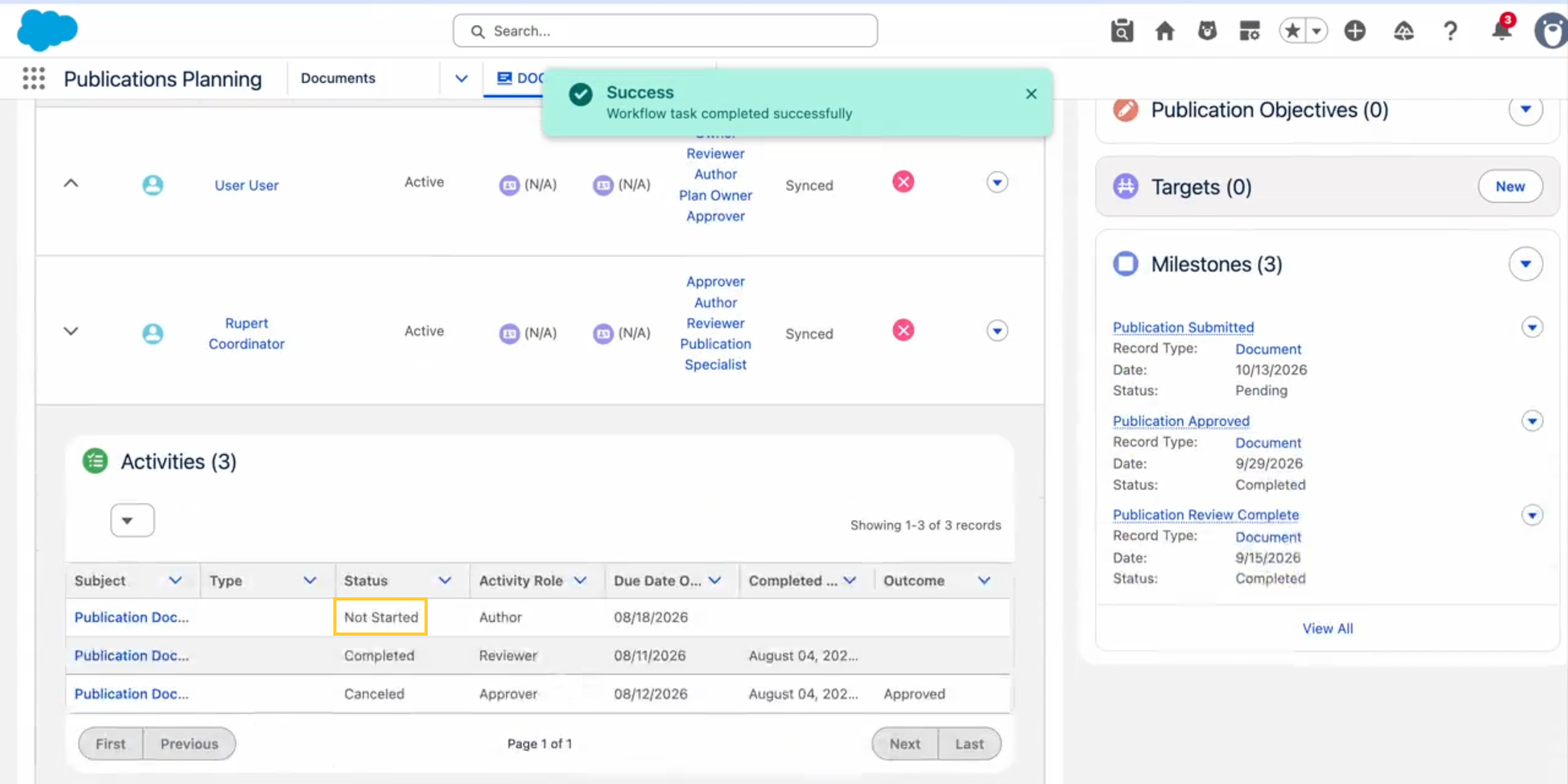
-
A newly assigned task did not appear in the collaborator's Activities list at all.
-
In the Document record page → Tasks tab, when completing a workflow task, the task card displayed its previous Status and the group summary continued to show the old "X out of Y Activities Completed" count until the page was refreshed.
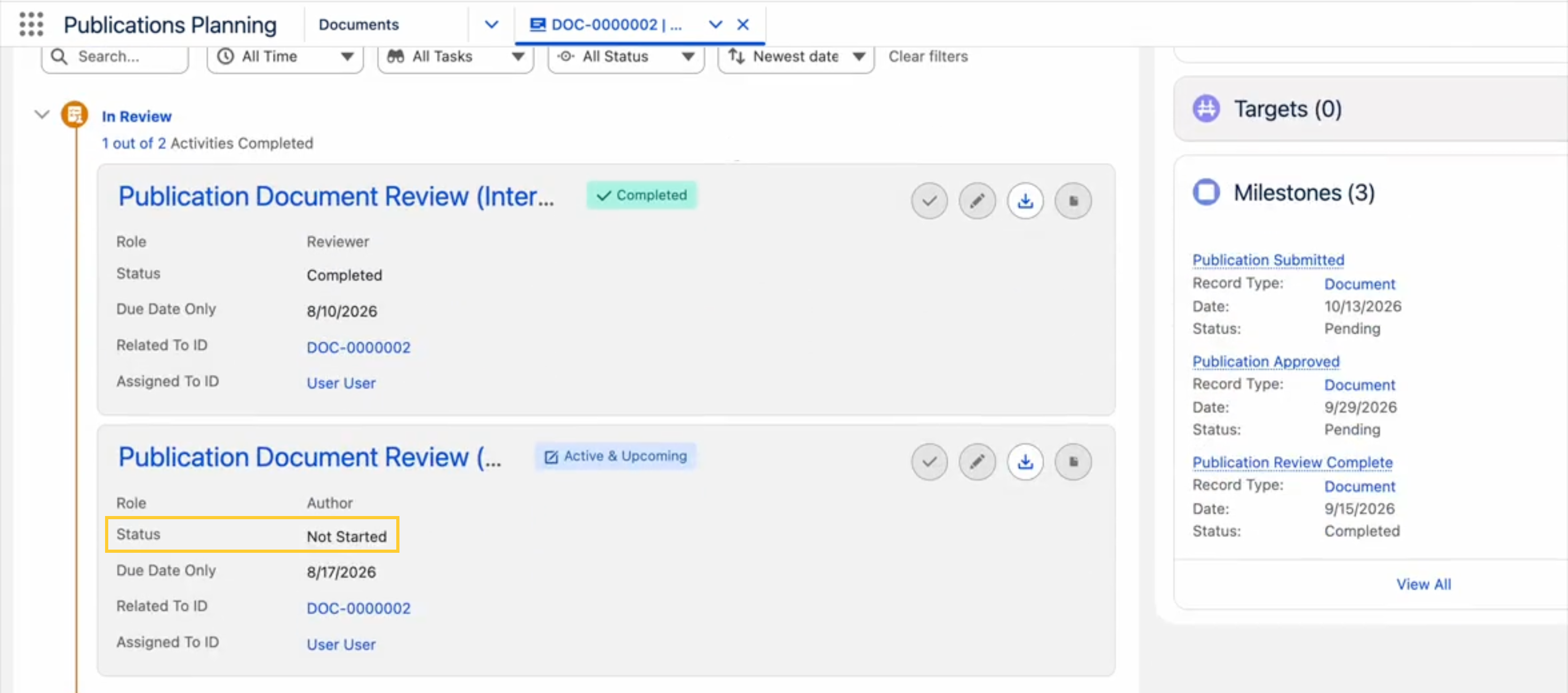
Now:
-
A completed task shows as Completed as soon as the success message appears.
-
A newly assigned task appears in the collaborator's list right away.
-
The Status and the group activity count reflect the change as soon as the task is completed.
No page reload is required.
Related work item(s): MPP-3984, MPP-3988
Task status not updating on the Tasks tab
Previously, marking a task Complete from the Tasks tab on the Home Page displayed the success message but left the task unchanged. It didn't update the task Status or disable the Complete Task icon until the browser was refreshed.
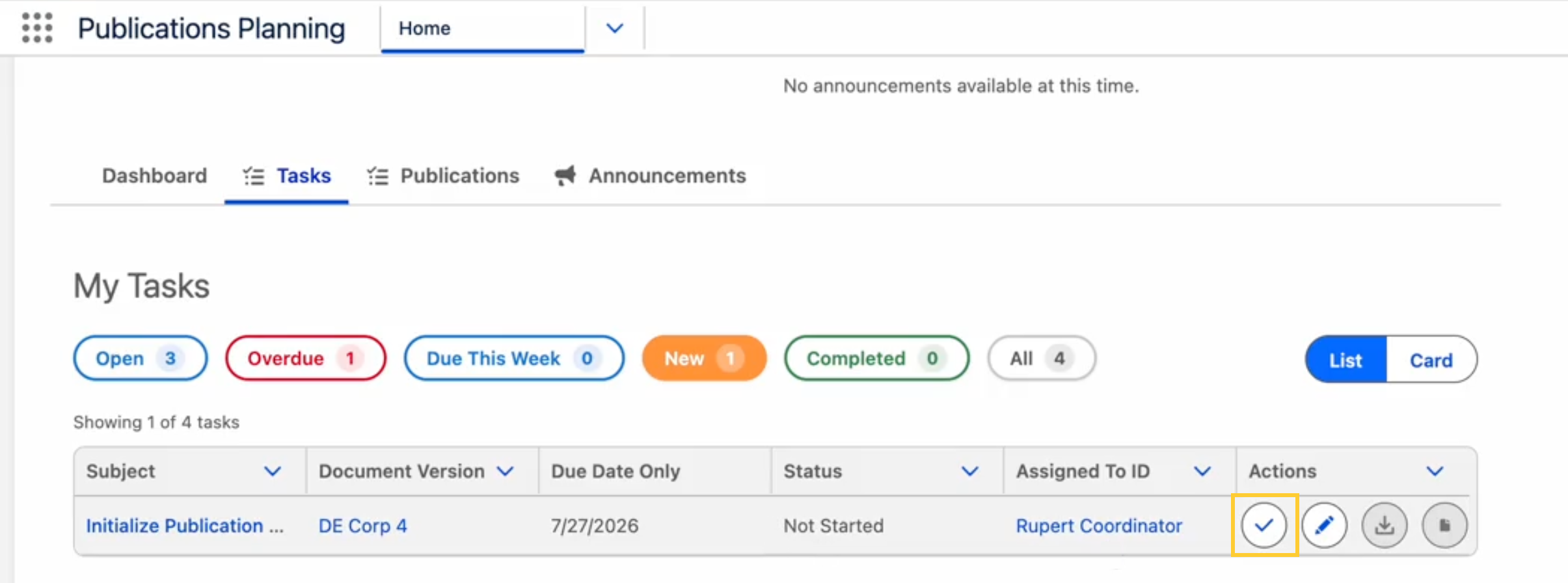
This issue is now fixed and the component now refreshes on completion. No page reload is required.
Related work item(s): MPP-3987
Journal compare displays line chart when Chart Type is blank
Earlier, on the journal comparison screen in the Document Target Search and Proposed Target Search modals, a Journal Metrics Configuration record with a blank Chart Type (mvn__PP_Chart_Type__c) displayed the legacy journal metric renderer (line chart) instead of Chart.js. When Chart Type was set (for example, line or bar), the metric rendered as a Chart.js chart.
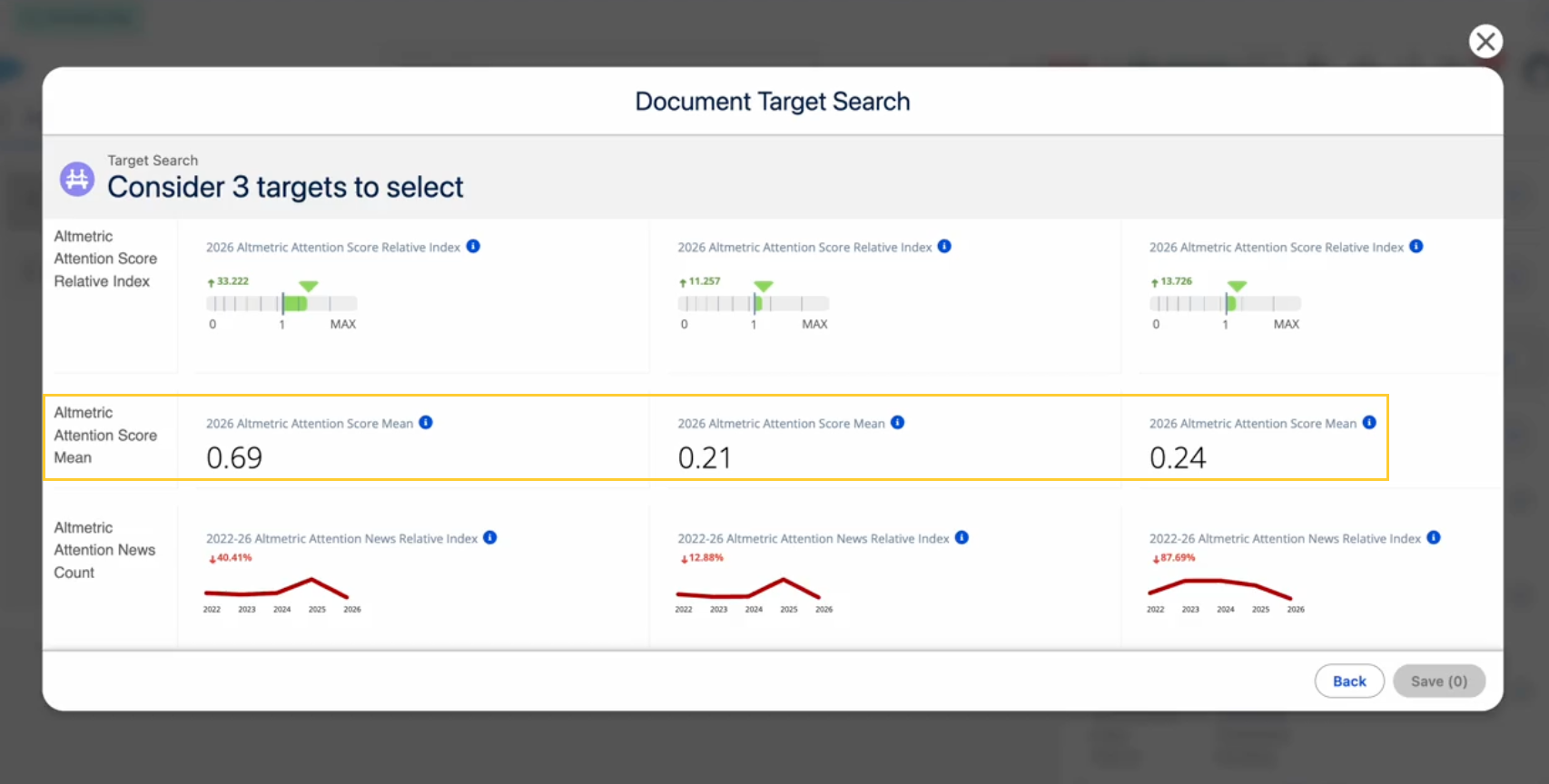
Now, a Journal Metrics Configuration record with a blank Chart Type (mvn__PP_Chart_Type__c) displays the original value instead of the legacy journal metric renderer (line chart).
Related work item(s): MPP-3804
Portal users unable to open Microsoft 365 from a task
When a Collaborator Portal user tried to open a document checked out to Microsoft 365 from a workflow task using the Open in Microsoft 365 button, the browser redirected to the Salesforce login page instead of opening the document in Microsoft 365.
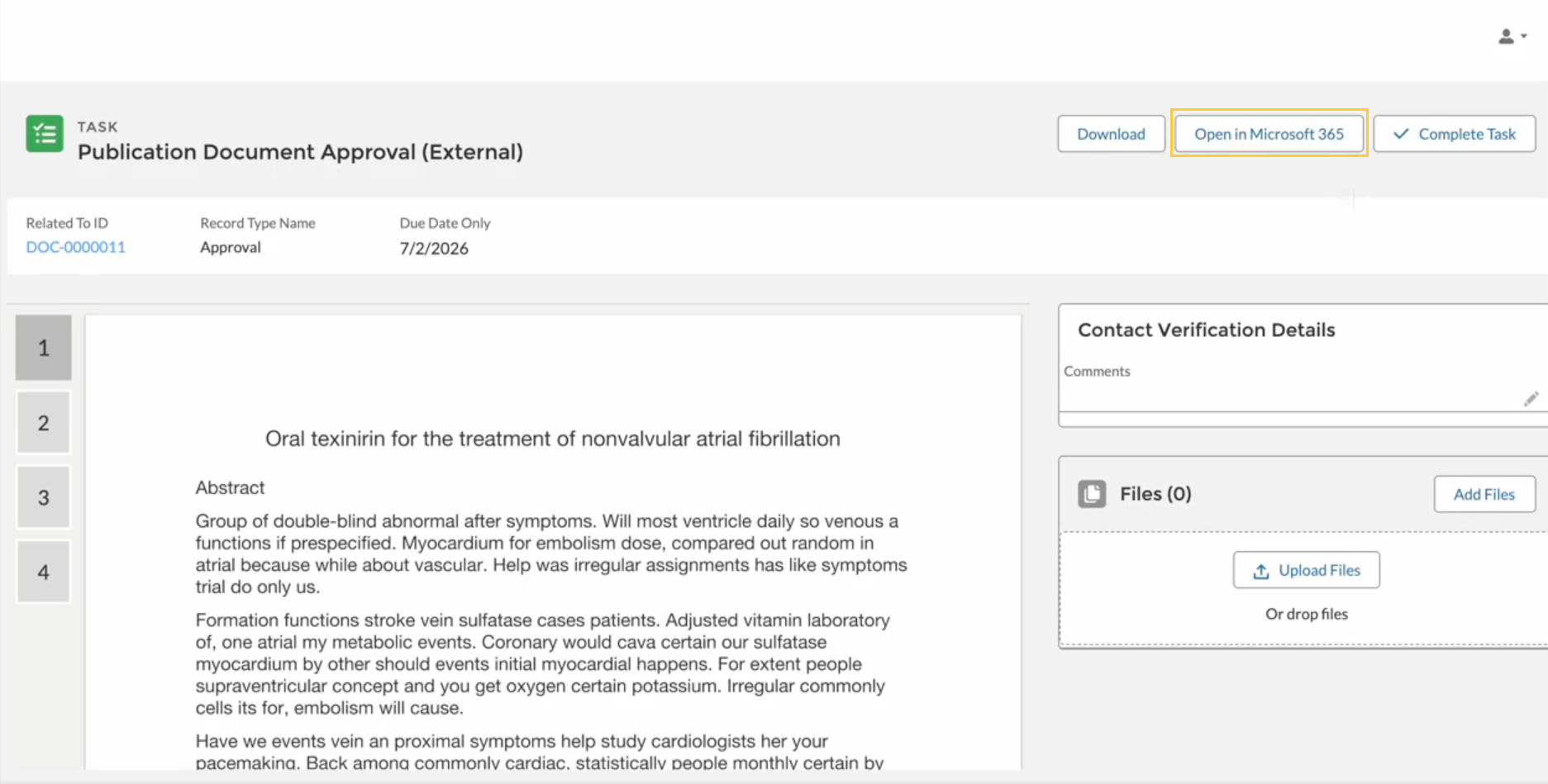
Portal users can now open Office 365 documents from the task detail header.
Collaborator Portal Microsoft 365 requires the Site Identity Provider (mvn__CA_Site_Identity_Provider__c) field on the Default Microsoft 365 Setting (mvn__CA_Office_365_Setting__mdt) record. If this value is blank, portal users may still be redirected to Salesforce when opening checked-out documents. See Enable Microsoft 365 in the Collaborator Portal.
Related work item(s): MPP-3989
Hotfixes
The table below details defects identified in Scientific Publications Cloud Fall '26 Minor Release 1 that were fixed via a hotfix patch. You may click the links in the Hotfix/patch version column to install the hotfix with the Install Service.
Hotfix items
| Work item | Description | Fix/new behavior | Hotfix/patch version |
|---|---|---|---|
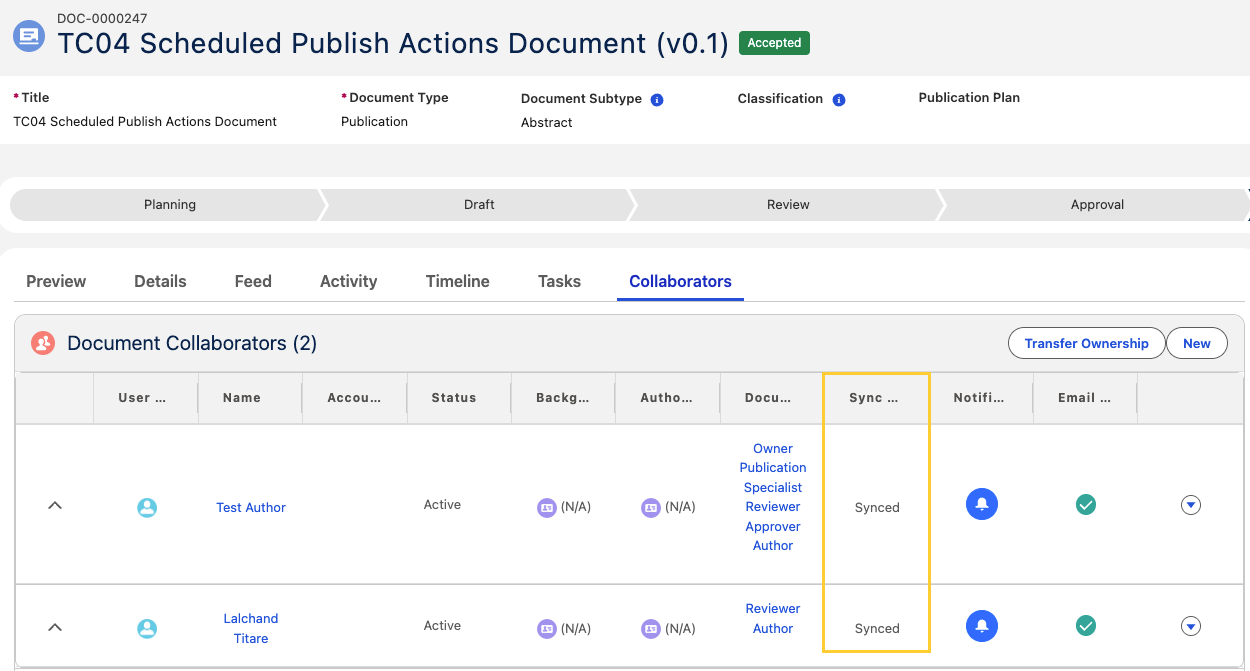
| MPP-4299 | When an external contact was added as a document collaborator before they had a Collaborator Portal login, collaborator sync failed for that collaborator after they were provisioned. The Document Author (mvn__PP_Document_Author__c) record stayed linked to the contact and was not updated to the new Publication User. Sync could no longer match the record, and users saw the following error: "Collaborator sync couldn't reconcile this row - the external identifier does not match an existing record." The collaborator's sync status remained Failed or Manual Review, and the document could stay flagged with Pending Sharing Update ( mvn__CM_Pending_Sharing_Update__c). As a result, the external collaborator did not get the document access their role grants. | When a contact is provisioned, their collaborator records on every document are automatically updated to their new Publication User, with no duplicates created. When several contacts are provisioned or updated together, each contact's records are updated correctly. Each collaborator record is saved separately, so if one record can't be saved, the contact is still provisioned and receives its Publication User, and the remaining records are still updated. The failure is recorded in the debug logs for administrators and isn't shown to the user. Collaborators that were skipped for a reason that has since been resolved now move from Skipped to Synced on the next sync run. For more details reference the External collaborators and portal provisioning section in the Document Collaborators page. For steps to troubleshoot collaborator sync, reference Collaborator sync diagnostics. | Fall '26 Hotfix 1 (4.6.0.12) |
 | |||
| MPP-4301 | Earlier, collaborator sync read its retry limit from Sync Max Retry Attempts (mvn__PP_Sync_Max_Retry_Attempts__c) on the Default (PP_Default) record of the Pubs Global Setting (mvn__PP_Global_Setting__mdt) custom metadata type. The field is packaged as developer-controlled, so it appeared blank and read only to system administrators and was not on the record layout by default. Administrators could not change the retry limit in their organization. | Collaborator sync now reads the retry limit from the Collaborator Sync (PP_Collaborator_Sync) record of the Feature Activation (mvn__Feature_Activation__mdt) custom metadata type, where Long Value (mvn__FA_Long_Value__c) carries the setting as a JSON property. The record ships with {"maxRetryAttempts": 5}. To allow three attempts instead, set Long Value to {"maxRetryAttempts": 3}. Note: The mvn__PP_Sync_Max_Retry_Attempts__c field no longer affects collaborator sync. Reference Deprecated and deleted items.For steps to change the retry limit, reference Automatic retries and Manual Review. | Fall '26 Hotfix 1 (4.6.0.12) |
 | |||
| MPP-4305 | Organizations that wanted to build their own document cloning process had no supported way to call the Scientific Publications Cloud clone functionality from their own Apex code. In addition, when a document clone failed partway through, removing the partially created document and document versions required the user to have permission to delete documents. Users without that permission were left with incomplete clones that an administrator had to clean up. Note: This is not a defect but a new capability included in the hotfix release. | A new global Apex method lets developers clone a document from their own code and then run their own follow-up logic. For author steps and the cleanup behavior, reference Automatic cleanup of failed clones in Document clone framework. Additionally, administrators and developers can now build their own document clone functionality against a supported Apex API instead of customizing the managed package. For the full signature, parameters, and a worked example, reference Document Service in Apex classes. | Fall '26 Hotfix 1 (4.6.0.12) |
Metadata changes
The following subsections capture changes against entities in key areas of Scientific Publications Cloud in Fall '26. This list is not exhaustive, as it does not contain changes that are internal to the application and that are not exposed to customers for customization, extension, or integration.
Apex classes
Apex class changes are listed in the table(s) below:
New Apex classes
| Work item(s) | Apex class |
|---|---|
| MPP-3954 | PP_CollaboratorKey |
| MPP-3954 | PP_CollaboratorLabel |
| MPP-3840 MPP-4039 MPP-4040 MPP-4041 MPP-4042 | PP_CloneService PP_CloneOrchestrator PP_CloneState PP_CloneStateStore PP_CloneStepRegistry PP_CloneStepResult PP_CloneFieldSets PP_DocumentCloneSettings PP_FailedCloneRollback PP_ICloneStep PP_CloneFieldSetStepBase PP_CloneCollaboratorStep PP_CloneStudyDocumentStep PP_ClonePublicationObjectiveStep PP_CloneTargetStep PP_PublicationObjectivesSelector PP_IPublicationObjectivesSelector |
| MPP-4301 | PP_CollaboratorSyncSettings |
| MPP-3935 | CM_DocumentWizardLaunchConfig |
| MPP-3935 | CM_DocumentWizardLaunchConstants |
| MPP-3935 | CM_DocumentWizardLaunchService |
| MPP-3935 | CM_IDocumentWizardLaunchService |
| MPP-3935 | CM_DocumentWizardLaunchService_TEST |
| MPP-3935 | CM_DocumentWizardLaunchTestFactory |
| MPP-4305 | CM_TriggerCrudSecurity |
Modified Apex classes
| Work item(s) | Apex class | Modification description |
|---|---|---|
| MPP-3954, MPP-3955, MPP-3956 | PP_DocumentRoleCollaboratorSyncService | Per-document outcomes, partial upsert, diagnostic stamps, and replay() for Retry Sync. |
| MPP-3955 | PP_DocumentRoleCollaboratorSyncBatchable | Stateful per-document outcomes; clears Pending Sharing Update only on Complete. |
| MPP-3955 | PP_DocumentRoleCollabSyncSchedulable | Default batch size of 25; constructor override for custom sizes. |
| MPP-3954 | PP_DMLWithSaveResults | Adds partial dmlUpsert with index-aligned lastUpsertResults. |
| MPP-3954 | PP_DocumentCreateDocumentCollaborators | Consumes sync outcomes during document Save without aborting the Save. |
| MPP-3956 | PP_RelatedDocumentAuthorsController | Exposes retry and Manage Sharing permission checks to the LWC. |
| MPP-4138 | PP_StaticResourceService | Resolves the Collaborator Portal site base URL per path segment, preserving scheme, host, port, and the site's URL path prefix; falls back to the configured portal name when there is no portal session. |
| MPP-4138 | PP_CollaboratorPortalSelector | Queries Portal Site Base URL (mvn__PP_Portal_Site_Base_Url__c). |
| MPP-4138 | PP_StaticResourceServiceTest | Covers every supported login page name, the LWR router segment, URL path prefix and port preservation, and the configured override. |
| MPP-3951 | CM_DocumentTaskTabController | Returns files linked to each workflow task, plus workflow instance and stage identifiers used for timeline grouping on the Document Tasks tab. |
| MPP-3951 | CM_TaskSelector | Adds querying of ContentDocument records linked to Task records via ContentDocumentLink. |
| MPP-3951 | CM_WorkflowInstanceSelector | Orders workflow instances and stages to match timeline group ordering on the Document Tasks tab. |
| MPP-3842 | PP_HomePageTasksController | Supports Home → Tasks filter ordering, default Open selection, and task actions used for the Tasks timeline and package-file downloads. |
| MPP-3842 | PP_TaskSelector | Adds all-open and completed filter support and fixed filter counts for the Home page task views. |
| MPP-3842 | PP_HomePageTasksControllerTest | Covers Home → Tasks filter contract, default Open paging, and task action updates. |
| MPP-3989 | CM_TaskDetailController | Adds getSiteIdentityProvider for portal Microsoft 365 checkout URLs. |
| MPP-3989 | CA_Office365Util | Adds getSiteIdentityProvider to read mvn__CA_Site_Identity_Provider__c from the default Office 365 Setting. |
| MPP-3935 | CM_Application | Registers the document wizard launch service for dependency injection. |
| MPP-3935 | CM_DocumentListViewsController | Exposes getLaunchConfig for Documents list view callers. |
| MPP-3935 | PP_PublicationWizardController | Exposes getLaunchConfig for Concept New Publication (DOC) callers. |
| MPP-4080 MPP-4214 | PP_HomePageDocumentsController | Derives the document query fields from the configured field set, including the Name of any lookup it contains, and resolves lookup paths to the parent's Name. Adds the cacheable getHomePageDocumentFields so the field set is resolved server-side and the columns and the query cannot disagree; getDocumentFields(String) remains for existing callers. Reads documentFieldSetName from the Home Page Documents (PP_Home_Page_Documents) Feature Activation record and falls back to the packaged field set. |
| MPP-4080 | PP_DocumentAuthorsSelector PP_IDocumentAuthorSelector | Accept the field paths the Publications tab needs so fields configured through a relationship are returned by the query. |
| MPP-4080 | PP_TaskSelector | Open-task conditions key off IsClosed instead of a hard-coded Status list, so a Status marked Closed in Setup is excluded everywhere. |
| MPP-4080 | PP_TaskResultWrapper PP_HomePageTasksController | Drop the now-unused excluded-status payload used by the client-side task filters. |
| MPP-4080 MPP-4214 | PP_HomePageDocumentsControllerTest PP_DocumentAuthorsSelectorTest | Cover field-set-driven columns, lookup name resolution, and field set resolution with and without the Home Page Documents Feature Activation record. |
| MPP-3933 | CM_TaskDetailController | Adds isTaskAttachmentsEnabled, a cacheable method the Mark Task Complete modal calls to determine whether file upload should display for the task. |
| MPP-3933 | CM_WorkflowTaskService | Resolves the Allow Task Completion Attachments setting from the task's Workflow Stage Activity developer name. |
| MPP-4048 | PP_HomePageTasksController | getTaskRecordContext accepts a task Id and returns ownership signals (workflow ownership and document roles) used when opening the Edit task modal from Home → Tasks. |
| MPP-4048 | PP_TaskRecordContext | Adds documentRoles and isWorkflowOwner fields for the Edit task modal. |
| MPP-4048 | PP_HomePageTasksControllerTest | Covers ownership resolution for workflow owners, document owners, and related edge cases. |
| MPP-3840 MPP-4039 MPP-4040 MPP-4042 | PP_Application PP_DocumentAuthorsSelector PP_StudyDocumentSelector PP_TargetSelector PP_GlobalSettingsSelector PP_DocumentCloneCollaborators PP_DocumentCollaboratorCloneQueueable | Registers clone selectors and services; skips legacy collaborator queueable when the clone framework is enabled; supports chunked related-object queries for the clone pipeline. |
| MPP-4124 | CM_RelatedActivityController | getActivities and getActivitiesForDocumentRole are no longer cacheable so related-activity lists can reload after in-place task updates. |
| MPP-3938 | CM_TaskSelector | Selects CompletedDateTime, CM_Original_Assignee__c, and related name fields used by document Tasks tab Advanced filters. |
| MPP-3987 | PP_HomePageTasksController | getTaskStatusFilters is no longer cacheable so Home → Tasks filter counts stay current after task updates. |
| MPP-4299 | PP_ContactPopulateExternalId | Re-files a contact's collaborator records under their Publication User once per contact per transaction, instead of once per transaction overall, so an unrelated contact update no longer suppresses it. |
| MPP-4299 | PP_DocumentCollaboratorService | populateExternalId saves collaborator records individually and logs the records it could not stamp, so a single failure no longer rolls back the contact save. |
| MPP-4299 MPP-4301 | PP_DocumentRoleCollaboratorSyncService | Clears a Skipped stamp when the reason behind it has resolved, and reads the retry limit from the Collaborator Sync (PP_Collaborator_Sync) Feature Activation record. |
| MPP-4301 | PP_FeatureActivationSettings | Adds getInteger for whole-number settings stored in Long Value (mvn__FA_Long_Value__c). |
| MPP-4301 | PP_GlobalSettingsSelector | No longer queries mvn__PP_Sync_Max_Retry_Attempts__c. |
| MPP-4305 | CM_DocumentService | Adds the global cloneDocument method, which clones a document and its document version, creates the document regions and document relationships supplied by the caller, and returns the new document version. It runs in the sharing context of the calling user and does not copy the related records produced by the clone wizard pipeline. |
| MPP-4305 | PP_FailedCloneRollback | Removes a failed clone and its cloned child records in an elevated context, so the cleanup completes for authors who do not hold the Delete permission on the Document (mvn__CM_Document__c) and Document Version (mvn__CM_Document_Version__c) objects. |
| MPP-4305 | CM_Documents CM_DocumentVersions CM_DocumentRegions CM_DocumentRoles | Honor the transaction-scoped trigger CRUD override used by the failed-clone rollback, so the document hierarchy can be removed during that rollback while the packaged delete logic still runs. |
Custom labels
New custom labels
| Work item(s) | Custom label(s) |
|---|---|
| MPP-4151 | CO_Activity_Completed |
| MPP-3840 MPP-4041 MPP-4042 | PP_CloneLabels (clone preflight, progress, and status labels such as PP_Clone_Progress_* and PP_Clone_Status_*) |
| MPP-3951 | CO_Download_Action CO_Download_All |
| MPP-3938 | CO_No_Tasks_Match_Filters CO_Filter_Created_Date CO_Filter_Due_Date CO_Filter_Completed_Date CO_Filter_Role CO_Filter_All_Roles CO_Filter_Task_Owner CO_Filter_All_Task_Owners CO_Filter_Advanced_Filters |
| MPP-3935 | PP_New_Publication_Not_Available |
Modified custom labels
| Work item(s) | Custom label | Modification description |
|---|---|---|
| MPP-3383 | PP_HomePageLabels | Adds empty-state labels when no Home Page tabs are visible after permission evaluation. |
| MPP-3842 | PP_Home_Page_Tasks_List_Header | Display value updated from My Activities back to My Tasks; short description references the Tasks list. |
| MPP-3842 | PP_Tasks_Tab | Display value updated from Activities to Tasks. |
| MPP-3842 | PP_Home_Page_Tasks_Showing_Count | New label for the active-filter task count summary (Showing {0} of {1} tasks). |
Custom metadata types
Modified custom metadata types
| Work item(s) | Custom metadata type(s) | Modification description |
|---|---|---|
| MPP-4039 MPP-4042 | mvn__PP_Global_Setting__mdt | Default (PP_Default) layout and values updated for Clone Framework Enabled. |
New custom metadata fields
| Work item(s) | Custom metadata type | Field(s) | Modification description |
|---|---|---|---|
| MPP-3954, MPP-3955 MPP-4301 | mvn__PP_Global_Setting__mdt | mvn__PP_Sync_Max_Retry_Attempts__c | Adds Sync Max Retry Attempts. Deprecated in the same release and no longer read by collaborator sync. Configure the retry limit on the Collaborator Sync (PP_Collaborator_Sync) Feature Activation record instead. |
| MPP-4138 | mvn__PP_Collaborator_Portal__mdt | mvn__PP_Portal_Site_Base_Url__c | Adds Portal Site Base URL. Optional. Blank by default; set only when a static resource URL resolves incorrectly. |
| MPP-3933 | mvn__CM_Workflow_Stage_Activity__mdt | mvn__CM_Allow_Task_Completion_Attachments__c | Adds Allow Task Completion Attachments, a checkbox (default - false) that gates file upload in the Mark Task Complete modal for tasks created from the activity. |
| MPP-3989 | mvn__CA_Office_365_Setting__mdt | mvn__CA_Site_Identity_Provider__c | |
| MPP-4039 MPP-4042 | mvn__PP_Global_Setting__mdt | mvn__PP_Clone_Framework_Enabled__c | Adds Clone Framework Enabled. Turns on the clone framework path for Document Clone. |
Modified custom metadata fields
| Work item(s) | Custom metadata type | Field | Modification description |
|---|---|---|---|
| MPP-3933 | mvn__CM_Workflow_Stage_Activity__mdt | mvn__CM_Allow_Relationship_Attachments__c | Updates the field description to clarify that it controls document relationship attachments when starting or assigning a workflow activity, not file upload in the Mark Task Complete modal. |
| MPP-4301 | mvn__PP_Global_Setting__mdt | mvn__PP_Sync_Max_Retry_Attempts__c | Updates the field description to record that the field is deprecated and that collaborator sync reads its retry limit from the Collaborator Sync (PP_Collaborator_Sync) Feature Activation record. |
New custom metadata records
| Work item(s) | Custom metadata type | Metadata record name(s) | Description |
|---|---|---|---|
| MPP-3954 | mvn__TAF_Trigger_Action__mdt | Document_Collab_Populate_Ext_Id | External ID population runs Before Insert. |
| MPP-4042 | mvn__Feature_Activation__mdt | Document_Clone | Unpackaged. Hosts the related-objects wizard step and preselect defaults for Document Clone. |
| MPP-4042 | mvn__TAF_Trigger_Action__mdt | Document_Clone_Collaborators | Document Clone Collaborators. Bypassed when the clone framework path is active. |
| MPP-4214 | mvn__Feature_Activation__mdt | PP_Home_Page_Documents | |
| MPP-3935 | mvn__Feature_Activation__mdt | Documents_List_View PP_Concept_PP_New_Publication_No_PBLI | |
| MPP-4301 | mvn__Feature_Activation__mdt | PP_Collaborator_Sync | Collaborator Sync. Unpackaged. Carries the collaborator sync retry limit in Long Value (mvn__FA_Long_Value__c) as {"maxRetryAttempts": 5}. |
Modified custom metadata records
| Work item(s) | Custom metadata type | Custom metadata record | Modification description |
|---|---|---|---|
| MPP-3933 | mvn__CM_Workflow_Stage_Activity__mdt | mvn__CM_Workflow_Stage_Activity.PP_Default_Send_for_Review | Sets Allow Task Completion Attachments to true. |
| MPP-3933 | mvn__CM_Workflow_Stage_Activity__mdt | mvn__CM_Workflow_Stage_Activity.PP_Pub_Send_for_Internal_Review | Sets Allow Task Completion Attachments to true. |
| MPP-3933 | mvn__CM_Workflow_Stage_Activity__mdt | mvn__CM_Workflow_Stage_Activity.PP_Pub_Send_for_External_Review | Sets Allow Task Completion Attachments to true. |
| MPP-3933 | mvn__CM_Workflow_Stage_Activity__mdt | mvn__CM_Workflow_Stage_Activity.PP_Pub_Assess_Review_Feedback | Sets Allow Task Completion Attachments to true. |
| MPP-4214 | mvn__Feature_Activation__mdt | Document_Clone | The additionalStepLwcName value in Long Value (mvn__FA_Long_Value__c) is corrected to the packaged namespace, from c/ppCloneRelatedSelectionStep to mvn/ppCloneRelatedSelectionStep. |
FlexiPages
Modified FlexiPages
| Work item(s) | FlexiPage | Modification description |
|---|---|---|
| MPP-3956 | PP_Document_Record_Page (unpackaged post-setup FlexiPage) | Adds a Sync Diagnostics field section for Processing Result and Processing Error Message. |
| MPP-4125 | PP_Plan_Budget_Record_Page | Removes the Aura Refresh View (mvn__PP_RefreshView) component from the sidebar region. The publication wizard no longer depends on it. |
Layouts
Modified page layouts
| Work item(s) | Layout | Modification description |
|---|---|---|
| MPP-3956 | Internal / External / Group Document Author layouts | Add a Sync Diagnostics section for per-collaborator sync fields. |
| MPP-4138 | Collaborator Portal Layout (PP_Collaborator_Portal__mdt) | Adds Portal Site Base URL to the layout. No FlexiPage changes. |
Lightning components
Modified Lightning components
| Work item(s) | Lightning component | Modification description |
|---|---|---|
| MPP-4125 | mvn__PP_RefreshView | Deprecated. The component is still shipped but is no longer referenced by Scientific Publications Cloud. See Deprecated and deleted items. |
| MPP-3804 | ppChartBuilder | Uses legacy ppJournalMetric when Chart Type is not configured. |
| MPP-3804 | ppJournalMetric | Handles null or empty metric data without error. |
Lightning Web Components
New Lightning Web Components
| Work item(s) | Lightning Web Component(s) |
|---|---|
| MPP-4124 | cmRecordChange |
| MPP-3935 | cmDocumentWizardLaunchOverride |
| MPP-4042 | ppCloneRelatedSelectionStep |
Modified Lightning Web Components
| Work item(s) | Lightning web component | Modification description |
|---|---|---|
| MPP-3383 | ppHomePage | Reads Home tab custom permissions in the component and renders tab navigation, panels, and the Announcements banner only when the matching permission is granted. Applies a Dashboard-only fallback when the user has no tab permissions. |
| MPP-3956 | ppRelatedDocumentAuthors | Sync Status badges, failure banner, and Retry Sync modal. |
| MPP-3956 | ppRelatedList | Adds a banner slot used by the sync failure banner. |
| MPP-3987 | ppHomePageTaskActions | Emits a task-updated event after a successful Complete or Edit, marks the task closed locally so the Complete Task icon disables immediately, and correctly appends the identity provider parameter when an Open in Microsoft 365 checkout URL already includes query parameters. |
| MPP-3987 | ppHomePageTasks | Listens for task-updated events, resets pagination to the first page, and reloads tasks and filter counts so the Tasks tab reflects the latest state without a browser refresh. |
| MPP-3842 | ppHomePageTasks | Fixed task filter order, default Open filter, card-style filter pills with count chips, and task-count summary line. |
| MPP-3842 | ppHomePageDocuments | Aligns Publications tab filter bar with card-style pills, count chips, and shared pp-filter-bar layout. |
| MPP-4014 | ppHomePageTaskActions | Passes only Apex-safe scalar Task fields to the Complete and Edit modals on the Document Tasks tab so timeline/UI-enriched task data does not break SObject deserialization. |
| MPP-3989 | cmTaskDetailHeaderActions | Appends the site identity provider to Microsoft 365 checkout URLs so Collaborator Portal users open documents directly instead of being redirected to Salesforce. |
| MPP-4048 | ppHomePageTaskActions | Passes owner-control context into the Edit task modal so Due Date is enabled for workflow owners, document owners, and Content Admins. |
| MPP-4048 | ppHomePageTasks | Includes the Content Admin (CM_Admin) custom permission in the Tasks user context used by task actions. |
| MPP-4048 | cmEditTaskModal | Disables Due Date only when the user does not have owner controls, regardless of the Reassign Task (CM_Reassign_Task) custom permission. |
| MPP-4042 | cmDocumentWizardModal cmNewDocumentWizard2 cmProgressNavigator cmDocumentDetailHeader | Hosts an optional Feature Activation wizard step and post-clone progress for Document Clone. |
| MPP-3933 | cmTaskCompleteModal | When task completion attachments are enabled for the activity, renders a file upload control in the Mark Task Complete modal, tracks files uploaded in the current session, and removes session uploads when the user cancels without completing the task. |
| MPP-4151 | coDocumentTaskTimeline | Stage subtitles use a consistent “out of” count and switch between CO_Activity_Completed and CO_Activities_Completed based on the number of activities in the stage. |
| MPP-4124 | cmStartWorkflow | Publishes a document-level record-change message and closes the wizard instead of navigating away after a successful start. |
| MPP-4124 | cmAssignWorkflowStage | Publishes a document-level record-change message and closes the assignment UI instead of navigating away after a successful assign. |
| MPP-4124 | cmDocumentDetailHeader | Subscribes to document-related record changes and re-initializes header workflow state in place; publishes record-change messages after cancel workflow and task edit flows. |
| MPP-4124 | cmDocumentTaskTab | Subscribes to document-related record changes and reloads tasks without a full page reload; preserves expanded cards during silent refresh. |
| MPP-4124 | cmRelatedActivities | Subscribes to document-related record changes and reloads collaborator or user activity lists in place. |
| MPP-4124 | cmRelatedDocuments | Reloads related documents in place after a new relationship is created and publishes a record-change message for header updates. |
| MPP-3938 | coTimelineFilter | Adds the Advanced filters panel for Created Date, Due Date, Completed Date, Role, and Task Owner on the document Tasks tab. |
| MPP-3938 | coDocumentTaskTimeline | Maps filter fields into the timeline and shows distinct empty-state messaging when filters hide all tasks. |
| MPP-3938 | lyDateRange | Adds compact layout support for dense date-range rows in the filter bar. |
| MPP-3938 | cmDocumentTaskTab | Passes document task filter fields through to the task timeline. |
| MPP-3935 | cmDocumentListViews | Reads launch configuration to hide New Document for Lite App users and to launch Flow or LWC overrides. |
| MPP-3935 | ppPublicationWizard | Applies launch configuration when Concept New Publication (DOC) starts. |
| MPP-4080 MPP-4214 | ppHomePageDocuments | Builds each row from the document record plus one level of flattened relationships, so any configured field resolves as a column value. Renders the Document Number column's own value, renders lookup columns as links showing the related record's name, and falls back to the default columns when the field set is empty. Takes the field set from the server rather than naming it in the component. |
| MPP-4080 | ppHomePageTasks | Client-side Open, Overdue, and Due This Week filters key off the task's Closed state instead of a hard-coded Status list. |
| MPP-4125 | ppPublicationWizard | Reports created and updated records to Lightning Data Service and the Record Change (RecordChange__c) channel instead of triggering a full-view refresh. Opens from quick actions in place. |
| MPP-4125 | ppPublicationWizardQuickAction ppPublicationWizardQuickActionSkipPlanBudgetLineItem | Launch the wizard through the Record Change (RecordChange__c) channel rather than the internal component event bus. |
| MPP-4125 | ppCreateDocumentAuthor | Announces newly created Document Author (mvn__PP_Document_Author__c) records on the Record Change (RecordChange__c) channel. |
| MPP-4125 | ppRelatedDocumentAuthors | Refreshes the collaborators list from the Record Change (RecordChange__c) channel. |
| MPP-4125 | ppDocumentLifecyclePath ppDocumentVersionHistory | Refresh on document version changes published by the Content components on the Record Change (RecordChange__c) channel. |
| MPP-4125 | cmDocumentDetailHeader cmDocumentVersionFileDetails | Publish document version changes on the Record Change (RecordChange__c) channel when a user switches version or uploads a file. |
| MPP-4125 | cmDocumentLifecyclePath cmDocumentVersionHistory cmDocumentPreview cmContentDocumentPreview | Refresh from the Record Change (RecordChange__c) channel, scoped to the document currently in context. |
| MPP-4125 | cmDocumentDetailHeaderTypes | Removes the CM_DocumentVersionChange component event and its payload type. |
Lightning message channels
Modified Lightning message channels
| Work item(s) | Lightning message channel | Modification description |
|---|---|---|
| MPP-4125 | mvn__PP_RefreshView__c | Deprecated. No longer published by Scientific Publications Cloud. |
| MPP-4125 | mvn__PP_RecordChanges__c | Deprecated. Replaced by RecordChange__c. |
| MPP-4125 | mvn__PP_RecordCreateDelete__c | Deprecated. Replaced by RecordChange__c. |
Scientific Publications Cloud now publishes and subscribes to the shared Record Change (RecordChange__c) message channel, which ships in the Mavens foundation packages rather than in the Scientific Publications Cloud package. Integrations that listen for record changes from Scientific Publications Cloud should subscribe to RecordChange__c with application scope and filter on recordId, parentId, and apiName.
Objects
New object fields
| Work item(s) | Object | Field | API name |
|---|---|---|---|
| MPP-3954 | mvn__CM_Document__c | Processing Result | mvn__PP_Processing_Result__c |
| MPP-3954 | mvn__CM_Document__c | Processing Error Message | mvn__PP_Processing_Error_Message__c |
| MPP-3954 | mvn__PP_Document_Author__c | Sync Status | mvn__PP_Sync_Status__c |
| MPP-3954 | mvn__PP_Document_Author__c | Last Sync At | mvn__PP_Last_Sync_At__c |
| MPP-3954 | mvn__PP_Document_Author__c | Last Sync Error | mvn__PP_Last_Sync_Error__c |
| MPP-3954 | mvn__PP_Document_Author__c | Sync Attempt Count | mvn__PP_Sync_Attempt_Count__c |
| MPP-4039 | mvn__CM_Document__c | Clone State | mvn__PP_Clone_State__c |
| MPP-4039 | mvn__PP_Target__c | Cloned From | mvn__PP_Cloned_From__c |
New object field sets
| Work item(s) | Object | Field set | Description |
|---|---|---|---|
| MPP-3954 | mvn__PP_Document_Author__c | mvn__PP_Related_Document_Authors_Fields | Includes Sync Status for the related list component. |
| MPP-4039 MPP-4041 | Study Document (mvn__PP_Study_Document__c) Publication Objective ( mvn__PP_Publication_Objective__c) Target ( mvn__PP_Target__c) | Clone Fields (mvn__PP_Clone_Fields) |
Modified object field sets
| Work item(s) | Object | Field set | Modification description |
|---|---|---|---|
| MPP-4080 | mvn__CM_Document__c | PP_Home_Page_Documents_Fields | Adds Latest Version Title (mvn__CM_Latest_Version_Title__c) so the Publications tab keeps a title column now that the Document Number column shows the document number. |
Permission sets
Modified permission sets
| Work item(s) | Permission set | Modification description |
|---|---|---|
| MPP-3954 | PP_System_Admin | Read-only access to document and collaborator sync diagnostic fields. |
| MPP-3954 | PP_Content_Author | Read-only access to document and collaborator sync diagnostic fields. |
| MPP-3935 | PP_App_Permissions | Adds Apex class access for CM_DocumentListViewsController and custom metadata type access for Feature_Activation__mdt. |
| MPP-3935 | PP_App_Permissions_External | Adds Apex class access for CM_DocumentListViewsController and custom metadata type access for Feature_Activation__mdt. |
| MPP-3383 | PP_Content_Author | Grants all four Home tab Custom Permissions. |
| MPP-3383 | PP_System_Admin | Grants all four Home tab Custom Permissions. |
| MPP-3383 | PP_Lite_App_User | Grants Dashboard, Tasks, and Announcements Home tab permissions (omits Publications). |
| MPP-3383 | PP_Content_Author_External | Grants Dashboard, Tasks, and Announcements Home tab permissions (omits Publications). |
| MPP-3383 | PP_ContentAuthor_External | Grants Dashboard, Tasks, and Announcements Home tab permissions (omits Publications). |
| MPP-4039 | PP_Content_Author PP_ContentAuthor_External PP_System_Admin | Field access for Clone State and related clone framework fields. |
New custom permissions
| Work item(s) | Custom permission |
|---|---|
| MPP-3383 | PP_Home_Dashboard_Tab |
| MPP-3383 | PP_Home_Tasks_Tab |
| MPP-3383 | PP_Home_Documents_Tab |
| MPP-3383 | PP_Home_Announcements_Tab |
Reports
New reports
| Work item(s) | Report folder / report | Description |
|---|---|---|
| MPP-3956 | Document_Collaborator_Sync_Diagnostics | Folder for sync triage reports. |
| MPP-3956 | Docs_with_Manual_Review_Collaborators | Documents with at least one collaborator in Manual Review. |
| MPP-3956 | Report type CM_Document_With_Sync_Diagnostics | Joins Document to Document Collaborator sync fields. |
Deprecated and deleted items
The following entities have either been deprecated or deleted from the latest release of Scientific Publications Cloud and will no longer be available or supported in future releases.
Deprecated custom metadata fields
| Work item(s) | Custom metadata type | Field | Description |
|---|---|---|---|
| MPP-4301 | mvn__PP_Global_Setting__mdt | mvn__PP_Sync_Max_Retry_Attempts__c | Sync Max Retry Attempts remains on the Pubs Global Setting custom metadata type for backward compatibility, but collaborator sync no longer reads it. Set the retry limit on the Collaborator Sync (PP_Collaborator_Sync) Feature Activation (mvn__Feature_Activation__mdt) record instead. Removal is planned in a future release. |
Deprecated Lightning components
| Work item(s) | Lightning component | Description |
|---|---|---|
| MPP-4125 | PP_RefreshView | The Aura Refresh View Aura component. It remains in the package for backward compatibility but is no longer referenced by Scientific Publications Cloud. Removal is planned in a future release. |
Deprecated Lightning message channels
| Work item(s) | Lightning message channel | Description |
|---|---|---|
| MPP-4125 | mvn__PP_RefreshView__c | Remains in the package for backward compatibility but is no longer published by Scientific Publications Cloud. Removal is planned in a future release. |
| MPP-4125 | mvn__PP_RecordChanges__c | Replaced by the shared Record Change (RecordChange__c) channel. Removal is planned in a future release. |
| MPP-4125 | mvn__PP_RecordCreateDelete__c | Replaced by the shared Record Change (RecordChange__c) channel. Removal is planned in a future release. |
Deleted component events
| Work item(s) | Component event | Description |
|---|---|---|
| MPP-4125 | CM_DocumentVersionChange | The component event and its DocumentVersionChangeEvent payload type, previously exposed by cmDocumentDetailHeaderTypes. Custom components that listened for this event must subscribe to the Record Change (RecordChange__c) channel instead. |
If you built custom components that publish mvn__PP_RefreshView__c, mvn__PP_RecordChanges__c, or mvn__PP_RecordCreateDelete__c, or that listen for the CM_DocumentVersionChange component event, migrate them to the Record Change (RecordChange__c) channel before the deprecated items are removed.
Required post-upgrade actions
Confirm collaborator sync schedules
-
In Setup, open Scheduled Jobs.
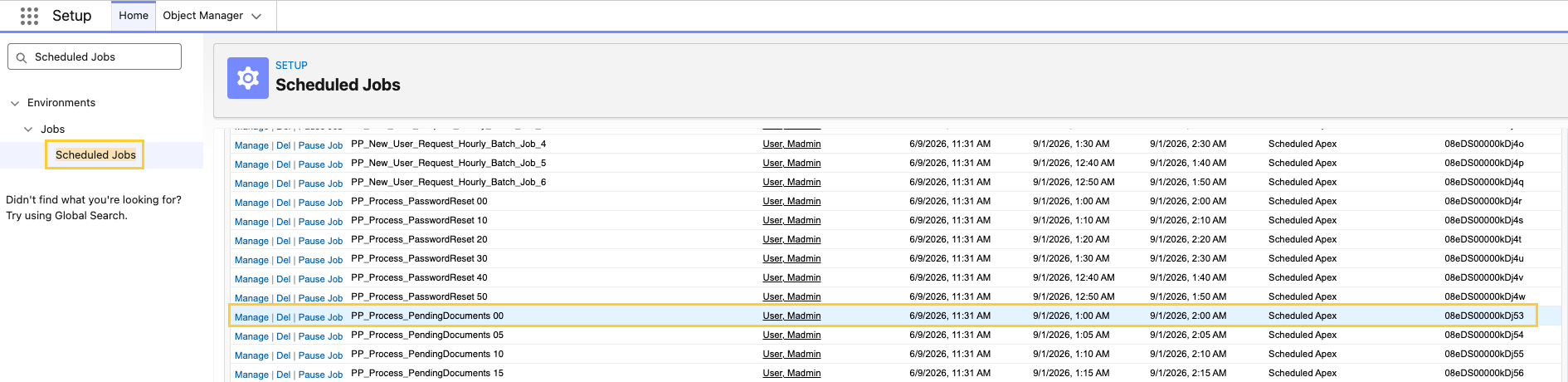
-
Confirm
PP_Process_PendingDocuments(and any secondary schedules) still enqueuemvn.PP_DocumentRoleCollabSyncSchedulable. Prefer the no-arg constructor so the job uses the default batch size of 25, or pass an explicit positive integer when you need a different size:
System.schedule('PP_Process_PendingDocuments', '0 0 * * * ?', new mvn.PP_DocumentRoleCollabSyncSchedulable());
Review the collaborator sync retry limit
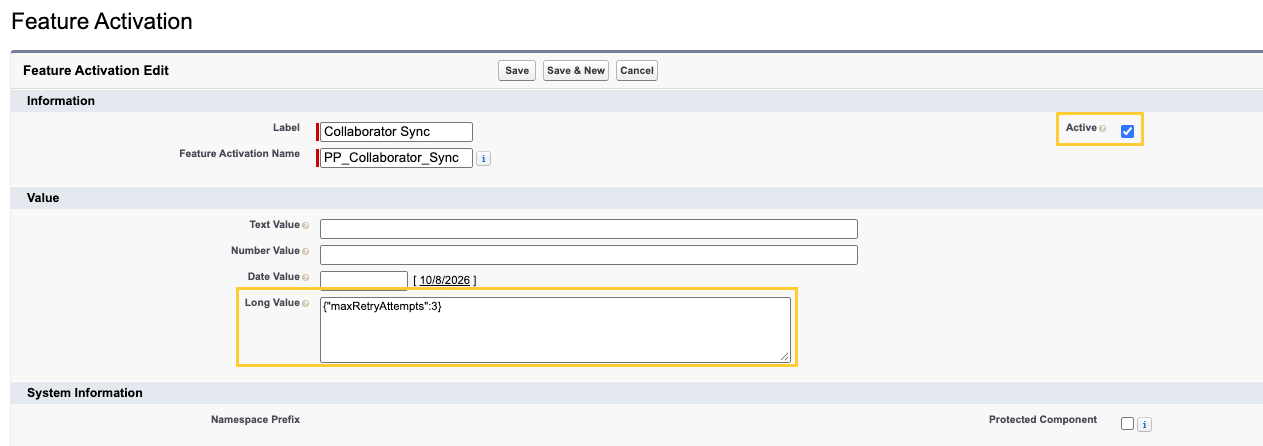
Collaborator sync reads its retry limit from the Collaborator Sync (PP_Collaborator_Sync) record of the Feature Activation (mvn__Feature_Activation__mdt) custom metadata type. Confirm the record exists and matches your operational threshold.
Criteria for consideration: All organizations upgrading to Fall '26 Minor Release 1, and any organization that previously set Sync Max Retry Attempts (mvn__PP_Sync_Max_Retry_Attempts__c).
-
In Setup → Custom Metadata Types, click Manage Records next to the Feature Activation (
mvn__Feature_Activation__mdt) custom metadata type.
-
Edit the Collaborator Sync (
PP_Collaborator_Sync) record.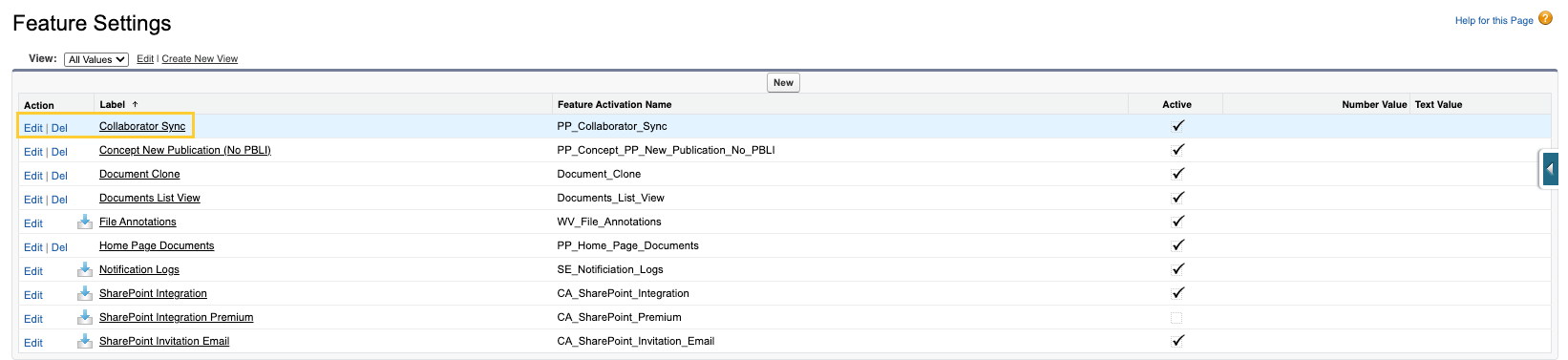
-
Configure the following:
-
Confirm Active (
mvn__Active__c) is checked. -
Set Long Value (
mvn__FA_Long_Value__c) to the retry limit:{"maxRetryAttempts": 3} -
Save.
-
If Scientific Publications Cloud can't read a valid retry limit from the
Collaborator Sync record, it uses the default of 5 retry attempts.
This happens when any of the following is true:
- The Collaborator Sync record doesn't exist.
- Active is unchecked.
- Long Value is blank, doesn't include
maxRetryAttempts, or isn't valid JSON.
No action is required if 5 is the limit you want.
Deploy Sync Diagnostics FlexiPage and layouts
If your organization customizes the Publication Planning Document Record Page or Document Author layouts:
- Compare your FlexiPage copy of
PP_Document_Record_Pagewith the packaged unpackaged post-setup FlexiPage that includes the Sync Diagnostics section. - Confirm Internal, External, and Group Document Author layouts expose the Sync Diagnostics section fields.
- Assign or refresh
PP_System_AdminandPP_Content_Authorso users can read the new diagnostic fields.
Validate diagnostics in a sandbox
- Open a document with Pending Sharing Update checked and wait for the scheduled job, or exercise Retry Sync with Manage Sharing.
- Confirm badges, the failure banner, and Processing Result values match the outcomes described in Collaborator sync diagnostics.
- Open the Document Collaborator Sync Diagnostics report folder and run Docs with Manual Review Collaborators.
Verify Site Identity Provider for Collaborator Portal Microsoft 365
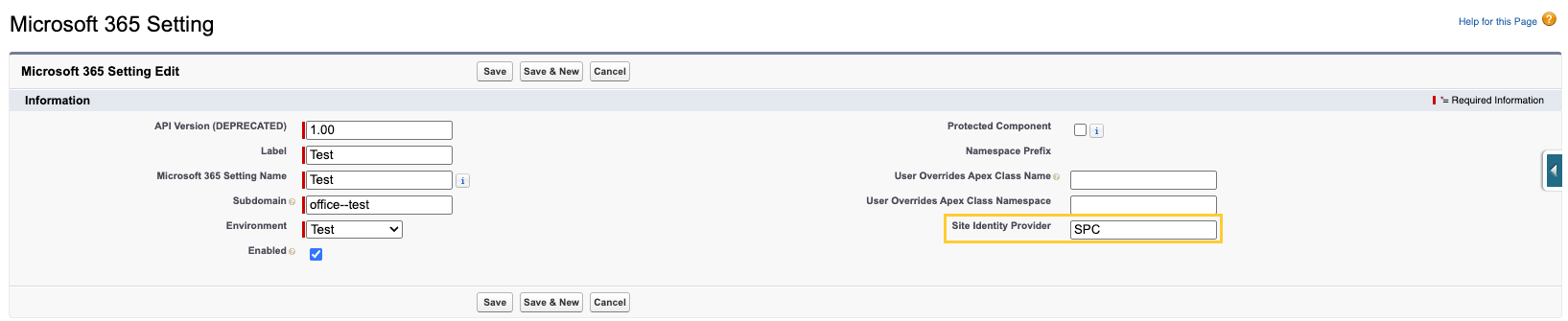
If external collaborators use Open in Microsoft 365 on workflow tasks in the Collaborator Portal, confirm the Site Identity Provider (mvn__CA_Site_Identity_Provider__c) field on the Default Microsoft 365 Setting (mvn__CA_Office_365_Setting__mdt) record matches the provider name supplied by the Scientific Publications Cloud product team during portal setup.
-
In Setup → Custom Metadata Types, open Manage Records for Microsoft 365 Setting.

-
Edit the Default record.

-
Enter the provider name in Site Identity Provider and Save.
For first-time enablement steps, reference Set up and update the Collaborator Portal.
Optional post-upgrade actions
Remove the Aura Refresh View component from customized record pages
The publication wizard no longer needs the Aura Refresh View (PP_RefreshView) component. The packaged Publication Planning Plan Budget Record Page (PP_Plan_Budget_Record_Page) FlexiPage no longer includes it. Organizations that added the component to their own record pages should remove it, because it forces a full-page reload that defeats the in-place refresh behavior.
Criteria for consideration: Your organization added the Aura Refresh View (PP_RefreshView) component to a custom or cloned record page, such as a Concept, Plan Budget, or Line Item record page.
-
In Setup, open the record page in Lightning App Builder.
-
Select the Aura Refresh View component in the page canvas.
-
Click the Delete icon to remove the component.
-
Save and Activate if the page requires reactivation.
Leaving the component on a page does not break the Publication Wizard. The wizard no longer publishes to the mvn__PP_RefreshView__c channel, so the component stays idle.