
Configure how users create documents
Administrators control what happens when a user starts creating a document, and each entry point is configured independently. An entry point's behavior comes from its own Feature Activation (mvn__Feature_Activation__mdt) record, where the Long Value (mvn__FA_Long_Value__c) field holds a JSON payload. That JSON determines whether the Lite App appears and, if needed, overrides the default experience with a Flow or a Lightning Web Component (LWC). When no override is configured, Scientific Publications Cloud launches the standard document creation wizard.
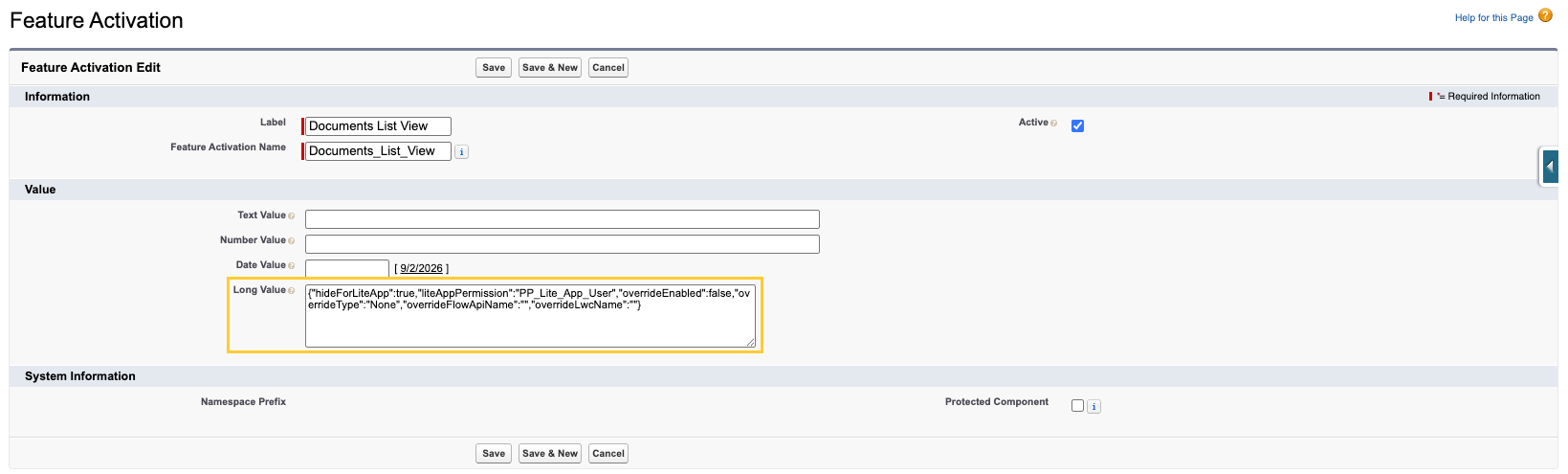
Supported entry points
| Entry point | Feature Activation Developer Name | Where users see the action |
|---|---|---|
| Documents list view | Documents_List_View | New Document on Documents list view |
| Concept record → New Publication (DOC) | PP_Concept_PP_New_Publication_No_PBLI | New Publication (DOC) (PP_New_Publication_No_PBLI) on a Concept record |

Long Value JSON keys
Store the following JSON in Long Value (mvn__FA_Long_Value__c) on the Feature Activation (mvn__Feature_Activation__mdt) record for the entry point. Keep Active selected so the configuration is available to the application.
| Key | Type | Description |
|---|---|---|
hideForLiteApp | Boolean | When true, users who hold the custom permission named in liteAppPermission do not see the create action (Documents list view) or cannot start new publication from the Concept record → New Publication (DOC) action. |
liteAppPermission | String | API name of the custom permission that identifies Lite App users. Scientific Publications Cloud unpackaged defaults use PP_Lite_App_User. |
overrideEnabled | Boolean | When true and overrideType is Flow or LWC, the custom Flow or LWC launches instead of the standard wizard. |
overrideType | String | One of None, Flow, or LWC (case-insensitive). |
overrideFlowApiName | String | API name of the Screen Flow to launch when overrideType is Flow. |
overrideLwcName | String | LWC module name to launch when overrideType is LWC, in namespace/componentName form (for example, c/myCustomWizard or mvn/ppHomePageTask). |
Default configuration (standard wizard)
By default, Scientific Publications Cloud ships unpackaged settings that keep the standard wizard in place and hide the create actions from Lite App users:
Keep the Standard Wizard
{
  "hideForLiteApp": true,
  "liteAppPermission": "PP_Lite_App_User",
  "overrideEnabled": false,
  "overrideType": "None",
  "overrideFlowApiName": "",
  "overrideLwcName": ""
}
Override with a Screen Flow
{
  "hideForLiteApp": true,
  "liteAppPermission": "PP_Lite_App_User",
  "overrideEnabled": true,
  "overrideType": "Flow",
  "overrideFlowApiName": "My_Custom_Document_Wizard",
  "overrideLwcName": ""
}
Override with a Lightning Web Component
{
  "hideForLiteApp": true,
  "liteAppPermission": "PP_Lite_App_User",
  "overrideEnabled": true,
  "overrideType": "LWC",
  "overrideFlowApiName": "",
  "overrideLwcName": "c/myCustomDocumentWizard"
}
Configure an entry point
-
In Setup → Custom Metadata Types, click Manage Records next to Feature Activation.

-
Open the record for the entry point (
Documents_List_VieworPP_Concept_PP_New_Publication_No_PBLI), or create it if your org does not yet have the unpackaged default.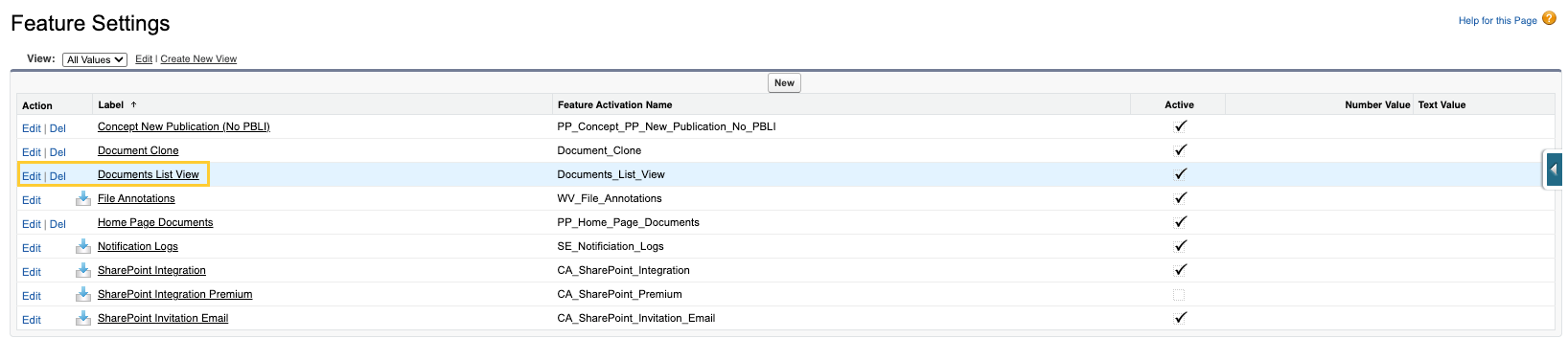
-
Select Active. In the Long Value, paste the JSON for your desired behavior and Save.
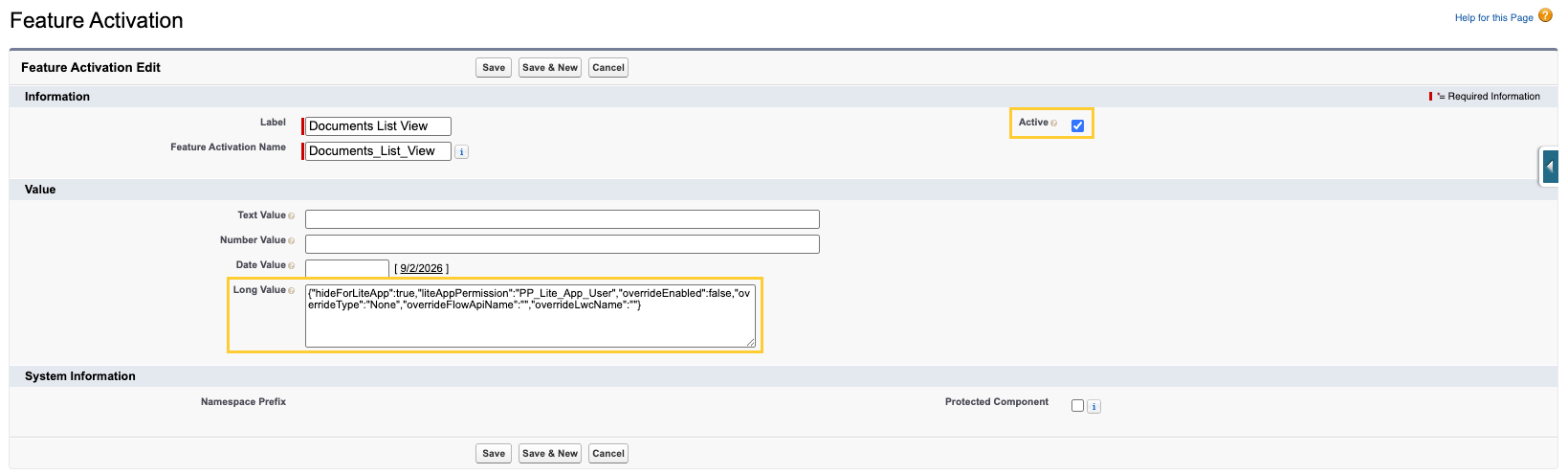
Test both Full App and Lite App users after you change the JSON. Confirm the New Document button visibility on the Documents list view and the Concept New Publication (DOC) action behavior, including any Flow or LWC override.
Lite App behavior
The Lite App rules apply when hideForLiteApp is true and the running user holds the permission named in liteAppPermission. For those users:
- Documents list view: The New Document button is hidden.
- Concept record → New Publication (DOC): The action does not open the wizard. Instead, it displays the
PP_New_Publication_Not_Availablemessage ("New Publication is not available.").
All other users continue to see the create actions, regardless of whether an override is configured.