Users
User access to Scientific Publications Cloud is governed by a series of permission set groups,
permission sets and custom permissions.
Administrators can use these permission set groups, permission sets, and custom permissions to provision new users. As some users may not have the required standard Salesforce permissions
to provision new users or reset passwords, users with the PP_Provision_User_Accounts custom permission set may provision document authors and reset their passwords by creating User Request records. User Request records are processed at the beginning of every hour by default.
Permission set groups
Permission set groups simplify permission assignment and management by grouping permission sets based on job functions. When you assign a user a permission set group, the user receives all of the permission sets that the permission set group is comprised of. The following table lists the Scientific Publications Cloud permission set groups and details the permission sets that each permission set group contains.
If there are permissions in the permission set groups that you do not want users to have, you can mute or block the permissions at the permission set group level without editing the permission sets.
Permission set groups
| Permission set group label | Permission set group API name | Permission sets | Permission set group description |
|---|---|---|---|
| PP_Plan_Team_Members | PP_Plan_Team_Members |
| Users with this permission set group are considered publication plan team members and have access to all corresponding planning objects. Publication plan team members are often responsible for initiating the plan, setting up the team, managing the overall plan timeline, and defining the publication workload based on study completion, concepts, and objectives. |
| PP_Publication_Author_Externals | PP_Publication_Author_Externals |
| Users with this permission set group are considered external publication authors and have access to all corresponding publication document objects. External authors are often responsible for publication document collaboration, and providing document updates, comments, reviews, and approvals. :::note External authors are considered community users. |
| PP_Publication_Collaborator_Externals | PP_Publication_Collaborator_Externals |
| Users with this permission set group are considered external publication authors, with access to all corresponding publication document objects. |
| PP_System_Admins | PP_System_Admins |
| Users with this permission set group are considered publication system administrators and have access to all Scientific Publications Cloud objects. System administrators are often responsible for maintaining the Scientific Publications Cloud system. |
| PP_Statistician | PP_Statistician |
| Users with this permission set are considered statisticians and have access to planning and publication document objects. Statisticians are often responsible for providing and clarifying study data. They are also responsible for the data checklist and ensuring proper data integrity and governance. |
| PP_Budget_Manager | PP_Budget_Manager |
| Users with this permission set are considered budget managers and have access to planning and budget related objects. Budget managers are often responsible for managing vendors and rate cards, as well as allocating and approving publication plan budgets, line items, and invoices. |
| PP_Publication_Authors | PP_Publication_Authors |
| Users with this permission set group are considered publication authors and have access to all corresponding publication document objects. Publication authors are often responsible for drafting, authoring, reviewing, approving, and managing the overall publication document from start to finish. |
Permission sets
Permission sets bundle permissions and extend users' access to tools and functions. The following table lists the Scientific Publications Cloud permission sets and details the custom permissions that each permission set contains.
The permission sets listed in the following table are considered internal system metadata and should not be altered in any way. If you need to customize a permission set, clone and assign the cloned permission set to users.
Permission sets
| Permission set label | Permission set API name | Custom permissions | Description |
|---|---|---|---|
| CA_Office_365_Admin | mvn__CA_Office_365_Admin | Microsoft 365 Admin | Users with this permission set can author Microsoft 365 content, check out any document to Microsoft 365, reopen in Microsoft 365 any document that is already checked out, and cancel the check out of any document. They are only able to check in documents that they performed the check out action upon. |
| CA_Office_365_Author | mvn__CA_Office_365_Author | Microsoft 365 User | Users with this permission set can author Microsoft 365 content, check out documents of which they are a collaborator, and reopen in Microsoft 365 any document that is already checked out and that they are a collaborator of. They are only able to check in or cancel the check out of documents that they performed the check out action upon. For more information on collaborator permissions, refer to Salesforce’s Change File Access in Lightning Experience documentation. |
| CM_CompleteTasksOnBehalfOfOthers | CM_TaskApproverOnBehalfOf | CM Task Completion On Behalf Of | Grants users the ability to update (e.g., complete) tasks on behalf of another user. |
| CM_ContentAuthor | mvn__CM_ContentAuthor |
| Standard Scientific Publications Cloud user. |
| CM_ContentReadOnly | mvn__CM_ContentReadOnly |
| Grants read only access to Scientific Publications Cloud module objects and fields. |
| CM_ReassignTasks | CM_ReassignTasks | CM_Reassign_Task | Grants users the ability to reassign workflow tasks from themselves to others. |
| CM_Self_Approver | mvn__CM_Self_Approver |
| Grants users the ability to assign workflow activities to themselves. |
| CM_SystemAdmin | mvn__CM_SystemAdmin |
| Grants users View All/Modify All access to Scientific Publications Cloud objects. |
| Download Audit Trail | mvn__AT_Download_Audit_Trail | Download Audit Trail | Allows a user to download an Audit Trail report for a record. |
| PP_App_Permissions | mvn__PP_App_Permissions | None | Users with this permission set are provisioned access to Scientific Publications Cloud product settings, custom metadata, Apex classes, etc. |
| PP_Budget | mvn__PP_Budget | None | Users with this permission set are provisioned access to budget and line item objects and fields. |
| PP_Content_Author | mvn__PP_Content_Author | None | Users with this permission set are provisioned access to content objects and fields specific to Scientific Publications Cloud. :::note This permission set should be used in conjunction with CM_ContentAuthor. |
| PP_Content_Author_External | mvn__PP_Content_Author_External | None | Users with this permission set are external authors with access to content objects and fields specific to Scientific Publications Cloud. :::note This permission set should be used in conjunction with CM_ContentAuthor. |
| PP_DS_Admin | PP_DS_Admin | None | Users with this permission set have admin access to Digital Science (Altmetric and Dimensions) journal and article attributes/ configuration. |
| PP_DS_Read_Only | PP_DS_Read_Only | None | Users with this permission set have read access to Digital Science (Altmetric and Dimensions) journal and article attributes/ configuration. |
| PP_Lite_App_User | PP_Lite_App_User | Lite App User | Restricts users to Lite App features only. |
| PP_Plan | mvn__PP_Plan | None | Users with this permission set are provisioned access to all related plan objects and fields. |
| PP_Provision_External_Author | mvn__PP_Provision_External_Author |
| Users with this permission set can provision users for external authors. |
| PP_System_Admin | mvn__PP_System_Admin | None | Users with this permission set are considered publication system administrators, with access to all Scientific Publications Cloud objects. |
| PP_UP_Admin | PP_UP_Admin | None | Users with this permission set have admin access to Unpaywall article attributes/ configuration. |
| PP_UP_Read_Only | PP_UP_Read_Only | None | Users with this permission set will be provisioned read access to Unpaywall article attributes/ configuration. |
Custom permissions
Custom permissions give users access to tools and functions. The following table lists the Scientific Publications Cloud custom permissions.
The custom permissions listed in the following table are considered internal system metadata and should not be altered in any way.
Custom permissions
| Custom permission label | Custom permission API name | Description |
|---|---|---|
| CA Office 365 MSFT Validation | mvn__CA_Office_365_MSFT_Validation | Users with this permission have the ability to upload WOPI test files for MSFT validation. This permission is just meant for the Microsoft validation team. It should not be published externally. |
| Check In Other Users Documents | CM_Check_In_Other_User_Document | Grants users the ability to check in documents that are checked out by other users, including documents that are checked out to Microsoft 365. |
| CM Admin | mvn__CM_Admin | Administrator Scientific Publications Cloud user. |
| CM Delete Document Role With Open Tasks | CM_Delete_Document_Role_With_Open_Tasks | Grants users the ability to delete document roles even if there are open workflow tasks on the document. |
| CM Electronic Signer | mvn__CM_Electronic_Signer | Users that have this permission are required to configure their electronic signature in order to electronically sign documents. For more information, reference Electronic signature. :::note Even with MCM Global Setting configured with Require Electronic Signatures set to true, if the user does not have the CM_Electronic_Signer custom permission assigned, electronic signature will not be required for that user. |
| CM Self Approver | mvn__CM_Self_Approver | Grants users the ability to assign workflow activities to themselves. |
| CM Complete Tasks On Behalf Of Others | CM_Task_Completion_On_Behalf_Of | Grants users the ability to update (e.g., complete) tasks on behalf of another user. |
| CM Reassign Task | CM_Reassign_Task | Grants users the ability to reassign workflow tasks from themselves to others. |
| CM User | mvn__CM_User | Standard Scientific Publications Cloud user. |
| Download Audit Trail | mvn__AT_Download_Audit_Trail | Allows users permission to download Audit Trail for a record. |
| Lite App User | PP_Lite_App_User | Identifies a user as a Lite App user to restrict their access from full features and functionalities. |
| Microsoft 365 Admin | mvn__CA_Office_365_Admin | Users with this permission have administrative access to the Microsoft 365 service. |
| Microsoft 365 User | mvn__CA_Office_365_User | Users with this permission may access the Microsoft 365 service. |
| Provision User Accounts | mvn__PP_Provision_User_Accounts | Users with this custom permission are able to provision access to collaborators. |
| Reset User Password | mvn__PP_Reset_User_Password | Users with this custom permission are able to reset collaborator user passwords. |
Provision new users
Scientific Publications Cloud access is governed by users having access to the CM User custom
permission. Administrators with the appropriate standard Salesforce
permissions can manually grant users access to Scientific Publications Cloud by assigning them the
CM User custom permission. Users with the PP_Provision_User_Accounts
custom permission set can provision document authors and reset their
passwords by creating User Request records.
Create new users
To manually create a new user and grant the user access to Scientific Publications Cloud:
-
If the user does not already exist in Salesforce, add the user to Salesforce. Visit Salesforce's View and Manage Users documentation.
-
In the Quick Find box in Setup, search for and select Users, and then click the Full Name of the user.
-
Click Edit Assignments on the Permission Set Group Assignments related list.
-
Select the appropriate Permission Set Group(s). To use the Scientific Publications Cloud product, the user must be assigned a permission set group that contains a permission set with the
CM Usercustom permission.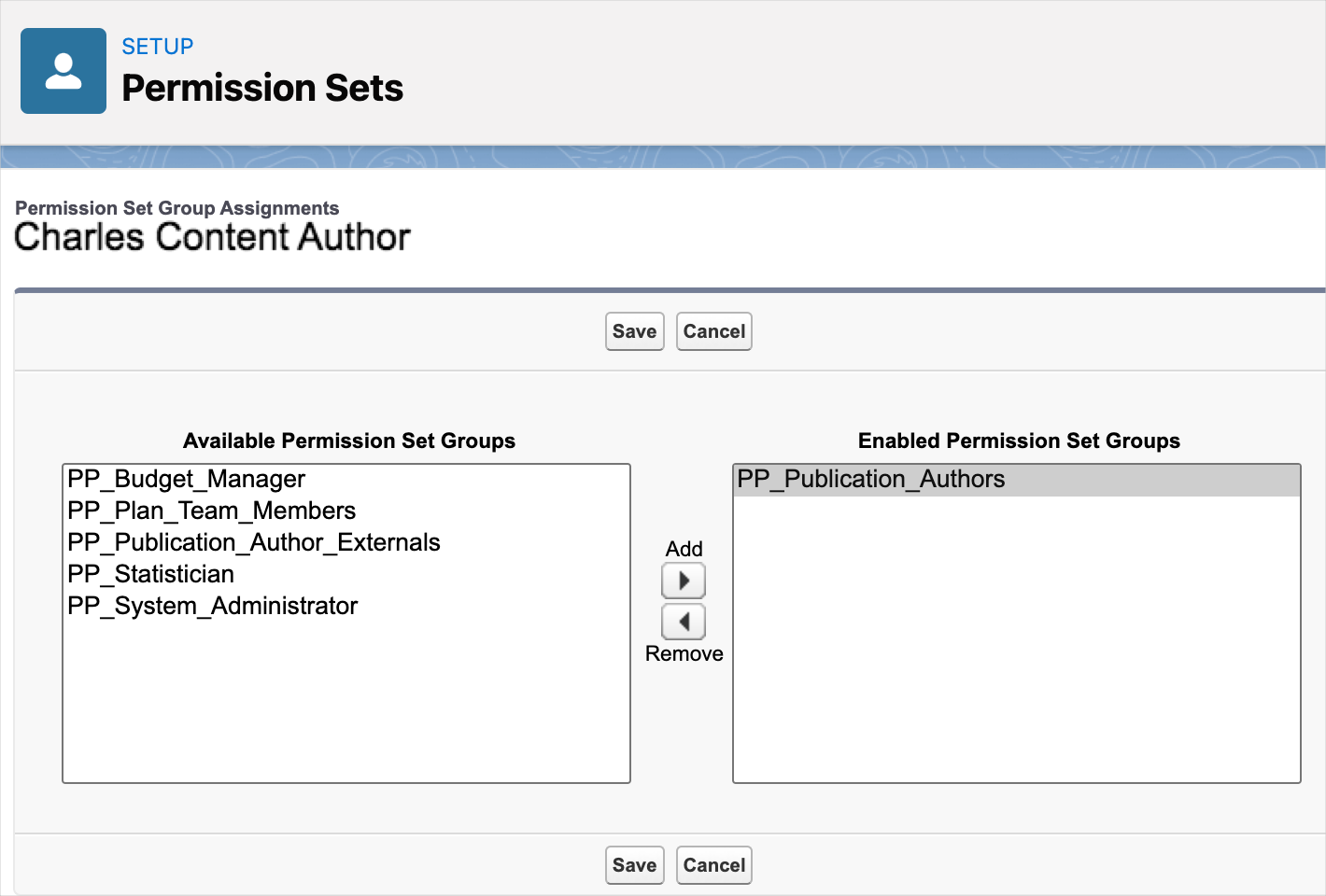
-
Click Save.
Create User Requests records
If you do not have the standard Salesforce permissions required to
create and provision new users but have the PP_Provision_User_Accounts
custom permission set, you can:
-
Provision document authors by using the Related Document Authors component to create User Request records with a record type of
New User. To prevent duplicate users, an error occurs if you use the component to try and provision a document author with the same email address as an existing user. This check is not performed if you use another method, such as a data load, to create and provision document authors. -
Reset users passwords by creating User Request records with a record type of
Password Reset.
System run batch jobs process User Request records at the beginning of every hour by default.
User Request (mvn__PP_User_Request__c)
The User Request (mvn__PP_User_Request__c) object stores user request
details for provisioning user access and resetting user passwords.
System run batch jobs process User Request records at the beginning of
every hour by default. Once a User Request record is processed, the
Result field changes to Success, and the Status field changes to
Complete. Processed records are not deleted.
To create a User Request record, you must have the
PP_Provision_User_Accounts custom permission set.
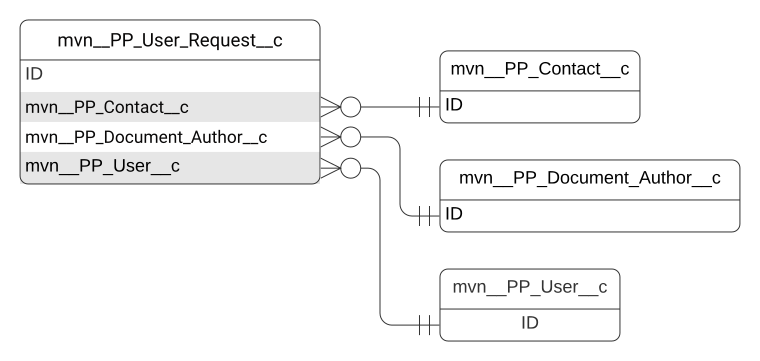
User Request schema
| Field label | API name | Data type | Description |
|---|---|---|---|
| Completed Date/Time | mvn__PP_Completed_Date_Time__c | Date/Time | Date and time the user request is completed. |
| Contact | mvn__PP_Contact__c | Master-Detail(Contact) | Master-detail relationship to the contact. |
| Created By | CreatedById | Lookup(User) | Id of the user who created the record. |
| Document Collaborator | mvn__PP_Document_Author__c | Lookup(Document Collaborator) | Lookup relationship to the document author. |
| Error Message | mvn__PP_Error_Message__c | Long Text Area(32768) | Message that displays when an error occurs. |
| Last Modified By | LastModifiedById | Lookup(User) | Id of the user who last modified the record. |
| Owner | OwnerId | Lookup(User,Group) | Id of the user or group who owns the record. |
| Record Type | RecordTypeId | Record Type | Id of the record type. Record types include:
|
| Result | mvn__PP_Result__c | Picklist | Outcome of the batch job that processed the user request record. Picklist values include:
|
| Status | mvn__PP_Status__c | Picklist | Picklist indicating the user request record status. Picklist values include:
|
| User | mvn__PP_User__c | Lookup(User) | Lookup relationship to the user. |
| User JSON Definition | mvn_PP_User_JSON_Definition__c | Long Text Area(32768) | JSON definition for creating user records. This field does not need to be manually filled out. Here is a sample JSON definition: \{ "ProfileId":"00e3F000001E9ViQAK", "CountryCode":"US", "LastName":"Smith", "Street":"123 Maple Ln.", "Phone":null, "CompanyName":"Test Account", "EmailEncodingKey":"UTF-8", "City":"Chicago", "PostalCode":"US", "Title":"Head Physician", "StateCode":"IL", "FirstName":"Jonathan", "TimeZoneSidKey":"America/Los_Angeles", "LanguageLocaleKey":"en_US", "LocaleSidKey":"en_US", "Email":"jsmith@example.com" \} |
| User Request # | Name | Auto Number | Automatically incremented record number. |
Deactivate users
Users can be deactivated so that they can no longer log into the Scientific Publications Cloud system.
When a user is deactivated, all of their associated records for the Plan
Team Member (mvn__PP_Plan_Team_Member__c) custom object are updated to
have an Inactive Status. Visit Deactivate
users
in Salesforce's Help.