Configuration considerations
Keep these considerations in mind when configuring the publication wizard:
-
For the publication wizard functionality to work correctly, the appropriate record page must contain these components:
-
SPC - New Publication Wizard (
ppPublicationWizard) -
Aura Refresh View (
PP_RefreshView)
-
-
To configure the layouts that the publication wizard uses to capture metadata specific to the type of line item being created, use standard Salesforce layouts.
-
To configure the layouts that the publication wizard uses to create new documents, use the Scientific Publications Cloud layout configuration method. The publication wizard relies on the same layout locations that the document wizard uses to create new documents.
Mapping a Concept field to Document Version field
You have the ability to map Concept fields to fields on the Document record when using the Publication Wizard. Mapping these fields adds another layer of convenience by allowing the Publication Wizard to pre-populate the chosen fields into the new document.
To map Concept fields to Document Version fields:
-
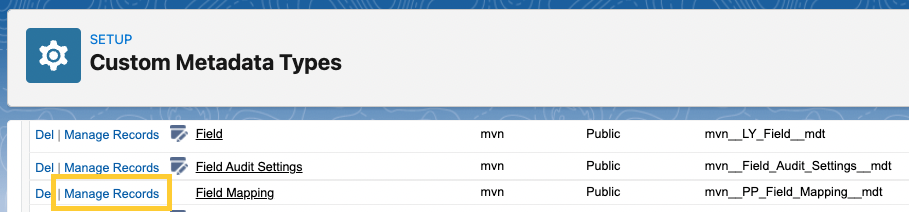
In Setup, navigate to the Field Mapping (
mvn__PP_Field_Mapping__mdt) custom metadata type. -
Click Manage Records.
-
Click New.
-
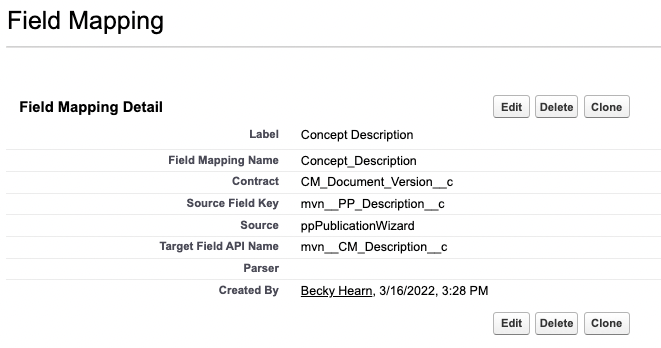
Add values to the fields listed in the table below:
| Field | Value |
|---|---|
| Label | Add a name for the new record |
| Field Mapping Name | This auto-populates when you press tab after entering a value in the above field or click outside of the field. |
| Contract | CM_Document_Version__c :::: note ::: title ::: This value directs the system to map the record to the Document Version object. :::: |
| Source Field Key | The API name of the field from the Concept object that you want mapped to the Document Version field. Example:mvn__PP_Description__c |
| Source | ppPublicationWizard |
| Target Field API Name | The API name of the Document Version field from which the value will be drawn. Example: mvn__CM_Description__c |
| Parser | Leave blank |
-
Click Save.