
Content Search Configuration
Content Search Configuration lets administrators choose, per inbound
search, which backend a Regulated Content Cloud published-document
search runs against. You can route searches to standard Einstein or to Salesforce Data 360 or split traffic across both based on Country, Channel, or any other attribute you stamp onto the request. For example, US users can search Data 360 while China users search Einstein. Because Data 360 uses a consumption-based cost model for both indexing and querying, this configuration gives you precise, cost-aware control over where searches run.
This page describes the Content Search Settings
(mvn__CM_Content_Search_Settings__mdt) custom metadata type and how
to author criteria that match specific slices of traffic.
How content search dispatch works
When Regulated Content Cloud runs a published-document search, the platform builds a request that captures every input the caller provided. Before the request goes to Einstein or Data 360, the content search resolver:
- Loads every Content Search Settings record in your org.
- Iterates the records in Order (
CM_Order__c) ascending, from lowest to highest. - Evaluates each record's Criteria (
CM_Criteria__c) JSON against the inbound request. - Stops at the first match and stamps that record's dispatch fields (algorithm, search type, index, data space, minimum score) onto the request.
- Hands the stamped request to either Einstein or Data 360.
Because matching is first-match-wins, more specific records should have a lower Order value than less specific records. If no record matches an inbound request, the search runs on Einstein with no additional dispatch fields applied.
Fields on Content Search Settings
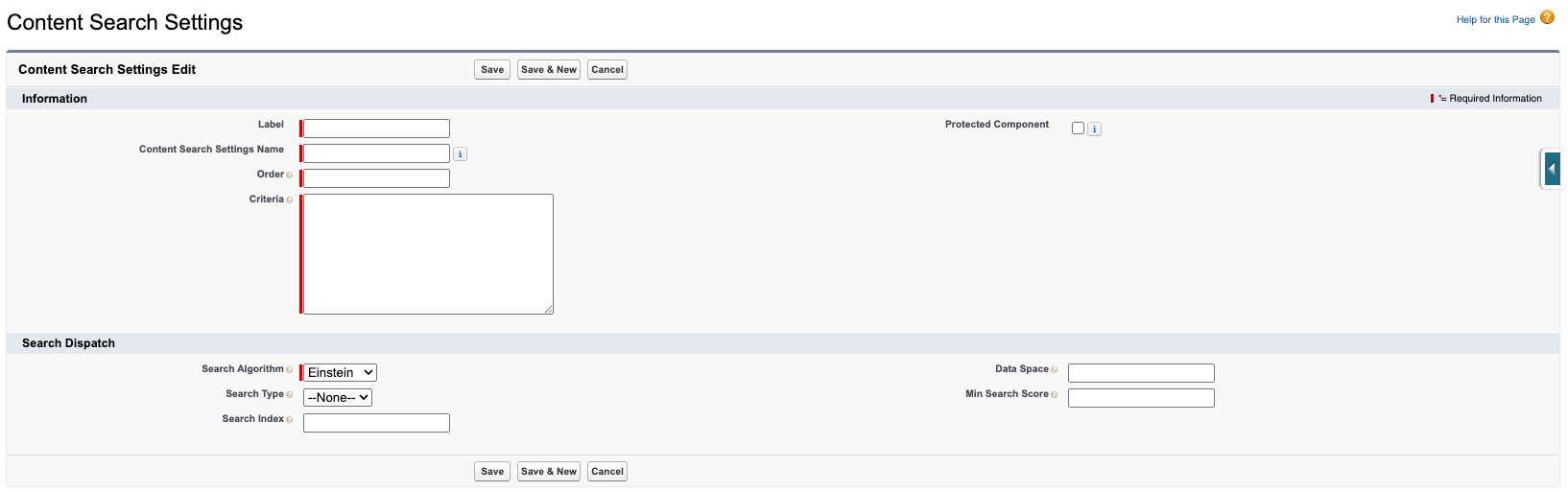
| Field label | API name | Type | Description |
|---|---|---|---|
| Order | CM_Order__c | Number, required | Evaluation order. Lower numbers evaluate first. |
| Criteria | CM_Criteria__c | Long Text Area, required (validation rule) | JSON rule evaluated against the inbound search request. See Author criteria. |
| Search Algorithm | CM_Search_Algorithm__c | Picklist, required | Einstein or Data 360. Selects which backend handles content searches for the segment. |
| Search Type | CM_Search_Type__c | Picklist | Vector or Hybrid. Used only when Search Algorithm is Data 360. Use Vector for semantic/LLM-grounding searches; use Hybrid to combine vector relevance with exact-term (keyword) matching. |
| Search Index | CM_Search_Index__c | Text(50) | Data Cloud DLO name for Data 360. Must end with _index__dlm so the paired chunk DLO can be derived. |
| Data Space | CM_Data_Space__c | Text(50) | Customer Data Platform data space. Use default for the standard data space. |
| Min Search Score | CM_Min_Search_Score__c | Number(3,2) | Minimum score (0–1) a record must exceed to be returned from Data 360. |
The Content Search Settings object also includes a validation rule,
CM_Data_360_Requires_Full_Config, that blocks Save when Search
Algorithm is Data_360 and any of Search Type, Search Index, Data
Space, or Min Search Score is blank. This catches incomplete Data 360
configuration at save time instead of at run time.
Author criteria
Criteria use the same JSON shape as Regulated Content Cloud's layout and workflow criteria. The full operator list and compound criteria syntax are documented in Criteria definition. Content Search Configuration extends that shape with a small set of paths that describe the inbound search request.
Available paths
Each path corresponds to an attribute of the inbound search request. Use them in your criteria JSON to define which requests a settings record applies to.
| Path | Type | Description |
|---|---|---|
publishedOnly | Boolean | true when the request originates from the published-document service. Use this path to route only published-document searches to Data 360 while keeping other consumers (list views, REST endpoints) on Einstein. |
regionCodes | Array of strings | Two-letter country codes (for example, US, CN) that the caller selected as a Country filter. Use Includes or NotIncludes to route per Country. |
customAttributes.<key> | Any | Caller-supplied values. The canonical example is customAttributes.channel, which is auto-stamped from the parent Interaction's Origin (for example, Phone, Email, Web). Other callers can set additional keys as needed. |
Examples
The examples below show common dispatch patterns. Paste the JSON into the Criteria field as written.
Route every published-document search to Data 360
Use this pattern when you want all published-document searches to use Data 360 while leaving other callers (REST endpoints, admin list views) on Einstein.
{
  "path": "publishedOnly",
  "operator": "isTrue"
}
Pair the criteria with these dispatch fields:
- Search Algorithm:
DATA_360 - Search Type:
Hybrid - Search Index:
<your_index>_index__dlm - Data Space:
default - Min Search Score:
0.80
Route only US published-document searches to Data 360
Use this pattern when you want to limit Data 360 to a specific Country. Other countries fall through and run on Einstein.
{
  "AllTrue": [
    { "path": "publishedOnly", "operator": "isTrue" },
    { "path": "regionCodes", "operator": "Includes", "value": "US" }
  ]
}
Route phone-channel published-document searches to Data 360
Use this pattern when you want to differentiate by the channel through
which the originating interaction was received. The
customAttributes.channel value is stamped from the parent
Interaction's Origin.
{
  "AllTrue": [
    { "path": "publishedOnly", "operator": "isTrue" },
    { "path": "customAttributes.channel", "operator": "Equals", "value": "Phone" }
  ]
}
Configure Data 360 dispatch
To route a slice of traffic to Data 360, complete the following steps:
-
In Setup → Custom Metadata Types → Content Search Settings.

-
Click Manage Content Search Settings and then click New to create a new record.

-
Configure the following:
- Label - Enter a Label that describe the slice (for example,
US Published Docs). - Order - Enter a value that reflects how specific the record is. Lower values evaluate first.
- Criteria - Paste a criteria JSON document that matches the slice. See Examples.
- Search Algorithm - Select
Data_360. - Search Type - Choose either
HybridorVector, depending on your Data Cloud index. - Search Index - Enter your Data Cloud DLO (Data Lake Object) name. The value must end with
_index__dlm. - Data Space - Enter your Customer Data Platform data space (typically
default). - Min Search Score - Specify a value between
0and1(for example,0.80).
- Label - Enter a Label that describe the slice (for example,
-
Save. If any of the four Data 360 fields are blank, the
CM_Data_360_Requires_Full_Configvalidation rule blocks the save with a descriptive error.
Data 360 dispatch requires that your Data Cloud DataKit and Data Lake Object (DLO) ingestion is configured and running. The DataKit is a separate prerequisite to Content Search Configuration. The value you enter in Search Index must match the DLO name that the DataKit creates.
Validate the configuration
After you save the record, run a test search that matches your criteria. Confirm that:
- Results are returned (Data 360 returns no results when nothing exceeds the Min Search Score threshold).
- Other searches that should not match the new record continue to run on Einstein.
If Data 360 returns a runtime error, the exception propagates to the caller — there is no automatic fallback to Einstein. Use the save-time validation rule and a careful Min Search Score to avoid runtime errors.