
KI-160
Sending an email with an attachment from an Interaction fails
| Created date | 10/26/2026 | Updated date | 10/26/2026 |
|---|---|---|---|
| Status | Backlog | Related work item | MIC-5312 |
| Description | Sending an email with an attachment from an Interaction fails with the following error: Cannot modify or delete an Attachment when record is closed. This happens when the user sends the email before Salesforce has saved it as a draft. Salesforce saves a new email only after the subject or body is edited. If the user uploads an attachment and clicks Send without editing either field, the email is considered unsaved as Saved doesn't appear next to the Send button. | ||
| Root Cause | An email that hasn't been saved yet has no status, and Medical Information Cloud record locking treats an email with no status as locked. When the email is sent, Salesforce updates the attached file, and the lock blocks that update. | ||
| Affects version(s) | Spring '26 (V18) | Impacted capabilities | Inquiry Management |
| Steps to reproduce |
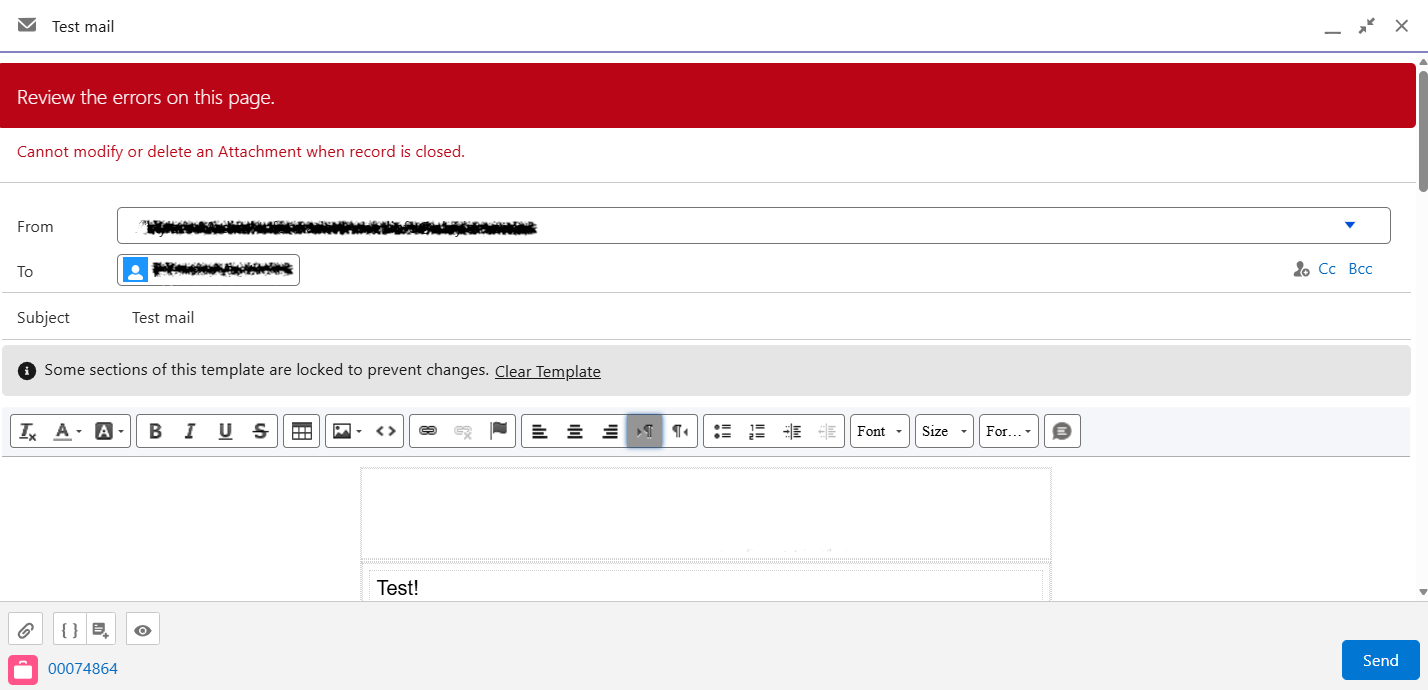 | ||
| Workaround | Before you send the email, edit the Body and then click or tab out of it. Wait until Saved appears next to the Send button, then click Send. | ||
| Fix version | Spring '27 (V20) | Resolution notes |