
Adverse Events
An Adverse Event (AE) record stores information on perceived unintended
or unfavorable symptoms of a product. An AE record can be added to an
Interaction to track pertinent information. The AE page is configured
using the Adverse Event
Layout (MED_Adverse_Event_Layout__mdt) custom
metadata type and uses the following custom objects:
Adverse Event primary sources
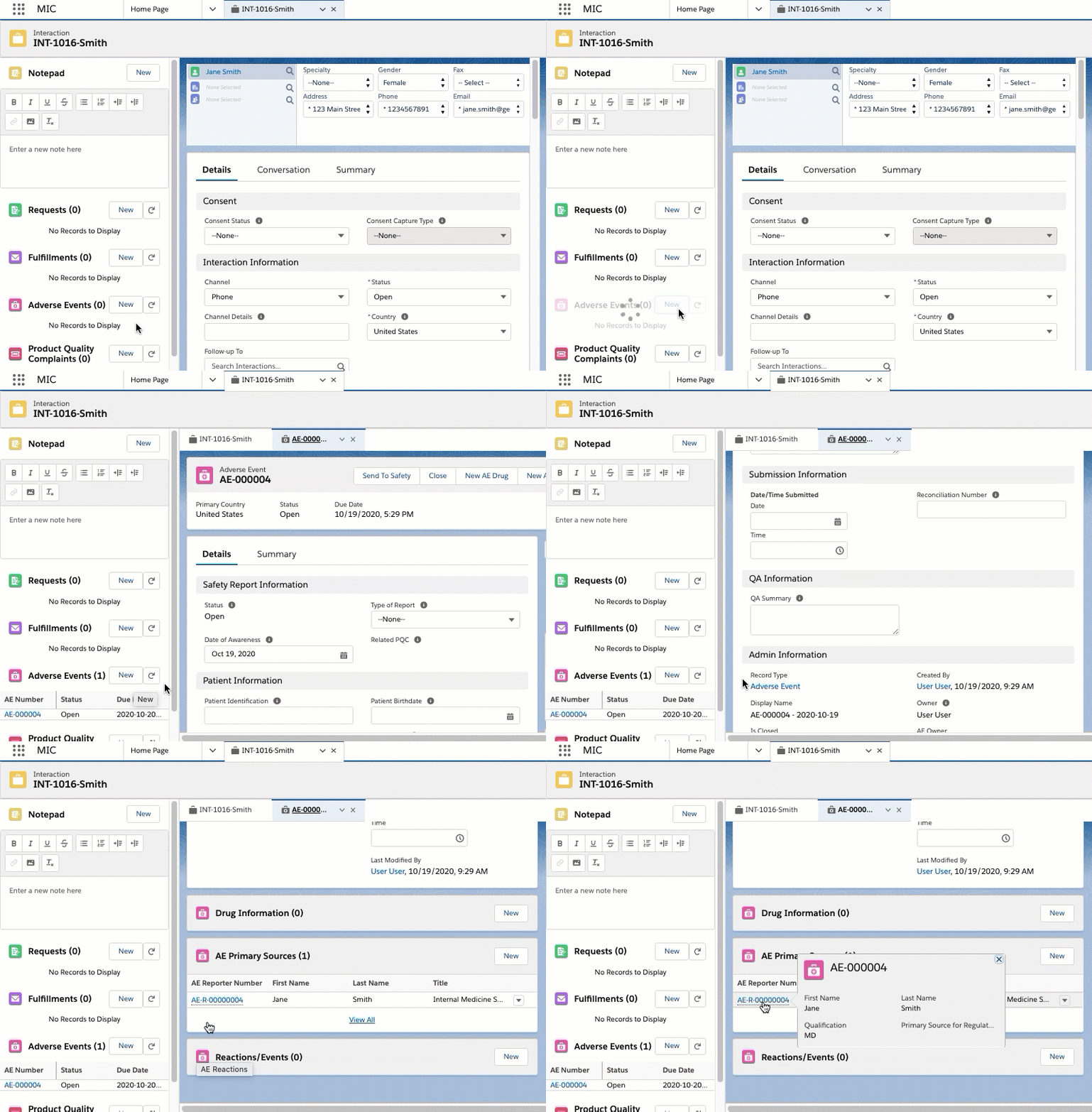
When the Auto Stamp Primary Source Global Setting is enabled and an Adverse Event record is created, Inquiry Management automatically creates and displays primary source records in the AE Primary Source Related List on the Adverse Event record. The primary source records automatically populate with information from the Requester and Referred By accounts listed on the Interaction. More specifically, information about the Requester listed on Interaction maps to an automatically generated primary source record associated with the Adverse Event. Likewise, Referred By fields on the Interaction map to a second primary source record. For more information about the Global Setting custom metadata, see Custom metadata settings.
Field mappings
The Requester to primary source field mapping and Referred By to primary source field mapping tables list the primary source field mappings.
Requester to primary source field mapping
| AE Primary Source | Case |
|---|---|
| MED_First_Name__c | Account.FirstName |
| MED_Last_Name__c | Account.LastName |
| MED_Middle_Name__c | Account.MiddleName |
| MED_Title__c | Account.PersonTitle |
| MED_Qualification__c | Account.MED_Credentials__c |
| MED_Organization__c | MED_Institution_Name__c |
| MED_City__c | MED_City__c |
| MED_Postal_Code__c | MED_Postal_Code__c |
| MED_Phone__c | MED_Phone__c |
| MED_State__c | MED_State__c |
| MED_Country__c | MED_Country__c |
| MED_Address_Street__c | MED_Address_Line_1__c + MED_Address_Line_2__c Note: If the Case street address value exceeds 100 characters, the value is truncated when mapped to MED_Address_Street__c. |
In the Referred By to primary source field mapping table, sometimes the Case fields lead with <primary address> or <primary phone>. <primary address> and <primary phone> indicate that the data is copied from the Contact Information records related to the Referred By Account.
Account type MED_Employee is blacklisted from creating a primary
source from Referred By.
Referred By to primary source field mapping
| AE Primary Source | Case |
|---|---|
| MED_First_Name__c | MED_Referred_By__r.FirstName |
| MED_Last_Name__c | MED_Referred_By__r.LastName |
| MED_Middle_Name__c | MED_Referred_By__r.MiddleName |
| MED_Title__c | MED_Referred_By__r.PersonTitle |
| MED_Qualification__c | MED_Referred_By__r.MED_Credentials__c |
| MED_City__c | <primary address>.MED_City__c |
| MED_Postal_Code__c | <primary address>.MED_Postal_Code__c |
| MED_Phone__c | <primary phone>.MED_Phone__c |
| MED_State__c | <primary address>.MED_State__c |
| MED_Country__c | <primary address>.MED_Country__c |
| MED_Address_Street__c | <primary address>.MED_Address_Line_1__c + MED_Address_Line_2__c Note: If the Case street address value exceeds 100 characters, the value is truncated when mapped to MED_Address_Street__c. |
E2B(R3) generation
E2B(R3) XML files can be generated from and attached to an Adverse Event
(MED_Adverse_Event__c) record. They are attached as Files or as
Attachments depending on the "Use Files" Global Setting value configured
within the instance.
Each generated E2B file is saved with a filename that combines the timestamp at which the file was generated and the Adverse Event Name:
ICSR_<yyyyMMddHHmmss>_<Adverse Event Name>.xml
For example, an E2B file generated on June 1, 2026 at 10:15:30 for the
Adverse Event named AE-00042 is saved as
ICSR_20260601101530_AE-00042.xml. Including the Adverse Event Name
ensures that the filename is unique even when E2B files for different
Adverse Events are generated within the same second.
The following file formats are supported:
-
Portable network graphics (.png)
-
Bitmap image format (.bmp)
-
Graphics interchange format (.gif)
-
Word processing document format (.wpd)
For additional details regarding the E2B(R3) support, see E2B(R3) support.
Enablement
To enable the ability for users to generate E2B files, add the Generate E2B quick action to the Adverse Event page layout.
Configuration
Inquiry Management ships with a default mapping of Adverse Event (and child object) fields to nodes in the E2B(R3) XML specification. These mappings can be modified using the E2B Field Mapping and E2B Setting custom metadata types. The field mapping maps the Data Element Identifiers (e.g., C.1.2) to fields in the Inquiry Management data model. Currently, only data elements with a default mapping are supported in the output E2B file.
If Inquiry Management is configured to use Salesforce Files instead of attachments, additional documents attached to the Adverse Event are also included in the E2B file.
Custom labels
This component makes use of the following labels that can be configured within the Salesforce translation workbench to change display text values.
| # | Label Name |
|---|---|
| 1 | MED_E2B_Download_Button |
| 2 | MED_E2B_Error |
| 3 | MED_E2B_Error_Header |
| 4 | MED_E2B_Field_Required |
| 5 | MED_E2B_Generate_Button |
| 6 | MED_E2B_Generator_Header |
| 7 | MED_E2B_Generator_Instruction_Text |
| 8 | MED_E2B_Invalid_Document_Format |
| 9 | MED_E2B_Locked_Message |
| 10 | MED_E2B_Success |
Customization
Customers can override how E2B XML documents are generated through the use of the E2B customization framework. This framework is intended to be utilized by a Salesforce.com developer to alter how E2B XML files are generated. This can be useful should an XML element attribute require a localized value that differs from the standard XML schema that is supported.
The high-level process of customizing an XML node generation is as follows:
-
Review the documentation within the
MED_E2B_MCCI_IN200100UV01_Batchapex class within the Inquiry Management source code. -
Create a new Apex Class that extends the
MED_E2B_MCCI_IN200100UV01_Batchapex class, and implement the desired implementations of the relevant virtual methods from theMED_E2B_MCCI_IN200100UV01_Batchclass. As a best practice appropriate test code should also be written to offer unit test coverage for the customization. -
Deploy the new Apex Class to the appropriate environments.
-
Create an E2B Custom Generator Custom Metadata Type to register the new Apex Class with the E2B generation process.
-
Test the custom functionality by generating test E2B documents.
For developers seeking to customize how an XML element within the E2B file is generated, visit How to Contact Customer Support to contact Mavens Customer Support for sample code and additional developer details.
Telecom tags
By default, \<telecom\> tags in E2B files automatically add the
appropriate telecommunication prefix for every reporter's phone number,
sender's phone number, sender's fax number, and sender's email
address, if a prefix does not already exist. The \<telecom\> tag
prefixes are as follows:
| Element number | Element name | \<telecom\> tag prefix |
|---|---|---|
| C.2.r.2.7 | Reporter's Telephone | tel: |
| C.3.4.6 | Sender's Telephone | tel: |
| C.3.4.7 | Sender's Fax | fax: |
| C.3.4.8 | Sender's Email | mailto: |
NullFlavors
As a general rule, Medical Information Cloud omits the node instead of using a nullFlavor. For
example, if a field does not have a value, it is not included and
nullFlavor is not used. When D.1, specifically, is left blank, they will
be sent as a nullFlavor of UNK.
To set a nullFlavor, map a value with nullFlavor_\<null flavor value\>.
The specified \<null flavor value\> (without the nullFlavor_ prefix)
will be set as a special nullFlavor attribute.
Integration
Customers that intend to integrate generated E2B files with 3rd party systems are recommended to explore facilitation via an integration service provider. The Salesforce.com platform is optimized to support multi-tenancy, which includes limits placed on the amount of computing resources any one tenant can consume from shared platform resources. Specifically, there exist several limits on the size and duration of outbound HTTP/S requests that can be made natively on the Salesforce.com platform.
Given the nature of E2B files and the potentially large number and large size of related source materials, it is recommended that Customers use an external integration solution, such as a middleware provider, to ensure E2B files are transmitted in a reliable and scalable fashion.
For more information on the relevant platform governor limits, see Salesforce's documentation.
E2B(R3) support
Inquiry Management can now generate E2B files that comply with the R3 specification, available here: https://www.fda.gov/downloads/Drugs/GuidanceComplianceRegulatoryInformation/Guidances/UCM275638.pdf
It should be noted that not all elements supported within the comprehensive E2B(R3) specification are supported currently. While efforts have been made to cover the portions of the specification most relevant to medical information, there may exist certain scenarios that are not presently covered. For this reason, it is highly recommended that sufficient time be allocated to properly define the requirements specific to a particular implementation of E2B within Inquiry Management and rationalize them against the supported field set to ensure no gaps exist. Fields that are not explicitly listed below should be considered unsupported.
Supported E2B(R3) elements
The current set of E2B(R3) elements supported within Inquiry Management is defined in the tables below.
Case safety report elements
| Element number | Element name |
|---|---|
| C.1.3 | Type of Report |
| C.1.4 | Date Report Was First Received from Source |
| C.1.6.1 | Are Additional Documents Available |
| C.1.6.1.r.1 | Documents Held by Sender |
| C.1.7 | Does This Case Fulfill the Local Criteria for an Expedited Report? |
| C.2.r.1.1 | Reporter's Title |
| C.2.r.1.2 | Reporter's Given Name |
| C.2.r.1.3 | Reporter's Middle Name |
| C.2.r.1.4 | Reporter's Family Name |
| C.2.r.2.1 | Reporter's Organization |
| C.2.r.2.2 | Reporter's Department |
| C.2.r.2.3 | Reporter's Street |
| C.2.r.2.4 | Reporter's City |
| C.2.r.2.5 | Reporter's State or Province |
| C.2.r.2.6 | Reporter's Postcode |
| C.2.r.2.7 | Reporter's Telephone |
| C.2.r.3 | Reporter's Country Code |
| C.2.r.4 | Qualification |
| C.2.r.5 | Primary Source for Regulatory Purposes |
| C.4.r.1 | Literature Reference(s) |
| C.5.3 | Sponsor Study Number |
| C.5.4 | Study Type Where Reaction(s) / Event(s) Were Observed |
Patient elements
| Element number | Element name |
|---|---|
| D.1 | Patient (name or initials) |
| D.2.1 | Date of Birth |
| D.2.2.1a | Gestation Period When Reaction / Event Was Observed in the Foetus (value) |
| D.2.2.1b | Gestation Period When Reaction / Event Was Observed in the Foetus (unit) |
| D.2.3 | Patient Age Group (as per reporter) |
| D.3 | Body Weight (kg) |
| D.4 | Height (cm) |
| D.5 | Sex |
| D.6 | Las Menstrual Period Date |
| D.7.1.r.1a | MedDRA Version for Medical History |
| D.7.1.r.1b | Medical history (disease / surgical procedure / etc.) (MedDRA code) |
| D.7.1.r.2 | Start Date |
| D.7.1.r.3 | Continuing |
| D.7.1.r.4 | End Date |
| D.7.1.r.5 | Comments |
| D.7.1.r.6 | Family History |
| D.7.2 | Text for Relevant Medical History and Concurrent Conditions (not including reaction / event) |
| D.7.3 | Concomitant Therapies |
| D.8.r.1 | Name of Drug as Reported |
| D.8.r.4 | Start Date |
| D.8.r.5 | End Date |
| D.8.r.6a | MedDRA Version for Indication |
| D.8.r.6b | Indication (MedDRA code) |
| D.8.r.7a | MedDRA Version for Reaction |
| D.8.r.7b | Reaction (MedDRA code) |
| D.9.1 | Date of Death |
| D.9.2.r.1a | MedDRA Version for Reported Cause(s) of Death |
| D.9.2.r.1b | Reported Cause(s) of Death (MedDRA code) |
| D.9.2.r.2 | Reported Cause(s) of Death (free text) |
| D.9.3 | Was Autopsy Done? |
| D.9.4.r.1a | MedDRA Version for Autopsy-determined Cause(s) of Death |
| D.9.4.r.2 | Autopsy-determined Cause(s) of Death (free text) |
| D.10.1 | Patient Identification |
| D.10.2.1 | Date of Birth of Parent |
| D.10.2.2a | Age of Parent (number) |
| D.10.3 | Last Menstrual Period Date of Parent |
| D.10.4 | Body Weight (kg) of Parent |
| D.10.5 | Height (cm) of Parent |
| D.10.6 | Sex of Parent |
| D.10.7.1.r.1a | MedDRA Version for Medical History |
| D.10.7.1.r.1b | Medical History (disease / surgical procedure/ etc.) (MedDRA code) |
| D.10.7.1.r.2 | Start Date |
| D.10.7.1.r.3 | Continuing |
| D.10.7.1.r.4 | End Date |
| D.10.7.1.r.5 | Comments |
| D.10.7.2 | Text for Relevant Medical History and Concurrent Conditions of Parent |
| D.10.8.r.1 | Name of Drug as Reported |
| D.10.8.r.4 | Start Date |
| D.10.8.r.5 | End Date |
| D.10.8.r.6a | MedDRA Version for Indication |
| D.10.8.r.6b | Indication (MedDRA code) |
| D.10.8.r.7a | MedDRA Version for Reaction |
| D.10.8.r.7b | Reactions (MedDRA code) |
Reaction / Event elements
| Element number | Element name |
|---|---|
| E.i.1.1a | Reaction / Event as Reported by the Primary Source in Native Language |
| E.i.1.1b | Reaction / Event as Reported by the Primary Source Language |
| E.i.1.2 | Reaction / Event as Reported by the Primary Source for Translation |
| E.i.2.1a | MedDRA Version for Reaction / Event |
| E.i.2.1b | Reaction / Event (MedDRA code) |
| E.i.3.1 | Term Highlighted by the Reporter |
| E.i.3.2a | Results in Death |
| E.i.3.2b | Life Threatening |
| E.i.3.2c | Caused / Prolonged Hospitalisation |
| E.i.3.2d | Disabling / Incapacitating |
| E.i.3.2e | Congenital Anomaly / Birth Defect |
| E.i.3.2f | Other Medically Important Condition |
| E.i.4 | Date of Start of Reaction / Event |
| E.i.5 | Date of End of Reaction / Event |
| E.i.6a | Duration of Reaction / Event (number) |
| E.i.6b | Duration of Reaction / Event (unit) |
| E.i.7 | Outcome of Reaction / Event at the Time of Last Observation |
| E.i.8 | Medical Confirmation by Healthcare Professional |
| E.i.9 | Identification of the Country Where the Reaction / Event Occurred |
Test result elements
| Element number | Element name |
|---|---|
| F.r.1 | Test Date |
| F.r.2.1 | Test Name (Free text) |
| F.r.2.2a | MedDRA Version for Test Name |
| F.r.2.2b | Test Name (MedDRA code) |
| F.r.3.1 | Test Result (code) |
| F.r.3.2 | Test Result (value / qualifier) |
| F.r.3.3 | Test Result (unit) |
| F.r.3.4 | Result Unstructured Data (free text) |
| F.r.4 | Normal Low Value Note: Enter numeric values for the units described in MED_Unit__c. Numeric values improve reporting per the E2B(R3) specification. |
| F.r.5 | Normal High Value Note: Enter numeric values for the units described in MED_Unit__c. Numeric values improve reporting per the E2B(R3) specification. |
| F.r.6 | Comments (free text) |
| F.r.7 | More Information Available |
Drug elements
| Element number | Element name |
|---|---|
| G.k.1 | Characterization of Drug Role |
| G.k.2.2 | Medicinal Product Name as Reported by the Primary Source |
| G.k.2.4 | Identification of the Country Where the Drug Was Obtained |
| G.k.3.1 | Authorization / Application Number |
| G.k.3.2 | Country of Authorization / Application |
| G.k.3.3 | Name of Holder / Applicant |
| G.k.4.r.1a | Dose(number) |
| G.k.4.r.1b | Dose (unit) |
| G.k.4.r.2 | Number of Units in the Interval |
| G.k.4.r.3 | Definition of the Time Interval Unit |
| G.k.4.r.4 | Date and Time of Start of Drug |
| G.k.4.r.5 | Date and Time of Last Administration |
| G.k.4.r.6a | Duration of Drug Administration (number) |
| G.k.4.r.6b | Duration of Drug Administration (unit) |
| G.k.4.r.7 | Batch / Lot Number |
| G.k.4.r.8 | Dosage Text |
| G.k.4.r.9.1 | Pharmaceutical Dose Form (free text) |
| G.k.4.r.10.1 | Route of Administration (free text) |
| G.k.4.r.10.2a | Route of Administration TermID Version Date / Number |
| G.k.4.r.10.2b | Route of Administration TermID |
| G.k.4.r.11.1 | Parent Route of Administration (free text) |
| G.k.4.r.11.2a | Parent Route of Administration TermID Version Date / Number |
| G.k.4.r.11.2b | Parent Route of Administration TermID |
| G.k.5a | Cumulative Dose to First Reaction (number) |
| G.k.5b | Cumulative Dose to First Reaction (unit) |
| G.k.6a | Gestation Period at Time of Exposure (number) |
| G.k.6b | Gestation Period at Time of Exposure (unit) |
| G.k.7.r.1 | Indication as Reported by the Primary Source |
| G.k.7.r.2a | MedDRA Version for Indication |
| G.k.8 | Action(s) Taken with Drug |
| G.k.9.i.3.1a | Time Interval between Beginning of Drug Administration and Start of Reaction / Event (number) |
| G.k.9.i.3.1b | Time Interval between Beginning of Drug Administration and Start of Reaction / Event (unit) |
| G.k.9.i.3.2a | Time Interval between Last Dose of Drug and Start of Reaction / Event (number) |
| G.k.9.i.3.2b | Time Interval between Last Dose of Drug and Start of Reaction / Event (unit) |
| G.k.9.i.4 | Did Reaction Recur on Re-administration? |
| G.k.11 | Additional Information on Drug (free text) |
Case summary elements
| Element number | Element name |
|---|---|
| H.1 | Case Narrative Including Clinical Course, Therapeutic Measures, Outcome and Additional Relevant Information |
| H.2 | Reporter's Comments |
Transmission identification elements
| Element number | Element name |
|---|---|
| N.1.3 | Batch Sender Identifier |
| N.1.4 | Batch Receiver Identifier |
| N.2.r.2 | Message Sender Identifier |
| N.2.r.3 | Message Receiver Identifier |
Document attachments
Optionally, you can configure whether or not you want documents compressed and included in the E2B file. This can be enabled for any attachments that are included in-line within the E2B file. Medical Information Cloud supports the deflate compression algorithm. For additional details on this configuration, see E2B(R3) support.
To enable file compression:
-
If you are including files, ensure the Use Compression (
MED_Use_Compression__c) field on the E2B Setting (MED_E2B_Setting__mdt) custom metadata type is checked. -
If the files attached to the E2B should be included in the E2B XML file, ensure the Include Files (
MED_Include_Files__c) field on the E2B Setting (MED_E2B_Setting__mdt) is checked.
As of Medical Information Cloud V15, the new E2B package, the E2B XML is now always stored as a
Salesforce file and never as an attachment as the
MED_Global_Settings__.MED_Use_Files__c metadata is no longer
supported. As such, you still need to configure these settings for the
new E2B package. Reference the Required actions section below.
Required actions
If using the new E2B package, you must complete the following required actions:
-
Assign the new MED_E2B_User permission set to users who need to generate E2B files. If using permission set groups, as recommended, add this new permission set to the existing group that is assigned to your users.
-
Make sure
MED_E2B_Setting__mdt.MED_Include_Files__cis checked unlessMED_Global_Settings__.MED_Use_Files__cwas unchecked (rare). The former controls whether files are included in the XML output.
E2B testing
Mavens uses the following procedures when validating E2B functionalities.
E2B development and bug fixing
When developing or fixing the E2B generation, developers should reference this information and use the following testing strategies.
-
Manually check the XML file for the values entered into the AE (Adverse Event)
-
Compare the XML structure to the reference instance
-
Perform E2B Schema validation with xmllint
-
Perform FDA validation with FDA online validator
-
XPath validation
Validation testing
Validation test cases require manually filling out a specific set of fields, generating the file, and verifying the values are present. While not every field is tested individually, all supported fields are included in the overall testing. Additionally, some tests involve populating a large number of fields then validating the file using the FDA validator.
Each bug identified also has a dedicated test case to replicate the exact scenario of the bug and manually confirm that the XML meets the expected format. Moving forward, Mavens will also be adding XPath validation to all new bug fix validation tests.
-
For Ad-hoc testing when developers make a change, the following processes are followed:
-
Use a tool to randomly populate a complete Adverse Event, generate the E2B then check it against the XML Schema using xmllint
-
Perform FDA validation steps
-
Compare the test case to the reference instance
-
-
For Existing test plans:
-
Most test cases manually check for the values
-
There is a generic case that uses xmllint to validate the entire file
-
-
For New bugs have a dedicated test plan that includes the following:
-
Conducting FDA validation
-
Performing XPath validation
- The XPath and version used will be published
-
Presubmit Validation for Adverse Events
Administrators can enforce client-specific data completeness on an Adverse Event (MED_Adverse_Event__c) record and its child records immediately before the Adverse Event is submitted to safety. Submission happens through Send To Safety (MED_Send_To_Safety) or Generate E2B (MED_Generate_E2B_Action) quick actions.
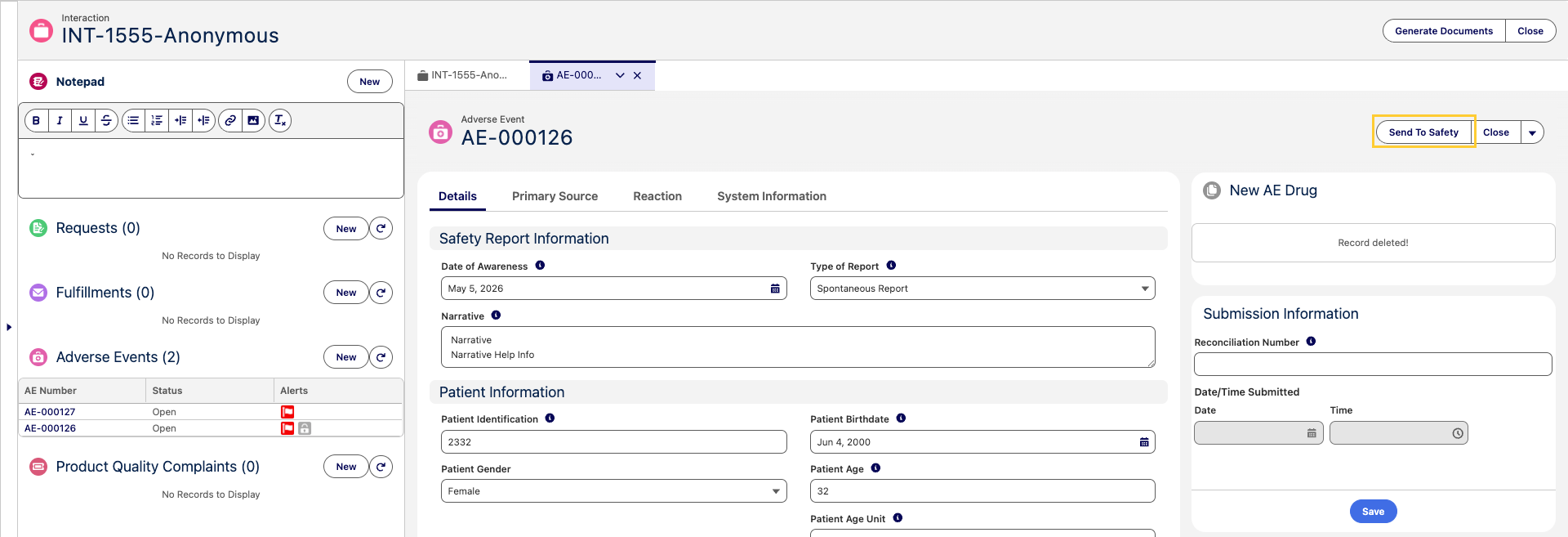
As specialists may need several days to collect Adverse Event data, applying these completeness checks on every save is not ideal. The Presubmit Validation mechanism lets administrators apply these checks only at submission time.
The Run Presubmit Validation (MED_Run_Presubmit_Validation__c) checkbox field is available on the Adverse Event (MED_Adverse_Event__c) object and on the following Adverse Event child objects:
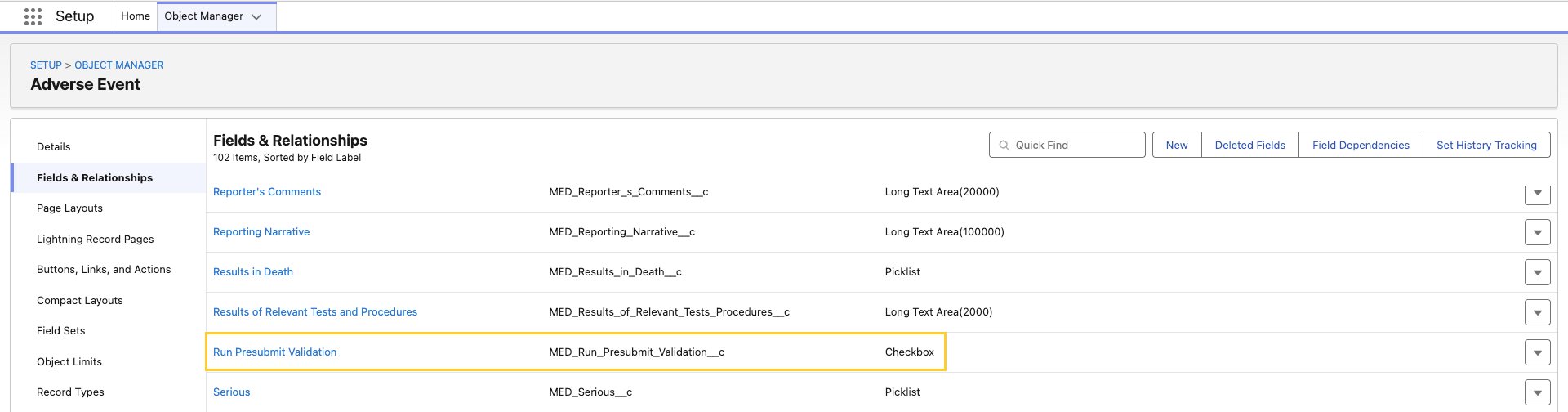
Adverse Event Child Objects
- Adverse Event Drug Information (
MED_AE_Drug_Information__c) - Adverse Event Drug History (
MED_AE_Drug_History__c) - Adverse Event Medical History (
MED_AE_Medical_History__c) - Adverse Event Primary Source (
MED_AE_Primary_Source__c) - Adverse Event Reaction (
MED_AE_Reaction__c) - Adverse Event Results (
MED_AE_Results__c)
The Run Presubmit Validation (MED_Run_Presubmit_Validation__c) field defaults to false on every record so validation rules using it are inactive during routine record edits and only enforce completeness at the moment of submission. When a user clicks Send To Safety or Generate E2B, the system sets Run Presubmit Validation to true on the parent Adverse Event record and propagates the value to every related child record. At this point, Salesforce evaluates every validation rule on the Adverse Event (MED_Adverse_Event__c) object and its child objects whose formula references the Run Presubmit Validation (MED_Run_Presubmit_Validation__c) field. If a validation rule blocks the update, the
submission is canceled and the user sees the validation error.
Use Presubmit Validation
To use Presubmit Validation:
-
Grant users access to the new Run Presubmit Validation (
MED_Run_Presubmit_Validation__c) field on the Adverse Event object and each Adverse Event child object listed above.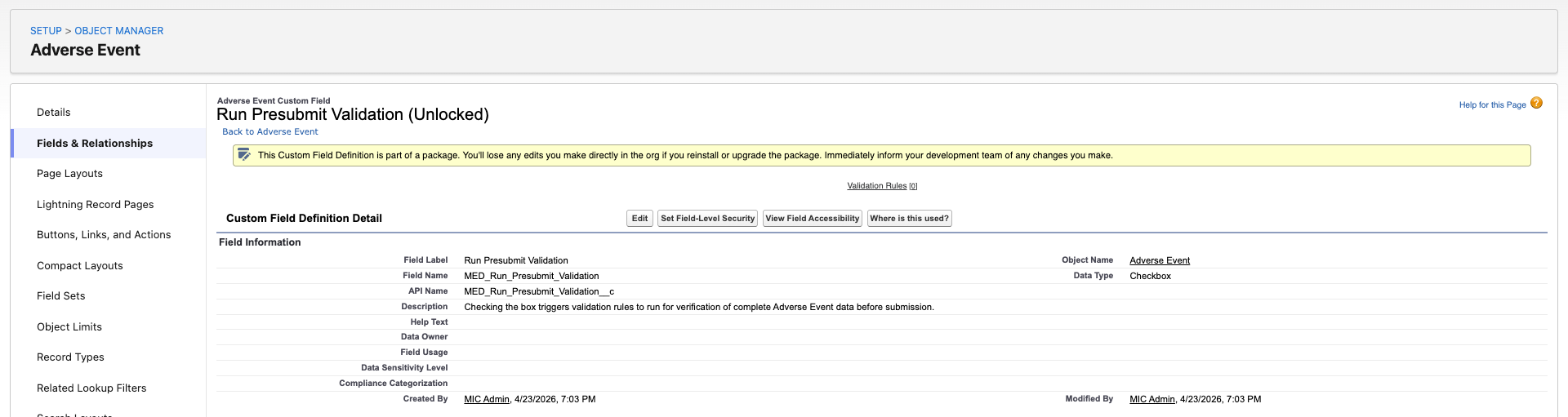
-
In the Object Manager, open the Adverse Event (
MED_Adverse_Event__c) object or an Adverse Event child object.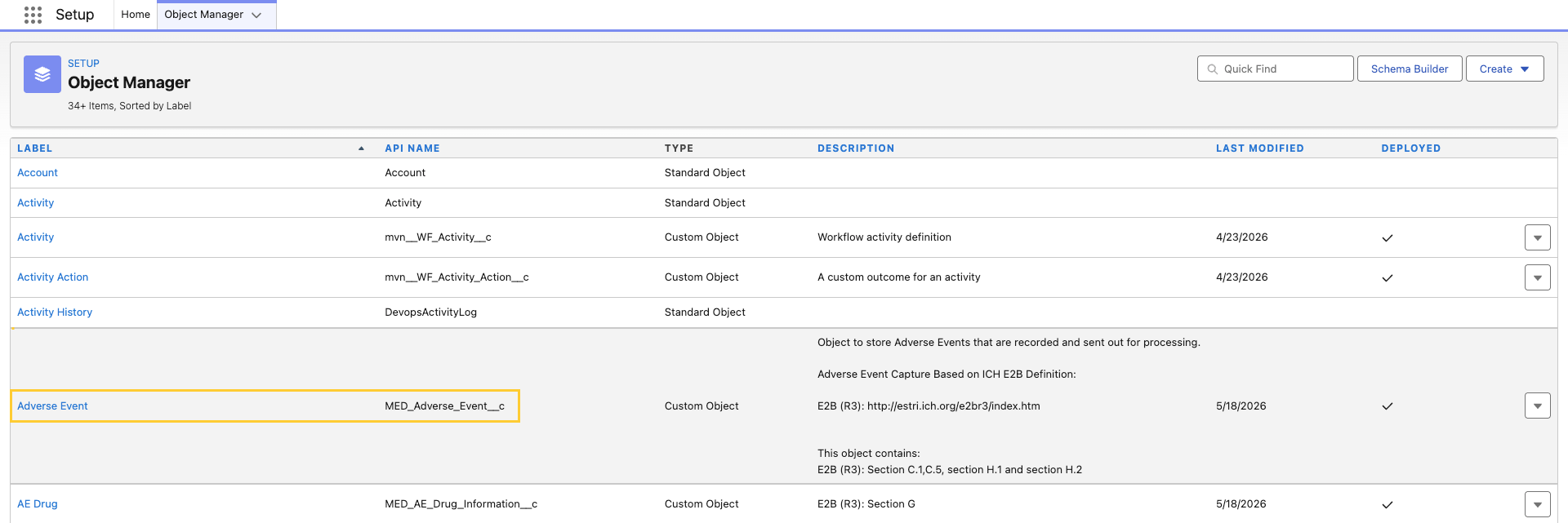
-
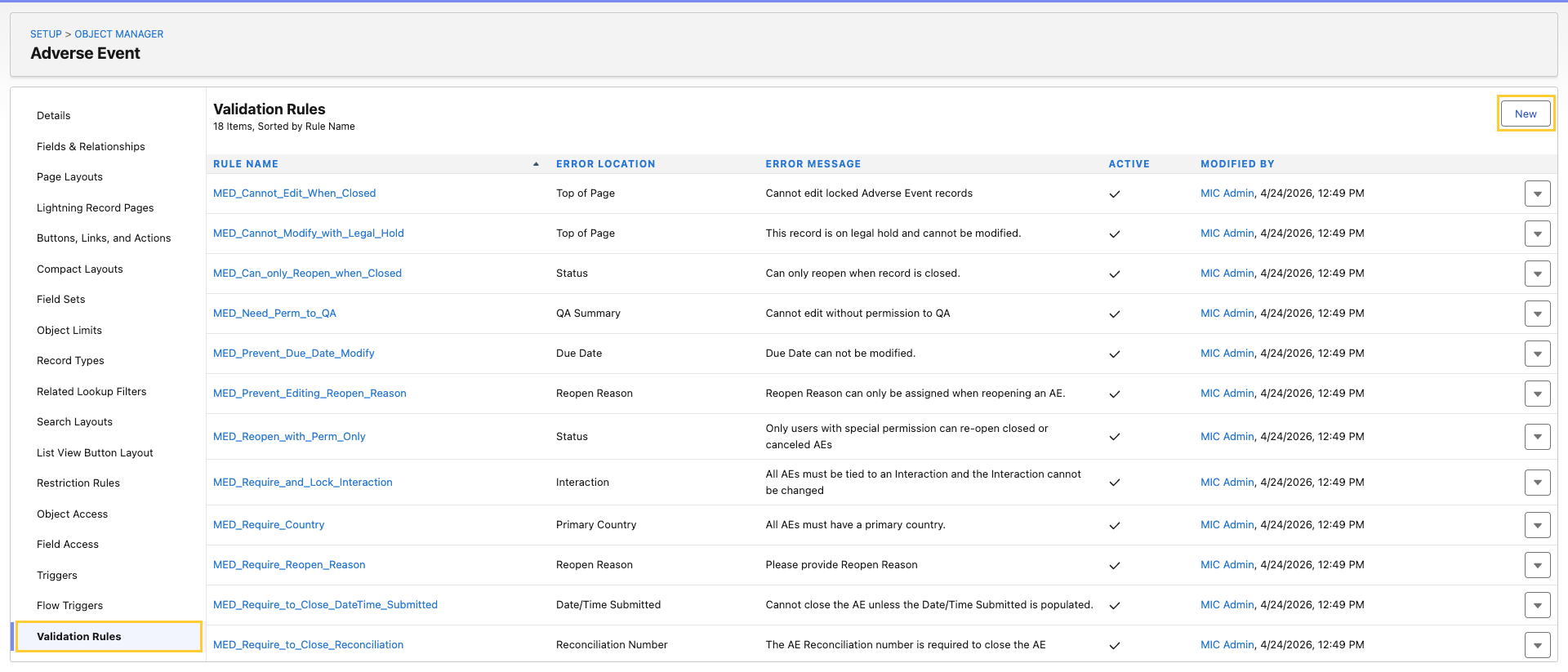
Create a new Validation Rule.
-
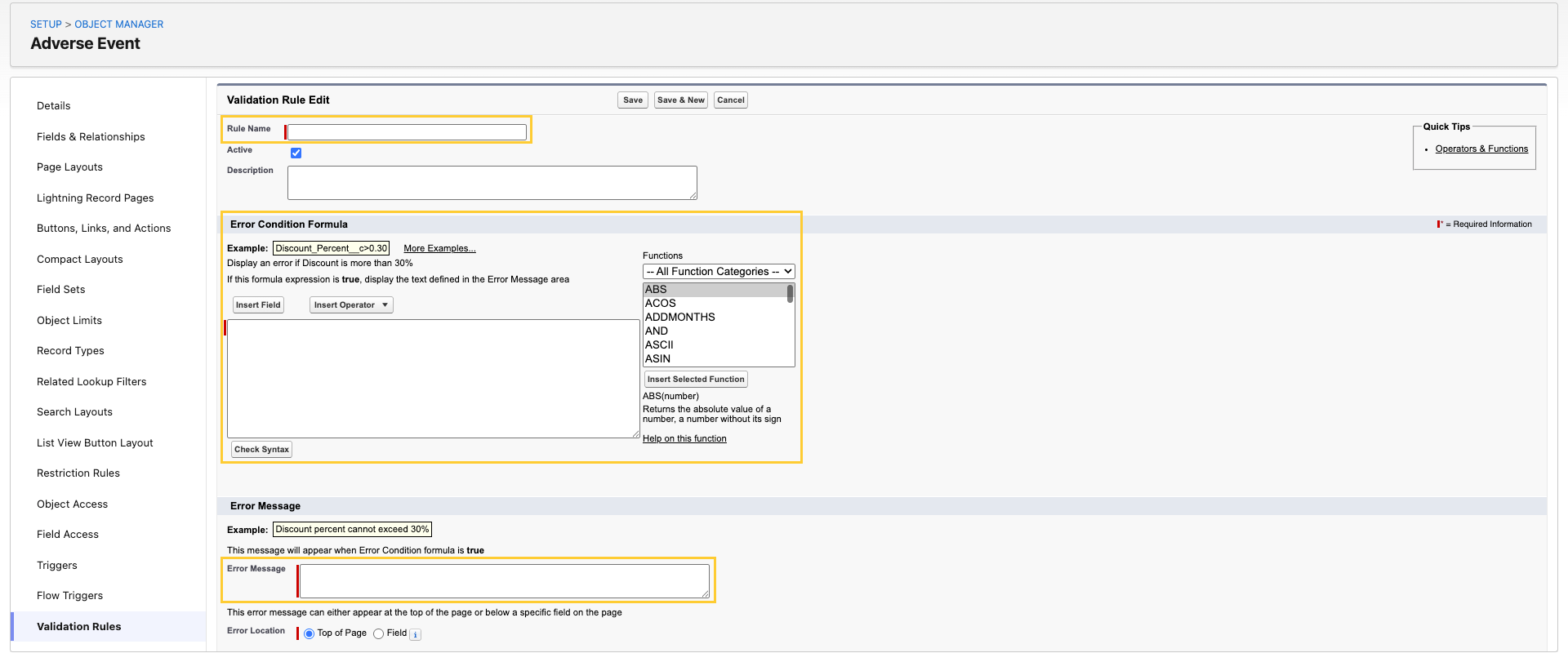
Configure the following:
-
Rule Name - Enter a name.
-
Error Condition Formula - Here, reference the Run Presubmit Validation (
MED_Run_Presubmit_Validation__c) field and the data-completeness condition you want to enforce. For example:AND(MED_Run_Presubmit_Validation__c,ISBLANK(MED_Some_Required_Field__c)) -
Error Message - Provide an error message that tells the user which field must be populated and where it lives.
tipAdministrators can also add the Run Presubmit Validation (
MED_Run_Presubmit_Validation__c) field to the Adverse Event (MED_Adverse_Event__c) Page Layout to allow users to toggle Presubmit Validation manually before clicking a submission button (Send To Safety (MED_Send_To_Safety) or Generate E2B (MED_Generate_E2B_Action)).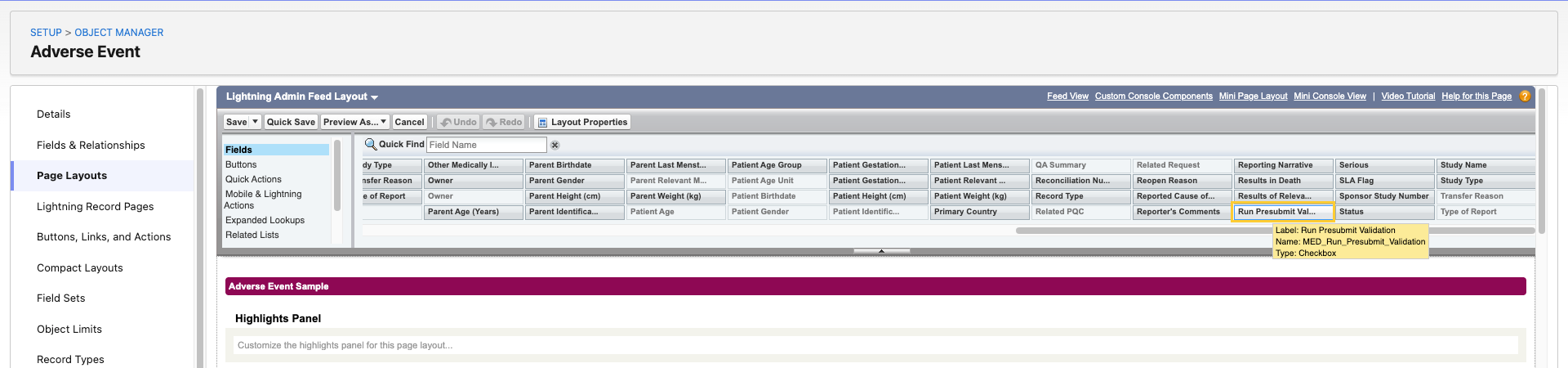
-