
Account
An Account is a record that stores information about a person or business, including name, title, and historical interactions. Examples of Accounts include:
-
Health Care Professionals (HCPs), e.g., doctors and pharmacists
-
Non-HCPs, e.g., consumers and payers
-
Employees, e.g., sales representatives and medical science liaisons (MSLs)
-
Institutions, e.g., hospitals and pharmacies
An Account record can be configured using the following custom metadata types:
-
Account Field Contact Info Mapping (
MED_Account_Field_Info_Mapping__mdt) -
Account Type Document Filter (
MED_Account_Type_Document_Filter__mdt)
Account records are also dependent upon the Account object.
Account Contact Information synchronization
Inquiry Management provides a utility to synchronize Account data with Contact Information records. For example, the Account Phone field might be used by non-agents as the work number for an HCP. To make that information available to the agents in the Inquiry Management module, the Account Contact Info Sync can be configured to create/update a related Contact Information record. The synchronization is a one-way sync. The Contact Info Records are configured to be locked.
Configuring Account fields to sync to Contact Information records
For the Account Contact Information synchronization to work, the Enable
Contact Info Mappings (MED_Enable_Contact_Info_Mappings__c) field must
be enabled in the Global Setting (MED_Global_Setting__mdt) custom
metadata type.
The fields that trigger the creation or update of an associated Contact Info record can be configured by creating an Account Field Contact Info Mapping record. Provide the following information:
-
Account Field API name of the field that should trigger the update.
-
Record Type Developer name of the Contact Info record that should be created/updated.
-
The field on the Contact Info Record to map the value to. This should be the same type as the source field.
-
Optionally provide the Type that should be set on the contact info record.
Once configured, any updates to the account trigger the synchronization of the account field to the proper contact info record.
Locking synced records
The records which are created using the functionality have a source of 'Parent Account', so by default, they will be locked by the Locked Record Handler unless it has been reconfigured.
Changing this formula to allow the records to be edited may result in data being out of sync and/or being overwritten when the account information changes.
Initializing Data
If the Medical Information Cloud product is being installed in a Salesforce instance that already has account data, then the synchronization must be initialized through a batch job. To kick off the batch job, perform these steps:
-
Open an Execute Anonymous Window. See Salesforce's documentation.
-
Enter the following code:
MED_AccountContactInfoSync batchJob = new MED_AccountContactInfoSync();``Database.executeBatch(batchJob); -
Click Execute.

A status of "Success" should be displayed in the log panel.

You should also see jobs being executed under Setup > Jobs> Apex Jobs. You can abort the job from this screen if necessary.
Data change requests
Data change requests (DCRs) represent a requested change to a managed Account or Contact Information record within Medical Information Cloud. While typically used in conjunction with a Master Data Management solution, Medical Information Cloud supports the generation of DCR records absent of a third-party Master Data Management solution.
You can use either Medical Information Cloud's native DCR handler or a custom DCR handler to process requested changes. Both native and custom DCR handlers can be called in the following scenarios:
-
The Account record is created via the New Account modal, which users can access when searching for Accounts.
-
The Account record is updated.
-
The Contact Information record is created.
-
The Contact Information record is updated.
Native DCR process
This section only applies to Medical Information Cloud's native DCR functionality, not custom
DCR handlers. Your instance uses Medical Information Cloud's native functionality if the value
of MED_Global_Setting__mdt.MED_DCR_Create_Handler_Class__c is
MED_DCRCreateHdlr.
The Data Change Request object stores information about requested changes to managed Account and Contact Information records and is on the master side of a master-detail relationship with the Data Change Request Line object, which captures the old and new values for change requests.
Every time a data change is submitted and invokes the native DCR handler, the DCR handler creates a Data Change Request record that has a record type of Account and that looks up to the relevant Account record. The DCR handler also creates any additional Data Change Request records and Data Change Request Line records that are needed to process the requested change or group of changes that were submitted together. See Native DCR data model.
A single Data Change Request record cannot capture more than one change
request. This means that each Data Change Request record should only
ever have one of these lookup fields populated at a time:
MED_Account__c, MED_Contact_Information__c, or
MED_Parent_Account__c. When multiple Data Change Request records are
created in a single step, the Account Data Change Request record is
always the parent, and the other Data Change Request records that were
created in the same step are linked to the parent record via the
MED_Parent_Data_Change_Request__c field.
Data Change Request records that have a Status of Pending are sent to Veeva Network, the Master Data Management source for a data steward to process. Once sent, the Status is set to
Submitted, and after a data steward processes the change request, the
Status is changed to Processed, the appropriate Data Change Request
and Data Change Request fields are updated, and any necessary merge work
occurs.
Account merge work prevents duplicate Account records from being
created. When the Data Change Request's Type field is set to New and
the Status field is set to Processed, Medical Information Cloud verifies that an Account with an
External ID matches the value of
MED_Data_Change_Request__c.MED_Account_External_ID__c does not already
exist in the product. If an existing Account record has an External ID
that matches, the existing record and new record are merged using
Salesforce's native merge
feature.
Metadata from the existing record is kept if the existing and new
records have conflicting data.
Medical Information Cloud also verifies that a new Contact Information record is not a duplicate
by looking at the External ID field on existing Contact Information
records to see if the value matches the value of
MED_Data_Change_Request__c.MED_Address_External_ID__c . If an existing
Contact Information record has an External ID that matches, Medical Information Cloud repoints
MED_Data_Change_Request__c.MED_Contact_Information__c from the new
Contact Information record to the existing Contact Information record
and then deletes the new Contact Information record.
Upon completion of any necessary merge work or if no merge work is required, a Medical Information Cloud trigger updates the External ID field on the related Account or Contact Information record.
Enable native and custom DCRs
To enable DCR generation:
-
Navigate to the appropriate Global Setting custom metadata record, and click Edit.
-
Set the DCR Globally Active field to
true. -
Enter a value into the DCR Create Handler Class field.
-
To use native DCR functionality, enter
MED_DCRCreateHdlr. -
To override default functionality and use a custom DCR handler, enter the Apex class name that implements
MED_DCRCreateIntf. When a change event occurs, this handler class is sent the full record and, if applicable, the old record and contact information to create DCR records as you would like.
-
-
Click Save.
Configure native DCR functionality
This section only applies to Medical Information Cloud's native DCR functionality. Your instance
uses Medical Information Cloud's native functionality if the value of
MED_Global_Setting__mdt.MED_DCR_Create_Handler_Class__c is
MED_DCRCreateHdlr.
After DCRs are enabled, you can configure native DCR functionality to specify when to generate DCRs and which users should not trigger DCRs. You can also integrate Veeva Network with your Medical Information Cloud instance and use it as your Master Data Management source.
Configure DCR change events
To configure the DCR creation behavior, leverage the
Account Field Setting custom metadata type to ensure the correct
fields are monitored for the appropriate change events and included
within the corresponding DCR records. To include a field within the DCR
scope, populate the Include in DCR field with the appropriate change
event for a given object (e.g. Account and Contact Information), field,
country, and record type (e.g. HCP).
Opt-out users
You can configure the DCR feature to exclude updates from specific individuals. This can be helpful in cases where you want to bypass the DCR generation for a particular user, such as an integration user, data steward, or administrator. To exclude a user from DCR consideration:
-
Locate the MIC Feature Flag custom setting within the Salesforce administrative user interface.
-
Create a MIC Feature Flag custom setting record for each profile and/or user that should be excluded from the DCR process. Be sure to check the
Bypass DCRfield when creating the records.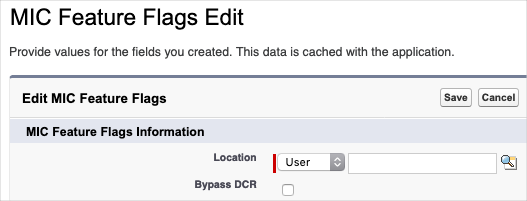
Configuration considerations
Important points to consider when leveraging DCRs are as follows:
-
Only new Accounts (inserts) that are created via the New Account modal, which users can access when searching for Accounts, are considered for a DCR.
-
Only updated Accounts that are sourced from an Account Master are considered for a DCR. If an account has a value present within the
MED_External_Id__cfield, it is deemed to have been sourced from an Account Master. -
DCRs are generated based on the underlying configuration which may include fields from both Accounts as well as related Contact Information.
-
DCR configuration supports separate configurations for Inserts and Updates.
-
When merging Accounts, there may be a delay from the time the DCR status is processed to when the Account is fully merged because the DCR status update and Account merge processes are asynchronous.
-
When merging Accounts, triggers, and workflows will not fire on child objects that are re-parented to the new Account.
Native DCR data model
This section only applies to Medical Information Cloud's native DCR functionality. Your instance
uses Medical Information Cloud's native functionality if the value of
MED_Global_Setting__mdt.MED_DCR_Create_Handler_Class__c is
MED_DCRCreateHdlr.
The DCR entity relationship diagram depicts the change request data model and field requirements for native DCR functionality. Data Change Request and Data Change Request Line fields listed on the entity relationship diagram are required.
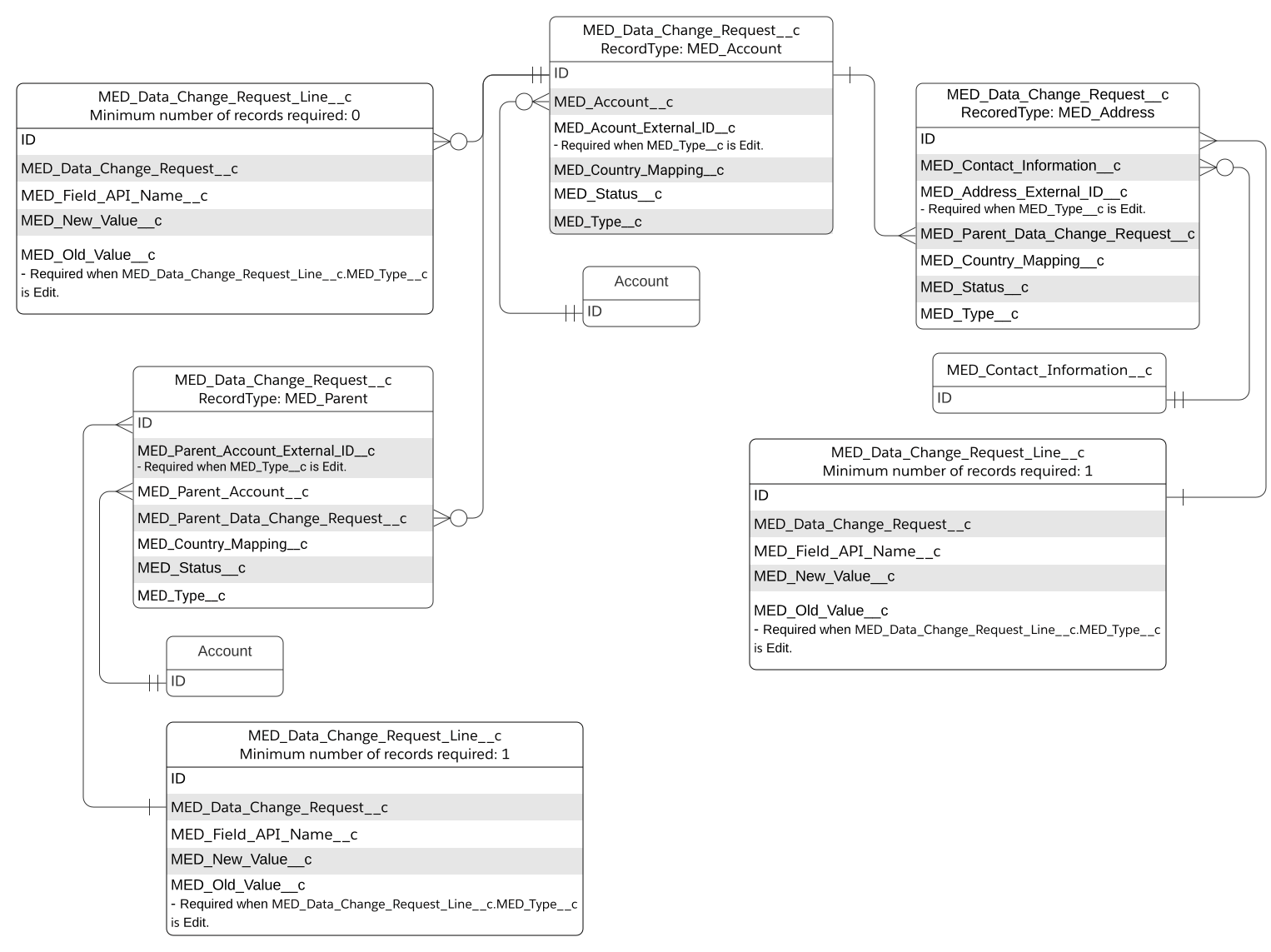
The native DCR data model relies on Data Change Request record types. Data Change Request object record types include:
-
Account - utilized when the associated Account record is either (1) new or modified or (2) the parent Account of other modified records.
A Data Change Request record with the Account record type must exist for every change request. This record is at the top of the DCR data model and must look up to the Account record that is new or modified or that is related to the Institution or Contact Information record that is new or modified. Depending on the change request, the Data Change Request record may not have any Data Change Request Line records associated.
-
Address - utilized when the associated Contact Information record is new or has been modified.
The Data Change Request record for the Address record type must look up to the Contact Information record that is new or modified, must look up to the Data Change Request record for the Account record type, and must have at least one Data Change Request Line record associated.
-
Parent - utilized when the associated Institution Account record is new or has been modified.
The Data Change Request record for the Parent record type must look up to the relevant Account record for the Institution that was created or modified, must look up to the Data Change Request record for the Account record type, and must have at least one Data Change Request Line record associated.
DCR objects
The Data Change Request object stores information about requested changes to managed Account and Contact Information records and is on the master side of a master-detail relationship with the Data Change Request Line object, which captures the old and new values for change requests.