Release process
The sections below detail the processes, responsibilities, and timing around updating Medical Information Cloud, not the initial installation and implementation of the product. Mavens strives to meet and exceed the stated details below; however, specifics around any particular product update may necessitate a deviation from these items. Should such a scenario arise, Mavens commits to providing communication as soon as possible to outline the specifics of the situation.
Overview
The Medical Information Cloud product is designed to be a single-tenant application, that resides and operates within customer-owned and customer-managed Salesforce.com environments. With the noted exception of the Nintex Document Generation utility, all components utilized to deliver product functionalities reside within each customer's Salesforce.com environment. In this model, customers retain all administrative responsibilities of the Medical Information Cloud product once installed within their respective environments.
While each customer receives their own instance of the Medical Information Cloud product, all customers are generally on the same, most recently released version of the product. The only exceptions to this rule of thumb occur during a new version upgrade window wherein customers initiate the upgrade at a time of their choosing via our Install Service.
Our Install Service gives customer administrators control and flexibility over the installation and upgrade of Mavens' products. With our Install Service, administrators can choose what product they want to install or upgrade, when they want to install or upgrade the product, and how they want to incorporate the product upgrade into their own internal procedures and release methodologies. For more information about our Install Service, visit our Install Service documentation.
Release responsibilities
Mavens is responsible for communicating when a new release is available and what changes are shipping with each release and for updating the product documentation.
Customers are responsible for initiating upgrades in their environments via our Install Service. Mavens will not initiate the upgrade.
Customers are also responsible for completing any required actions listed in the given version's release notes. Required actions are actions that customers must take to ensure new versions of Medical Information Cloud operate as desired. Mavens makes all attempts to minimize the need for required actions; however, often times changes must be made in areas where customers are allowed to make changes (e.g. formula fields), which then requires customer action. For example, to ensure customizations stay in place, Mavens does not overwrite customer environments if a defect is found in the stock formula. Instead, Mavens asks customer Administrators, who know their system and its customizations, to evaluate the required action and to perform the requested actions in the best manner possible, which takes into account local customizations. For help with questions regarding required action, visit How to Contact Customer Support.
While not required, customers should also consider implementing the recommended actions listed in the given version's release notes. Recommended actions are similar to required actions and usually represent areas of the product that have been deprecated or revamped to offer enhanced performance and reliability. For reasons similar to those of required actions, Mavens does not forcibly deploy these changes to customer environments and instead asks customers to consider them for incorporation. It is common that a recommended action becomes a required action in subsequent releases.
Release process and timing
Mavens releases two major versions of Medical Information Cloud each year, which are generally available in mid-May and mid-November. When the major version becomes generally available, you can install the version in your sandbox and production environments.
Before general availability, Mavens follows a communication cadence to let customers know what changes are included with the new version. Once the new version becomes available, Mavens advises customers to upgrade to this new version during the recommended upgrade window. Upgrading during this window ensures product support eligibility. The release communication sequence and release windows are detailed in table below.
Release timeline
| Timing | Steps performed |
|---|---|
2 months prior to Version N general availability | - A release announcement is sent to customers via email. The release announcement highlights key new features and enhancements of the new version. |
1 month prior to Version N general availability | - Release notes are made available online. The release notes provide a preview of new features and enhancements, defect fixes, and metadata changes. They also include required actions administrators must take when upgrading Medical Information Cloud. |
Date of Version N general availability | - The recommended upgrade window and product support window for Version N starts. Visit Product support and recommended upgrade windows. - Customers can initiate the Medical Information Cloud upgrade with our Install Service. Visit our Install Service documentation for more information. - Updated product documentation has been released. |
Date of Version N+1 general availability | - The recommended upgrade window for Version N ends. Visit Product support and recommended upgrade windows. |
Date of Version N+2 general availability | - The product support window for Version N ends. Visit Product support and recommended upgrade windows. |
Product support and recommended upgrade windows
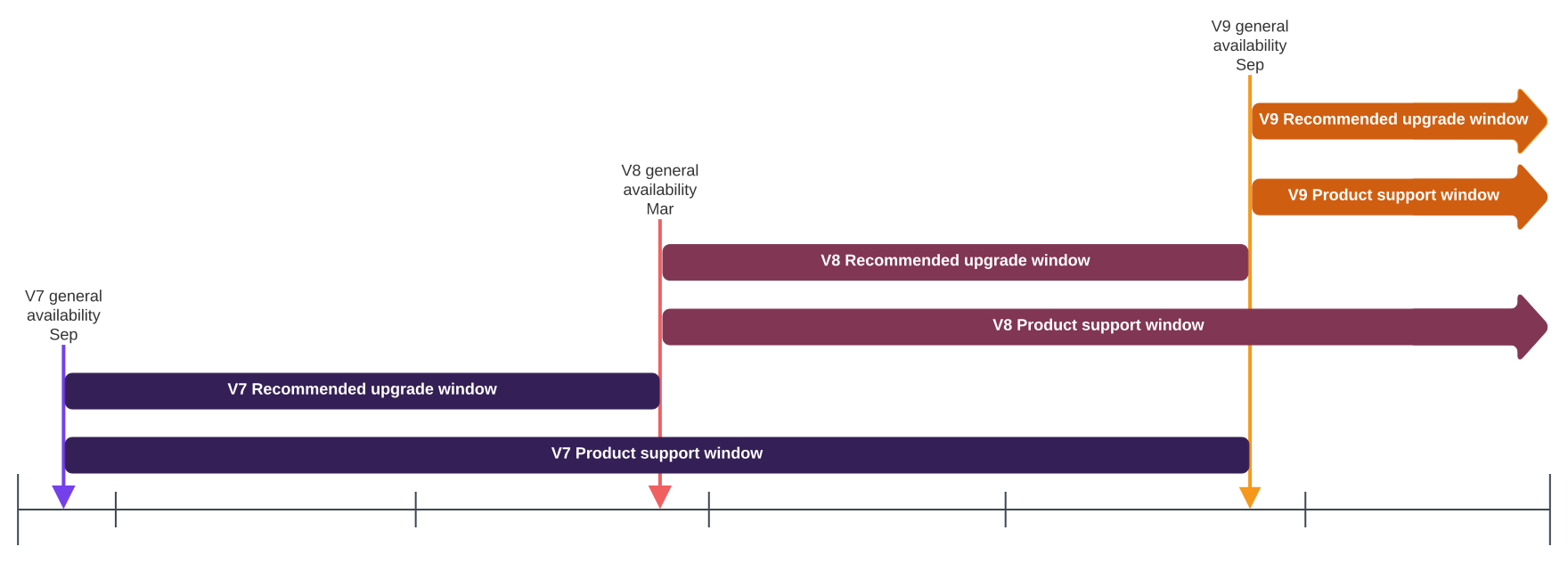
Customers are advised to remain up-to-date on product releases. Product versions more than 1 release behind the most recent product version are not officially supported. For example, when Version 9 of Medical Information Cloud was released, Version 7 of Medical Information Cloud became unsupported. Mavens highly recommends staying up to date on the most recent product version by completing product upgrades during the recommended upgrade window. Visit Unsupported and supported version considerations.
The recommended upgrade window spans from the date of general availability until the next product version becomes available. The product support and recommended upgrade windows for Medical Information Cloud V7, V8, and V9 are illustrated in the timeline below
Unsupported and supported version considerations
The risk and unpredictability of utilizing an unsupported version of the product increases as time passes due to these considerations:
-
The unsupported version is not eligible for product changes. This includes defect fixes.
-
The unsupported version is not regression tested against 3rd party releases, such as Salesforce.com, Veeva Vault, and Nintex. As these 3rd party releases continue to ship, Mavens cannot ensure that an unsupported version will function without issues.
-
Product documentation aligns with the most recent release of Medical Information Cloud and may not apply to the unsupported version.
-
Mavens Customer Support's ability to support the unsupported version is impaired due to the considerations stated above, and remediation of an identified issue likely will result in a recommendation to upgrade to a supported version of Medical Information Cloud.
Benefits to staying up to date with product releases by upgrading Medical Information Cloud at least once a year include:
-
Receiving security and performance enhancements with ongoing releases.
-
Ensuring environments continue to function as expected in light of 3rd party releases.
For example, Salesforce has 3 releases a year and typically introduces enhancements to the platform that are force-enabled within customer environments within a specified time horizon. To ensure customer environments continue to function as expected, Mavens performs regression testing against these changes and develops new features and enhancements in response to Salesforce releases. Failure to ensure Medical Information Cloud is up to date within the time horizon set by Salesforce can result in unexpected cessation of features and functionalities.
In addition, browser releases can impact how products function. For example, when Chrome made SameSite cookie changes, Mavens released enhancements to Medical Information Cloud to ensure customer environments continued to function amid these unanticipated and uncontrollable changes.
-
Gaining access to new features and functionalities that can positively impact customer's users and business.
Upgrading environments
Customers are responsible for upgrading their sandbox and production environments during the upgrade window.
Users performing the upgrade actions below must have the following:
-
Medical Information Cloud admin permission set
-
CM_SystemAdmin permission set
-
DocGen Admin permission set
-
Nintex License
To perform an upgrade:
- Customers decide when in the recommended upgrade window they want to upgrade Medical Information Cloud.
While customers have twelve months post general availability to upgrade their environments and maintain product support eligibility, Mavens highly recommends completing the upgrade during the recommended upgrade window. Visit Product support and recommended upgrade windows.
-
Customers run all unit tests and compile all Apex code.
-
Run all unit tests to ensure no issues exist that could cause the upgrade job to fail. Mavens also recommends regularly performing unit tests to help identify issues as soon as possible post the introduction of a conflicting change. For information on how to run all unit tests and ensure customizations do not interfere with unit tests, visit Unit test considerations and Salesforce's Run Unit Test Methods documentation.
-
Compile all Apex code before upgrading their environments to ensure no issues exist that could cause the upgrade job to fail. For more information, visit Salesforce's Apex Developer Guide.
-
-
Customers initiate upgrades through our Install Service and select if they want to be notified by email upon the job's completion.
-
Our Install Service upgrades the product.
Our Install Service performs the tasks necessary in an automated fashion to upgrade the product. All operations performed against a Salesforce.com instance are done in the context of the user that initiates the upgrade. No access beyond what the logged-in user possesses is required to perform product upgrades.
User activity in the product during an upgrade is not likely to interfere with the upgrade; however, users are likely to experience unexpected errors and behaviors. For this reason, Mavens highly recommends that users NOT be active within the Salesforce.com instance while an upgrade is underway.
Within our Install Service, customers can monitor the status of the upgrade job. If customers select when initiating the job to be notified upon the job's completion, our Install Service emails them when the job finishes. Each upgrade job typically takes an hour.
-
Customers complete required actions and consider implementing recommended actions.
Once the product has been updated, customers must complete the required actions listed in the given version's release notes. In addition, Mavens encourages customers to consider implementing the recommended actions listed in the given version's release notes. Completing the recommended actions ensures maximal use of the new features and enhancements released in the new version. While not required, they offer guidance to customers to ensure optimal performance and reliability within Medical Information Cloud. Recommended actions typically become required actions over time, especially in cases where components have been deprecated.
Upgrade failures
If the upgrade fails in a post-deploy step, the new version was not installed fully. You can retry the upgrade by clicking Retry in the Installed Products section on the Home page.
If an upgrade fails before the package is installed, the instance remains on the previously installed version until a new upgrade is attempted.
For help with questions or to provide feedback, visit How to Contact Customer Support.
Maintenance releases
A maintenance or hotfix release is a release that contains a typically small number of fixes for issues that are affecting customers. Mavens provides email communication when a maintenance release is available and release notes detailing the changes contained in the maintenance release. Customers are responsible for initiating the upgrade via our Install Service.