V14 - V14.1 release notes
This topic contains release notes for V14 and V14.1 of Medical Information Cloud. The release notes are organized into these high-level sections:
-
New features (V14.1) -- new features and functionalities released in version 14.1.
-
New features (V14) - new features and functionalities released in version 14.
-
Updated features (V14.1) -- updated features and functionalities released in version 14.1.
-
Updated features (V14) - updated features and functionalities released in version 14.
-
Hotfixes - details defects identified in V14 that were fixed via hotfix patches.
-
Defect fixes and maintenance -- fixed defects and maintenance items within the new release.
-
Metadata changes -- changes to the underlying data models, user permissions, or system configurations included within the new release.
To identify if a feature request you made was included in this release, search these release notes or the release note archive for the work item number that Customer Support gave you. The release notes include a work item number for every new feature, updated feature, and defect fix.
As this page is maintained and updated over time to ensure accurate and timely information, Mavens recommends referencing the release notes online rather than printing and referencing static versions of the page.
New features (V14.1)
The V14.1 release of Medical Information Cloud contains several new features, the functionalities of which are detailed below. Details about enablement and configuration are included within the product documentation, which will be updated when the release is made available.
Email token stamping
Interaction (Case) email thread tokens are now stamped automatically
on the case. New formula fields on child objects allow for merging the
thread ID into emails sent from Requests, Adverse Events (AEs), Product
Quality Complaints (PQCs), and Fulfillments. Visit Pre-upgrade recommended actions
for more information.
Related work item: MIC-3423
Trigger Action Framework (TAF)
The email thread generation is the first trigger to use the new custom
metadata type-driven trigger framework. This framework allows customers
to control trigger orders relative to Medical Information Cloud triggers as well as temporarily
disable triggers. Currently, it is only enabled on Interactions (Case)
with the email threading trigger, but more objects and Medical Information Cloud triggers will be
migrated to it over the next several releases.
Related work item: MIC-3423
Updated features (V14.1)
The V14.1 release of Medical Information Cloud also contains several improvements and optimizations to existing features and functionalities to better align with customer feedback and provide an enhanced user experience. Unless noted otherwise, all updated features are shipped "off" by default for existing customers and "on" by default for new customers.
Updates to Enhanced Record Edit
The Enhanced Record Edit Lightning Web Component now supports the configuration of how work is saved by allowing you to add a Save button for manual saving and by disabling autosave.
Related work item: MIC-2729
Updates to Account Search
Several updates have been made to the Account Search feature in V14.1 that will improve the overall function and usability. Updates include:
-
Affiliation columns: New layout types (
MED_Affil_Results_Columns_PersonandMED_Affil_Results_Columns_Instituion) were added to provide support for affiliation columns. The record type being searched for determines which is displayed. By default, no affiliation columns will appear. To add a new affiliation column, you will create a new layout section on the layout type and add new layout field records to the section. Each section becomes a column in the search results grid, containing all fields configured to it. -
New fields and triggers: A new Country Summary (
MED_Country_Summary__c) field was added to the Account object. This is a multi-picklist field that automatically reflects all countries from the account's country field and its related contact information country fields. You will need to manually configure the new search handlers that use the new field. -
CTI integration can now open the new Account Search user interface.
-
A new search handler, mvn.MED_MICAccountSearchHdlr was added that uses the new Country Summary field for more efficient filtering by country.
Related work item(s): MIC-3577, MIC-3529, MIC-3527
Improved email thread detection
Komodo custom email handler MED_InboundEmailHandler now has improved thread detection. Emails should go back to the correct record more often. In addition, support for Lightning email threading has been added as a fallback, and lightning threading tokens will be used to attach emails to existing cases if an email thread is not found on other objects.
Related work item: MIC-3423
New features (V14)
The V14 release of Medical Information Cloud contains several new features, the functionalities of which are detailed below. Details about enablement and configuration are are included within the product documentation, which will be updated when the release is made available.
New account search experience
The V14 release of Medical Information Cloud introduced a new quick search experience on
Interaction (Case) records that launches the full account search
experience and replaces the current Account Search component. We
enhanced this experience based on direct feedback from our
customers/users. The changes made have been designed to improve the
overall experience by increasing its flexibility such that you can
initiate the account search workflow and then easily use the search
results to add or create an account to associate with an Interaction.
This enhancement improves the user experience by reducing the number of
clicks when creating a new account. The new experience has been built
using Lightning Web Component architecture to optimize Account Search V3
(delivered in V12), as well as help avoid certain Visualforce
limitations such as ViewState size limits. Additionally, the layout has
been updated such that it will be Omni-search first, thereby avoiding
the need for switching tabs. By default, the new account search
experience will appear on the Interaction page for only new installs of
V14.
The new account search experience will not appear by default for those upgrading to V14.
The quick search feature allows you to launch the enhanced full account search experience into a new local Interaction tab via a new Search button so that you can view account search components. Furthermore, the full account search experience has been updated in V14 to provide an easier way to search for specific accounts and associate them with an Interaction.
Updates included in V14 allow you to:
-
narrow down Person Account search results to those associated with a selected Institution, thereby providing a more focused list of people from which to select.
-
add emphasis to the contact information of each account displayed in the search results.
-
identify when the number of results in the Account Search Results table exceeds the configured maximum.
To facilitate these enhancements, certain elements have been updated and/or added to custom metadata settings and field sets, which are shown throughout the Metadata changes section of this document. For more information, visit Account Search.
::: Related work item(s): MIC-2608, MIC-2609 MIC-2999, MIC-3055, MIC-3153, MIC-3064, MIC-3184 :::
New sortable document list views
Users can now sort Document list views by product and region with the
new Products (mvn__CM_Products__c) and Regions (mvn__CM_Regions__c)
fields on the Document Version (mvn__CM_Document_Version__c) object.
You must complete the steps in the Populate sortable Products and Regions columns section below after
upgrading to the V14.0.1 patch version and then perform a data migration
on existing documents to ensure that the new Products and Regions fields
are populated as appropriate. The data migration script is provided in
the V14.0.1 upgrade.
Related work item: PLTFM-2245
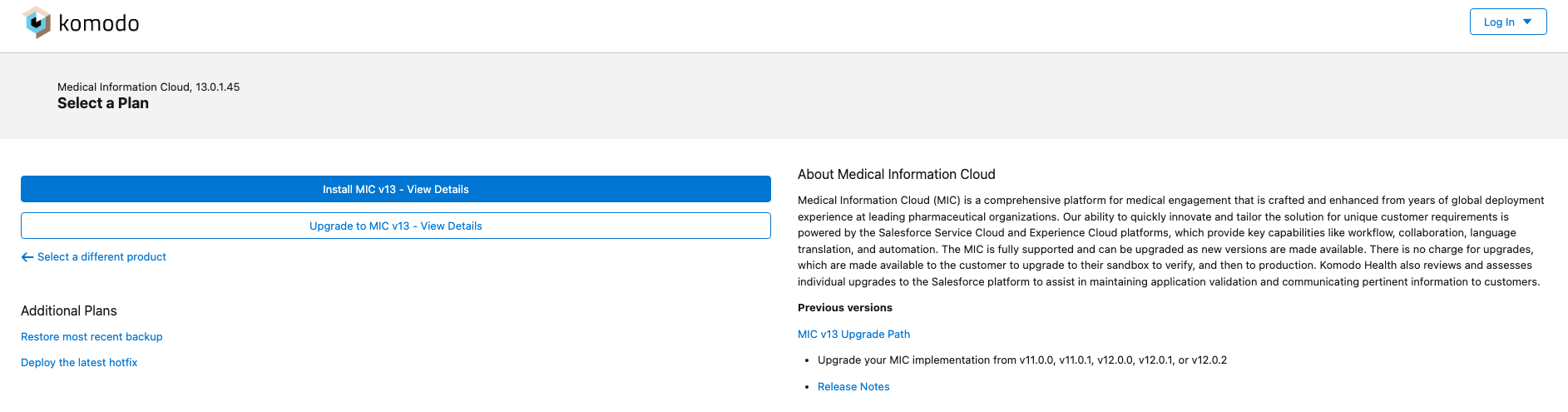
Komodo Install Service
Mavens has launched the new Install Service in tandem with the Medical Information Cloud V14 release. Like our legacy install service, this new iteration continues to give you control and flexibility over the installation and upgrade of Mavens' products. The new install service has been thoughtfully designed to provide a cleaner user experience and provide additional helpful information and links. The new install service is accessible by clicking the same Install our products button on help.mavens.com. For more information, visit Installation.
Updated features (V14)
The V14 release of Medical Information Cloud also contains several improvements and optimizations to existing features and functionalities to better align with customer feedback and provide an enhanced user experience. Unless noted otherwise, all updated features are shipped "off" by default for existing customers and "on" by default for new customers.
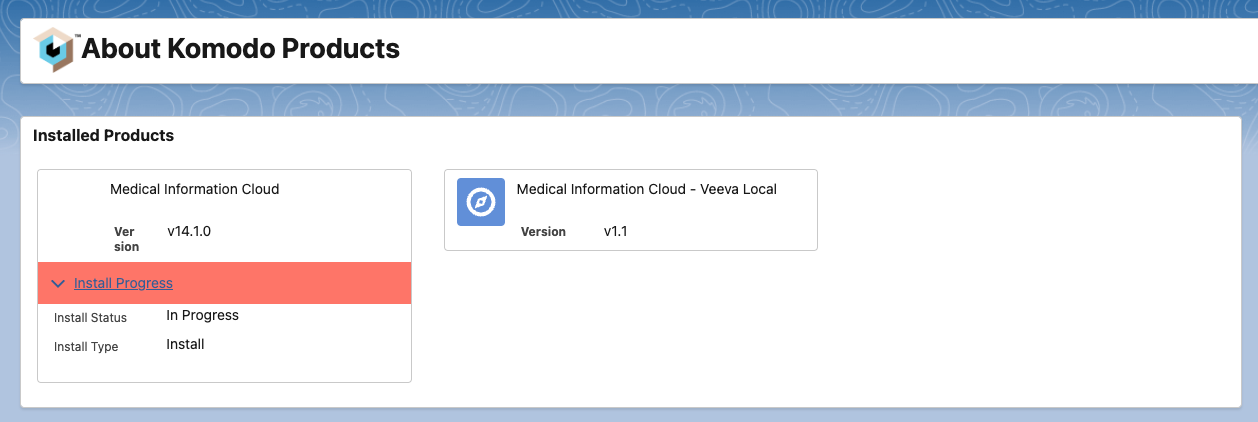
About Komodo Products page
The About Komodo Products page was updated in V14 to provide a more holistic view of your installed products. Information includes:
-
Installed Products
-
Licensed Users
-
General Info
-
Recent Jobs
-
Current install state
-
Install progress
Related work item(s): MIC-3042, MIC-3039
Account creation enhancements
The Account creation process was enhanced in V14 via an updated New Account modal. These enhancements include:
-
New Referred By accounts can be created and saved in the New Account modal via the addition of a Create as Referred By button.
-
New Institution accounts can be created and saved via a new Institution button. When clicked, a Create Institution button appears at the bottom of the modal allowing you to save the new account as an Institution.
-
New accounts can be created and saved as Requesters using a new Create as Requester save button.
For more information, visit Account Search.
Related work item(s): MIC-3179, MIC-3032, MIC-2610
Additional enhancements
| Work item # | Enhancement | Version introduced |
|---|---|---|
| MIC-2729 | You can now add a Save button and turn autosave off if desired. For information on how to configure these settings, visit Enhanced Record Edit. | V14.1 |
| MIC-3232 | Accounts that are only used in Referred By will not be anonymized until the Case is closed. | V14 |
| MIC-3267 | The number of search results that are returned by the Content Search feature and displayed on the Document search page will be configurable in V14. Configurations will utilize the CM_Maximum_Search_Results__c and CM_Default_Search_Rows_Limit__c fields in the MCM Global Setting (mvn__CM_Global_Setting__mdt) custom metadata type. | V14 |
| MIC-3456 | A new workflow stage option that sets the due date based on business hours instead of days was added via a new field (mvn.CM_Days_To_Complete_Calculation__c) on the Workflow Stage Activity (mvn.CM_Workflow_Stage_Activity__mdt) custom metadata type. | V14 |
| MIC-3527 | A new Country Summary (mvn__MED_Country_Summary__c) field has been added to the Account object that will help make filtering on countries more efficient during an account search. This is a multi-picklist field that automatically reflects all countries from the account's country field and its related contact information country fields. To backfill this field, run the following batch job: | V14.1 |
| MIC-3531 | Contact Information columns are now configurable based on selected record type and/or selected country. | V14.1 |
| MIC-3529 | The Affiliation column type has been added to the Account Search results component. For information on how to configure these columns, visit Account Search. | V14.1 |
| MIC-3555 | Previously, the initial-values property of the layout renderer was populated for the Account section but not the Contact section. It is now set for both. This allows account search fields to automatically populate the New Account form with the desired search terms so that there is no need to re-enter the data. | V14.1 |
| MIC-3627 | The maximum number of digits for service-level agreements (SLA) fields has been increased from 99 to 999. | V14.1 |
| MIC-3323 | AfterInsert and AfterUpdate triggers have been added to the Account and Contact Information (MED_Contact_Information) objects to populate the new Country Summary (mvn__MED_Country_Summary___c) field. In addition, an AfterDelete trigger will be added to the Contact Information (MED_Contact_Information) object. To backfill this field, a new batch job can be run: mvn.MED_CountrySummaryBatch batchJob = new mvn.MED_CountrySummaryBatch(); Database.executeBatch(batchJob); | V14.1 |
Hotfixes
The table below includes defects identified in a V14 environment that were fixed via a hotfix patch.
Hotfix defect(s)
| Work # | Description | New behavior | Hotfix patch version | Affects version(s) |
|---|---|---|---|---|
| PLTFM-2245 | Products and regions were blank in list views after upgrading to V14. | To add product/region sorting to your custom list views, replace the Product and Region columns with the Products and Regions columns, respectively. The data migration script provided in the hotfix patch will ensure that the Products and Regions columns are populated as appropriate. | V14.0.1 | V14 |
| PLTFM-2248 | If a user set the Assignment (mvn__CM_Assignment__c) field on a Workflow Stage Activity (mvn__CM_Workflow_Stage_Activity__mdt) metadata record to Workflow Creator, the workflow would hang on the spinner and never start. | Workflows where activities are assigned to the workflow creator no longer hang on the spinner and now start as expected. | V14.0.1 | V14 |
| MIC-3466 | Account Quick Search is throwing a "Script thrown exception" error out of the box, with no indication of what caused it. | Quick Search now throws fewer errors, and the errors are more descriptive. | V14.0.1 | V14 |
| MIC-3477 | The new Account Search feature was missing the new Apex controllers that need to be added to the permission sets. | The mvn__MED_NewAccountCtrl and mvn__MED_AccountSearchCtrl Apex controllers have been added to both user and admin permission sets. | V14.0.1 | V14 |
| MIC-3480 | The new Account Search V3 user interface was not allowing country-specific default account types for searches. | Account Type Settings have been updated and can now be configured using segments. | V14.0.1 | V14 |
| MIC-3481 | ContentDocumentLinks were failing when done in an async context, such as batch, @future, and queueable. | ContentDocumentLinks no longer fail. | V14.0.1 | V14, V13.0.1, V12.0.4 |
Defect fixes and maintenance
The table below details defects and maintenance items identified in V13 that were fixed in the V14 release.
Fixed items
| Work item | Description | New behavior | Version fixed |
|---|---|---|---|
| MIC-2587 | Nodes E.i.1.1b and E.i.1.1a were never included in the E2B output file. | Nodes will now output as configured. | V14 |
| MIC-3156 | In some cases, the function that suppresses Request creation on Inbound Forms was failing. | Request creation on Inbound Forms will now be suppressed as intended. | V14 |
| MIC-3204 | An access error was appearing on Adverse Events when trying to add Interaction-related items from an email. | The access error will no longer appear when trying to add email-sourced Interaction-related items to an Adverse Event. | V14 |
| MIC-3205 | The email status was not changing when an email had been read on a closed Interaction (Case). | The email status will now change to "read" on closed Interactions. | V14 |
| MIC-3285 | The InboundEmailHandler was throwing a "null pointer" if no "To" address was included. | A null check was added so that if the "To" field is blank, an error will not be thrown. | V14 |
| MIC-3339 | When using email-to-case whereby an account is successfully matched by email, the resulting Case would reflect the email-to-case country (specified in the local settings) instead of the matched country. | The email-to-case country now shows the country specified by the matched account. | V14 |
| MIC-3352 | Interaction creation sometimes failed when a new account, not already in Medical Information Cloud, was specified on a Veeva MIRF. This happened when using Veeva CRM as an MDM, Account Search V3, and Veeva MIRF integration all at the same time. | Interaction and account creation no longer fail. | V14 |
| MIC-3412 | Selected account labels on account searches were overlapping the icons in smaller screen sizes. | Labels are now displaying properly. | V14.1 |
| MIC-3456/PLTFM-2147 | The non-enhanced previewer displays a "No Preview Available" message when uploading an Office file (e.g., docx, doc, pptx...). This is caused by Salesforce dropping SVG-based preview renditions in Hyperforce. | Previews continue to work in Hyperforce. | V14 |
| MIC-3510 | The Country field in Quick Search was not defaulting to the Interaction's country. | The Country field on Quick Searches now defaults to the country associated with the Interaction (Case). | V14.1 |
| MIC-3519 | Account Search Layout Types were not rendering correctly as users changed record types, specifically country values. This issue was detailed in KI-108. | Country is no longer required to be specified in all Account Search layouts. This fixes KI-108. | V14.1 |
| MIC-3525 | Fields marked and configured as "required" were not being enforced thereby allowing searching without them. | The "required" configurations on these fields are now enforced. | V14.1 |
| MIC-3554 | If the country was changed after previously being selected during an institution search for an Interaction, the search would revert to the default person search. | Institution search criteria will now persist if the country is changed. | V14.1 |
| MIC-3574 | If you don't fill out the required fields on the New Account modal and click Save, the expected error does not appear. | An error now appears if required fields are not completed. | V14.1 |
| MIC-3598 | The New Account modal was continually spinning when no country was selected. | The New Account modal will now load when clicking New Account with no search terms populated. | V14.1 |
| PLTFM-2063 | When users clicked on a picklist field, hovered over the options, and then clicked out of the field and dropdown, the dropdown would remain expanded. This caused multiple picklist dropdowns to be open at the same time. The dropdowns would only close if the users select a picklist option or if the users never hover over any of the picklist options. | Picklist dropdowns now close when users move their mouse anywhere outside of the picklist field and dropdown. This means that only one picklist dropdown can be open at a time. | V14.1 |
| PLTFM-2241 | The Severity (mvn__Severity__c) field on the Debug Log (mvn__Debug_Log__c) object was missing several log levels. | Additional log levels have been added as picklist values to the Severity field on the Debug Log (MED_Debug_log) object. | V14.1 |
| PLTFM-2284 | The due date for the first task in an auto-start workflow was always calculated with actual days, even if the Days to Complete Calculation (mvn__CM_Days_To_Complete_Calculation__c) field on the Workflow Stage Activity (mvn__CM_Workflow_Stage_Activity__mdt) metadata record was configured to use regional business hours. | The due date for every task in auto-start workflows is now calculated according to the Days to Complete Calculation field on the Workflow Stage Activity (mvn__CM_Workflow_Stage_Activity__mdt) custom metadata type as expected. | V14.1 |
| MPP-2144 | Users who tried to view archived Task records ran into an "Attempt to de-reference a null object" error message. | Archived Task records can now be queried and viewed without errors. |
Metadata changes
The following subsections capture the changes against entities in key areas of Medical Information Cloud that have been introduced in the latest release. This list is not exhaustive, as it does not contain changes that are internal to the application and that are not exposed to customers for customization, extension, or integration.
Custom labels
Custom label changes are listed in the tables below:
New custom labels
| Work item | Custom label | Version added |
|---|---|---|
| MIC-3055 | MED_New_Account | V14 |
| MED_Full_Search_No_Results | V14 | |
| MIC-3064 | MED_Primary_Contact_Tooltip | V14 |
| MIC-3076 | MED_Associate_Institution_Success | V14 |
| MED_Associate_Referred_By_Success | V14 | |
| MED_Associate_Requester_Success | V14 | |
| MIC-3153 | MED_Search_Results_Header | V14 |
| MED_Results_Exceeded_Max | V14 |
Modified custom labels
| Work item | Custom label | Version modified |
|---|---|---|
| MIC-3055 | mvn.MED_Restrict_To_Selected_Requester | V14 |
Custom metadata types
Custom metadata type changes are listed in the tables below:
New custom metadata types
| Work item | Custom metadata type | Version added |
|---|---|---|
| MIC-3153 | mvn__MED_Global_Setting__mdt | V14 |
| MIC-3423 | mvn__TAF_DML_Finalizer__mdt | V14.1 |
| mvn__TAF_sObject_Trigger_Setting__mdt | ||
| mvn__TAF_Trigger_Action__mdt |
New custom metadata type fields
| Work item | Custom metadata type | Field | Version added |
|---|---|---|---|
| MIC-3267 | mvn__CM_Global_Setting__mdt | CM_Maximum_Search_Results__c | V14 |
| mvn__CM_Global_Setting__mdt | CM_Default_Search_Rows_Limit__c | V14 | |
| MIC-3456 | mvn__CM_Workflow_Stage_Activity__mdt | CM_Days_To_Complete_Calculation__c | V14 |
New custom metadata type records
| Custom metadata type | Record label | API name | Version added |
|---|---|---|---|
| mvn__LY_Layout__mdt | Account Search Filters Full | MED_Account_Search_Filters_Full | V14 |
| Account Search Filters Quick | MED_Account_Search_Filters_Quick | ||
| Account Search New Account Layout | MED_Account_Search_New_Account | ||
| Account Search New Contact Record Layout | MED_Account_Search_New_Contact | ||
| Account Search Results Full | MED_Account_Search_Results_Full | ||
| Contact Search Results Full | MED_Contact_Search_Results Full | ||
| mvn__LY_Layout_Fact__mdt | Account search Layout Fact | MED_Account_Search_Layout_Fact | |
| Affiliation Layout Fact | MED_Affiliation_Layout_Fact | ||
| Contact Search Results Layout Fact | MED_Contact_Search_Results_Layout_Fact |
Objects
Object changes are listed below.
New object fields
| Object | Field | Description | Version added |
|---|---|---|---|
| Document Version | mvn__CM_Regions__c | An automated list of regions from Document Region (CM_Document_Region__c) records. This is displayed on the Documents list view page and used for sorting Region (mvn__Region__c) records. | V14 |
| mvn__CM_Products__c | An automated list of products from Document Relationship (CM_Document_Relationship__c) records. This is displayed on the Documents list view page and used for sorting MCM Product (mvn__CM_Product__c) records. | V14 | |
| Account | mvn__MED_Country_Summary__c | Compiles the countries listed in the account and contact information country fields. | V14.1 |
| Interaction | mvn__MED_Email_Thread_Token__c | Stores the Lightning Threading token so it can be used from other objects. | V14.1 |
| Request | MED_Case_Thread_Token__c | Copy of the related Case thread token that can be used for email merge fields. | V14.1 |
| Fulfillment | MED_Case_Thread_Token__c | Copy of the related Case thread token that can be used for email merge fields. | V14.1 |
| Adverse Event | MED_Case_Thread_Token__c | Copy of the related Case thread token that can be used for email merge fields. | V14.1 |
| Product Quality Complaint | MED_Case_Thread_Token__c | Copy of the related Case thread token that can be used for email merge fields. | V14.1 |
Modified object fields
| Work item | Object | Field | Modification description | Version modified |
|---|---|---|---|---|
| PLTFM-2241 | mvn__Debug_Log__c | mvn__Severity__c | The following picklist values have been added: - INFO - DEBUG - FINE - FINER - FINEST | V14.1 |
Lightning components
Lightning component changes are listed in the tables below:
New Lightning components
| Work item | Lightning component | Description | Version added |
|---|---|---|---|
| MIC-2608 | mvn.medCaseAccountsQuickSearch | A quick search component that can be embedded in an Interaction (Case) record page. | V14 |
New Aura components
| Work item | Aura component | Description | Version added |
|---|---|---|---|
| MIC-2999 | MED_AccountSearchV3 | URL Addressable account search page. | V14 |
Pre-upgrade recommended actions
This section includes the recommended actions administrators can take before upgrading to Medical Information Cloud V14 and V14.1.
Lightning threading
Salesforce is moving to Lightning threading and several new features in Medical Information Cloud V14.1 require it. Therefore, Mavens recommends that customers enable Lightning threading. Visit Salesforce's documentation for more information.
To ease the transition from Ref ID to Lightning email threading, Mavens recommends using the Apex email service instead of Email-to-Case. For more information, visit Email to Interaction.
Post-upgrade required actions
This section includes the required actions administrators must take after upgrading to Medical Information Cloud V14. Each required action specifies the criteria for consideration, which details the conditions that must exist to warrant action by a customer.
Populate sortable Products and Regions columns
-
Ensure no users are in the system.
-
Disable triggers in the Enterprise Framework Setting (
mvn__Enterprise_Framework_Settings__mdt) custom metadata type. -
In execute anonymous as CM_SystemAdmin, run the following:
Database.executeBatch(new DocVersionStampRegionsProductsBatch(), 200);
-
When completed, re-enable triggers in the Enterprise Framework Setting custom metadata type.
-
Check the Debug Log (
mvn__Debug_Log__c) object for documents that failed to update. -
Delete the
DocVersionStampRegionsProductsBatchandDocVersionStampRegionsProductsBatch__TESTApex classes as they are no longer needed.
Account search handler
The new account search handler (mvn.MED_MICAccountSearchHdlr) released
in V14.1 requires a one-time migration of the Country Summary
(MED_Country_Summary__c) field on the Account object. This can be
selected in the Install Service as an optional step or it can be done manually by
running the following job in Execute Anonymous:
mvn.MED_CountrySummaryBatch countrySummaryBatch = new mvn.MED_CountrySummaryBatch();Database.executeBatch(countrySummaryBatch);