V12 release notes
This page contains release notes for Version 12 (V12) of Medical Information Cloud. The release notes are organized into these high-level sections:
-
New features - new features and functionalities being released as part of the new version of Medical Information Cloud.
-
Updated features - updated features and functionalities being released as part of the new version of Medical Information Cloud.
-
Hotfixes - details defects identified in V12 that were fixed via hotfix patches.
-
Defect fixes - details regarding product defects that are fixed within the new release.
-
Metadata changes - changes to the underlying data models, user permissions, or system configurations included within the new release.
-
Pre-upgrade required actions - required actions administrators must take before upgrading to the new version of Medical Information Cloud.
-
Required actions - required actions administrators must take after upgrading to the new version of Medical Information Cloud.
-
Deprecated items - any components of Medical Information Cloud that have been designated for retirement or removal from the new version of Medical Information Cloud.
To identify if a feature request you made was included in this release, search these release notes for the work item number that Mavens Customer Support gave you. The release notes include a work item number for every new feature, updated feature, and defect fix.
As this page is maintained and updated over time to ensure accurate and timely information, Mavens recommends referencing the release notes online rather than printing and referencing static versions of the page.
New features
The V12 release of Medical Information Cloud contains several new features, whose functionalities are detailed below. Enablement and configuration details will be included in the updated documentation, which will be released as the product is available.
Komodo Insights Component
When installed and enabled in your environment, this module surfaces key metrics from Komodo Health's Aperture and Iris products directly into a provider's profile. These additional elements can help users and teams perfect their current workflows and enhance engagements.
Requests
Users (request owners) are now notified via bell notification when newly published documents are automatically attached to their requests.
Related work items: MIC-2392, MIC-2393
Follow-up Interactions on Requests
You can now create a follow-up Interaction and associated Requests to communicate content updates to requesters who have given their consent to receive them.
Visit Requests for more information.
Related work items: MIC-2598, MIC-2602
New Flows
Medical Information Cloud V12 introduced the Flow feature to replace Workflow Rules, the latter of which is being deprecated by Salesforce in the next year. A flow is a structured process that collects information from your organization's system and uses it to automate business processes. Unlike workflows, flows can be connected to multiple objects, thereby increasing their usability and scope.
New product installs will automatically come with the new flows. If you are an existing customer, you will have the new flows when you upgrade to V12, but they will be turned off by default. Your existing workflows will continue to be used. You will have to turn off your current workflows and move them to the new flows. If you have customized a workflow, you will need to clone one of the provided flows as a flow override and apply your modifications.
For more information, including a list of available flows in Medical Information Cloud, visit Flows.
For more information about Flows, visit Salesforce's Flow documentation.
Workflow Rule to Flow migration crosswalk
The table below shows the existing workflow rule and the new flow it has been migrated to. In some cases, multiple workflow rules were migrated to a single flow.
Workflow Rule to Flow crosswalk
| Previous workflow rule | New flow label | Flow API name |
|---|---|---|
| MED_AE - Lock AE RecType | Adverse Event: Status Changes | MED_Adverse_Event_Status_Changes |
| MED_AE - Set Date/Time Closed | Adverse Event: Status Changes | MED_Adverse_Event_Status_Changes |
| MED_AE - UnLock AE RecType | Adverse Event: Status Changes | MED_Adverse_Event_Status_Changes |
| MED_AE_Clear Transfer Reason When Owner Changed or Reopened | Adverse Event: Owner Change | MED_Adverse_Event_Owner_Change |
| MED_AE - Clear Date/Time Closed When Reopened | Adverse Event: Status Changes | MED_Adverse_Event_Status_Changes |
| MED_AE_Clear Reopen Reason | Adverse Event: Status Changes | MED_Adverse_Event_Status_Changes |
| MED_AE_Drug History - Lock RecType | AE Drug History: Lock & Unlock RecordTypes | MED_AE_Drug_History_Lock_Unlock_RecordTypes |
| MED_AE_Drug History - Unlock RecType | AE Drug History: Lock & Unlock RecordTypes | MED_AE_Drug_History_Lock_Unlock_RecordTypes |
| MED_AE_Drug - Lock RecType | AE Drug: Lock & Unlock Record Types | MED_AE_Drug_Lock_Unlock_Record_Types |
| MED_AE_Drug - Unlock RecType | AE Drug: Lock & Unlock Record Types | MED_AE_Drug_Lock_Unlock_Record_Types |
| MED_AE_Medical History - Lock RecType | AE Medical History: Lock & Unlock Record Typ. | MED_AE_Medical_History_Lock_Unlock_Record_Types |
| MED_AE_Medical History - Unlock RecType | AE Medical History: Lock & Unlock Record Typ. | MED_AE_Medical_History_Lock_Unlock_Record_Types |
| MED_AE Primary Source - Anonymize | AE Primary Source: Anonymize | MED_AE_Primary_Source_Anonymize |
| MED_AE_Primary Source - Lock RecType | AE Primary Source: Lock & Unlock Record Type | MED_AE_Primary_Source_Lock_Unlock_Record_Types |
| MED_AE_Primary Source - Unlock RecType | AE Primary Source: Lock & Unlock Record Type | MED_AE_Primary_Source_Lock_Unlock_Record_Types |
| MED_AE_Reaction - Lock RecType | AE Reaction: Lock & Unlock Record Types | MED_AE_Reaction_Lock_Unlock_Record_Types |
| MED_AE_Reaction - Unlock RecType | AE Reaction: Lock & Unlock Record Types | MED_AE_Reaction_Lock_Unlock_Record_Types |
| MED_AE_Test Result - Lock RecType | AE Test Result: Lock & Unlock Record Types | MED_AE_Test_Result_Lock_Unlock_Record_Types |
| MED_AE_Test Result - Unlock RecType | AE Test Result: Lock & Unlock Record Types | MED_AE_Test_Result_Lock_Unlock_Record_Types |
| MED_AuditTest_InboundForm | Inbound Form Audit Test | MED_Inbound_Form_Audit_Test |
| MED_Expire_Anonymous_Fulfillment | Fulfillment: Expire Anonymous | MED_Fulfillment_Expire_Anonymous |
| MED_Fulfillment - Anonymize | Fulfillment: Anonymize | MED_Fulfillment_Anonymize |
| MED_Fulfillment - Anonymize 2 | Fulfillment: Anonymize | MED_Fulfillment_Anonymize |
| MED_Fulfillment - Clear Transfer Reason When Owner Changed or Reopened | Fulfillment: Owner Change | MED_Fulfillment_Owner_Change |
| MED_Fulfillment - Clear Date/Time Closed When Reopened | Fulfillment: Status Changes | MED_Fulfillment_Status_Changes |
| MED_Fulfillment - Clear Reopen Reason | Fulfillment: Status Changes | MED_Fulfillment_Status_Changes |
| MED_Fulfillment - Lock Record Type | Fulfillment: Status Changes | MED_Fulfillment_Status_Changes |
| MED_Fulfillment - Set Date/Time Close | Fulfillment: Status Changes | MED_Fulfillment_Status_Changes |
| MED_Fulfillment - UnLock Record Type | Fulfillment: Status Changes | MED_Fulfillment_Status_Changes |
| MED_Inbound Form - Anonymize | Inbound Form: Anonymize | MED_Inbound_Form_Anonymize |
| MED_Inbound Form - Anonymize 2 | Inbound Form: Anonymize | MED_Inbound_Form_Anonymize |
| MED_Inbound Form - Set Interactions Notes | Inbound Form: Set Interaction Notes | MED_Inbound_Form_Set_Interaction_Notes |
| MED_Case - Anonymize | Interaction: Anonymize | MED_Case_Anonymize |
| MED_Case - Anonymize 2 | Interaction: Anonymize | MED_Case_Anonymize |
| MED_Case - Clear Transfer Reason When Owner Changed or Reopened | Interaction: Owner Change | MED_Case_Owner_Change |
| MED_Case - Clear Reopen Reason | Interaction: Status Changes | MED_Case_Status_Change |
| MED_Case - Lock Interaction RecType | Interaction: Status Changes | MED_Case_Status_Change |
| MED_Case - UnLock Interaction RecType | Interaction: Status Changes | MED_Case_Status_Change |
| Interaction - Set Record Type | Interaction: Set Record Type | MED_Case_Set_Record_Type |
| MED_Case - Clear Reopen Reason | Interaction: Status Changes | MED_Case_Status_Changes |
| MED_PQC - Anonymize | PQC: Anonymize | MED_PQC_Anonymize |
| MED_PQC - Anonymize 2 | PQC: Anonymize | MED_PQC_Anonymize |
| MED_PQC - Clear Transfer Reason When Owner Changed or Reopened | PQC: Owner Change | MED_PQC_Owner_Change |
| MED_PQC_Defaults | PQC: Set Defaults | MED_PQC_Set_Defaults |
| MED_PQC - Clear Date/Time Closed When Reopened | PQC: Status Changes | MED_PQC_Status Changes |
| MED_PQC - Clear Reopen Reason | PQC: Status Changes | MED_PQC_Status Changes |
| MED_PQC - Lock PQC RecType | PQC: Status Changes | MED_PQC_Status_Changes |
| MED_PQC - Set Date/Time Closed | PQC: Status Changes | MED_PQC_Status_Changes |
| MED_PQC - UnLock PQC RecType | PQC: Status Changes | MED_PQC_Status_Changes |
| MED_Request - Clear Transfer Reason When Owner Changed or Reopened | Request: Owner Change | MED_Request_Owner_Change |
| MED_Request - Clear Date/Time Closed When Reopened | Request: Status Changes | MED_Request_Status_Changes |
| MED_Request - Clear Reopen Reason | Request: Status Changes | MED_Request_Status_Changes |
| MED_Request - Set Date/Time Closed | Request: Status Changes | MED_Request_Status_Changes |
| MED_Request - Truncate Question | Request: Truncate Question | MED_Request_Truncate_Question |
| MED_Request - Lock Request RecType | Request: Status Changes | MED_Request_Status_Changes |
| MED_Request - UnLock Request RecType | Request: Status Changes | MED_Request_Status_Changes |
| MED_Interaction_QA_Completed | Interaction: QA Completed | MED_Case_QA_Completed |
| MED_AuditTest_InboundForm | Inbound Form: Audit Test | MED_Case_QA_Completed |
Related work items: MIC-2691, MIC-2689, MIC-2693, MIC-2692, MIC-2690, MIC-2722, MIC-2688
New standard email templates
Medical Information Cloud V12 provides a set of default email templates that are available out of the box.
The new email templates are offered out-of-the-box for new product installations only.
To access the out-of-the-box email templates:
-
In Setup, in the Quick Find search box, search for and select Classic Email Templates.
-
Using the Folder dropdown, select MIC Email Templates. A list of all available templates appears.
Available templates are shown in the table below.
Out-of-the-box email templates
Email template name
AE Snapshot Email Template Follow-up Fulfillment Template Follow-up Template Fulfillment Template Interaction Assignment Notification Interaction Snapshot Template New AE Email Notification New Interaction Email Notification New PQC Email Notification PQC Email Template Request Acknowledgment Template Request Snapshot Template Update/Follow-up PQC Email Template
Related work items: MIC-2501, MIC-2687
User interface components
The V12 release includes new user interface components, which make it easier for users to record and manage medical information inquiries. The new components include:
Updated features
In addition to the new features detailed above, the V12 release contains many improvements and optimizations to existing features and functionalities to better align with customer feedback and provide an enhanced user experience. Unless noted otherwise, all updated features are shipped "off" by default for existing customers and "on" by default for new customers.
Custom Audit tracking
The terminology used for custom audit tracking for the mvn__Origin__c
field has been changed from "Mavens Anonymizer" to "Anonymization
Service". Now, if a field is tracked by the custom Audit Trail and is
anonymized, the value stamped in the mvn__Origin__c field will reflect
the updated term.
Related work item: MIC-2744
Account Search V3
The V12 release includes these enhancements to Account Search:
-
A new interface Apex class
mvn__MED_IAccountSearchV3has been added for clients using the updated Account Search system. -
The Interaction Account Quick Search section was enhanced by integrating Omni search methodology via the addition of a new Search field.

New Apex classes includes a list of all new Apex classes associated with the Account Search V3 feature.
To enable the new Account Search system, reference the Account Search V3 section to select Account Search V3 and then reference the Configuring interface handlers for Account Search V3 section to configure a corresponding interface handler with the new MED_AccountSearchHdlrV3.
For customers upgrading to V12 from a prior version (not new installs), they must perform the following additional steps to finish enabling Account Search V3:
-
From Setup, search for and select Custom Metadata Types.
-
Click Manage Records next to the Global Settings (
MED_Global_Setting__mdt) custom metadata type. -
Click Edit next to the Global Setting record.
-
Under the Account Search Settings, check the Use Account Search Version 3 checkbox.
-
Click Save.
Once enabled, a new Omni search box will appear in the Account Search feature.
Related work items: MIC-2707, MIC-2706, MIC-2715, MIC-2709, MIC-2790, MIC-2802, MIC-2710
Additional enhancements
In addition to the feature updates listed above, the V12 release includes several other enhancements that improve the overall user experience and increase the product's configurability.
Enhancements
| Work item # | Enhancement |
|---|---|
| MIC-2392/MIC-2393 | A new custom notification type, Related Document Attached (MED_Related_Document_Attached) was added. Functionality was also added to the MED_DocumentStateEntryHdlr Apex class to send these custom notifications when triggered. |
| MIC-2507 | Fulfillment jobs that appear in the utility bar queue will now remember current or completed jobs between sessions and refreshes. The job status persists until dismissed. Note: If the page is refreshed while a job is running, the progress bar will disappear but the job will still report if the status is running and completed. |
| MIC-2509 | If a Request is cloned, leading to multiple Requests relating to the same Inbound Form, the Inbound Form status will now only update once all related Requests have the same status value. For example, the Inbound Form will not be closed until all related Requests are closed. Previously, the status would change to closed when the first Request was closed. |
| MIC-2513 | The following attachment formats are now supported for E2B integration: - Portable network graphics (.png) - Bitmap image format (.bmp) - Graphics interchange format (.gif) - Word processing document format (.wpd) |
| MIC-2525 | A new field, MED_Request.MED_Cloned_From was added to the Request (MED_Request__c) custom object that enables the system to pre-populate certain fields from an existing Request to a new "cloned" Request. The status of the new cloned Request is also automatically set to Open. Further, if the new Request is cloned onto a new or different Interaction, the Inbound Form field will be cleared. |
| MIC-2527 | The Account Search process was sometimes slow and inefficient due to low selectivity. Therefore, additional selectivity was added to the MED_AccountSearchHdlr that removes a RecordTypeId filter if it is not paired with another field such as phone or country. This change improves the overall performance of the Account Search process. |
| MIC-2542 | The "finalize" action from the fulfillment files list that occurs after a package has completed processing has been enhanced to provide a cleaner user experience in the following ways: - A spinner now appears when the package begins the finalizing process - When the process is complete, a success message appears - The associated file list refreshes once the package has completed processing |
| MIC-2709 | In the new Account Search V3 feature, Veeva Network integrations now support the Omni search bar to search multiple Veeva Network fields at once. |
| MIC-2710 | Veeva CRM integrations now support SOSL queries for those using the new Account Search V3 feature. |
Hotfixes
The table below includes defects identified in a V12 environment that were fixed via hotfix patches. Customers can view and install the versions listed in the table below by visiting the About page in their environments.
Hotfix defect(s)
| Work # | Description | New behavior | Hotfix patch version | Affects version(s) |
|---|---|---|---|---|
| MIC-2964 | When a user tries to check out a response letter from a list of files, the wrong document is checked out. Instead of the selected document, the last document in the Fulfillment Files list is checked out instead. This issue was identified by users after they upgraded their dev org to V12 and was detailed in Known Issue (KI-90). | The correct document is now checked out when selected by the user. | V12.0.1 | V12 |
| MIC-2990 | Some account external IDs could cause Inbound form processing to fail with an InstanceOf ID error. | External IDs no longer result in inbound forms failing. | V12.0.2 | V12 |
| MIC-2974/MIC-3013 | When using the new Account Search V3 subsystem, Request creation for MIRFs may sometimes fail with the following error found in the Debug Logs object: System.TypeException: Invalid id value for this SObject type: 243209199570387973. This is because the Salesforce Apex call instanceof Id has a bug where it does not do a proper check on whether the string is a valid SObject Id. Note: This issue is directly related to a Salesforce known issue. | Request creation for MIRFs no longer fails for Requester_External_ID, specifically. | V12.0.2 | V12 |
| MIC-3268/MIC-3296 | Previously, users could not modify another user's notes. However, in the V12 release, this ability was inadvertently turned on for new notes (not existing notes), thereby allowing users to modify one another's notes. | The V12.0.4 hotfix reversed this change so that users are once again not allowed to edit each other's notes. | V12.0.4 | V12, V13 |
Defect fixes
The table below lists the defects that were resolved with the release of Medical Information Cloud V12.
Defect fixes
| # | Defect description | New behavior |
|---|---|---|
| MIC-142 | After escalation, finalizing the fulfillment package does not delete the previous document. Document duplication can occur across a variety of use cases, particularly if the user running the finalization process was not the user who generated the package initially. Only the latest version is attached to the record. | Package-generated documents will now be replaced, instead of duplicated when uploading a new version. |
| MIC-206 | An INVALID_TYPE_ON_FIELD_IN_RECORD error occurred if a document was selected that had an unpopulated field NULL value mapped to Veeva Vault's Yes/No field type. This issue was detailed in Known Issue (KI-48). | Now, the Vault Search Handler (MED_VaultSearchHdlr) will skip assigning a value to that field on the document record, which will prevent the error. |
| MIC-233 | If a Vault field contained a multi-select picklist, the MED_VaultSearchHdlr was only retrieving the first value, instead of all. | When searching for content in Veeva Network, results will now accurately match against Veeva fields of the multi-select picklist type. |
| MIC-695 | When creating a Fulfillment for an Interaction after the requester has been changed from one HCP to an HCP that does not have contact information, the contact information from the first HCP is retained and populates the Fulfillment information fields. | Now, when an Interaction's associated requester is changed, the stamped account details will clear if the new requester does not have corresponding contact information records. |
| MIC-2272 | The autosearch process was firing before the Content Search form was fully rendered. This caused any default fields with default values to appear empty. | The MED_ContentSearchCtrl Apex class was updated so that Default values are now honored when conducting initial Content searches. |
| MIC-2537 | If the Interaction lookup is not on the Adverse Event (AE) or Product Quality Complaint (PQC) page layouts, the AE drug never gets created and the modal does not close. Additionally, if the Request product is blank, completing that field does not create the AE drug. This issue was addressed in Known Issue (KI-66) | These issues were corrected by making the Interaction lookup no longer a requirement on the AE/PQC page layouts. |
| MIC-2547 | The Add Related Adverse Event and Add Related Product Quality Complaint components were only copying to/from the MED_Question_Rich__c field, which didn't work properly for customers using V10. | A new method was added to the medStringUtil that will format rich text strings as plain text fields. Additionally, the previous MED_Question__c value will now be appended to the Narrative/Complaint if there is data. |
| MIC-2568 | The text/value of the MED_Answer__c field was not formatted correctly when copied to the Request Document (MED_Request_Document__c) object. This error occurred regardless of what field it was mapped to. | The rich text in the MED_Answer__c field is now only removed when copying it to the plain text MED_Request_Document__c object. |
| MIC-2572 | Documents with bundled relationships were not included on requests if a related document was selected. This issue was detailed in Known Issue (KI-68). | The API name referenced in the MED_ContentSearchHdlr class was updated from Bundle to CM_Bundle. This corrected the problem. |
| MIC-2573 | Email attachments were not handled correctly by the custom Email Handler (MED_InboundEmailHandler) because the IsClientManaged flag was not set to true for attachments. | Inbound Email-to-Case messages that have attachments will now show those attachments on the case file related list if "Show Email Attachments in Case Attachments Related List" is set to true in Support Settings. |
| MIC-2574 | When an Adverse Event or Product Quality Complaint was created, changes made to the product selection were not honored. | The source data is prevented from reloading and overwriting product selection. The selected product is now honored. |
| MIC-2579 | Insufficient padding was noted between the Search Content field and the barrier of the Request Content Search component. This issue was detailed in Known Issue (KI-76). | This was a cosmetic issue that was fixed by adding a padding class to the search box input. |
| MIC-2591 | Running batch or ad hoc QA processes on new Interaction QA objects will prompt an error message if the Interaction objects have a QA status of N/A. This is because N/A, which was the default value for the QA status before V9, is a valid picklist value on Interaction objects but not on the new QA objects. This issue is detailed in Known Issue (KI-69). | A background utility now checks for incoming invalid N/A statuses when creating new Interaction QA records. When an invalid status is found, the system will change the status to "Review Required". |
| MIC-2496 | Users received an error when attempting to attach a Vault document to a request that was bigger than 2147483647 (max size of a 32-bit signed integer). This was because the value of the size__v field was in memory as a generic Object, resulting in the error because the number was too large. | This was resolved by casting the incoming numerical values as either Integer or Decimal based on the field type and then adding them to the mapping. This removed the overflow error for that field since Integer and Decimal have much higher max values than Object. |
| MIC-2623 | Inbound email messages were "bouncing" back (i.e., not delivering) if the content was too large. | Inbound email messages will now be truncated (if needed), and the full, raw message will be attached to the email as a TXT file, thereby preventing large messages from bouncing. |
| MIC-2636 | The Date of Awareness in an AE/PQC did not accurately reflect the current user's timezone and instead defaulted to UTC or the org default timezone. | To correct this, the C.1.5 E2B element was made a configurable record in the E2B Field Mapping (MED_E2B_Field_Mapping__mdt) custom metadata type. |
| MIC-2653 | When adding a new related AE or PQC to an Interaction, the date field was stamped with the local computer's timezone. | The user's Salesforce timezone is now stamped on the related AE/PQC. |
| MIC-2684 | In a few instances, the fulfillment utility bar would fail when processing non-JSON messages from non-MIC sources, triggering a pop-up message. This issue was detailed in Known Issue (KI-83). | The code has been updated so that it will catch parsing errors and ignore messages not meant for it. |
| MIC-2686 | The MED_FulfillmentCloseCleanup Apex class was not processing Fulfillments correctly when the Fulfillment's status was changed to "Cancelled". | To resolve this, the MED_FulfillmentCloseCleanup Apex class was refactored to differentiate between "Completed" (Fulfilled) and "Closed" (either Fulfilled or Cancelled) so that the related Fulfillment objects process accordingly. |
| MIC-2699 | When document usage reporting is enabled and a document from Regulated Content Cloud is used in a Request, the document usage should be logged in the Document record's audit log. However, two document usages instead of one are logged. This is because field updates in the Request workflows edit the Request record twice. This issue was detailed in Known Issue (KI-80). | A "run once check on request" trigger (MED_ContentRequestReportHdlr.firstRun) was added the to content-core default trigger logic to prevent the error in log handling. |
| MIC-2746 | The Country was not stamped on Request Documents for results from Regulated Content Cloud. | The Country is now stamped on Regulated Content Cloud Request Documents. |
| MIC-2755 | Product names did not appear on the Request Document attachment list. | Product names are now displayed correctly. |
| MIC-2823 | A mismatch in the default metadata record of the Language (CM_Language __c) field in the Document Version (mvn__CM_Document_Version__c) custom object was causing an issue that prevented the creation of an attachment. | The default metadata record has been updated to correct this issue. |
Metadata changes
The following subsections capture changes that have been introduced within the V12 release against entities in key areas of Medical Information Cloud. This list is not exhaustive, as it does not contain changes that are internal to the application and that are not exposed to customers for customization, extension, or integration.
Apex classes
V12 Apex class changes are listed in the tables below.
New Apex classes
| Apex class | Description |
|---|---|
| mvn.MED_AccountSearchHdlrV3 | Next generation search handler for searching local accounts. |
| mvn.MED_AccountSearchService | Retrieves a service that implements an Account Search interface. |
| mvn.MED_IAccountSearchServiceV3 | Serves as an extension of MED_IAccountSearchV3 which adds an upsert Accounts header. Note: All considerations when using MED_IAccountSearchV3 still apply. |
| mvn.MED_IAccountSearchV3 | Interface used by the Account search process to support searching and retrieving arbitrary MDM Systems. |
| mvn.MED_AccountSearchResponseV3 | Response wrapper for the Account search methods. |
| mvn.MED_AccountDetailRequestV3 | Request class for requesting more details on accounts. |
| mvn.MED_AccountSearchRequestV3 | A packaged search request that includes all search terms and filters for use when searching the MDM. |
| mvn.MED_AccountSearchResultV3 | Unified account result entry. This contains key account information and additionally, the full account object, related contact information, affiliations, and parent accounts. |
| MED_CMSService | Service class responsible for interacting with CMS handlers. |
Custom labels
Custom label changes are listed below:
New custom labels
- MED_AttachedEmailLabel
- MED_Requestor_Consent
- MED_Related_Document_Attached
Custom metadata types
Custom metadata type changes are listed in these tables:
New Custom Metadata Types
| Custom metadata type | Description |
|---|---|
| mvn__Interface_Handler__mdt | Configuration object for an interface handler. |
New Custom Metadata Type Record
| Custom metadata type API name | New custom metadata type record API name | Description |
|---|---|---|
| mvn__SE_System_Event_Configuration__mdt | Document State Entry Published (CM_System_Event_Document_State_Entry_Published) | Points to namespaced Apex class MED_SystemEventService to automatically attach documents when they are released to the related Requests. |
Flows
New flows are listed in the table below.
New flows
| Flow label | Flow API name | Process type |
|---|---|---|
| Adverse Event: Owner Change | MED_Adverse_Event_Owner_Change | Autolaunched Flow |
| Adverse Event: Status Changes | MED_Adverse_Event_Status_Changes | Autolaunched Flow |
| AE Drug History: Lock & Unlock RecordTypes | MED_AE_Drug_History_Lock_Unlock_RecordTypes | Autolaunched Flow |
| AE Drug: Lock & Unlock Record Types | MED_AE_Drug_Lock_Unlock_Record_Types | Autolaunched Flow |
| AE Medical History: Lock & Unlock Record Type | MED_AE_Medical_History_Lock_Unlock_Record_Types | Autolaunched Flow |
| AE Primary Source: Anonymize | MED_AE_Primary_Source_Anonymize | Autolaunched Flow |
| AE Primary Source: Lock & Unlock Record Type | MED_AE_Primary_Source_Lock_Unlock_Record_Types | Autolaunched Flow |
| AE Reaction: Lock & Unlock Record Types | MED_AE_Reaction_Lock_Unlock_Record_Types | Autolaunched Flow |
| AE Test Result: Lock & Unlock Record Types | MED_AE_Test_Result_Lock_Unlock_Record_Types | Autolaunched Flow |
| Interaction: Anonymize | MED_Case_Anonymize | Autolaunched Flow |
| Interaction: Owner Change | MED_Case_Owner_Change | Autolaunched Flow |
| Interaction: QA Completed | MED_Case_QA_Completed | Autolaunched Flow |
| Interaction: Set Record Type | MED_Case_Set_Record_Type | Autolaunched Flow |
| Interaction: Status Changes | MED_Case_Status_Changes | Autolaunched Flow |
| Fulfillment: Anonymize | MED_Fulfillment_Anonymize | Autolaunched Flow |
| Fulfillment: Expire Anonymous | MED_Fulfillment_Expire_Anonymous | Autolaunched Flow |
| Fulfillment: Owner Change | MED_Fulfillment_Owner_Change | Autolaunched Flow |
| Fulfillment: Status Changes | MED_Fulfillment_Status_Changes | Autolaunched Flow |
| Inbound Form: Anonymize | MED_Inbound_Form_Anonymize | Autolaunched Flow |
| Inbound Form: Audit Test | MED_Inbound_Form_Audit_Test | Autolaunched Flow |
| Inbound Form: Set Interaction Notes | MED_Inbound_Form_Set_Interaction_Notes | Autolaunched Flow |
| PQC: Anonymize | MED_PQC_Anonymize | Autolaunched Flow |
| PQC: Owner Change | MED_PQC_Owner_Change | Autolaunched Flow |
| PQC: Set Defaults | MED_PQC_Set_Defaults | Autolaunched Flow |
| PQC: Status Changes | MED_PQC_Status Changes | Autolaunched Flow |
| Request Document: FAQ Mapping | MED_Request_Document_FAQ_Mapping | Autolaunched Flow |
| Request: Owner Change | MED_Request_Owner_Change | Autolaunched Flow |
| Request: Status Changes | MED_Request_Status_Changes | Autolaunched Flow |
| Request: Truncate Question | MED_Request_Truncate_Question | Autolaunched Flow |
| Request: Reset Override Lock | MED_Reset_Request_Override_Lock | Autolaunched Flow |
| Request: Update Consent | MED_Update_Follow_up_Consent | Screenflow |
| Update Pending DDPs | MED_Update_Pending_DDPs | Autolaunched Flow |
Lightning components
V12 Lightning component changes are listed in these tables:
New Lightning components
| Lightning component | Description |
|---|
Deprecated Aura components
| Aura component | Notes |
|---|---|
| MED_WorkspaceRefresh | This component has been deprecated. |
Objects
V12 object changes are listed in these tables:
Modified objects
| Object | Description of change |
|---|---|
| Mavens Key Contact | Deprecated |
New fields
| Object | Field | Description |
|---|---|---|
| Request | MED_Follow_up_Reason__c | Field houses information for why a follow-up request should be considered. |
| Request | MED_Cloned_From__c | If this request was created by cloning a previous request, holds a lookup to the source request. |
| Request | MED_Consent_Expiry_Date__c | Date when the requester's consent should expire. |
| Request | MED_Eligible_for_Follow_up__c | An indication that content updates are available to be shared with the requester pertaining to this request. |
| Request | MED_Opt_Out_Date__c | Date that a requester has requested to opt out of future content updates. |
| Request | MED_Requester_Consent__c | Indicates if the requester has consented to receiving updated information in response to this request. |
| Request | MED_Target_Follow_up_Date__c | Indicates when updated information about a request may be available to share with the requester. |
Platform events
The table below represents new and/or changed Platform Events.
Platform event changes
| Platform event | Purpose |
|---|---|
| mvn__MED_MIC_System_Event__e | Is triggered upon document publication. |
Quick actions
Quick action changes are listed in these tables:
New quick actions
| Object | Quick action | Description |
|---|---|---|
| Request | MED_Update_Follow-up_Consent_Details | Screen flow to update follow-up consent fields for open and closed requests. |
Pre-upgrade required actions
This section includes the required actions administrators must take before upgrading to Medical Information Cloud V12. Each required action specifies the criteria for consideration, which details the conditions that must exist to warrant action by a customer.
Required actions
This section includes the required actions administrators must take after upgrading to Medical Information Cloud V12. Each required action specifies the criteria for consideration, which details the conditions that must exist to warrant action by a customer.
Remove deprecated items
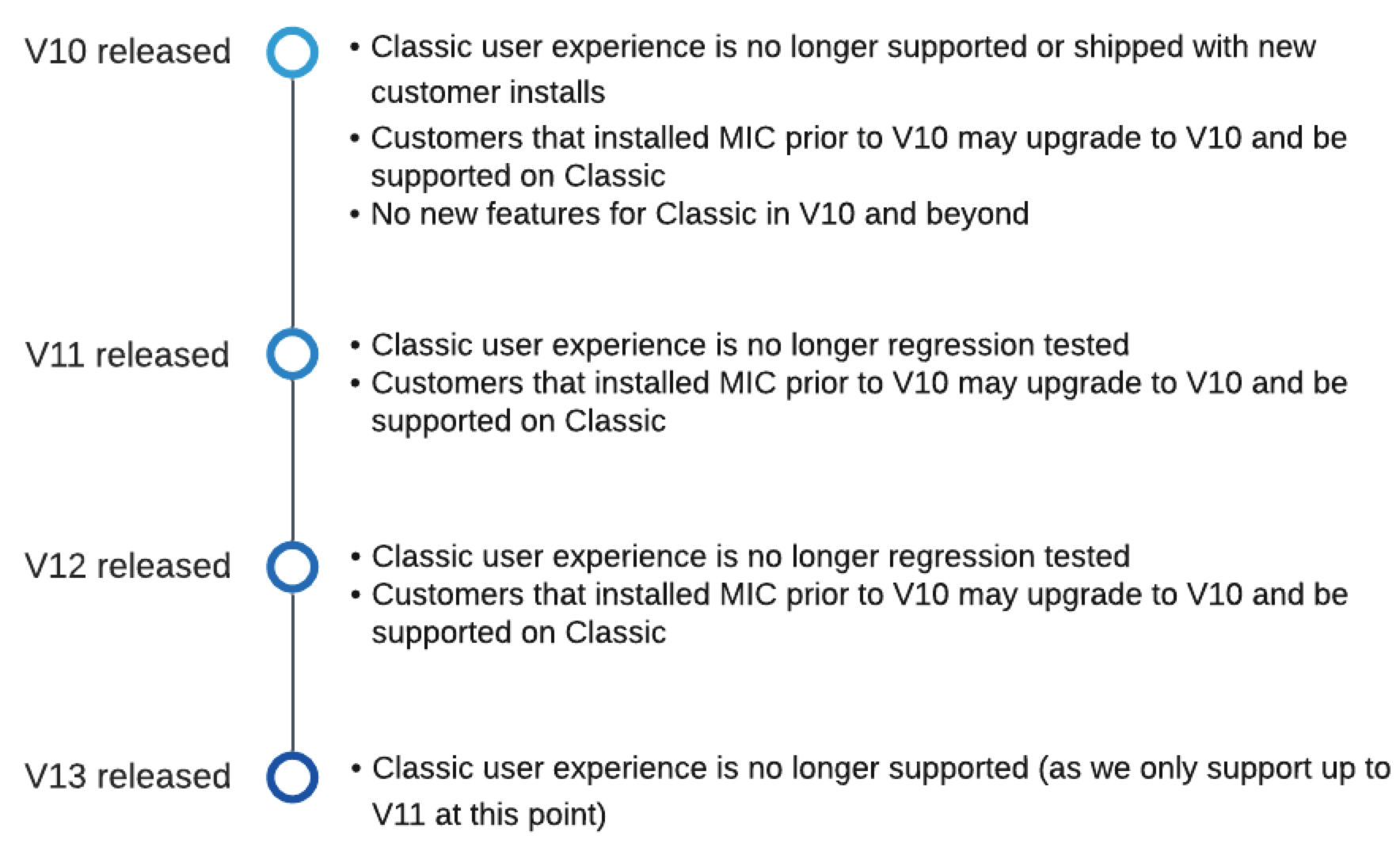
In line with Salesforce's deprecation of Classic, the Medical Information Cloud Classic user experience was deprecated in V11, and several Classic items that the Medical Information Cloud Lightning module used in V10 were deprecated in V12. As support for the Classic user experience and the deprecated items have been removed, the deprecated items should no longer be used.
As of V11, the Classic user experience is no longer utilized or supported.
If you upgraded to V10 and are still on V10, the Classic user experience is still supported. This support ends upon upgrade to V11 or when V13 is released due to our support policy. Visit Release process.
Related work item: MIC-2226
Deprecated items
The entities listed in these tables have been deprecated and no longer ship with Medical Information Cloud:
Deprecated Aura components
| Aura component | Notes |
|---|---|
| MED_WorkspaceRefresh | This component has been deprecated. |
Deprecated objects
| Object | Notes |
|---|---|
| Mavens Key Contact | Deprecated |