Workflows
A workflow is a document process modeled as a progression of stages and activities associated with those stages.
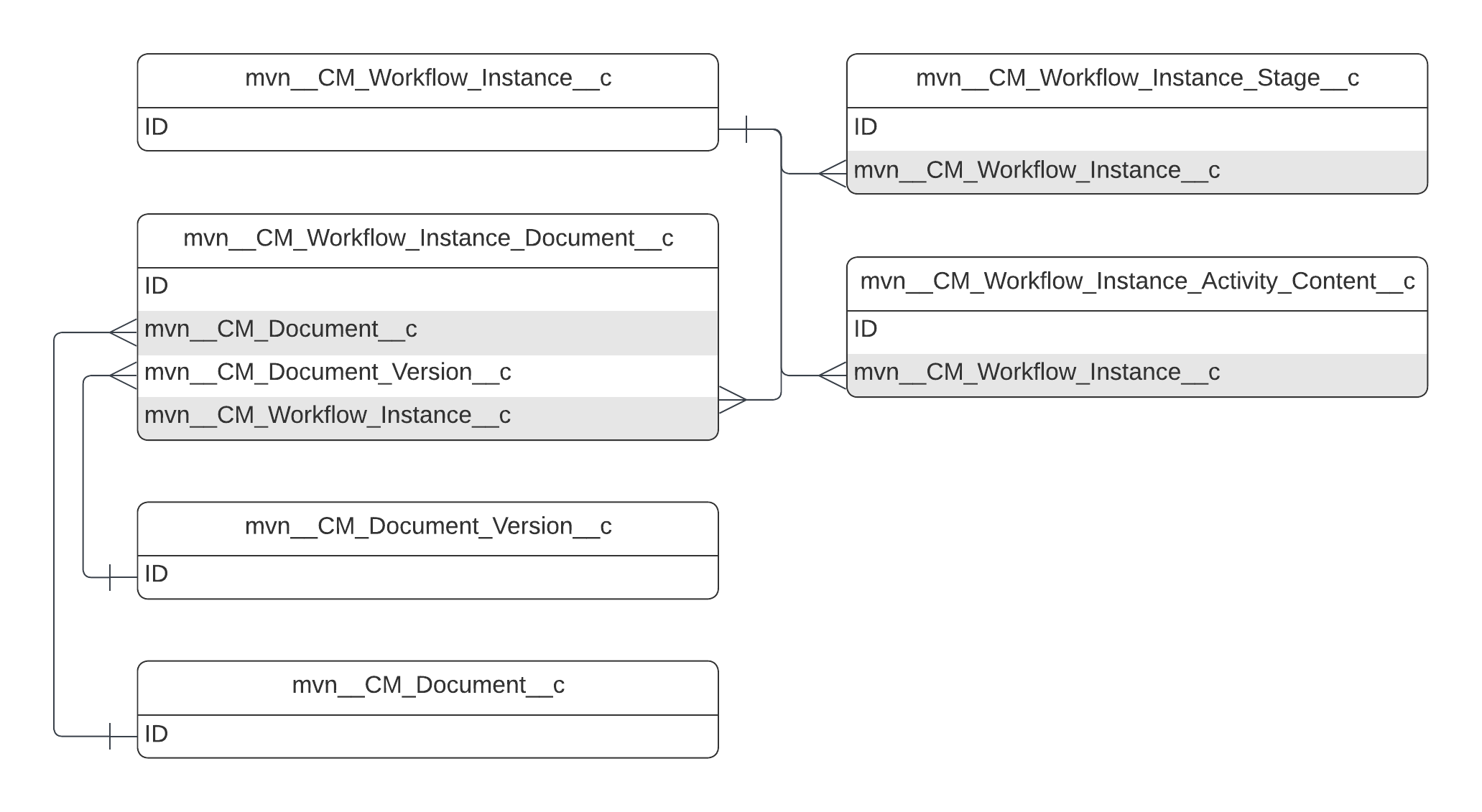
Workflows are defined by creating Workflow, Workflow Stage, Workflow Stage Activity, Workflow Stage Transition, and Workflow Activity Capacity custom metadata type records. When a workflow becomes active, a series of workflow-related custom objects (i.e. Workflow Instance, Workflow Instance Stage, and Workflow Instance Document) are instantiated to track the instance of the workflow.
A Workflow Instance has a status (Pending, Complete, Canceled) and
an outcome (Approved, Rejected, Completed). As the Workflow
Instance transitions between stages, it can optionally assign activities
and modify the status of the document associated with it. For example, a
workflow can be configured to change the status of a document
to In Review when the workflow starts.
Workflow Stage Activities include tasks, which are to-do items assigned to users to progress a document through a workflow.
Configuration
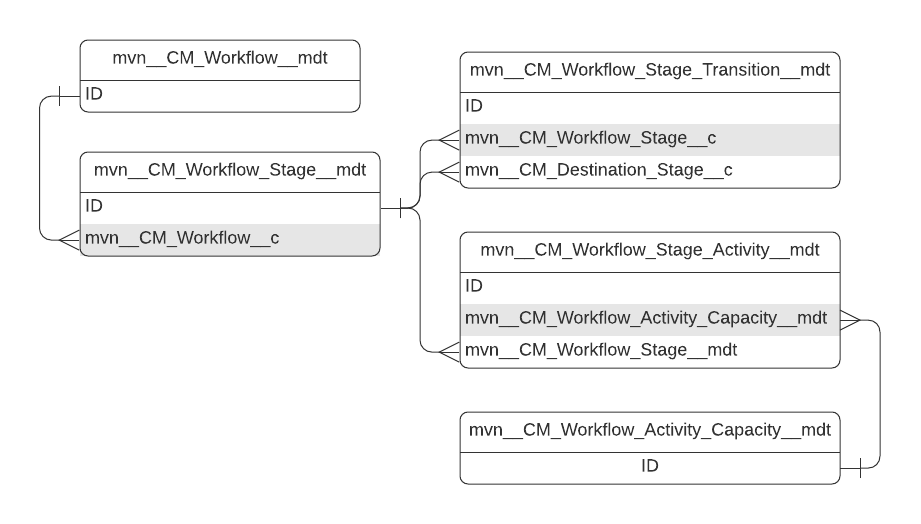
Workflows are configured using custom metadata types. The custom metadata types that configure workflows include:
-
Workflow - a document process.
-
Workflow Stage - a possible step in a workflow.
-
Workflow Stage Activity - the type of activity or to-do item that upon completion and when paired with transitions activates different stages in a workflow.
-
Workflow Stage Transition - the criteria that must be met to move to a different stage in a workflow.
-
Workflow Activity Capacity - the capacity in which a user acts when reviewing an activity.
Workflows and Workflow Stages are associated with a one-to-many relationship. Each Workflow Stage can have multiple activities associated. Workflow Stage Transitions facilitate the transition of workflows between stages.
Workflows
A workflow or document process is defined in the CM_Workflow__mdt
custom metadata type. Each workflow is associated with a single
lifecycle and has entry criteria that determine whether/when a document
can enter the workflow. Only a single document is supported per
workflow.
Key concepts
-
Workflows are associated with a lifecycle.
-
For a document to enter a workflow, it must match the entry criteria configured for the workflow. Entry criteria are stored on the workflow's
CM_Entry_Criteria__cfield. Visit Criteria definition. -
A single document is supported per workflow.
-
Auto-start workflows automatically start when a document is created. Visit Auto-start workflows.
Localization
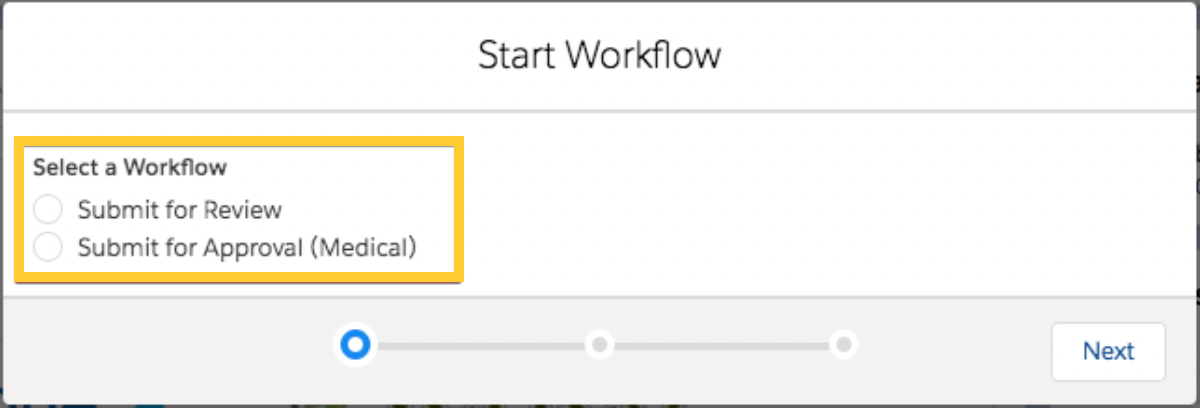
The name of the workflow is translated in the user interface using the
custom label referenced in the workflow's CM_Custom_Label_API_Name__c
field.
:::
 :::
:::
Auto-start workflows
To configure a workflow to start automatically when a document is
created set the value of its CM_Auto_Start__c to true.
Be careful when configuring auto-start workflows. If multiple auto-start workflows are found for a document, the document enters an error state and requires manual intervention.
Workflow Stages
Workflow Stages are defined in the CM_Workflow_Stage__mdt custom
metadata type and represent the list of possible steps in a workflow.
Not every instance of a workflow will necessarily enter every defined
Workflow Stage. The stages that become activated in a workflow instance
depend on the outcome of workflow activities and the transitions
configured for the workflow. For a list of workflow stage fields, visit
Workflow Stage.
Key concepts
-
Workflow Stages represent the list of possible steps in a workflow.
-
Workflows should have a single initial stage that represents the first step in the workflow.
-
Manual stages require user intervention to assign activities.
-
Workflow stages can (optionally) update the document state. Visit Document State.
-
Workflows can have multiple final stages. When the workflow reaches one of these stages, it is considered complete.
Document State
To update the state of the document when the workflow enters the stage,
populate the CM_Document_State__c field on CM_Workflow_Stage__mdt
with the desired state. If null, the workflow will not update the
document state when the workflow enters this stage. For a list of
document state fields, visit Document State.
The value of CM_Document_State__c must be a valid state for the
lifecycle associated with the workflow.
Localization
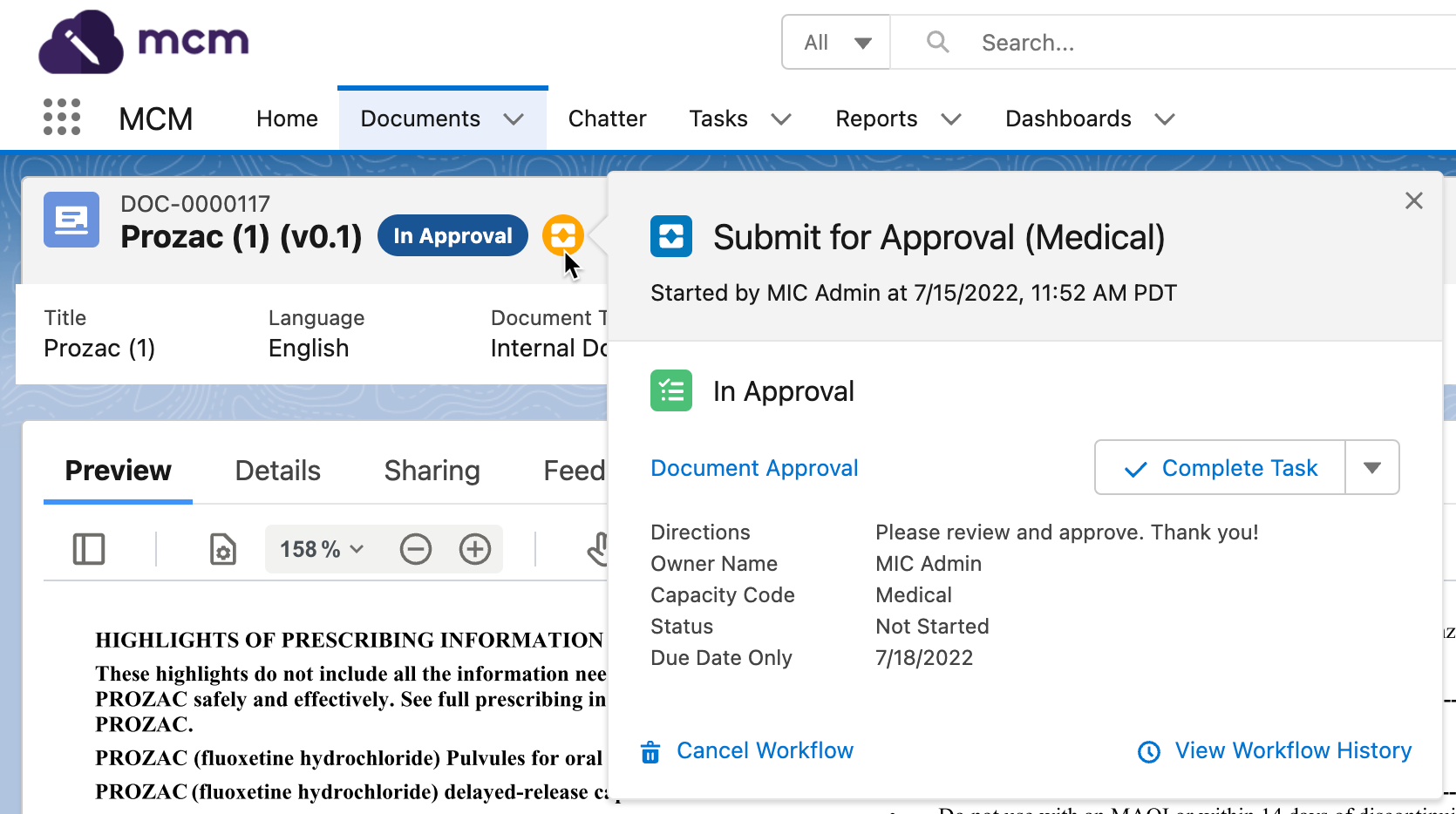
The name of the Workflow Stage is translated in the user interface using
the custom label referenced in the Workflow Stage's
CM_Custom_Label_API_Name__c field.
:::
 :::
:::
Workflow Stage Activities
Workflow Stage Activities are the types of activities or to-do items
that upon completion and when paired with transitions activate different
stages in a workflow and progress a document through the workflow.
Workflow Stage Activities are defined in
the CM_Workflow_Stage_Activity__mdt custom metadata type. You can
associate many Workflow Stage Activities to a single Workflow Stage. For
a list of Workflow Stage Activity fields, visit
Workflow Stage Activity.
Key concepts
-
Activity assignments can either be manual or automatic. Visit Assignment.
-
Activities are either general (e.g. peer review) or approval (e.g. MLR review) activities. Visit Type.
-
When the
Require Electronic Signaturesfield on theMCM Global Settingcustom metadata type is activated, all workflow activities require an electronic signature. Visit Electronic signatures.
Assignment
The assignment of activities is configured using the CM_Assignment__c
field. To prompt a user to manually assign activities, set the value to
Manual or Document Role, otherwise, the activity is assigned to the
Document Creator, Document Owner, Workflow Creator, or Workflow Owner.
If the activity is assigned to a Document Role, the activity is
pre-populated with all users with that specified Document Role. Users
can be added or removed from the pre-populated list before starting the
workflow.
Activities cannot be assigned to inactive users.
When the CM_Role_Assignment__c field is populated, the activity that
is created as part of the workflow will create a specified Document Role
for the owner of the activity. When the CM_Role_Assignment__c field is
not populated, the Reviewer or Approver role is automatically assigned
depending on whether the activity is configured as an Approval or
General activity.
:::: ::: title :::
The Owner role cannot be selected in the Role Assignment field as a document is allowed to have only one Owner role. ::::
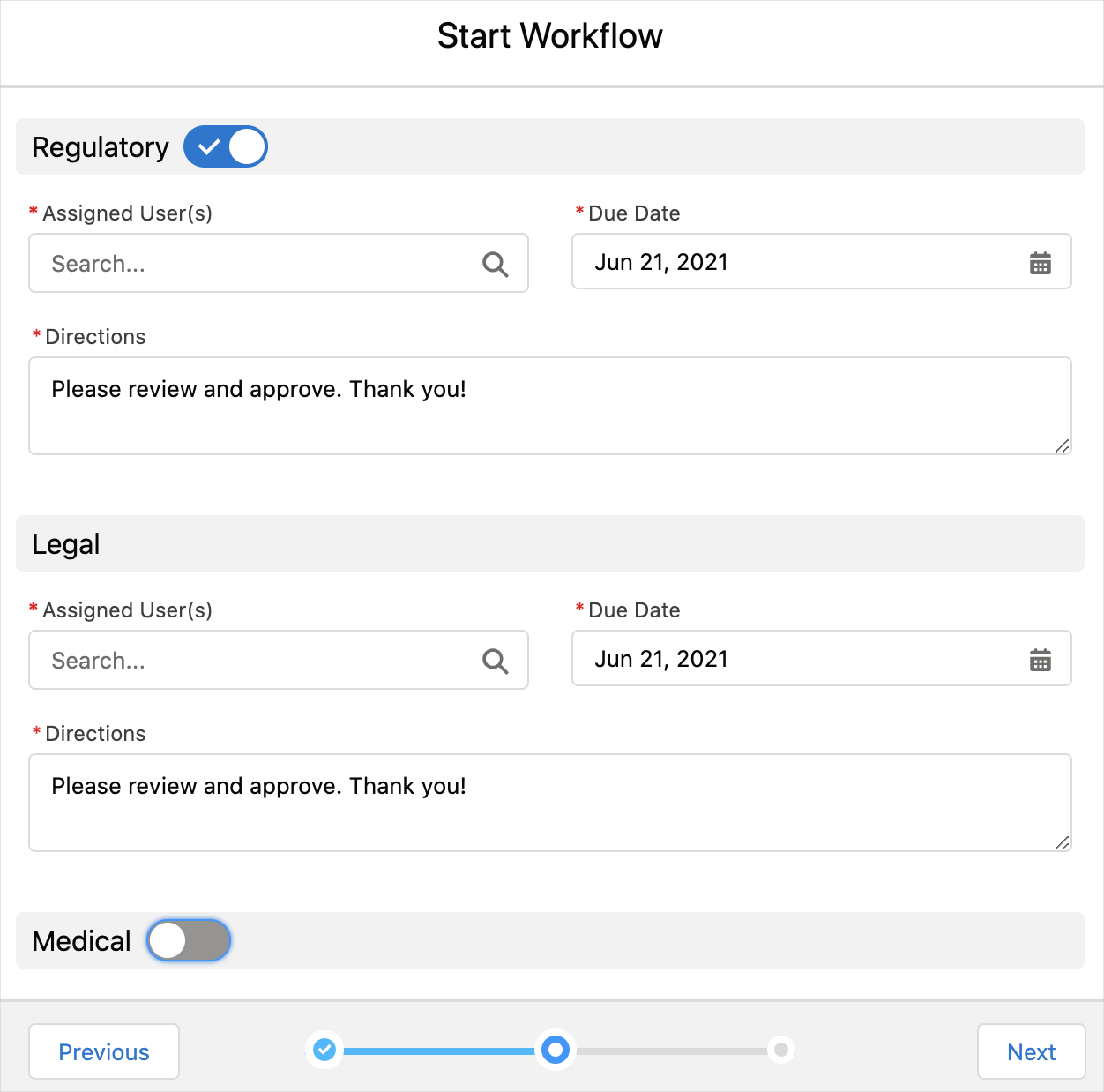
When an activity is configured as optional, the Start Workflow modal displays a toggle button next to the activity. The user can use this toggle to specify whether to create an assignment for that activity or not. At least one activity must be assigned before the workflow can be started.
:::
 :::
:::
Type
Activity type is configured using the CM_Type__c field. Activity types
include:
-
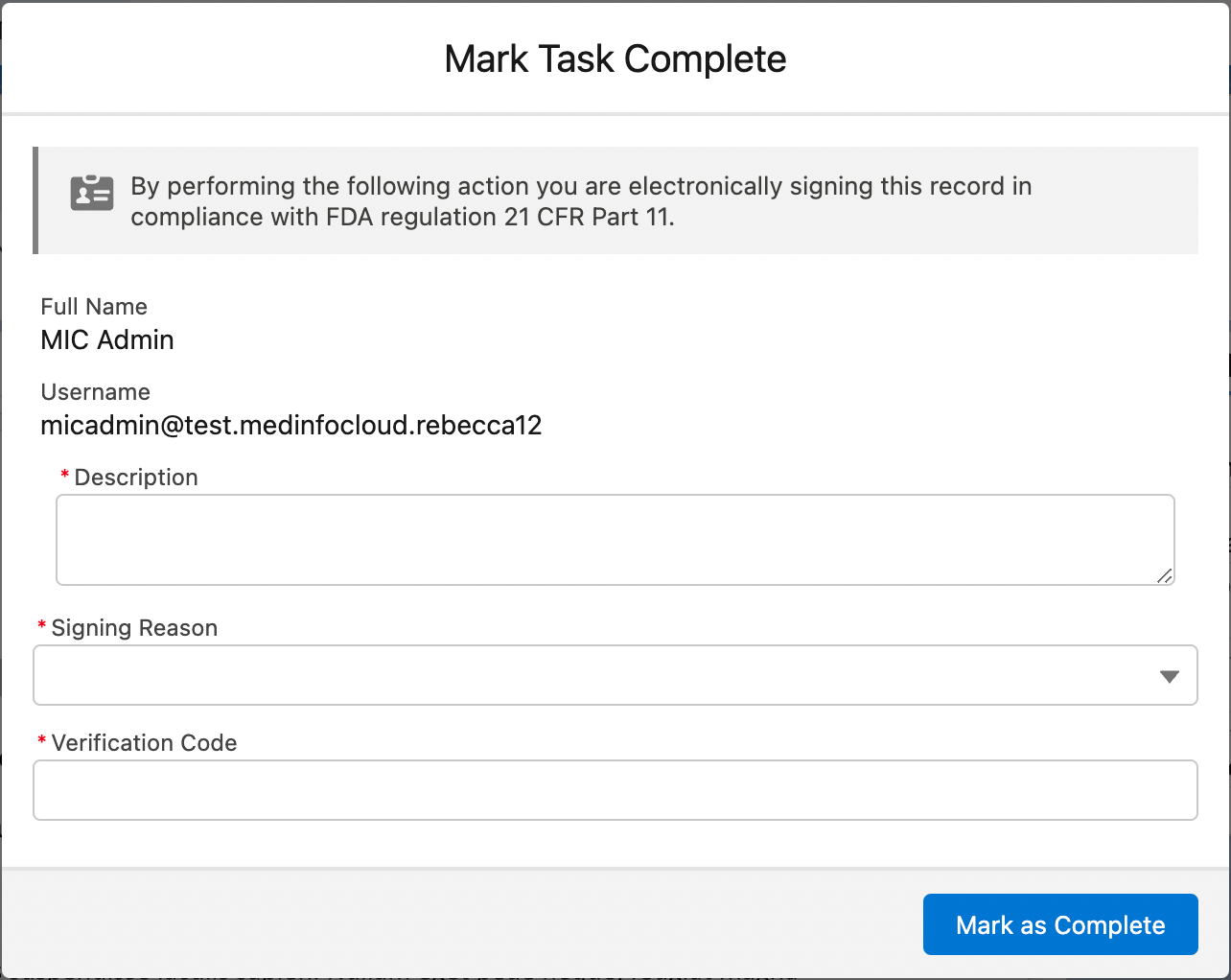
General activity. General activities are either pending or complete. When the user opens the activity modal, the
Mark as Completebutton appears.:::
 :::
::: -
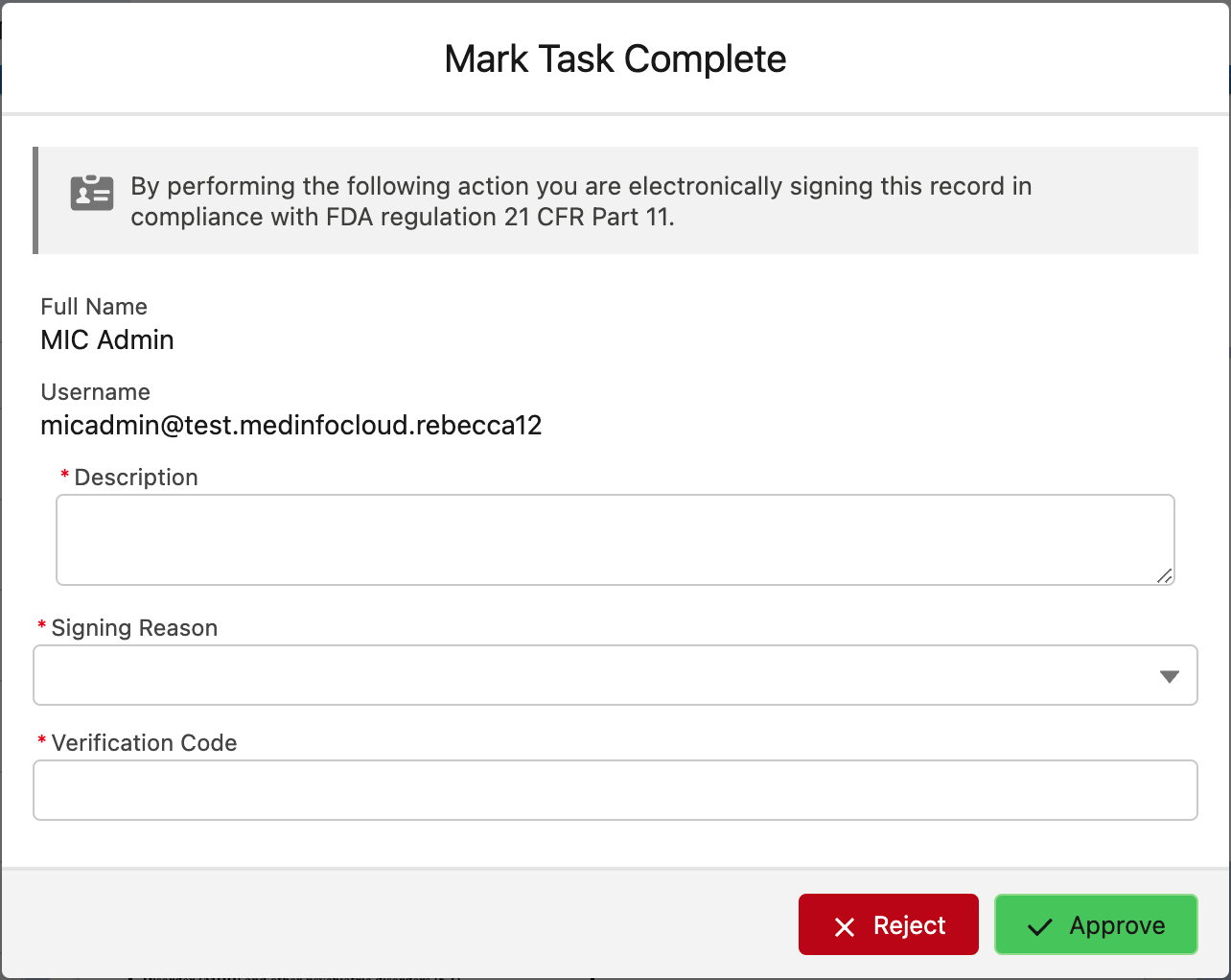
Approval activity. Approval activities require an
ApproveorRejectverdict.:::
 :::
:::
The buttons that are available in the Mark Task Complete modal, and
therefore the outcomes that are available when the workflow task is
completed or closed, can be customized with the
Activity Action
(mvn__CM_Activity_Action__mdt) and
Workflow Stage Activity Action
(mvn__CM_Workflow_Stage_Activity_Action__mdt) custom metadata types.
-
For each action button to appear in the Mark Task Complete modal, create a new Activity Action metadata record. The default Approve, Reject, and Mark as Complete buttons are available out of the box via the Approve (
CM_Approve), Reject (CM_Reject), and Complete (CM_Mark_Complete) metadata records.a. Configure the workflow event and status that should be used when one or all of the tasks are marked as complete or closed. For the list of available workflow events, reference Workflow Event Types below.
b. Customize the icon and label that should appear in the Mark Task Complete modal as well as the label that should appear in the Task Tile component, as desired.
-
For each custom Activity Action metadata record, create a corresponding Workflow Stage Activity Action metadata record. The default Activity Action metadata records do not need any Workflow Stage Activity Action metadata records.
a. Relate the Workflow Stage Activity Action metadata record to the Workflow Stage Activity metadata record that the action buttons should be used for.
Workflow Stage Transitions
Workflow Stage Transitions are the criteria that must be met to move a
workflow to a different stage. Workflow Stage Transitions are defined in
the CM_Workflow_Stage_Transition__mdt custom metadata type. You can
associate many Workflow Stage Transitions to a single Workflow Stage.
For a list of Workflow Stage Transition fields, visit
Workflow Stage Transition.
Key concepts
-
Workflow Stage Transitions dictate how and when a workflow will transition between stages.
-
The
CM_Condition__cfield houses the logic that determines when a transition executes. Transitions occur when the Condition evaluates totrue. -
The Destination Stage is the stage the workflow will transition to when the transition runs.
The Destination Stage must be a stage under the same workflow as the current stage.
Conditions
Each Workflow Stage Transition has a condition in which the transition executes. The condition is a JSON document that must conform to the following:
-
The
pathproperty must reference theevent,documentVersion, ortaskobject using dot notation. -
The
operatorproperty must beEquals. -
The
valueproperty must be a Workflow Event Type. Visit Workflow Event Types.
Workflow Event Types
The following event types are valid enums to use when configuring transitions:
-
SingleTaskCompleted - published when a single non-approval workflow activity for the current stage has been completed.
-
AllTasksCompleted - published when all non-approval workflow activities for the current stage have been completed.
-
SingleReviewerApproved - published when the first reviewer marks their activity as
Approved. -
AllReviewersApproved - published when all reviewers have marked their activities as
Approved. -
SingleReviewerRejected - published when a single reviewer has marked their activity as
Rejected. -
AllReviewersRejected - published when all reviewers have marked their activities as
Rejected.
Examples
{
    "path": "event.mvn__CM_Type__c",
    "operator": "Equals",
    "value":  "SingleTaskCompleted"
}
{
    "AllTrue": [
        {
            "path": "event.type",
            "operator": "Equals",
            "value": "AllTasksCompleted"
        },
        {
            "path": "documentVersion.mvn__CM_Document_Type__c",
            "operator": "Equals",
            "value": "CM_Internal_Document"
        },
        {
            "path": "task.KLS_Type__c",
            "operator": "Equals",
            "value": "some custom type"
        }
    ]
}
Workflow Activity Capacity
The Workflow Activity Capacity
(CM_Workflow_Activity_Capacity__mdt) custom metadata type defines the
capacities in which users act when reviewing workflow activities. For a
list of Workflow Activity Capacity fields, visit
Workflow Activity Capacity.
To configure a custom capacity for a specific Workflow Stage Activity,
associate a Workflow Activity Capacity record to the appropriate
Workflow Stage Activity record via
the mvn__CM_Workflow_Stage_Activity__mdt.mvn__CM_Workflow_Activity_Capacity__c field.
Storing workflow data
When a workflow is activated, the
Workflow Instance
(mvn__CM_Workflow_Instance__c),
Workflow Instance Stage
(mvn__CM_Workflow_Instance_Stage__c), and
Workflow Instance Document
(mvn__CM_Workflow_Instance_Document__c) custom objects begin storing
information about the activated workflow. More specifically, a Workflow
Instance record is created to track the workflow's progress, and a
Workflow Instance Stage record is created each time the workflow
transitions to a new stage. The Workflow Instance Document contains a
list of documents associated with the workflow.