Groups
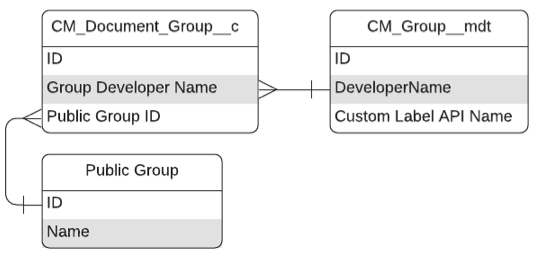
Access to documents in Regulated Content Cloud can be granted using groups. Document groups
define groups of users and are maintained in the
Document Group (CM_Document_Group__c)
custom object. A document group is always associated with both a
Public Group and a Group.
A public group is a standard Salesforce object that allows customers to define a set of Salesforce users comprised of users, roles, and other groups.
Regulated Content Cloud only supports public groups comprised of individual Salesforce users.
Groups define groups of Regulated Content Cloud users and are maintained in the
Group (CM_Group__mdt) custom
metadata type.
Configure groups
To create a Document Group:
-
Create the Group.
-
Navigate to the CM_Group__mdt records list.
-
In the Quick Find box in Setup, search for and select Custom Metadata Types.
-
In the Group row, click Manage Records.
-
-
Click New.
-
Enter group information. For a list of fields, visit Group.
-
Click Save.
-
-
Create the Public Group.
-
In the Quick Find box in Setup, search for and select Public Groups.
-
Click New.
-
Enter a Label and Group Name and add the desired members to the group.
-
Click Save.
-
-
Create the Document Group.
-
Navigate to the Document Groups tab.
-
Click New.
-
Enter document group information.
-
Document Group Name - enter the name for the group.
-
Public Group ID - enter the Salesforce ID of the Public Group you created.
-
Group Developer Name - enter the DeveloperName of the
CM_Group__mdtrecord associated with this document group.
-
-
Click Save.
-
If you create a Public Group named MCM - North America with the ID
00G17000002kJ7X, then creating a Document Group with a
CM_Public_Group_Id__c = 00G17000002kJ7X will add every user that is
a member of MCM - North America to the Document Group.