Document Permissions
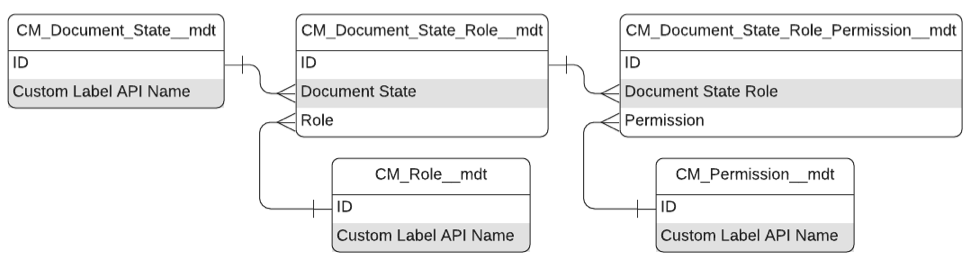
Once a role is inserted into a document's Document Roles database table, the Document Roles table specifies what system-defined actions users and groups assigned to a Role are allowed to do as the document progresses through its lifecycle. The Document Roles table is determined by these custom metadata types: and Document State Role Permission custom metadata type records.
-
Permission (
mvn__CM_Permission__mdt) - grants users or groups of users system-defined actions at either the document or document version level. -
Document State Role (
mvn__CM_Document_State_Role__mdt) - connects the Document State and Role custom metadata types. -
Document State Role Permission (
mvn__CM_Document_State_Role_Permission__mdt) - connects the Document State Role and Permission custom metadata types and grants a Role for a given Document State a specific Permission.
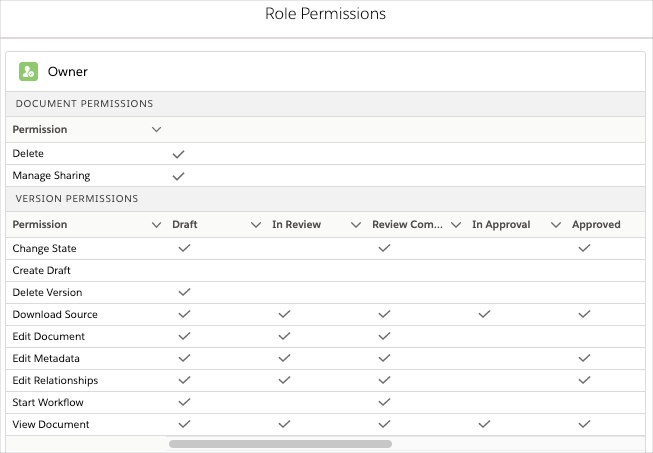
On the Sharing tab of a document record, you can view the list of users and groups that have access to the document. You can also access the Role Permissions matrix for a role to see what permissions that role has for the document.
Permissions
Regulated Content Cloud ships with eleven predefined permissions, which can be found in the
Permission (CM_Permission__mdt) custom
metadata type. Each permission grants a user or group of users a
system-defined action at either the document or document version level.
Once granted, document-level permissions give users the ability to
perform actions regardless of the document's state. Document
version-level permissions are governed by the matrix model of state and
permission.
Do not create, modify, or delete any permission records. Permission records are considered protected system metadata.
Document permissions
| Label | DeveloperName | Description |
|---|---|---|
| Delete | mvn__CM_Delete | Delete the document and any document versions. |
| Manage Sharing | mvn__CM_Manage_Sharing | Manage the Document Roles table for the document. |
Document version permissions
| Label | DeveloperName | Description |
|---|---|---|
| Change State | mvn__CM_Change_State | Change the status value of the document version record. |
| Create Draft | mvn__CM_Create_Draft | Create a new document version in the document lifecycle's initial state. |
| Delete Version | mvn__CM_Delete_Version | Delete a document version. |
| Download Source | mvn__CM_Download_Source | Download the file associated with a document if the file is hosted in Salesforce. Visit Files. |
| Edit Document | mvn__CM_Edit_Document | Check the document in and out, and upload a new version of the Document. |
| Edit Metadata | mvn__CM_Edit_Metadata | Edit document fields. |
| Edit Relationships | mvn__CM_Edit_Relationships | Add, edit, or delete document relationships. Visit Relationships. |
| Start Workflow | mvn__CM_Start_Workflow | Start a workflow for a document. Visit Workflows and tasks. |
| View Document | mvn__CM_View_Document | Read access to the document, its associated file, and any metadata, including relationships. |