Objects
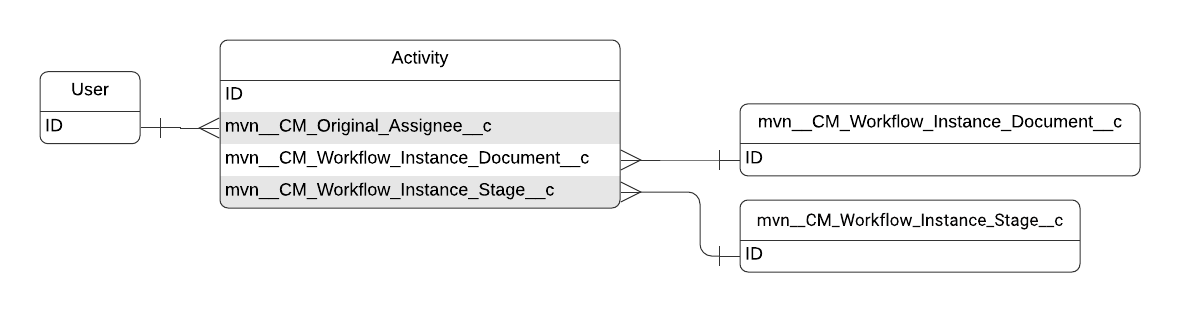
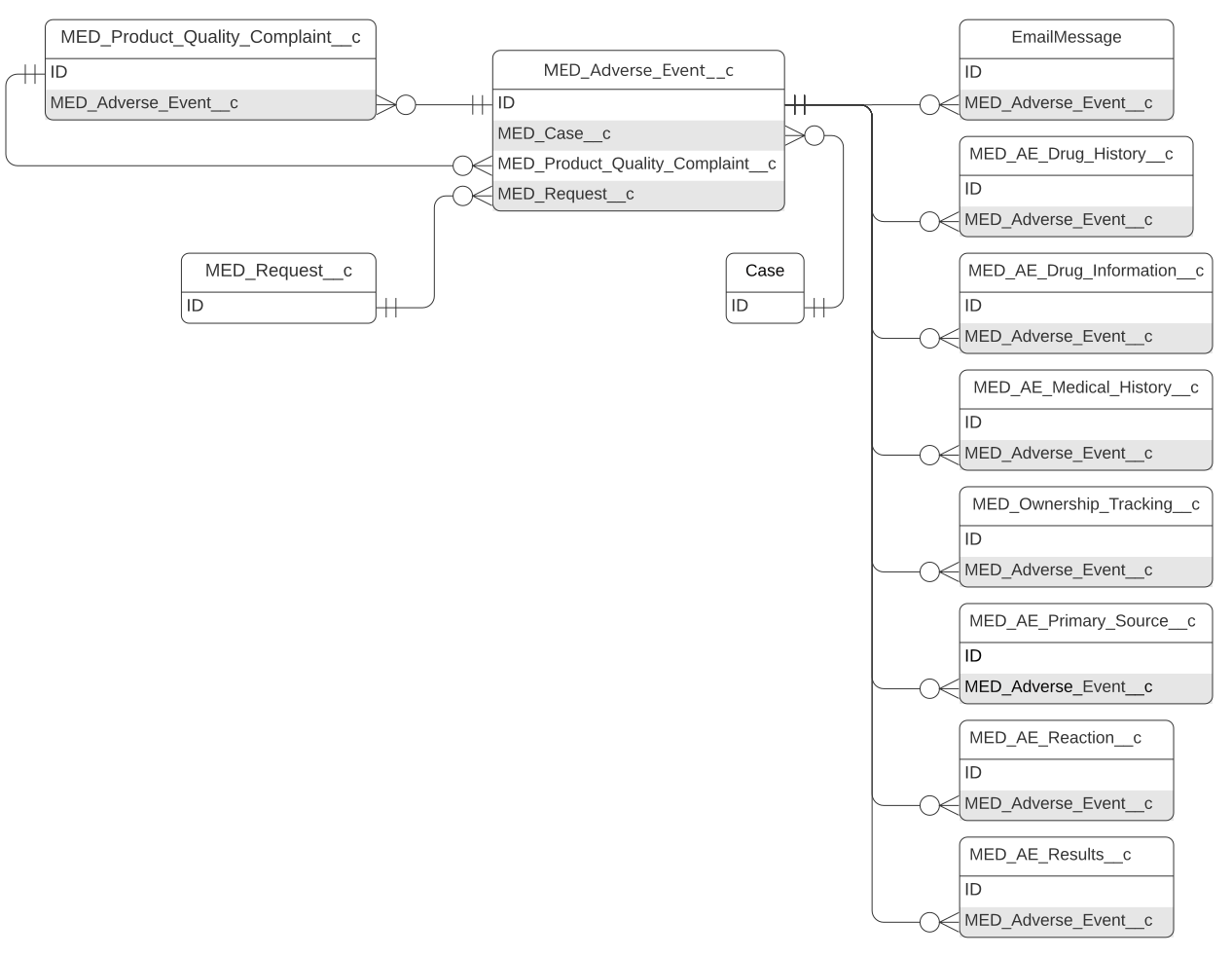
This reference page provides information about the objects that the Medical Information Cloud product uses. Each object section on this page includes a description of the object, an entity relationship diagram for that object, and a table of custom and standard fields that the object uses. The schema tables do not include standard fields that the Medical Information Cloud product does not use out of the box.
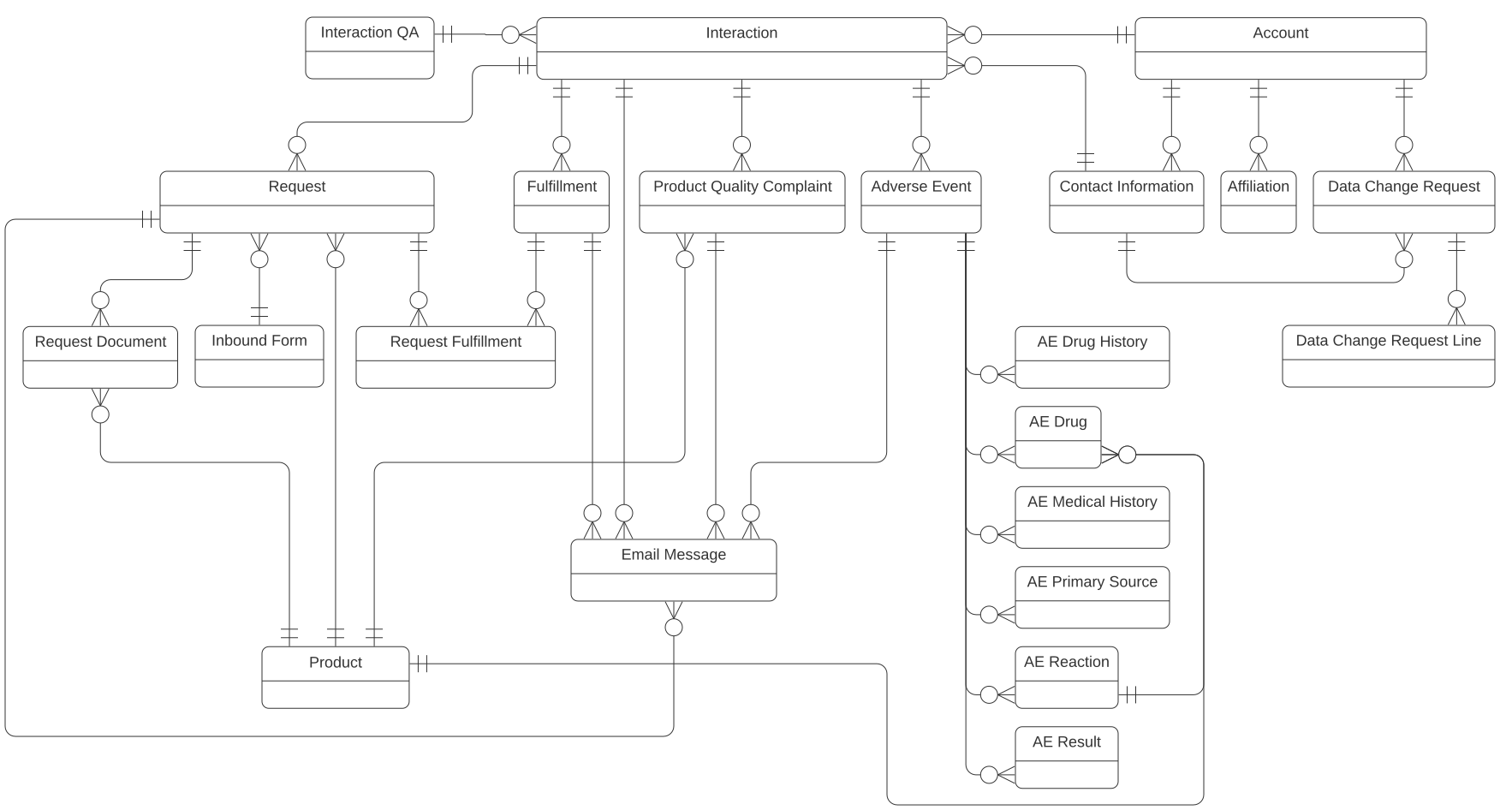
The simplified Inquiry Management module entity relationship diagram below displays many of the primary Inquiry Management objects and their relationships. The diagram does not depict every object or relationship that the module uses. To see a diagram for a particular object that contains all relevant Inquiry Management relationships, navigate to that object's section on this page or use Salesforce's Schema Builder.
Account
The Account standard object stores information about a person or business. Accounts can be:
-
Health Care Professionals (HCP), e.g. doctors and pharmacists
-
Non-HCPs, e.g. consumers and payers
-
Employees, e.g. sales representatives and medical science liaisons (MSL)
-
Institutions, e.g. hospitals and pharmacies
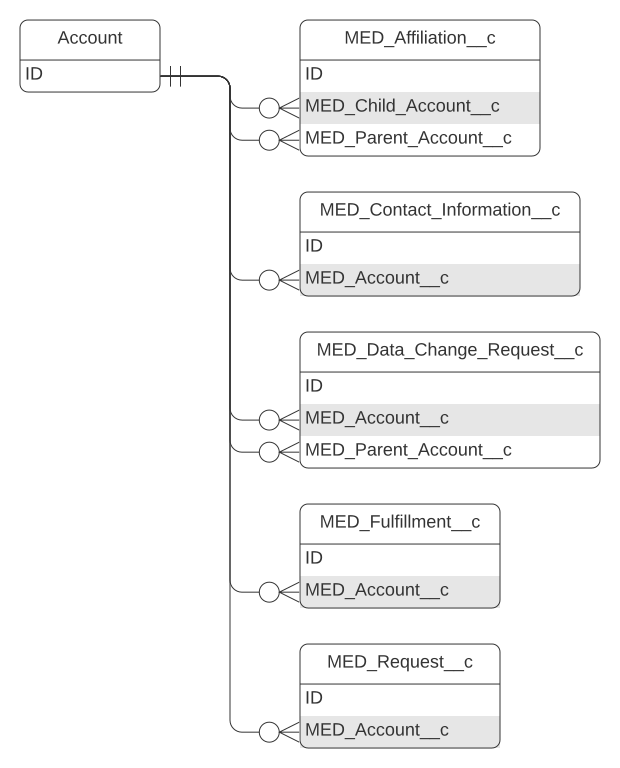
The table below only includes Inquiry Management custom fields.
Account schema
| Field label | API name | Data type | Description |
|---|---|---|---|
| Account Name Formula | MED_Account_Name_Formula__c | Formula (Text) | Returns the formatted name of the account that can be used for quick display or stamped values. |
| Anonymize | MED_Anonymize__c | Checkbox | A checkbox for anonymizing an Account. When checked, a daily batch job will check if all the Cases have been closed for the Account and if so, will Anonymize the account. |
| Company | MED_Company__c | Picklist | Company associated with the Employee Account. |
| Country | MED_Country__c | Picklist | Primary country for the account. |
| Country Summary | mvn__MED_Country_Summary__c | Picklist (Multi-Select) | Compiles the countries listed in the account and contact information country fields. |
| Credentials | MED_Credentials__c | Picklist | Picklist of the professional's (Person Account) credentials. Edit the picklist to change the available credentials. |
| Employee Type | MED_Employee_Type__c | Picklist | Type of employee. |
| External ID | MED_External_ID__c | Text | External ID is used for data loading and master data management integrations. |
| Gender | MED_Gender__c | Picklist | Gender of the account. |
| Legal Hold | MED_Legal_Hold__c | Checkbox | Indicates if there is a legal hold on the record. If true, the record cannot be modified, anonymized, or deleted. |
| Locked | MED_Locked__c | Formula (Checkbox) | Indicates if the record is locked. When locked, a record cannot be modified, anonymized, or deleted. The record is locked if it is closed or canceled or if a legal hold has been placed on it. |
| Override Lock | MED_Override_Lock__c | Checkbox | Allows for this account to be edited even when it is locked. |
| Primary Language | MED_Primary_Language__c | Picklist | Primary language of the account. |
| Provider ID | mvn__MED_Provider_ID__c | Text(50) (Unique Case Insensitive) | Used to identify health care providers by region or country. Must follow industry standards and be unique to match across internal and 3rd party systems. |
| Provisional ID | MED_Provisional_ID__c | Text(18) | Medical Information Cloud no longer uses this field to pass a unique identifier to Veeva when an Account is created. |
| Record Type Name | MED_Record_Type_Name__c | Formula(Text) | Displays the Name of the Account Record Type. |
| Request to Anonymize | MED_Request_to_Anonymize__c | Checkbox | Used to request account anonymization by another user who has permission to do so. Used to drive list views/reports. |
| Salutation | MED_Salutation__c | Picklist | Salutation of the Account. Used in Cover Letters. |
| Source | MED_Source__c | Picklist | Source system of the account information. |
| Specialty | MED_Specialty__c | Picklist | Picklist of the professional's specialty. Edit the picklist to change the available values. |
| Status | MED_Status__c | Picklist | Account status used in DCR and account management. |
Activity
The primary metadata used to store task data is the Task standard object. The Task object inherits all of its fields from the Activity standard object. For more information on the Task object, visit Salesforce's documentation.
Activity schema
| Field label | API name | Data type | Description |
|---|---|---|---|
| Assigned Document Role Developer Name | mvn__CM_Assigned_Document_Role_Developer_Name__c | Text(40) | System maintained field with the assigned document role for this workflow task. |
| Capacity Code | mvn__CM_Capacity_Code__c | Text(255) | Capacity in which this activity is being carried out. |
| Created By Name | mvn__CM_Created_By_Name__c | Formula (Text) | Name of the user who created the activity. |
| Directions | mvn__CM_Directions__c | Text Area(255) | Directions to the assignee. |
| Document Version | mvn__CM_Document_Version__c | Lookup(Document Version) | Id of the associated Document Version. |
| Document Version Fully Qualified Name | mvn__CM_Document_Version_Fully_Qualified_Name__c | Formula (Text) | Fully Qualified Name of the document version. The Fully Qualified Name is comprised of the document version's Title followed by the Version Number. For example, if the Fully Qualified Name of a document version is Dosing Guide (v0.4), Dosing Guide is the Title, and 0.4 is the Version Number. |
| Notifications Muted | mvn__CM_Notifications_Muted__c | Checkbox | When true, notifications that would be sent from updates on this task will not be sent. |
| Original Assignee | mvn__CM_Original_Assignee__c | Lookup(User) | Name of the user who the activity was originally assigned to before the activity was reassigned to a delegated approver. |
| Owner Name | mvn__CM_Owner_Name__c | Formula (Text) | Name of the user who is assigned the activity. |
| Record Type Developer Name | mvn__CM_Record_Type_Developer_Name__c | Formula (Text) | API name of the record type. |
| Record Type Name | mvn__CM_Record_Type_Name__c | Formula (Text) | Name of the record type. |
| Signing Reason | mvn__CM_Signing_Reason__c | Picklist | Reason a user completed the activity. Picklist values include: - I have reviewed this document - I am the author of this document |
| TwoFactorInfoId | mvn__CM_TwoFactorInfoId__c | Text(18) | Record ID of the TwoFactorInfo record used to electronically sign this activity. |
| Verification Code | mvn__CM_TOTP_Code__c | Text(100) | One-time code that the activity owner inputs when marking the activity as complete. This code verifies the activity owner's identity. This field is only used when electronic signature is enabled. |
| Workflow Instance Document | mvn__CM_Workflow_Instance_Document__c | Lookup(Workflow Instance Document) | Id of the associated Workflow Instance Document. |
| Workflow Instance ID | mvn__CM_Workflow_Instance_ID__c | Formula (Text) | Id of the associated Workflow Instance. |
| Workflow Instance Stage | mvn__CM_Workflow_Instance_Stage__c | Lookup(Workflow Instance Stage) | Id of the associated Workflow instance Stage. |
| Workflow Process Flag | mvn__CM_Workflow_Process_Flag__c | Checkbox | System field used when this activity is being processed by a Regulated Content Cloud workflow service. |
Adverse Event
The Adverse Event object stores information on perceived, unintended, or unfavorable symptoms of a product and sends that information out for processing. Adverse Event capture is based on the ICH E2B (R3) definition and contains these sections:
-
C.1
-
C.5
-
H.1
-
H.2
The Adverse Event object has a one-to-many lookup relationship with the Interaction object; a single Interaction record can be associated to multiple Adverse Event records.
Adverse Event schema
| Field label | API name | Data type | Description |
|---|---|---|---|
| Additional Documents Available | MED_Additional_Documents_Available__c | Picklist | E2B (R3): C.1.6.1 Are Additional Documents Available? User guidance: When retransmitting information, the sender (retransmitter) indicates 'true' in this data element only if they have the documents available. Conformance: Required Data type: Boolean OID: None Value allowed: false, true |
| AE Number | Name | Auto Number | Number that is automatically assigned to the record upon the record's creation. |
| AE Owner | MED_Owner_HyperLink__c | Formula (Text) | Hyperlink to Owner record page. |
| Alerts | MED_Alerts__c | Formula (Text) | Shows a composite summary of different flags (urgent, roll up, escalated, locked, SLA). |
| Anonymize | MED_Anonymize__c | Checkbox | Indicates if the record should be anonymized. If True, a workflow removes personally identifiable information (PII) from the record. |
| Autopsy Cause of Death | MED_Autopsy_Cause_of_Death__c | Text(250) | E2B (R3): D.9.4.r.2 Autopsy-determined Cause(s) of Death (free text) Conformance: Optional, but required if D.9.4.r.1 is populated. Data type: 250AN OID: None Value allowed: Free text |
| Autopsy Done? | MED_Autopsy_Done__c | Picklist | E2B (R3): D.9.3 Was Autopsy Done? Conformance: Optional, but required if D.9.1 is populated. Data type: Boolean OID: None Value allowed: false, true nullFlavor: ASKU, NASK, UNK |
| Case Thread Token | MED_Case_Thread_Token__c | Formula (Text) | Copy of the related Case thread token that can be used for email merge fields. |
| Caused or Prolonged Hospitalization | MED_Caused_or_Prolonged_Hospitalization__c | Picklist | E2B (R3): Moved to E.i.3.2 (AE Reaction) |
| Concomitant Therapies | MED_Concomitant_Therapies__c | Checkbox | E2B (R3): D.7. 3 Concomitant Therapies User guidance: When this data element is set to 'true', details should be provided in the narrative section. Conformance: Optional Data type: Boolean OID: None Value allowed: True |
| Congenital Anomaly/Birth Defect | MED_Congenital_Anomaly_Birth_Defect__c | Picklist | E2B (R3): Moved to E.i.3.2 (AE Reaction) |
| Country of Occurrence | MED_Country_of_Occurrence__c | Picklist | E2B (R3): Moved to E.i.9 (AE Reaction) |
| Date of Awareness | MED_Date_of_Awareness__c | Date | Captures the date of first awareness for the Adverse Event. E2B (R3): C.1.4 Date Report Was First Received from Source User guidance: For organizations transmitting an initial case, this data element should be the date when the information was received from the primary source and fulfilling the 4 minimum criteria, as described in the Section 3.3.1. When retransmitting information received from another regulatory agency or another company or any other secondary source, C.1.4 should be the date the retransmitter first received the information. Conformance: Required Data type: Date / Time OID: None |
| Date of Death | MED_Date_of_Death__c | Date | E2B (R3): D.9.1 Date of Death Conformance: Optional Data type: Date / Time OID: None nullFlavor: MSK, ASKU, NASK |
| Date/Time Closed | MED_Date_Time_Closed__c | Date/Time | Date and time record was closed. |
| Date/Time Opened | MED_Date_Time_Opened__c | Date/Time | Date and time record was created. |
| Date/Time Submitted | MED_Date_Time_Submitted__c | Date/Time | Date and time record was submitted to pharmacovigilance. |
| Disabling/Incapacitating | MED_Disabling_Incapacitating__c | Picklist | E2B (R3): Moved to E.i.3.2 (AE Reaction) |
| Display Name | MED_Display_Name__c | Formula (Text) | Resolved value becomes the Adverse Event tab label. |
| Due Date | MED_Due_Date__c | Date/Time | Date and time the record is due to be closed. |
| Due Date Warning | MED_Due_Date_Warning__c | Date/Time | Hidden field on the layout that is used as a formula helper to provide the time when the Alerts field should display the due date warning icon. |
| Email To Address | MED_Email_To_Address__c | Text Area(255) | List of email addresses for the local pharmacovigilance team that the Product Quality Complaint information should be emailed to. This list is based on the Local Setting custom metadata. |
| Escalated? | MED_Escalated__c | Formula (Text) | Displays icon if the record is escalated. |
| ICSR Batch Number | MED_ICSR_Batch_Number__c | Text(255) | Batch number for the ICSR report generated for this Adverse Event. |
| Integration Message | MED_Integration_Message__c | Long Text Area(32768) | Message returned from E2B integration. |
| Integration Status | MED_Integration_Status__c | Picklist | Status of integration with system to process E2B file. |
| Interaction | MED_Case__c | Lookup(Interaction) | Lookup to the Interaction associated to the Adverse Event. |
| Is Closed | MED_Is_Closed__c | Formula (Checkbox) | Indicates if the record is closed. |
| Is Escalated | MED_Is_Escalated__c | Formula (Checkbox) | Indicates if the Adverse Event is currently escalated to another user. The field is marked as true if the Adverse Event Owner is different than the Interaction Owner. |
| Legal Hold | MED_Legal_Hold__c | Checkbox | Indicates if there is a legal hold on the record. If true, the record cannot be modified, anonymized, or deleted. |
| Life Threatening | MED_Life_Threatening__c | Picklist | E2B (R3): Moved to E.i.3.2 (AE Reaction) |
| List of Documents Held | MED_List_of_Documents_Held__c | Text(100) | E2B (R3): C.1.6.1.r.1 Documents Held by Sender User guidance: A description of the documents held by the sender relevant to this ICSR (e.g. clinical records, hospital records, autopsy reports, ECG strips, chest X-ray, or photographs) should be listed individually in this data element. Conformance: Optional, but required if C.1.6.1 is 'true'. Data type: 2000AN OID: None Value allowed: Free text |
| Locked | MED_Locked__c | Formula (Checkbox) | Indicates if the record is locked. When locked, a record cannot be modified, anonymized, or deleted. The record is locked if it is closed or cancelled or if a legal hold has been placed on it. |
| Locked Flag | MED_Locked_Flag__c | Formula (Text) | Displays icon when the record is locked. |
| MedDRA Reported Cause Of Death | MED_MedDRA_Reported_Cause_Of_Death_LLT__c | Text(8) | This data element captures the MedDRA LLT code for the reported cause of death. E2B (R3): D.9.2.r.1b Conformance: Optional, but required if D.9.2.r.1a is populated. Data type: 8N OID: 2.16.840.1.113883.6.163 |
| MedDRA Version Autopsy Cause of Death | MED_MedDRA_Autopsy_Cause_of_Death__c | Text(4) | E2B (R3): D.9.4.r.1a MedDRA Version for Autopsy-determined Cause(s) of Death User guidance: MedDRA terms should be used where applicable. Conformance: Optional, but required if D.9.4.r.1b is populated. Data type: 4AN OID: None Value allowed: Numeric and '. '(dot) |
| MedDRA Version Reported Cause of Death | MED_MedDRA_Reported_Cause_of_Death__c | Text(4) | E2B (R3): D.9.2.r.1a MedDRA Version for Reported Cause(s) of Death User guidance: MedDRA terms should be used where applicable. Conformance: Optional, but required if D.9.2.r.1b is populated. Data type: 4AN OID: None Value allowed: Numeric and '. '(dot) |
| Narrative | MED_Narrative__c | Long Text Area(100000) | E2B (R3): H.1 Case Narrative Including Clinical Course, Therapeutic Measures, Outcome and Additional Relevant Information User guidance: This data element captures a focused, factual and clear description of the case, including the words or short phrases used by the reporter. Conformance: Required Data type: 100000AN OID: None Value allowed: Free text |
| Other Medically Important Condition | MED_Other_Medically_Important_Condition__c | Picklist | E2B (R3): Moved to E.i.3.2 (AE Reaction) |
| Owner | MED_Owner_Name_Formula__c | Formula (Text) | Calculates the owner name to use for tracking ownership. |
| Parent Age (Years) | MED_Parent_Age__c | Number(3, 0) | E2B (R3): D.10.2.2a Age of Parent (number) User guidance: The date of birth should be used if the precise birthday is known; otherwise the age should be used. Conformance: Optional, but required if D.10.2.2b is populated. Data type: 3N OID: None Value allowed: Numeric |
| Parent Birthdate | MED_Parent_Birthdate__c | Date | User guidance: The date of birth should be used if the precise birthday is known; otherwise the age should be used. E2B (R3): D.10.2.1 Date of Birth of Parent Conformance: Optional Data Type: Date / Time OID: None Value Allowed: nullFlavor: MSK, ASKU, NASK |
| Parent Gender | MED_Parent_Gender__c | Picklist | Sex of the parent. E2B (R3): D.10.6 Sex of ParentConformance: Required if any data element in D.10 section is populated. Data type: 1N OID: 1.0.5218 Value allowed: 1=Male, 2=Female nullFlavor: UNK, MSK, ASKU, NASK |
| Parent Height (cm) | MED_Parent_Height__c | Number(3, 0) | Height of parent in cm. E2B (R3): D.10.5 Height (cm) of Parent Conformance: Optional Data type: 3N OID: None Value allowed: Numeric |
| Parent Identification | MED_Parent_Identification__c | Text(60) | E2B (R3): D.10.1 Parent Identification User guidance: This section should be used in the case of a parent-child or parent-fetus report where the parent had no reaction or event. Conformance: Optional Data type: 60AN OID: None Value allowed:Free text nullFlavor: MSK, ASKU, NASK, UNK |
| Parent Last Menstrual Period | MED_Parent_Last_Menstrual_Period__c | Date | E2B (R3): D.10.3 Last Menstrual Period Date of Parent Conformance: Optional Data type: Date / Time OID: None nullFlavor: MSK, ASKU, NASK |
| Parent Relevant Medical History | MED_Parent_Relevant_Medical_History__c | Long Text Area(10000) | E2B (R3): D.10.7.2 Text for Relevant Medical History and Concurrent Conditions of Parent User guidance: Text for relevant medical history and concurrent conditions of parent (not including reaction/event). Conformance: Optional Data type: 10000AN OID: None Value allowed: Free text |
| Parent Weight (kg) | MED_Parent_Weight__c | Number(6, 0) | Weight of parent in kg. E2B (R3): D.10.4 Body Weight (kg) of Parent Conformance: Optional Data type: 6N OID: None Value allowed: Numeric |
| Patient Age | MED_Patient_Age__c | Number(5, 0) | E2B (R3): D.2.2a Age at Time of Onset of Reaction / Event (number) User guidance: If several reactions/events are in the report, use the age at the time of the first reaction/event. For fetal reactions/events, use the Gestation period when reaction/event was observed in the fetus. Conformance: Optional, but required if D.2.2b is populated. Data type: 5N OID: None Value allowed: Numeric |
| Patient Age Group | MED_Patient_Age_Group__c | Picklist | E2B (R3): D.2.3 Patient Age Group (as per reporter) User guidance: This section should be completed only when the age is not provided more specifically. Conformance: Optional Data type: 1N OID: 2.16.840.1.113883.3.989.2.1.1.9 Value allowed: 0=Foetus, 1=Neonate (Preterm and Term newborns), 2=Infant, 3=Child, 4=Adolescent, 5=Adult, and 6=Elderly |
| Patient Age Unit | MED_Patient_Age_Unit__c | Picklist | E2B (R3): D.2.2bAge at Time of Onset of Reaction / Event (unit) User guidance: When providing the age in decades, please note that, for example, the 7th decade refers to a person in their 60's Conformance: Optional, but required if D.2.2a is populated. Data type: 50AN OID: 2.16.840.1.113883.3.989.2.1.1.26 Value allowed: UCUM codes for Year, Month, Week, Day, and Hour: {Decade} |
| Patient Birthdate | MED_Patient_Birthdate__c | Date | E2B (R3): D.2.1 Date of Birth User guidance: A full precision date should be used (i.e., day, month, year). If the full date of birth is unknown, an approximate age can be used. Conformance: Optional Data type: Date / Time OID: None nullFlavor: MSK |
| Patient Gender | MED_Patient_Gender__c | Picklist | E2B (R3): D.5 Sex Conformance: Optional Data type: 3N OID: None Value allowed: Numeric |
| Patient Gestation Period | MED_Patient_Gestation_Period__c | Number(3, 0) | E2B (R3): Gestation Period When Reaction / Event Was Observed in the Foetus (number) User guidance: Gestation period when reaction or event was observed in the fetus. Conformance: Optional, but required if D.2.2.1b is populated. Data type: 3N OID: None Value allowed: Numeric |
| Patient Gestation Period Unit | MED_Patient_Gestation_Period_Unit__c | Picklist | E2B (R3): D.2.2.1b Gestation Period When Reaction/Event Was Observed in the Foetus (unit) User guidance: Gestation period when reaction or event was observed in the fetus. Conformance: Optional, but required if D.2.2.1a is populated. Data type: 50AN OID: 2.16.840.1.113883.3.989.2.1.1.26 Value allowed: UCUM codes for Month, Week, and Day:{Trimester} |
| Patient Height (cm) | MED_Patient_Height__c | Number(3, 0) | E2B (R3): D.4 Height (cm) User guidance: This data element captures the reported height of the patient in centimetres at the time of the event/reaction. Conformance: Optional Data type: 3N OID: None Value allowed: Numeric |
| Patient Identification | MED_Patient_Identification__c | Text(10) | User guidance: The identification of the patient may be prohibited by certain national confidentiality laws or directives. The information should be provided when it is in conformance with the confidentiality requirements. |
| Patient Last Menstrual Period | MED_Patient_Last_Menstrual_Period__c | Date | E2B (R3): D.6 Last Menstrual Period Date User guidance: This data element captures the date of the last menstrual period of the patient when it is relevant. Conformance: Optional Data type: Date / Time OID: None nullFlavor: MSK |
| Patient Relevant Medical History | MED_Patient_Relevant_Medical_History__c | Long Text Area(10000) | E2B (R3): D.7.2 Text for Relevant Medical History and Concurrent Conditions (not including reaction / event) User guidance: Text for relevant medical history and concurrent conditions of patient (not including reaction/event). Conformance: Optional, but required if Section D.7.1 is null. Data Type: 10000AN OID: None Value Allowed: Free text nullFlavor: MSK, ASKU, NASK, UNK |
| Patient Weight (kg) | MED_Patient_Weight__c | Number(6, 0) | E2B (R3): D.3 Body Weight (kg) User guidance: The weight at the time of the event or reaction. Conformance: Optional Data Type: 6N OID: None Value Allowed: Numeric |
| Primary Country | MED_Country__c | Picklist | Country for the Adverse Event. Used for sharing. E2B Mapping: A.1.1, primarysourcecountry, 2A |
| QA Summary | MED_QA_Summary__c | Text Area(255) | Summary of the QA review of the Adverse Event record. |
| Reconciliation Number | MED_Reconciliation_Number__c | Text(25) (External ID) | Reconciliation number for the Patient Safety System. |
| Record Type | RecordTypeId | Record Type | Id of the record type. Record types include: - Adverse Event - Adverse Event - Closed |
| Related PQC | MED_Product_Quality_Complaint__c | Lookup(Product Quality Complaint) | Indicates that this Adverse Event has a corresponding Product Quality Complaint. |
| Related Request | MED_Request__c | Lookup(Request) | The related Request record used to create the Adverse Event. |
| Reopen Reason | MED_Reopen_Reason__c | Picklist | Reason the Adverse Event record was reopened. |
| Reported Cause of Death | MED_Reported_Cause_of_Death__c | Text(250) | E2B (R3): D.9.2.r.2 Reported Cause(s) of Death (free text) User guidance: MedDRA term should be used if applicable. Conformance: Optional, but required if D.9.2.r.1 is populated. Data type: 250AN OID: None Value allowed: Free text |
| Reporter's Comments | MED_Reporter_s_Comments__c | Long Text Area(20000) | E2B (R3): H.2 Reporter's Comments User Guidance: This data element captures the reporter's comments on the diagnosis, causality assessment or other issues considered relevant. Conformance: Optional Data type: 20000AN OID: None Value allowed: Free text |
| Results in Death | MED_Results_in_Death__c | Picklist | E2B (R3): Moved to E.i.3.2 (AE Reaction) |
| Results of Relevant Tests and Procedures | MED_Results_of_Relevant_Tests_Procedures__c | Long Text Area(2000) | E2B (R3): NA |
| Serious | MED_Serious__c | Picklist | E2B (R3): NA |
| SLA Flag | MED_SLA_Flag__c | Formula (Text) | Visual indicator for the service-level agreement (SLA) status of the Adverse Event. |
| Sponsor Study Number | MED_Sponsor_Study_Number__c | Text(50) | E2B (R3): C.5.3 Sponsor Study Number User guidance: This data element should be completed only if the sender is the study sponsor or has been informed of the study number by the sponsor. Conformance: Optional Data type: 50AN OID: 2.16.840.1.113883.3.989.2.1.3.5 Value allowed: Free text nullFlavor: ASKU, NASK |
| Status | MED_Status__c | Picklist | Status of the record. The record is locked when closed, and the record is locked and removed from reporting when cancelled. |
| Study Name | MED_Study_Name__c | Long Text Area(2000) | E2B (R3): C.5.2 Study Name User guidance: This data element should be populated with the study name as registered in the jurisdiction where the ICSR is reported. Conformance: Optional Data type: 2000AN OID: None Value allowed: Free text nullFlavor: ASKU, NASK |
| Study Type | MED_Study_Type__c | Picklist | E2B (R3): C.5.4 Study Type User guidance: This information should be provided if the 'Type of Report' has been populated with 'Report from study'. Conformance: Optional, but required if C.1.3=2 (Report from study). Data type: 1N OID: 2.16.840.1.113883.3.989.2.1.1.8 Value Allowed: 1=Clinical trials, 2=Individual patient use(e.g. 'compassionate use' or 'named patient basis'), and 3=Other studies (e.g. pharmacoepidemiology, pharmacoeconomics, intensive monitoring) |
| Transfer Reason | MED_Transfer_Reason__c | Picklist | Reason the record was transferred or escalated. |
| Type of Report | MED_Type_of_Report__c | Picklist | E2B (R3): C.1.3 Type of Report User guidance: This data element captures the type of report independently of its source; a separate element for the designation of the source is covered in item C.4 and is not duplicated in this section. Conformance: Required Data type: 1N OID: 2.16.840.1.113883.3.989.2.1.1.2 Value allowed: 1=Spontaneous report, 2=Report from study, 3=Other, and 4=Not available to sender (unknown) |
AE Drug
An AE Drug record links a product to a parent Adverse Event record and stores information about the product, such as dosage and where the drug was obtained. AE Drug capture is based on the ICH E2B(R3) definition and contains section G.
The AE Drug object is on the detail side of a master-detail relationship with the Adverse Event object and has a one-to-many lookup relationship with the Product object and AE Reaction object.
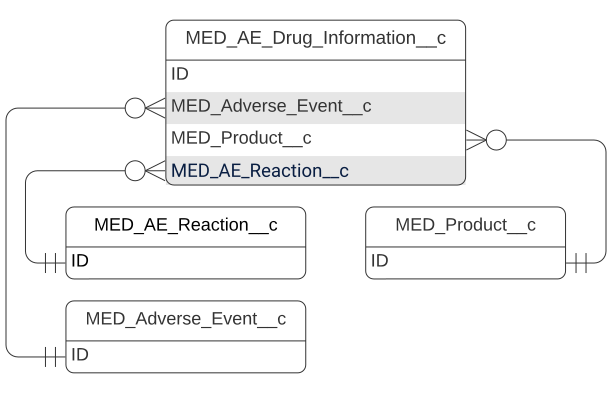
AE Drug schema
| Field label | API name | Data type | Description |
|---|---|---|---|
| Action taken with Drug | MED_Action_taken_with_Drug__c | Picklist | E2B (R3): G.k.8 Action(s) Taken with Drug User guidance: This data, taken together with the outcome of the reaction, provide the information concerning the challenge. The Not applicable value should be used in circumstances such as if the patient died or the treatment had been completed prior to the reaction or event. Conformance: Optional Data type: 1N OID: 2.16.840.1.113883.3.989.2.1.1.15 Actions taken codes: - 1=Drug withdrawn - 2 = Dose reduced - 3 = Dose increased - 4 = Dose not changed - 0 = Unknown - 9 = Not applicable |
| Active Substance Names | MED_Active_Substance_Names__c | Text(100) | The International Nonproprietary Names (INN) for Pharmaceutical Substances or drug substance name or drug identification code should be provided if no name exists. For combination products, specify each active ingredient. |
| Additional Information on Drug | MED_Additional_Information_on_Drug__c | Long Text Area(2000) | E2B (R3): G.k.11 Additional Information on Drug (free text) User guidance: Use this field to specify any additional information pertinent to the case that is not covered by other fields. You can also use this field to provide additional information concerning the indication for the drug. Conformance: Optional Data type: 2000AN OID: None Value allowed: Free text |
| Adverse Event | MED_Adverse_Event__c | Master-Detail(Adverse Event) | Lookup to the parent Adverse Event record. |
| AE Closed | MED_AE_Closed__c | Checkbox | Indicates whether the parent Adverse Event record is closed (true) or open (false). This field is used to trigger a change in the Record Type. |
| AE Drug Number | Name | Auto Number | Number that is automatically assigned to the record upon the record's creation. |
| AE Reaction | MED_AE_Reaction_c | Lookup(AE Reaction) | Lookup relationship to the AE Reaction (MED_AE_Drug_Information__c) record. |
| Anonymize | MED_Anonymize__c | Checkbox | Indicates whether the given record should be anonymized (true) or not (false). |
| Authorization/Application Number | MED_Authorization_Application_Number__c | Text(35) | E2B (R3): G.k.3.1 Authorization / Application Number User guidance: If relevant and known, the name of the holder should be provided with the authorization number in the country where the drug was obtained when the case report is sent to that country. This field applies to both applications and authorizations. Conformance: Optional Data type: 35 AN OID: 2.16.840.1.113883.3.989.2.1.3.4 Value allowed: Free text |
| Batch/Lot Number | MED_Batch_Lot_Number__c | Text(35) | E2B (R3): G.k.4.r.7 Batch / Lot Number User guidance: This field is particularly important for vaccines and biologicals and allows for multiple batch or lot numbers, each separated by a delimiter defined by the transmission standard chosen. The most specific information available should be provided. Conformance: Optional Data type: 35AN OID: None Value allowed: Free text |
| Characterization of Drug Role | MED_Characterization_of_Drug_Role__c | Picklist | E2B (R3): G.k.1 Characterization of Drug Role User guidance: Characterization of the drug as provided by primary reporter. All spontaneous reports should have at least one suspect drug. If the reporter indicates a suspected interaction, interacting should be selected. All interacting drugs are considered suspect. Data type: 1N OID: 2.16.840.1.113883.3.989.2.1.1.13 Value allowed: - 1 = Suspect - 2 = Concomitant - 3 = Interacting - 4 = Drug Not Administered |
| Country | MED_Country__c | Formula (Text) | Country associated with the parent Adverse Event record. This field is used by the product lookup. |
| Country Drug Obtained | MED_Country_Drug_Obtained__c | Picklist | E2B (R3): G.k.2.4 Identification of the Country Where the Drug Was Obtained User guidance: Country where the medicinal was obtained. Conformance: Optional Data type: 2A OID: 1.0.3166.1.2.2 Value allowed: ISO 3166-1 alpha-2, EU |
| Country of Authorization/Application | MED_Country_of_Authorization_Application__c | Picklist | E2B (R3): G.k.3.2 Country of Authorization / Application Conformance: Optional, but required if G.k.3.1 is provided. Data type: 2A OID: 1.0.3166.1.2.2 Value allowed: ISO 3166-1 alpha-2, EU |
| Cumulative Dose to First Reaction (Num) | MED_Cumulative_Dose_First_Reaction_Num__c | Number(10, 0) | E2B (R3): G.k.5a Cumulative Dose to First Reaction (number) User guidance: The total dose administered until the first sign, symptom, or reaction. Conformance: Optional, but required if G.k.5b is populated. Data type: 10N OID: None Value allowed: Numeric |
| Cumulative Dose to First Reaction (Unit) | MED_Cumulative_Dose_First_Reaction_Unit__c | Picklist | E2B (R3): G.k.5b Cumulative Dose to First Reaction (unit) User guidance: The total dose administered until the first sign, symptom, or reaction. Conformance: Optional, but required if G.k.5a is populated. Data type: 50AN OID: 2.16.840.1.113883.3.989.2.1.1.25 Value allowed: Constrained UCUM codes: {DF} |
| Date of Last Administration | MED_Date_of_Last_Administration__c | Date | E2B (R3): G.k.4.r.5 Date and Time of Last Administration User guidance: For ongoing drug administration after the onset of the reaction or event, this item should be blank and Actions taken with drug should be used. Conformance: Optional Data type: Date / Time OID: None Value allowed: nullFlavor: MSK, ASKU, NASK |
| Did Reaction Recur on Readministration? | MED_Reaction_Recur_on_Readministration__c | Picklist | E2B (R3): G.k.9.i.4 Did Reaction Recur on Re-administration? User guidance: Unknown indicates that a rechallenge was done, but it is unknown if the event recurred. This segment should not be completed if it is unknown whether a rechallenge was done. Conformance: Optional Data type: 1N OID: 2.16.840.1.113883.3.989.2.1.1.16 Value allowed: - 1 = yes -- yes (rechallenge was done, reaction recurred) - 2 = yes -- no (rechallenge was done, reaction did not recur) - 3 = yes -- unk (rechallenge was done, outcome unknown) - 4 = no -- n/a (no rechallenge was done, recurrence is not applicable) |
| Dosage Form | MED_Dosage_Form__c | Text(60) | E2B (R3): G.k.4.r.9.1 Pharmaceutical Dose Form (free text) User guidance: e.g., tablets, capsules, syrup Conformance: Optional Data type: 60 AN OID: None Value allowed:Free text nullFlavor: ASKU, NASK, UNK |
| Dosage Interval | MED_Dosage_Interval__c | Number(4, 0) | E2B (R3): G.k.4.r.2 Number of Units in the Interval User guidance: For example, if the dosage is5 mg 2 times a day every other day for 30 days, the Dosage Interval is 2. Conformance: Optional Data type: 4N OID: None Value allowed: Numeric |
| Dosage Interval (Units) | MED_Dosage_Interval_Units__c | Picklist | E2B (R3): G.k.4.r.3 Definition of the Time Interval Unit User guidance: For example, if the dosage is5 mg 2 times a day every other day for 30 days, the Dosage Interval (Units) is day. Conformance: Optional, but required if G.k.4.r.2 is populated. Data type: 50AN OID: 2.16.840.1.113883.3.989.2.1.1.26 Value allowed: Constrained UCUM codes:{cyclical}, {asnecessary},{total} |
| Dosage Text | MED_Dosage_Text__c | Long Text Area(2000) | E2B (R3): G.k.4.r.8 Dosage Text User guidance: This item should be used in cases where provision of structured dosage information is impossible. Conformance: Optional Data type: 2000AN OID: None Value allowed: Free text |
| Dose (Number) | MED_Dose_number__c | Number(6, 2) | E2B (R3): G.k.4.r.1a Dose (number) User guidance: For example, if the dosage is 5 mg 2 times a day every other day for 30 days, the Dose (Number) is 5. Conformance: Optional Data type: 8N OID: None Value allowed: Numeric |
| Dose (Units) | MED_Dose_Units__c | Picklist | E2B (R3): G.k.4.r.1b Dose (unit) User guidance: For example, if the dosage is 5 mg 2 times a day every other day for 30 days, the Dose (Units) is mg. Conformance: Optional, but required if G.k.4.r.1a is populated. Data type: 50AN OID: 2.16.840.1.113883.3.989.2.1.1.25 Value allowed: Constrained UCUM codes: {DF} |
| Duration of Drug Administration | MED_Duration_of_Drug_Administration__c | Number(5, 0) | E2B (R3): G.k.4.r.6a Duration of Drug Administration (number) User guidance: This item should be used if exact dates of drug administration are unavailable at the time of the report, but there is information concerning the duration of drug administration. The information requested is the overall duration of drug administration. Conformance: Optional, but required if G.k.4.r.6b is populated. Data type: 5N OID: None Value allowed: Numeric |
| Duration of Drug Administration (Unit) | MED_Duration_of_Drug_Administration_Unit__c | Picklist | E2B (R3): G.k.4.r.6b Duration of Drug Administration (unit) User guidance: This item should be used if exact dates of drug administration are unavailable at the time of the report, but there is information concerning the duration of drug administration. The information requested is the overall duration of drug administration. Conformance: Optional, but required if G.k.4.r.6a is populated. Data type: 50AN OID: 2.16.840.1.113883.3.989.2.1.1.26 Value allowed: Constrained UCUM codes |
| E2B Product | MED_E2B_Product__c | Formula (Text) | Returns the Product name if Product is selected and returns the Product (Other) name otherwise. |
| Gestation Period (Unit) | MED_Gestation_Period_Unit__c | Picklist | E2B (R3): G.k.6b Gestation Period at Time of Exposure (unit) User guidance: Use the gestational age at the time of the earliest exposure. Gestation period at time of exposure should be expressed by providing both a number and designation of units of days, weeks, months, or trimester. Conformance: Optional, but required if G.k.6a is populated. Data type: 50AN OID: 2.16.840.1.113883.3.989.2.1.1.26 Value allowed: UCUM codes for Month, Week, and Day:{Trimester} |
| Gestation Period at Time of Exposure | MED_Gestation_Period_at_Time_of_Exposure__c | Number(3, 0) | E2B (R3): G.k.6a Gestation Period at Time of Exposure (number) User guidance: Use the gestational age at the time of the earliest exposure. Gestation period at time of exposure should be expressed by providing both a number and designation of units of days, weeks, months, or trimester. Conformance: Optional, but required if G.k.6b is populated. Data type: 3N OID: None Value allowed: Numeric |
| If Yes, which Reactions Recurred? | MED_If_Yes_which_Reactions_Recurred__c | Text(250) | E2B (R3): NA User guidance: Unknown indicates that a rechallenge was done, but it is unknown if the event recurred. This segment should not be completed if it is unknown whether a rechallenge was done. |
| Indication for Use in the Case | MED_Indication_for_use_in_the_case__c | Text(250) | E2B (R3): G.k.7.r.1 Indication as Reported by the Primary Source User guidance: The indication as reported. For multiple indications for the same drug, repeat the entire drug entry, specifying the same drug for each indication. Conformance: Optional Data type: 250AN OID: None Value allowed:Free text nullFlavor: ASKU, NASK, UNK |
| MedDRA Version for Indication | MED_MedDRA_Version_for_Indication__c | Text(4) | E2B (R3): G.k.7.r.2a MedDRA Version for Indication User guidance: The indication as reported. For multiple indications for the same drug, repeat the entire drug entry, specifying the same drug for each indication. MedDRA terms should be provided as code. Conformance: Optional, but required if G.k.7.r.2b is populated. Data type: 4AN OID: None Value allowed: Numeric and '. '(dot) Warning: This field has been deprecated as of Fall '25 and is only available in V16 and below. |
| MedDRA Version for Reactions Recurred | MED_MedDRA_for_Reactions_Recurred__c | Text(8) | E2B (R3): NA User guidance: Use MedDRA terms |
| Name of Holder/Applicant | MED_Name_of_Holder_Applicant__c | Text(60) | E2B (R3): G.k.3.3 Name of Holder / Applicant Conformance: Optional Data type: 60AN OID: None Value allowed: Free text |
| Number of Separate Dosages | MED_Number_of_Separate_Dosages__c | Number(3, 0) | E2B (R3): NA |
| Parent Route of Administration | MED_Parent_Route_of_Administration__c | Picklist | E2B (R3): G.k.4.r.11.1 Route of Administration (free text) User guidance: This section should be used in a parent-child or fetus report and linked to parent reports to indicate the route of administration to the parent. Conformance: Optional Data type: 60 AN OID: None Value allowed: Free text nullFlavor: ASKU, NASK, UNK |
| Product | MED_Product__c | Lookup(Product) | E2B (R3): G.k.2.2 Medicinal Product Name as Reported by the Primary Source User guidance: The name should be that used by the reporter. It is recognized that a single product may have different proprietary names in different countries, even when produced by a single manufacturer. Conformance: Required Data type: 250AN OID: None Value allowed: Free text |
| Product (Other) | MED_Other_Product__c | Text(255) | The name of a third-party product. |
| Record Type | RecordTypeId | Record Type | Id of the record type. Record types include: - AE Drug - AE Drug - Closed |
| Related Record Label | MED_Related_Record_Label__c | Formula (Text) | The concatenation of the product information and the drug role characterization. |
| Route of Administration | MED_Route_of_Administration__c | Picklist | E2B (R3): G.k.4.r.10.1 Route of Administration (free text) User guidance: For a parent-child or parent-fetus report, this indicates the route of administration of a drug given to the child or fetus. This is usually an indirect exposure, such as transmammary, but can include more usual routes of administration. Conformance: Optional Data type: 60 AN OID: None Value allowed: Free text nullFlavor: ASKU, NASK, UNK |
| Route of Administration | MED_Route_of_Administration_Text__c | Text(60) | E2B (R3): G.k.4.r.10.1 Route of Administration (free text)User Guidance: This data element captures a free text description of the route of administration when the Route of Administration TermID (G.k.4.r.10.2b) is not available. An appropriate nullFlavor can be used if the source has not provided or does not know the information. Conformance: Optional Data Type: 60 AN OID: None Value Allowed: Free text nullFlavor: ASKU, NASK, UNK |
| Start of Drug | MED_Start_of_Drug__c | Date | E2B (R3): G.k.4.r.4 Date and Time of Start of Drug User guidance: First date of use. Conformance: Optional Data type: Date / Time OID: None Value allowed: nullFlavor: MSK, ASKU, NASK |
| Time Between Last Dose and Reaction | MED_Time_Between_Last_Dose_and_Reaction__c | Number(5, 0) | E2B (R3): G.k.9.i.3.2a Time Interval between Last Dose of Drug and Start of Reaction / Event (number) User guidance: The major uses of intervals are to cover circumstances where both the dates are known but the interval is very short (e.g., minutes, such as in anaphylaxis) and when only imprecise dates are known but more information concerning the interval is known. Conformance: Optional, but required if G.k.9.i.3.2b is populated. Data type: 5N OID: None Value allowed: Numeric |
| Time Between Last Dose/Reaction (Unit) | MED_Time_Between_Last_Dose_Reaction_Unit__c | Picklist | E2B (R3): G.k.9.i.3.2b Time Interval between Last Dose of Drug and Start of Reaction / Event (unit) User guidance: The major uses of intervals are to cover circumstances where both the dates are known but the interval is very short (e.g., minutes, such as in anaphylaxis) and when only imprecise dates are known but more information concerning the interval is known. Conformance: Optional, but required if G.k.9.i.3.2a is populated. Data type: 50AN OID: 2.16.840.1.113883.3.989.2.1.1.26 Value allowed: Constrained UCUM codes |
| Time Between Start and Reaction (Unit) | MED_Time_Between_Start_and_Reaction_Unit__c | Picklist | E2B (R3): G.k.9.i.3.1b Time Interval between Beginning of Drug Administration and Start of Reaction / Event (unit) User guidance: The major uses of intervals are to cover circumstances where both the dates are known but the interval is very short (e.g., minutes, such as in anaphylaxis) and when only imprecise dates are known but more information concerning the interval is known. Conformance: Optional, but required if G.k.9.i.3.1a is populated. Data type: 50AN OID: 2.16.840.1.113883.3.989.2.1.1.26 Value allowed: Constrained UCUM codes |
| Time Between Start of Drug and Reaction | MED_Time_From_Start_of_Drug_to_Reaction__c | Number(5, 0) | E2B (R3): G.k.9.i.3.1a Time Interval between Beginning of Drug Administration and Start of Reaction / Event (number) User guidance: The major uses of intervals are to cover circumstances where both the dates are known but the interval is very short (e.g., minutes, such as in anaphylaxis) and when only imprecise dates are known but more information concerning the interval is known. Conformance: Optional, but required if G.k.9.i.3.1b is populated. Data type: 5N OID: None Value allowed: Numeric |
AE Drug History
An AE Drug History record stores relevant drug history information about the patient who experienced the adverse reaction or the patient's parent who did not experience the adverse reaction. AE Drug History capture is based on the ICH E2B (R3) definition and contains sections D.8 and D.10.8.
The AE Drug History object is on the detail side of a master-detail relationship with the Adverse Event object.

AE Drug History schema
| Field label | API name | Data type | Description |
|---|---|---|---|
| Adverse Event | MED_Adverse_Event__c | Master-Detail | Lookup to the parent Adverse Event record. |
| AE Closed | MED_AE_Closed__c | Checkbox | Indicates whether the parent Adverse Event record is closed (true) or not closed (false). This field is used to trigger a change in the Record Type. |
| AE Drug History Number | Name | Auto Number | Number that is automatically assigned to the record upon the record's creation. |
| Anonymize | MED_Anonymize__c | Checkbox | Indicates whether the given record should be anonymized (true) or not (false). |
| End Date | MED_End_Date__c | Date | E2B (R3): D.8.r.5 End Date E2B (R3): D.10.8.r.5 End Date Conformance: Optional Data type: Date / Time OID: None nullFlavor: MSK, ASKU, NASK |
| Indication | MED_Indication__c | Text(8) | E2B (R3): D.8.r.6b Indication (MedDRA code) E2B (R3): D.10.8.r.6b Indication (MedDRA code) User guidance: If applicable, MedDRA terms should be used in the indication. Conformance: Optional, but required if D.10.8.r.6a is populated. Data type: 8NOID: 2.16.840.1.113883.6.163 Value allowed: Numeric |
| MedDRA Version for Indication | MED_MedDRA_Version_for_Indication__c | Text(4) | E2B (R3): D.8.r.6a MedDRA Version for Indication E2B (R3): D.10.8.r.6a MedDRA Version for Indication User guidance: If applicable, MedDRA terms should be used in the indication. Conformance: Optional, but required if D.10.8.r.6b is populated. Data type: 4AN OID: None Value allowed: Numeric and '. '(dot) Warning: This field has been deprecated as of Fall '25 and is only available in V16 and below. |
| MedDRA Version for Reaction | MED_MedDRA_Version_for_Reaction__c | Text(4) | E2B (R3): D.8.r.7a MedDRA Version for Reaction E2B (R3): D.10.8.r.7a MedDRA Version for Reaction User guidance: If applicable, MedDRA terms should be used in the reaction. Conformance: Optional, but required if D.10.8.r.7b is populated. Data type: 4AN OID: None Value allowed: Numeric and '. '(dot) Warning: This field has been deprecated as of Fall '25 and is only available in V16 and below. |
| Name of Drug as Reported | MED_Name_of_Drug_as_Reported__c | Text(250) | E2B (R3): D.8.r.1 Name of Drug as Reported E2B (R3): D.10.8.r.1 Name of Drug as Reported User guidance: This segment concerns drugs previously taken but not those taken concomitantly or drugs that may have potentially been involved in the current reaction or event. Information concerning concomitant and other suspect drugs should be captured separately. Conformance: Optional Data type: 250AN OID: None Value allowed: Free text |
| Parent History? | MED_Parent_History__c | Checkbox | Indicates if the history is for the parent (true) or the patient (false). This should be used in the case of a parent-child or parent-fetus report where the parent had no reaction or event. |
| Reactions | MED_Reactions__c | Text(8) | E2B (R3): D.8.r.7b Reactions (MedDRA code) E2B (R3): D.10.8.r.7b Reactions (MedDRA code) User guidance: If applicable, MedDRA terms should be used in the reaction. Conformance: Optional, but required if D.10.8.r.7a is populated. Data type: 8N OID: 2.16.840.1.113883.6.163 Value allowed: Numeric |
| Record Type | RecordTypeId | Record Type | Id of the record type. Record types include: - AE Drug History - AE Drug History - Closed |
| Start Date | MED_Start_Date__c | Date | E2B (R3): D.8.r.4 Start Date E2B (R3): D.10.8.r.4 Start Date Conformance: Optional Data type: Date / Time OID: None nullFlavor: MSK, ASKU, NASK |
AE Medical History
An AE Medical History record stores relevant medical history information about the patient who experienced the adverse reaction or the patient's parent who did not experience the adverse reaction. AE Medical History capture is based on the ICH E2B (R3) definition and contains sections D.7.1 and D.10.7.1.
The AE Medical History object is on the detail side of a master-detail relationship with the Adverse Event object.

AE Medical History schema
| Field label | API name | Data type | Description |
|---|---|---|---|
| Adverse Event | MED_Adverse_Event__c | Master-Detail(Adverse Event) | Lookup to the parent Adverse Event record. |
| AE Closed | MED_AE_Closed__c | Checkbox | Indicates whether the parent Adverse Event record is closed (true) or not closed (false). This field is used to trigger a change in the Record Type. |
| AE Medical History Number | Name | Auto Number | Number that is automatically assigned to the record upon the record's creation. |
| Anonymize | MED_Anonymize__c | Checkbox | Indicates whether the given record should be anonymized (true) or not (false). |
| Comments | MED_Comments__c | Long Text Area(2000) | E2B (R3): D.7.1.r.5 Comments E2B (R3): D.10.7.1.r.5 Comments User guidance: This data element provides additional relevant information about the 'medical condition' that could not be captured otherwise in a structured data element. Conformance: Optional Data type: 2000AN OID: None Value allowed: Free text |
| Continuing? | MED_Continuing__c | Picklist | E2B (R3): D.7.1.r.3 Continuing E2B (R3): D.10.7.1.r.3 Continuing User guidance: Indicates if the 'medical condition' is known to be still present at the time of this report. Conformance: Optional Data type: Boolean OID: None Value allowed: falsetrue nullFlavor: MSK, ASKU, NASK |
| Disease/Surgical Procedure/Etc. | MED_Disease_Surgical_Procedure_Etc__c | Text(8) | E2B (R3): D.7.1.r.1b Medical History (disease / surgical procedure / etc.) (MedDRA code) E2B (R3): D.10.7.1.r.1b Medical History (disease / surgical procedure / etc.) (MedDRA code) User guidance: Medical judgment should be exercised in completing this section. Information pertinent to understanding the case is desired, such as diseases, conditions (e.g. pregnancy), surgical procedures, and psychological trauma. Conformance: Optional, but required if D.10.7.1.r.1a is populated. Data type: 8N OID: 2.16.840.1.113883.6.163 Value allowed: Numeric |
| End Date | MED_End_Date__c | Date | E2B (R3): D.7.1.r.4 End Date E2B (R3): D.10.7.1.r.4 End Date User guidance: If precise dates are unknown and a text description aids in understanding the medical history or if concise additional information is helpful in showing the relevance of the past medical history, this information can be included in the Comments field. Conformance: Optional Data Type: Date / Time OID: None nullFlavor: MSK, ASKU, NASK |
| Family History | MED_Family_History__c | Checkbox | E2B (R3): D.7.1.r.6 Family History User guidance: Set to true when the medical information provided is also present in another family member (e.g. hereditary diseases). However, this data element is not used when the same medical concept is already provided in the medical history of the parent. Conformance: Optional Data Type: Boolean OID: None Value Allowed: True |
| MedDRA Version for Medical History | MED_MedDRA_Version_for_Medical_History__c | Text(4) | E2B (R3): D.7.1.r.1a MedDRA Version for Medical History E2B (R3): D.10.7.1.r.1a MedDRA Version for Medical History User guidance: If applicable, MedDRA terms should be used in the main description for disease or surgical procedures. Conformance: Optional, but required if D.7.1.r.1b is populated. Data Type: 4AN OID: None Value Allowed: Numeric and '. '(dot) Warning: This field has been deprecated as of Fall '25 and is only available in V16 and below. |
| Parent History? | MED_Parent_History__c | Checkbox | Indicates if the history is for the parent (true) or the patient (false). This should be used in the case of a parent-child or parent-fetus report where the parent had no reaction or event. |
| Record Type | RecordTypeId | Record Type | Id of the record type. Record types include: - AE Medical History - AE Medical History - Closed |
| Start Date | MED_Start_Date__c | Date | E2B (R3): D.7.1.r.2 Start Date E2B (R3): D.10.7.1.r.2 Start Date User guidance: If precise dates are unknown and a text description aids in understanding the medical history or if concise additional information is helpful in showing the relevance of the past medical history, this information can be included in the Comments field. Conformance: Optional Data Type: Date / Time OID: None nullFlavor: MSK, ASKU, NASK |
AE Primary Source
The AE Primary Source object stores information about the primary sources related to Adverse Events. When the Auto Stamp Primary Source Global Setting is enabled and an Adverse Event record is created, AE Primary Source records are automatically created and populated with information from the Requester and Referred By accounts listed on the parent Interaction record. More specifically, information about the Requester listed on an Interaction maps to an automatically generated AE Primary Source record associated with the Adverse Event. Likewise, Referred By fields on the Interaction map to a second automatically generated AE Primary Source record. For more information about Adverse Event primary source population, visit Adverse Event primary sources.
The AE Primary Source object is on the detail side of a master-detail relationship with the Adverse Event object. AE Primary Source capture is based on the ICH E2B(R3) definition and section C.2.r.
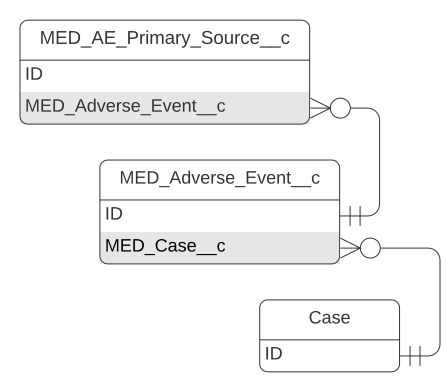
AE Primary Source schema
| Field label | API name | Data type | Description |
|---|---|---|---|
| Address Street | MED_Address_Street__c | Text(100) | E2B (R3): C.2.r.2.3 Reporter's Street User guidance: This data element captures the reporter's street name. Conformance: Optional Data type: 100AN OID: None Value allowed: Free text nullFlavor: MSK, ASKU, NASK |
| Adverse Event | MED_Adverse_Event__c | Master-Detail(Adverse Event) | Lookup to the parent Adverse Event record. |
| AE Closed | MED_AE_Closed__c | Checkbox | Indicates whether the parent Adverse Event record is closed (true) or not closed (false). This field is used to trigger a change in the Record Type. |
| AE Reporter Number | Name | Auto Number | Number that is automatically assigned to the record upon the record's creation. |
| Anonymize | MED_Anonymize__c | Checkbox | Indicates whether the given record should be anonymized (true) or not (false). |
| City | MED_City__c | Text(35) | E2B (R3): C.2.r.2.4 Reporter's City User guidance: This data element captures the reporter's city name. Conformance: Optional Data type: 35ANOID: None Value allowed: Free text nullFlavor: MSK, ASKU, NASK |
| Consent to Contact? | MED_Consent_to_Contact__c | Picklist | Captures whether the reporters has consented to contact in the positive, negative or has not specified. |
| Country | MED_Country__c | Picklist | E2B (R3): C.2.r.3 Reporter's Country Code User guidance: This data element captures the two letter ISO 3166 Part 1 code (ISO3166-1 alpha-2) to represent the name of the reporter's country. In exceptional cases where the country of the primary source is not available to the sender, the country where the reaction/event occurred (E.i.9) must be provided. Conformance: Optional, but required if C.2.r.5 = 1. Data type: 2A OID: 1.0.3166.1.2.2 Value allowed: ISO 3166-1 (alpha 2), EU nullFlavor: MSK, ASKU, NASK, UNK |
| Department | MED_Department__c | Text(60) | E2B (R3): C.2.r.2.2 Reporter's Department User guidance: This data element captures the reporter's department name. Conformance: Optional Data type: 60AN OID: None Value allowed: Free text nullFlavor: MSK, ASKU, NASK |
| First Name | MED_First_Name__c | Text(60) | E2B (R3): C.2.r.1.2 Reporter's Given Name User guidance: This data element captures the reporter's given name. Conformance: Optional Data type: 60AN OID: None Value allowed: Free text nullFlavor: MSK, ASKU, NASK |
| Last Name | MED_Last_Name__c | Text(60) | E2B (R3): C.2.r.1.4 Reporter's Family Name User guidance This data element captures the reporter's family name. Conformance: Optional Data type: 60AN OID: None Value allowed: Free text nullFlavor: MSK, ASKU, NASK |
| Literature References | MED_Literature_References__c | Long Text Area(500) | E2B (R3): C.4.4.1 Literature Reference(s) Conformance: Optional Data type: 500AN OID: None Value allowed:Free text nullFlavor: ASKU, NASK |
| Middle Name | MED_Middle_Name__c | Text(60) | E2B (R3): C.2.r.1.3 Reporter's Middle Name User guidance: This data element captures the reporter's middle name. Conformance: Optional Data type: 60AN OID: None Value allowed: Free text nullFlavor: MSK, ASKU, NASK Entity name: given (same as first name, the entity name is repeated and the second one is middle) |
| Organization | MED_Organization__c | Text(60) | E2B (R3): C.2.r.2.1 Reporter's Organisation User guidance: This data element captures the reporter's organization's name. Conformance: Optional Data type: 60AN OID: None Value allowed: Free text nullFlavor: MSK, ASKU, NASK Entity name: name |
| Phone | MED_Phone__c | Phone | E2B (R3): C.2.r.2.7 Reporter's Telephone User guidance: This data element captures the reporter's telephone number, including the country code and any extension. Numbers should be entered in a fashion that allows for international dialing (e.g. +cc) and not include any domestic trunk prefix. The phone number should not include domestic international dialing prefixes (also known as country exit codes, such as 00 in Europe, 011 in US, 010 in Japan). Begin with the International Telecommunications Union plus sign (+) notation followed by the country code appropriate for the location of the telephone number. Additional visual separators for human readability are not required. If used these characters should be limited to dashes '-' or dots '.'. Conformance: Optional Data type: 33AN OID: None Value allowed: Free text nullFlavor: MSK, ASKU, NASK |
| Postal Code | MED_Postal_Code__c | Text(15) | E2B (R3): C.2.r.2.6 Reporter's Postcode User guidance: This data element captures the reporter's postcode. Conformance: Optional Data type: 15AN OID: None Value allowed: Free text nullFlavor: MSK, ASKU, NASK |
| Prescriber? | MED_Prescriber__c | Picklist | Indicates if the source is a prescriber, not, or unspecified if blank. |
| Primary Source for Regulatory Purposes | MED_Primary_Source_Regulatory_Purposes__c | Picklist | E2B (R3): C.2.r.5 Primary Source for Regulatory Purposes User guidance: This data element identifies which primary source to use for regulatory purposes and in case of multiple sources, it identifies the source of the World Wide Case Unique Identification number; this source should identify where the case occurred. The data element determines where the case will be reported as a 'domestic' case and where the case will be reported as a 'foreign' case. Conformance Required for one and only one instance of this element. Data type: 1N OID: None Value allowed: 1=primary |
| Qualification | MED_Qualification__c | Picklist | E2B (R3): C.2.r.4 Qualification User guidance: This data element captures the reporter qualification. Conformance: Optional, but required if C.2.r.5 = 1. Data type: 1N OID: 2.16.840.1.113883.3.989.2.1.1.6 Value allowed: - 1=Physician - 2=Pharmacist - 3=Other health professional - 4=Lawyer - 5=Consumer or other non health professional nullFlavor: UNK |
| Record Type | RecordTypeId | Record Type | Id of the record type. Record types include: - AE Reporter - AE Reporter - Closed |
| Related Record Label | MED_Related_Record_Label__c | Formula (Text) | The concatenation of the primary source's first name, last name, and regulatory purposes. |
| Sponsor Study Number | MED_Sponsor_Study_Number__c | Text(35) | E2B (R3): Moved to C.5.3 (AE Object) |
| State | MED_State__c | Text(40) | E2B (R3): C.2.r.2.5 Reporter's State or Province User guidance: This data element captures the reporter's State or Province. Conformance: Optional Data type: 40AN OID: None Value allowed: Free text nullFlavor: MSK, ASKU, NASK |
| Study Name | MED_Study_Name__c | Text(100) | E2B (R3): Moved to C.5.2 (AE Object) |
| Study Type | MED_Study_Type__c | Picklist | E2B (R3): Moved to C.5.4 (AE Object) |
| Title | MED_Title__c | Text(50) | E2B (R3): C.2.r.1.1 Reporter's Title User guidance: This data element captures the reporter's title. Conformance: Optional Data type: 50AN OID: None Value allowed: Free text nullFlavor: MSK, ASKU, NASK, UNK Entity name: prefix |
AE Reaction
An AE Reaction record stores reaction information related to the parent Adverse Event record. AE Reaction capture is based on the ICH E2B (R3) definition and section E.
The AE Reaction object is on the detail side of a master-detail relationship with the Adverse Event object.
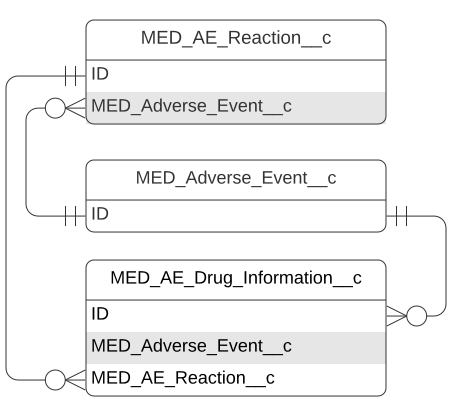
AE Reaction schema
| Field label | API name | Data type | Description |
|---|---|---|---|
| Adverse Event | MED_Adverse_Event__c | Master-Detail(Adverse Event) | Lookup to the parent Adverse Event record. |
| AE Closed | MED_AE_Closed__c | Checkbox | Indicates whether the parent Adverse Event record is closed (true) or open (false). This field is used to trigger a change in the Record Type. |
| AE Reaction Number | Name | Auto Number | Number that is automatically assigned to the record upon the record's creation. |
| Anonymize | MED_Anonymize__c | Checkbox | Indicates whether the given record should be anonymized (true) or not (false). |
| Caused/Prolonged Hospitalization | MED_Caused_Prolonged_Hospitalization__c | Checkbox | E2B (R3): E.i.3.2c Caused/Prolonged Hospitalization User guidance: The seriousness criteria of the reaction/event should be based on the definitions provided in the ICH E2A and E2D guidelines. More than one seriousness criteria can be chosen. If the event is not serious, all of these data elements should be left blank. Conformance: Required Data type: Boolean OID: None Value allowed: true nullFlavor: NI |
| Confirmed by HCP | MED_Confirmed_by_HCP__c | Picklist | E2B (R3): E.i.8 Medical Confirmation by Healthcare Professional User guidance: If an event is reported by a non-healthcare professional (e.g., lawyers, consumers), this data element indicates whether the occurrence of the event was subsequently confirmed by a healthcare professional. Conformance: Optional Data type: Boolean OID: None Value allowed: false, true |
| Congenital Anomaly/Birth Defect | MED_Congenital_Anomaly_Birth_Defect__c | Checkbox | E2B (R3): E.i.3.2e Congenital Anomaly/Birth Defect User guidance: The seriousness criteria of the reaction/event should be based on the definitions provided in the ICH E2A and E2D guidelines. More than one seriousness criteria can be chosen. If the event is not serious, all of these data elements should be left blank. Conformance: Required Data type: Boolean OID: None Value allowed: true nullFlavor: NI |
| Country Where Reaction/Event Occurred | MED_Country_Where_Reaction_Occurred__c | Picklist | E2B (R3): Identification of the Country Where the Reaction / Event Occurred User guidance: This data element captures the country where the reaction occurred. Conformance: Optional Data type: 2A OID: 1.0.3166.1.2.2 Value allowed: ISO 3166-1 alpha-2, EU |
| Disabling/Incapacitating | MED_Disabling_Incapacitating__c | Checkbox | E2B (R3): E.i.3.2d Disabling/Incapacitating User guidance: The seriousness criteria of the reaction/event should be based on the definitions provided in the ICH E2A and E2D guidelines. More than one seriousness criteria can be chosen. If the event is not serious, all of these data elements should be left blank. Conformance: Required Data type: Boolean OID: None Value allowed: true nullFlavor: NI |
| Duration of Reaction/Event | MED_Duration_of_Reaction_Event__c | Number(5, 0) | E2B (R3): E.i.6a Duration of Reaction / Event (number) User guidance: This section will usually be computed from the start/end date and time of the reaction/event. However, there might be situations in which the precise duration of the reaction/event and date can be useful. Conformance: Optional, but required if E.i.6b is populated. Data type: 5N OID: None Value allowed: Numeric |
| Duration Unit | MED_Duration_Unit__c | Picklist | E2B (R3): E.i.6b Duration of Reaction / Event (unit) User guidance: This data element captures the unit of time for the value recorded. Conformance: Optional, but required if E.i.6a is populated. Data type: 50AN OID: 2.16.840.1.113883.3.989.2.1.1.26 Value allowed: Constrained UCUM codes |
| End Date of Reaction/Event | MED_End_Date_of_Reaction_Event__c | Date | E2B (R3): E.i.5 Date of End of Reaction / Event User guidance: This data element captures the date the reaction is reported as resolved/recovered or resolved/recovered with sequelae. When multiple terms are reported and the reporter does not provide a specific stop date for each, populated with the end date of the last. Conformance: Optional Data type: Date / Time OID: None nullFlavor: MSK, ASKU, NASK |
| First Use Time Interval Unit | MED_Time_Start_of_Drug_Reaction_Event__c | Picklist | E2B (R3): Moved to G.k.4r (AE Drug) |
| Last Use Time Interval Unit | MED_Last_Use_Time_Interval_Unit__c | Picklist | E2B (R3): Moved to G.k.4r (AE Drug) |
| Life Threatening | MED_Life_Threatening__c | Checkbox | E2B (R3): E.i.3.2b Life Threatening User guidance: The seriousness criteria of the reaction/event should be based on the definitions provided in the ICH E2A and E2D guidelines. More than one seriousness criteria can be chosen. If the event is not serious, all of these data elements should be left blank. Conformance: Required Data type: Boolean OID: None Value allowed: true nullFlavor: NI |
| MedDRA Version (LLT) | MED_MedDRA_Version_LLT__c | Text(4) | E2B (R3): E.i.2.1a MedDRA Version for Reaction / Event User guidance: This data element provides the MedDRA version. Conformance: Required Data type: 4AN OID: None Value allowed: Numeric and '. '(dot) |
| MedDRA Version (PT) | MED_MedDRA_Version_PT__c | Text(8) | E2B (R3): NA |
| Other Medically Important Condition | MED_Other_Medically_Important_Condition__c | Checkbox | E2B (R3): E.i.3.2f Other Medically Important Condition User guidance: The seriousness criteria of the reaction/event should be based on the definitions provided in the ICH E2A and E2D guidelines. More than one seriousness criteria can be chosen. If the event is not serious, all of these data elements should be left blank. Conformance: Required Data type: Boolean OID: None Value allowed: true nullFlavor: NI |
| Outcome at Last Observation | MED_Outcome_at_Last_Observation__c | Picklist | E2B (R3): E.i.7 Outcome of Reaction / Event at the Time of Last Observation User guidance: In case of irreversible congenital anomalies, the choice not recovered/not resolved/ongoing should be used. For other irreversible medical conditions, recovered/resolved with sequelae should be used. Fatal should be used when death is possibly related. Conformance: Required Data type: 1N OID: 2.16.840.1.113883.3.989.2.1.1.11 Value allowed: - 1 = recovered/resolved - 2 = recovering/resolving - 3 = not recovered/not resolved/ongoing - 4 = recovered/resolved with sequelae - 5 = fatal - 0 = unknown |
| Reaction/Event as Reported (English) | MED_Reaction_Event_as_Reported_en__c | Text(250) | E2B (R3): E.i.1.2 Reaction / Event as Reported by the Primary Source for Translation User guidance: Captures the original reporter's words and/or short phrases used to describe the reaction/event should be provided in an English translation for international transmission. Conformance: Optional Data type: 250AN OID: None Value allowed: Free text |
| Reaction/Event as Reported (Native) | MED_Reaction_Event_as_Reported_Native__c | Text(250) | E2B (R3): E.i.1.1a Reaction / Event as Reported by the Primary Source in Native Language User guidance: This data element captures the original reporter's words and/or short phrases used to describe the reaction/event. Text should be provided in the native language it was received, when it is received in a language other than English. Conformance: Optional Data type: 250AN OID: None Value allowed: Free text |
| Reaction/Event as Source Langauge | MED_Reaction_Event_as_Source_Langauge__c | Picklist | E2B (R3): E.i.1.1b Reaction / Event as Reported by the Primary Source Language User guidance: Provide the language used to describe the reaction/event. Conformance: Optional, but required if E.i.1.1a is populated. Data type: 3A OID: 2.16.840.1.113883.6.100 Value allowed: ISO 639-2/RA, alpha-3 |
| Reaction/Event MedDRA Term (LLT) | MED_Reaction_Event_MedDRA_Term_LLT__c | Text(8) | E2B (R3): E.i.2.1b Reaction / Event (MedDRA code) User guidance: This data element captures the MedDRA LLT most closely corresponding to the reaction/event as reported by the primary source. In the exceptional circumstance when a MedDRA term cannot be found, the sender should use clinical judgment to complete this item. Conformance: Required Data type: 8N OID: 2.16.840.1.113883.6.163 Value allowed: Numeric |
| Reaction/Event MedDRA Term (PT) | MED_Reaction_Event_MedDRA_Term_PT__c | Text(250) | E2B (R3): NA |
| Record Type | RecordTypeId | Record Type | Id of the record type. Record types include: - AE Reaction - AE Reaction - Closed |
| Results in Death | MED_Results_in_Death__c | Checkbox | E2B (R3): E.i.3.2a Results in Death User guidance: The seriousness criteria of the reaction/event should be based on the definitions provided in the ICH E2A and E2D guidelines. More than one seriousness criteria can be chosen. If the event is not serious, all of these data elements should be left blank. Conformance: Required Data type: Boolean OID: None Value allowed: true nullFlavor: NI |
| Start Date of Reaction/Event | MED_Start_Date_of_Reaction_Event__c | Date | E2B (R3): E.i.4 Date of Start of Reaction / Event User guidance: This data element captures the date of the start of the reaction/event. When multiple terms are reported and the reporter does not provide a specific onset date for each reaction/event, it should be populated with the start date of the first symptom. Conformance: Optional Data type: Date / Time OID: None nullFlavor: MSK, ASKU, NASK |
| Term Highlighted by Reporter | MED_Term_Highlighted_by_Reporter__c | Picklist | E2B (R3): E.i.3.1 Term Highlighted by the Reporter User guidance: A highlighted term is a reaction/event that the primary source indicated was a major concern or reason for reporting the case. If the information is not explicitly provided by the initial reporter the term should not be considered a highlighted term. Conformance: Optional Data type: 1N OID: 2.16.840.1.113883.3.989.2.1.1.10 Value allowed: - 1 = Yes, highlighted by the reporter, NOT serious - 2 = No, not highlighted by the reporter, NOT serious - 3 = Yes, highlighted by the reporter, SERIOUS - 4 = No, not highlighted by the reporter, SERIOUS |
| Time Between First Use & Reaction/Event | MED_Time_Btwn_First_Use_Reaction_Event__c | Number(5, 0) | E2B (R3): Moved to G.k.4r (AE Drug) |
| Time Between Last Use & Reaction/Event | MED_Time_Between_Last_Use_Reaction_Event__c | Number(5, 0) | E2B (R3): Moved to G.k.4r (AE Drug) |
AE Test Result
An AE Test Result record stores results from a test or procedure that was performed to investigate an adverse reaction or event. AE Test Result capture is based on the ICH E2B (R3) definition and contains section F.
The AE Test Result object is on the detail side of a master-detail relationship with the Adverse Event object.

AE Test Result schema
| Field label | API name | Data type | Description |
|---|---|---|---|
| Adverse Event | MED_Adverse_Event__c | Master-Detail(Adverse Event) | Lookup to the parent Adverse Event record. |
| AE Closed | MED_AE_Closed__c | Checkbox | Indicates whether the parent Adverse Event record is closed (true) or not closed (false). This field is used to trigger a change in the Record Type. |
| AE Results Number | Name | Auto Number | Number that is automatically assigned to the record upon the record's creation. |
| Anonymize | MED_Anonymize__c | Checkbox | Indicates whether the given record should be anonymized (true) or not (false). |
| Comments | MED_Comments__c | Long Text Area(2000) | E2B (R3): F.r.6 Comments User guidance: This data element captures any relevant comments made by the reporter about the test result. Conformance: Optional Data type: 2000AN OID: None Value allowed: Free text |
| MeDRA Code | MED_MeDRA_Code__c | Text(8) | E2B (R3): F.r.2.2b Test Name (MedDRA code) User guidance: This data element captures the MedDRA LLT code for the test name. Conformance: Optional, but required when F.r.1 is populated and F.r.2.1 is not populated. Data type: 8N OID: 2.16.840.1.113883.6.163 Value allowed: Numeric |
| MeDRA Version for Test Name | MED_MeDRA_Version_for_Test_Name__c | Text(4) | E2B (R3): F.r.2.2a MedDRA Version for Test Name User guidance: This data element provides the MedDRA version for F.r.2.2b. Conformance: Optional, but required when F.r.2.2b is populated. Data type: 4AN OID: None Value allowed: Numeric and '. '(dot) Warning: This field has been deprecated as of Fall '25 and is only available in V16 and below. |
| More Information Available | MED_More_Information_Available__c | Picklist | E2B (R3): F.r.7 More Information Available User guidance: This data element indicates if more information is held by the sender about the test and test result. For example, true means that more documentation is available upon request, e.g. ECG strips, chest X-ray. False means that no more documentation is available from the sender. Conformance: Optional Data type: Boolean OID: None Value allowed: false, true |
| Normal High Range | MED_Normal_High_Range__c | Text(50) | E2B (R3): F.r.5 Normal High Value User guidance: This data element captures the 'highest' value in the normal range for the test. This value is usually published by the laboratory providing the test results. The same units as used in F.r.3.3 are implied. For best results, use only numeric values of the units set in the Unit field. Conformance: Optional Data Type: 50AN OID: None Value Allowed: Free text |
| Normal Low Range | MED_Normal_Low_Range__c | Text(50) | E2B (R3): F.r.4 Normal Low Value User guidance: This data element captures the 'lowest' value in the normal range for the test. This value is usually published by the laboratory providing the test results. The same units as used in F.r.3.3 are implied. For best results, use only numeric values of the units set in the Unit field. Conformance: Optional Data type: 50AN OID: None Value allowed: Free text |
| Record Type | RecordTypeId | Record Type | Id of the record type. Record types include: - AE Test Result - AE Test Result - Closed |
| Result (Free Text) | MED_Result__c | Long Text Area(2000) | E2B (R3): F.r.3.4 Result Unstructured Data (free text) User guidance: This data element is used when 'results' and 'units' cannot be split, often because a UCUM code is not available for the test unit. For example, for the test 'protein excretion', the result could be recorded here as '125mg /24 hours'. Conformance: Optional, but required if F.r.2 is populated, and F.r.3 is not populated. Data type: 2000AN OID: None Value allowed: Free text |
| Test Date | MED_Test_Date__c | Date | E2B (R3): F.r.1 Test Date User Guidance: This data element captures the date of the test or procedure. Imprecise dates can be used. Conformance: Optional, but required if F.r.2 is populated. Data Type: Date / Time OID: None nullFlavor = UNK |
| Test Name | MED_Test_Name__c | Text(250) | E2B (R3): F.r.2.1 Test Name (free text) User guidance: This data element captures a free text description of the test when an appropriate MedDRA code is unavailable. Conformance: Optional, but required if F.r.1 is populated and F.r.2.2b is not populated. Data type: 250AN OID: None Value: Allowed Free text |
| Test Result Code | MED_Test_Result_Code__c | Picklist | E2B (R3): F.r.3.1 Test Result (code) User guidance: This data element allows a descriptive code to indicate the test result. Conformance: Optional, but required if F.r.2 is populated, and F.r.3.2 and F.r.3.4 is not populated. Data type: 1N OID: 2.16.840.1.113883.3.989.2.1.1.12 Value allowed: - 1=Positive - 2=Negative - 3=Borderline - 4=Inconclusive |
| Test Result Value | MED_Test_Result_Value__c | Number(18, 0) | E2B (R3): F.r.3.2 Test Result (value / qualifier) User guidance: This data element captures the value (amount) for the test result. A qualifier symbol can be added to the value when appropriate. The supported qualifiers are 'greater than', 'less than', 'greater than or equal to' and 'less than or equal to'. Conformance: Optional, but required if F.r.2 is populated, and F.r.3.1 and F.r.3.4 is not populated. Data type: 50N OID: None Value allowed: Numeric nullFlavor: NINF, PINF |
| Unit | MED_Unit__c | Text(50) | E2B (R3): F.r.3.3 Test Result (unit) User guidance: This data element captures the unit for the test value. When a UCUM code is not suitable, or results and units cannot be split, Results (free text) should be used. Conformance: Optional, but required if F.r.3.2 is populated Data type: 50AN OID: 2.16.840.1.113883.6.8 Value allowed: UCUM |
Affiliation
The Affiliation object stores the hierarchical relationship between people and organizations.
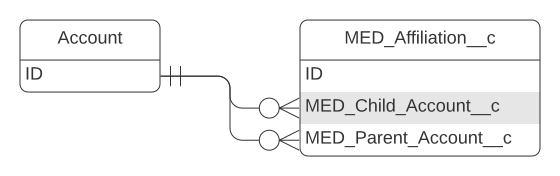
Affiliation schema
| Field label | API name | Data type | Description |
|---|---|---|---|
| Child Account | MED_Child_Account__c | Lookup(Account) | Child account of the affiliation. |
| Display Name | MED_Display_Name__c | Formula(Text) | Resolved value become the Affiliation tab label. |
| External ID | MED_External_ID__c | Text(40) | External ID for allowing upsert operations. |
| Locked | MED_Locked__c | Formula(Checkbox) | Indicates if the record is locked. When locked, a record cannot be modified, anonymized, or deleted. The record is locked if it is closed or cancelled or if a legal hold has been placed on it. |
| Override Lock | MED_Override_Lock__c | Checkbox | Indicates a lock on this record can be bypassed (true) or cannot be bypassed (false). |
| Parent Account | MED_Parent_Account__c | Master-Detail(Account) | Parent account of the affiliation. |
| Parent Account Name | MED_Parent_Account_Name__c | Formula(Text) | Pulls the parent account name onto the affiliation object. |
| Role | MED_Role__c | Text(100) | Indicates the role of the individual at an institution. |
| Source | MED_Source__c | Picklist | Source of the affiliation link between accounts. |
| Status | MED_Status__c | Picklist | Status of the Affiliation record. |
Contact Information
The Contact Information object stores all the contact information for an Account.
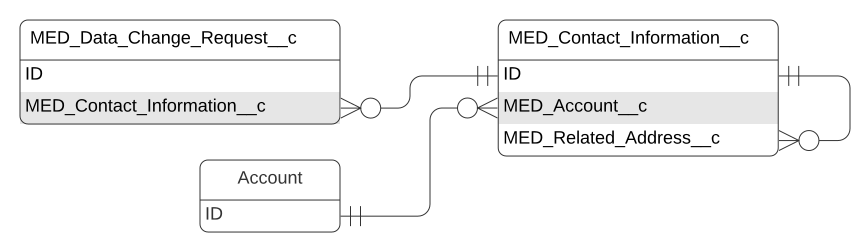
Contact Information schema
| Field label | API name | Data type | Description |
|---|---|---|---|
| Account | MED_Account__c | Master-Detail(Account) | Account that this Contact Information is related to. |
| Address Line 1 | MED_Address_Line_1__c | Text(100) | First line of an address. |
| Address Line 2 | MED_Address_Line_2__c | Text(100) | Second line of an address. |
| City | MED_City__c | Text(40) | City of an address. |
| Concatenated Address | MED_Concatenated_Address__c | Formula(Text) | Combines the address fields into a single line of text for display. |
| Country | MED_Country__c | Picklist | Country of an address. |
| MED_Email__c | Email address of the account. | ||
| External ID | MED_External_ID__c | Text(120) | Reference ID to an external system. |
| Fax | MED_Fax__c | Phone | Fax number of the account. |
| Locked | MED_Locked__c | Formula(Checkbox) | Indicates if the record is locked. When locked, a record cannot be modified, anonymized, or deleted. The record is locked if it is closed or canceled or if a legal hold has been placed on it. |
| Override Lock | MED_Override_Lock__c | Checkbox | Indicates the lock on this contact should be ignored while performing updates. This field, when set to true, should be set back to false via workflow. |
| Phone | MED_Phone__c | Phone | Phone number of an account. |
| Postal Code | MED_Postal_Code__c | Text(20) | Postal code of an address. |
| Primary | MED_Primary__c | Checkbox | Indicates if the record is the primary contact information record for a particular record type (true) or not (false). A trigger ensures that there is only one primary for each record type. |
| Profile | MED_Profile_Handle_URL_ID__c | Text(255) | Social media account for an account. |
| Record Type | RecordTypeId | Record Type | Id of the record type. Record types include: - Address - Email - Fax - Phone - Social |
| Related Address | MED_Related_Address__c | Lookup(Contact Information) | Related address for other types of contact information. |
| Source | MED_Source__c | Picklist | Name of the external system that is the source of the data. |
| State | MED_State__c | Picklist | State of an address. |
| Status | MED_Status__c | Picklist | Determines if the record will return in search results. |
| Type | MED_Type__c | Picklist | Indicates additional information about the contact information. |
| Value | MED_Value__c | Formula(Text) | Returns the appropriate contact information for the record, so that the correct value can display in search results. |
Data Change Request
The Data Change Request object stores information about requested changes to managed Account and Contact Information records and is on the master side of a master-detail relationship with the Data Change Request Line object, which captures the old and new values for change requests.
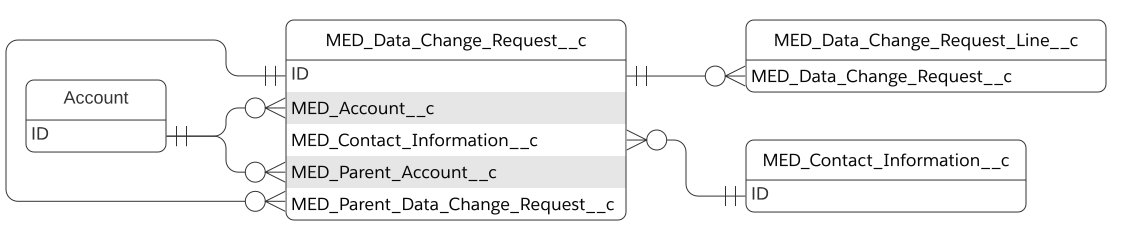
Medical Information Cloud supports master data management (MDM) integrations with Veeva Network
and custom account search handlers. If your Medical Information Cloud instance is integrated with
Veeva Network, every time a data change is submitted, a Data Change
Request record is created and associated with the relevant Account or
Contact Information record via a lookup field. A single Data Change
Request record cannot capture more than one change request. This means
that each Data Change Request record should only ever have one of these
lookup fields populated at a time: MED_Account__c,
MED_Contact_Information__c, or MED_Parent_Account__c. If you use a
custom master data management solution, this restriction and model may
not apply.
Data Change Request schema
| Field label | API name | Data type | Description |
|---|---|---|---|
| Account | MED_Account__c | Lookup(Account) | Account to be modified or parent Account of other records being modified. |
| Account External ID | MED_Account_External_ID__c | Text(100) | Unique identifier of the Account in the external Master Data Management source. When the status of this record changes to Processed, this value is stamped on the related Account's External ID field. |
| Address | MED_Contact_Information__c | Lookup(Contact Information) | Address to be modified. |
| Address External ID | MED_Address_External_ID__c | Text(100) | Unique identifier of the Address in the external Master Data Management source. When the status of this record changes to Processed, this value is stamped on the related Account's External ID field. |
| Country Mapping | MED_Country_Mapping__c | Text(2) | Country code used for mapping when the Data Change Request is processed. |
| Data Change Request Number | Name | Auto Number | Number that is automatically assigned to the Data Change Request record upon the record's creation. |
| Date Time | MED_Date_Time__c | Date/Time | Date and time the request was submitted. |
| DCR External ID | MED_DCR_External_ID__c | Text(100) (External ID) (Unique Case Insensitive) | External Data Change Request ID. |
| Error | MED_Error__c | Text(255) | Details of any errors that occurred during outbound or inbound data change request updates. Errors are cleared after the requested update is successfully processed. |
| Notes | MED_Notes__c | Text Area(255) | User notes. |
| Parent Account | MED_Parent_Account__c | Lookup(Account) | Lookup to a parent Account. |
| Parent Account External ID | MED_Parent_Account_External_ID__c | Text(100) | Unique identifier of the parent account in the external Master Data Management source. When the status of this record changes to Processed, this value is stamped on the related parent Account's External ID field. |
| Parent Data Change Request | MED_Parent_Data_Change_Request__c | Lookup(Data Change Request) | Link to the parent Data Change Request record. This field is only used when multiple Data Change Request records are created in a single step. The Account Data Change Request record is always the parent, and the other Data Change Request records that were created in the same step are linked to it. |
| Record Type | RecordTypeId | Record Type | Id of the record type. Native DCR functionality utilizes these record types: - Account - utilized when the associated Account record is either (1) new or modified or (2) the parent Account of other modified records. - Address - utilized when the associated Contact Information record is new or has been modified. - Parent - utilized when the associated Institution Account record is new or has been modified. These additional record types exist in case you want to configure a custom DCR handler: - Email - Fax - Phone - Social |
| Result | MED_Result__c | Picklist | Result of the data change request. The master data management source returns this value. Results include: - Partial - Accepted - Rejected - Modified - Already Applied |
| Sent Datetime | MED_Sent_Datetime__c | Date/Time | Date and time the record was sent to the master data management source for approval. |
| Status | MED_Status__c | Picklist | Status of the requested change. Statuses include: - Submitted - the record has been sent to the MDM for processing but has not yet been processed. - Pending - the record has not been sent to the MDM for a data steward to process. Only Data Change Request records that have this value will be sent to the MDM for processing. - Processed - the record has been processed or canceled by a data steward. When this status value is set, a trigger performs any necessary merge work and then updates the External ID field on the related Account or Contact Information record. - Canceled - the native DCR functionality does not use this status. |
| Type | MED_Type__c | Picklist | Type of change requested. Types include: - Delete - the native DCR configuration does not utilize this Type. - Edit - indicates that a change was made to the Account record or that the related Parent Account or Contract Information record was created or modified. - New - indicates that the related Account record was created. This value never applies to related Parent Account or Contact Information records. |
Data Change Request Line
The Data Change Request Line object captures the new and old data values from a data change request. Data Change Request Line is on the detail side of a master-detail relationship with the Data Change Request object, which stores information about requested changes to managed Account and Contact Information records.
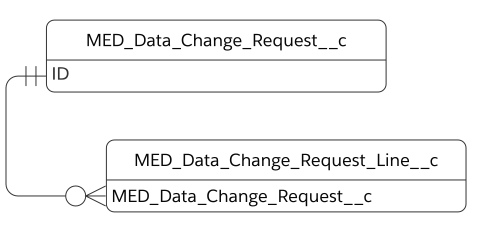
Data Change Request Line schema
| Field label | API name | Data type | Description |
|---|---|---|---|
| Data Change Request | MED_Data_Change_Request__c | Master-Detail(Data Change Request) | Lookup to the parent Data Change Request record. |
| DCR Line Number | Name | Auto Number | Number that is automatically assigned to the Data Change Request Line record upon the record's creation. |
| Field API Name | MED_Field_API_Name__c | Text(43) | API name of the field in the customer relationship management (CRM) that the change request relates to. |
| Field Name | MED_Field_Name__c | Text(40) | Name of the modified field in Inquiry Management. |
| Final Value | MED_Final_Value__c | Long Text Area(4000) | Field value after a data steward manually processes the data change request in the MDM/Veeva Network. If the data steward rejects the New Value, the Final Value could be the same value as the Old Value. If the New Value is accepted, the Final Value might match the New Value. Data stewards might also modify the New Value. For example, a data steward could change Street to St. for consistency. The Final Value is set when the completed data change request from the MDM/Veeva Network is pulled. |
| Is Address Field | MED_Is_Address_Field__c | Checkbox | Indicates whether the field the change request relates to is part of an address (true) or not (false). |
| New Value | MED_New_Value__c | Long Text Area(4000) | Field value that is requested in the Medical Information Cloud change request and that is sent to the master data management (MDM) system. |
| Old Value | MED_Old_Value__c | Long Text Area(4000) | Field value before the change occurs. |
Debug Log
The Debug Log (mvn__Debug_Log__c) custom object stores application
warnings and error logs.
mvn__Debug_Log__c schema
| Field label | API name | Data type | Description |
|---|---|---|---|
| Body | mvn__Body__c | Text(255) | Stores the full error or warning message. |
| Class | mvn__Class__c | Text(50) | The class name, if applicable. |
| Log Number | Name | Auto Number | The auto-generated record name. |
| LWC | mvn__LWC__c | Text(50) | The name of the Lightning Web Component, if applicable. |
| Message | mvn__Message__c | Text(255) | The debug message. |
| Method | mvn__Method__c | Text(50) | The method name, if applicable. |
| Severity | mvn__Severity__c | Picklist | The severity of the log: - ERROR - WARN - INFO - FINE - FINER - FINEST |
| Stack Trace | mvn__Stack_Trace__c | Text(255) | The stack trace for the exception, if applicable. |
Document
Document (mvn__CM_Document__c) is a fundamental custom object
consisting of metadata. Each Document record can have many associated
Document Version (mvn__CM_Document_Version__c) records.
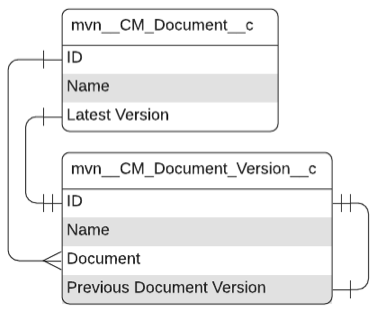
mvn__CM_Document__c schema
| Field Label | API Name | Data Type | Description |
|---|---|---|---|
| Cloned From | mvn__CM_Cloned_From__c | Lookup(Document) | The related Document (mvn__CM_Document__c) record from which this document was cloned. |
| Created By Name | mvn__CM_Created_By_Name__c | Formula (Text) | Full name of the user who created the document. |
| Customer Id | mvn__CM_Customer_Id__c | Text(255) (External ID) | Customer ID associated to the document. |
| Document Lifecycle Developer Name | mvn__CM_Document_Lifecycle_Developer_Name__c | Text(255) | DeveloperName of the document's Lifecycle. |
| Document Number | Name | Auto Number | Autogenerated Document Number. Note: If you make a change to the Auto Number format, an update to Regulated Content Cloud will override it. |
| External Content Version Id | mvn__CM_External_Content_Version_Id__c | Text(18) | ID of the latest External Content Version associated with the document. |
| Language | mvn__CM_Latest_Version_Language__c | Formula (Text) | Latest version's Language. |
| Latest Version | mvn__CM_Latest_Version__c | Lookup(Document Version) | Pointer to the latest document version. |
| Mute Document Level Notifications? | mvn__CM_Mute_Document_Level_Notifications__c | Checkbox | Whether this document has system event notifications muted. |
| Preview | mvn__CM_Preview__c | Formula (Text) | Latest version's preview/thumbnail URL. |
| Status | mvn__CM_Latest_Version_Status__c | Formula (Text) | Latest version's Status. |
| Subtype | mvn__CM_Latest_Version_Subtype__c | Formula (Text) | Latest version's Subtype. |
| Title | mvn__CM_Latest_Version_Title__c | Formula (Text) | Latest version's Fully Qualified Name. |
| Type | mvn__CM_Latest_Version_Type__c | Formula (Text) | Latest version's Type. |
Document Group
Document groups define groups of users and are maintained in the
CM_Document_Group__c custom object. A document group is always
associated with both a Public Group and a Group.
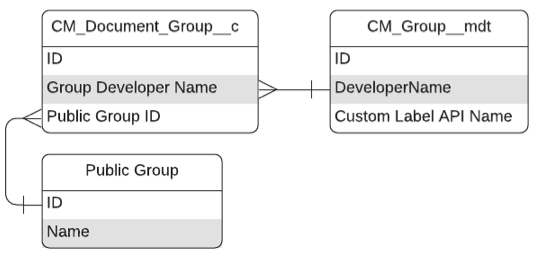
mvn__CM_Document_Group__c schema
| Field label | API name | Data type | Description |
|---|---|---|---|
| Document Group Name | Name | Text(80) | Name of the Document Group. |
| Group Developer Name | mvn__CM_Group_Developer_Name__c | Text(255) | DeveloperName of the associated Group__mdt record. |
| Public Group Id | mvn__CM_Public_Group_Id__c | Text(255) | The ID of the Salesforce Public Group. |
Document Region
Document Region (CM_Document_Region__c) is a junction between the
Region and Document Version custom objects. A validation rule ensures
that a Document Region can only be created if it looks up to a Region
and a Document Version.
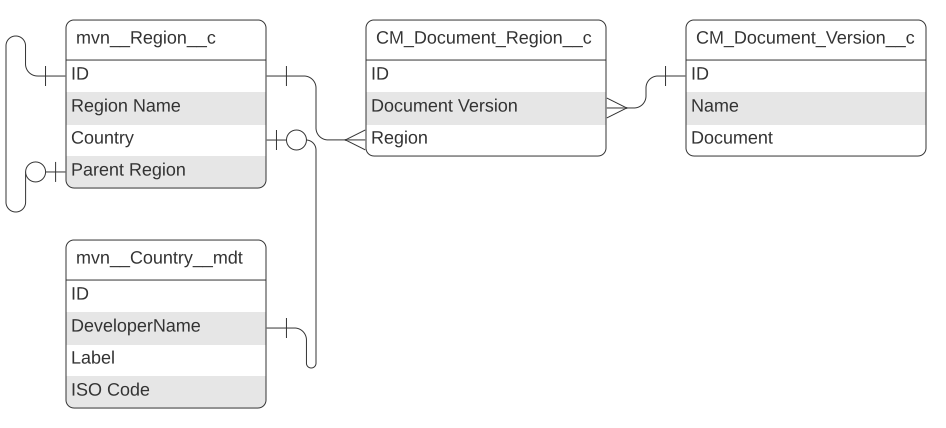
mvn__CM_Document_Region__c schema
| Field label | API name | Data type | Description |
|---|---|---|---|
| Country ISO Code | mvn__CM_Country_ISO_Code__c | Formula(Text) | ISO 3166-1 country code. |
| Document Region Name | Name | Auto Number | Auto-generated name of the document region. |
| Document Version | mvn__CM_Document_Version__c | Master-Detail(Document Version) | Associated version of a document. |
| External ID | mvn__CM_External_ID__c | Text(255) (External ID) (Unique Case Insensitive) | External ID used for Apex DML purposes. |
| Region | mvn__CM_Region__c | Lookup(Region) | Associated region. |
Document Relationship
Document Relationship (mvn__CM_Document_Relationship__c) is a
polymorphic junction object between either:
-
Document version and document version
Document version and document version relationship
Document Version 1 Document Version 2 Product Category Type <document version 1 ID> <document version 2 ID> Document Bundle :::: -
Document version and product
Document version and product relationship
Document Version 1 Document Version 2 Product Category Type <document version 1 ID> <product ID> Product ::::
A document relationship record is deleted if one of the lookup objects
it connects is deleted. For example, a document relationship connecting
Document A to Document B is deleted if either Document A or
Document B is deleted.
mvn__CM_Document_Relationship__c schema
| Field label | API name | Data type | Description |
|---|---|---|---|
| Category | CM_Category__c | Formula(Text) | Category of the relationship (document vs product). |
| Controlling Document Version Id | CM_Controlling_Document_Version_Id__c | Formula (Text) | Either Document Version 1 or Document Version 2. If the value of CM_Type__c is Local Version or Translation, the Controlling Document Version Id is Document Version 1. If the value of CM_Type__c is Bundle, Relevant, or Sourced, the Controlling Document Version Id is Document Version 2. The Controlling Document Version Id field is only set when the CM_Category__c equals Document. |
| Dependent Document Name | CM_Dependent_Document_Name__c | Formula (Text) | Either Document Version 1 or Document Version 2. If the value of CM_Type__c is Local Version or Translation, the Dependent Document Name is Document Version 2. If the value of CM_Type__c is Bundle, Relevant, or Sourced, the Dependent Document Name is Document Version 1. The Dependent Document Name field is only set when the CM_Category__c equals Document. |
| Document Relationship Name | Name | Auto Number | Autogenerated record name. |
| Document Version 1 | CM_Document_Version_1__c | Lookup(Document Version) | Version that is the source of the relationship. |
| Document Version 2 | CM_Document_Version_2__c | Lookup(Document Version) | Version that is the target of the relationship. |
| Document Version 2 Name | CM_Document_Version_2_Name__c | Formula (Text) | Fully qualified name of the target version. |
| External ID | CM_External_ID__c | Text(255) (External ID) (Unique Case Insensitive) | External ID used for Apex DML purposes. |
| Product | MED_Product__c | Lookup(Product) | Product associated to Document Version 1. |
| Type | CM_Type__c | Picklist | Type of the relationship if the Category is a document-document relationship. Visit Relationships. |
Document Role
Document Role is a child to Document and is managed in the
CM_Document_Role__c custom object.
mvn__CM_Document_Role__c schema
| Field label | API name | Data type | Description |
|---|---|---|---|
| Document | mvn__CM_Document__c | Master-Detail(Document) | Document associated to this Document Role. |
| Document Group | mvn__CM_Document_Group__c | Lookup(Document Group) | Document Group associated to this Document Role. |
| Document Role Name | Name | Auto Number | Name of the Document Role. |
| External ID | mvn__CM_External_ID__c | Text(255) (External ID) (Unique Case Insensitive) | For Apex DML purposes. |
| Public Group ID | mvn__CM_Public_Group_ID__c | Formula (Text) | ID of the Public Group associated to this Document Role, if one exists (via the Document Group). |
| Role Custom Label API Name | mvn__CM_Role_Custom_Label_API_Name__c | Text(255) | Stamped with the Custom Label API Name defined on the Role. |
| Role Developer Name | mvn__CM_Role_Developer_Name__c | Text(255) | Stamped with the DeveloperName of the Role. |
| Role User Name | mvn__CM_Role_User_Name__c | Formula (Text) | Name of the user associated to this Document Role, if one exists (via the user). |
| User | mvn__CM_User__c | Lookup(User) | User associated to this Document Group. |
Document Role Share
The Document Role Share (mvn__CM_Document_Role_Share__c) object is a utility object for keeping track of sharing records for various Medical Information Cloud objects. It has a Master-detail relationship with the Document Role object.
Document Role Share schema
| Field label | Field name | Data type | Description |
|---|---|---|---|
| Document Role | mvn__CM_Document_Role__c | Mater-detail (Document Role) | Document roles manage users or groups and their associated role(s) on a document. This field has a Master-detail relationship to the Document Role Share object. |
| Document Role Share Name | Name | Auto Number | Automatically incremented record number. |
| Object Share Id | mvn__CM_Object_Share_Id__c | Text (18) (External ID) | ID of the Object Share record associated to the Document Role Share object. |
| Share Object Name | mvn__CM_Share_Object_Name__c | Text (255) | The name of the Share object this record makes reference to, e.g. mvn__CM_Document_Version__Share. |
Document Version
A mvn__CM_Document_Version__c record maps to a mvn__CM_Document__c
record. Many mvn__CM_Document_Version__c records can map to the same
mvn__CM_Document__c record. Each mvn__CM_Document_Version__c record
associated to the same mvn__CM_Document__c record can have different
metadata and a different internal or external file associated to it.
Regulated Content Cloud ships with a mvn__CM_Document_Version__c field set named
mvn__CM_System_Fields. This field set is considered protected system
metadata and should not be modified or deleted.
mvn__CM_Document_Version__c Schema
| Field label | API name | Data type | Description |
|---|---|---|---|
| Allowed Audience | mvn__CM_Allowed_Audience__c | Picklist (Multi-Select) | Audience allowed to use the document version. |
| Allowed Requests | MED_Allowed_Requests__c | Text(255) | Comma-separated list of Request Names in Medical Information Cloud that this document is allowed to be attached to. |
| Answer | mvn__CM_Answer__c | Rich Text Area(32768) | FAQ answer content for a FAQ document version. |
| Approved Channels | mvn__CM_Approved_Channels__c | Picklist (Multi-Select) | Channels where the document version can be consumed. |
| Changelog | mvn__CM_Changelog__c | Text Area(255) | Description of changes made to a document version. The Changelog for the first version of a document is blank. |
| Check Out Date Time | mvn__CM_Check_Out_Date_Time__c | Date/Time | Date and time when the document version was checked out. |
| Check Out Id | mvn__CM_Check_Out_Id__c | Text(36) (External ID) | Unique identifier for the checkout. |
| Check Out Type | mvn__CM_Check_Out_Type__c | Picklist | Type of check out the user requested. Picklist values include: - Office 365 - Local - FilesConnect |
| Check Out URL | mvn__CM_Check_Out_URL__c | URL(255) | URL where the file is stored in Microsoft 365. |
| Check Out User | mvn__CM_Check_Out_User__c | Lookup(User) | User who checked out the document version. |
| Check Out User Name | mvn__CM_Check_Out_User_Name__c | Formula (Text) | Full name of the user who checked out the document version. |
| Checked Out | mvn__CM_Checked_Out__c | Formula (Checkbox) | Whether the document version is currently checked out. |
| Classification | mvn__CM_Classification__c | Picklist | Classification of the document version. Classification depends on Document Subtype. Visit Document Types. |
| Content (rich text) | mvn__CM_Content_Rich_Text__c | Rich Text Area(32768) | A rich text field. For documents without files, content in this field will appear in the document preview. Merge fields are supported. For more information, reference Salesforce's documentation on Merge Fields. |
| Content Version Id | mvn__CM_Content_Version_Id__c | Text(18) (External ID) | Content Version ID of a file that is associated to the document version. |
| Custom Response | MED_Custom_Response__c | Formula (Checkbox) | Formula to determine if this is a custom response document that should be restricted in Medical Information Cloud. |
| Delivery Option | mvn__CM_Delivery_Option__c | Picklist | Approved fulfillment delivery options for the document version. |
| Description | mvn__CM_Description__c | Text Area(255) | Description of the document version. |
| Document | mvn__CM_Document__c | Lookup(Document) | Parent document of the document version. |
| Document Lifecycle | mvn__CM_Document_Lifecycle__c | Formula (Text) | Lifecycle of the parent document. Visit Document Lifecycles. |
| Document Number | mvn__CM_Document_Number__c | Formula (Text) | Document number of the parent document. |
| Document Response ID | mvn__CM_Document_Response_ID__c | Long Text Area(1000) | Comma-separate list of document request IDs associated to the document version. |
| Document Subtype | mvn__CM_Document_Subtype__c | Picklist | Subtype of the document version. Subtype depends on Document Type and controls Document Classification. Visit Document Types. |
| Document Type | mvn__CM_Document_Type__c | Picklist | Document Type of the document version. Visit Document Types. |
| Document Version Name | Name | Auto Number | Automatically generated name of the document version. |
| Expiration Date | mvn__CM_Expiration_Date__c | Date/Time | Expiration date of the document version. |
| Expiration Reminder Date | mvn__CM_Expiration_Reminder_Date__c | Date | Date when expiration reminders are sent. |
| External File | mvn__CM_External_File__c | Checkbox | Whether the document version points to an external file. |
| External URL | mvn__CM_External_URL__c | URL(255) | URL of an externally hosted file that is associated to the document version. |
| File Extension | mvn__CM_File_Extension__c | Text(40) | Extension of the related file. |
| File Id | mvn__CM_File_Id__c | Text(255) (External ID) | File ID of a file that is associated the document version. |
| File Size | mvn__CM_File_Size__c | Number(9, 0) | Size of the associated file in bytes. |
| Fully Qualified Name | mvn__CM_Fully_Qualified_Name__c | Formula (Text) | Fully Qualified Name of the document version. The Fully Qualified Name is comprised of the Title followed by the Version Number. For example, if the Fully Qualified Name of a document version is Dosing Guide (v0.4), Dosing Guide is the Title, and 0.4 is the Version Number. |
| Is Clone | mvn__CM_Is_Clone__c | Checkbox | True when the document version has been cloned from an existing document. |
| Is Latest Version | mvn__CM_Is_Latest_Version__c | Checkbox | Whether this is the latest document version of the document record that the document version is associated to. |
| Language | mvn__CM_Language__c | Picklist | Language of the document version. |
| Latest Document Version ID | mvn__CM_Latest_Document_Version_ID__c | Formula (Text) | Record ID of the latest document version. |
| Latest Version Number | mvn__CM_Latest_Version_Number__c | Formula (Text) | Version number of the latest document version. |
| Latest Version Title | mvn__CM_Latest_Version_Title__c | Formula (Text) | Title of the latest document version. |
| Major Version Number | mvn__CM_Major_Version_Number__c | Number(18, 0) | Major version number of the document version. For example, if the Version Number is 5.4, the Major Version Number is 5. |
| Metadata Last Modified By | mvn__CM_Metadata_Last_Modified_By__c | Lookup(User) | User who last modified the document version's metadata. Note: This Metadata Last Modified By field should be used in place of Salesforce's standard Last Modified By (LastModifiedById) field. This is because the Last Modified By field is updated frequently by hidden and automatic processes. |
| Metadata Last Modified Date | mvn__CM_Metadata_Last_Modified_Date__c | Date/Time | Date and time when the document version metadata was last modified. |
| Minor Version Number | mvn__CM_Minor_Version_Number__c | Number(18, 0) | Minor version number of the version. For example, if the Version Number is 5.4, the Minor Version Number is 4. |
| Preview | mvn__CM_Preview__c | Text Area(255) | Plain text preview of the document version. |
| Previous Document Version | mvn__CM_Previous_Document_Version__c | Lookup(Document Version) | Previous version of the document. |
| MIC Location | MED_Location__c | Picklist (Multi-Select) | The location in Medical Information Cloud that this document applies to. Required for Work Instructions. |
| Product | mvn__CM_Product__c | Picklist (Multi-Select) | System field for querying products related to the document version. This field will not display data when queried using the standard API. |
| Products | mvn__CM_Products__c | Text(255) | An automated list of products from Document Relationship (CM_Document_Relationship__c) records. This is displayed on the Documents list view page and used for sorting MCM Product (mvn__CM_Product__c) records. |
| Question | mvn__CM_Question__c | Text Area(255) | FAQ question content for a FAQ document version. |
| Region | mvn__CM_Region__c | Picklist (Multi-Select) | System field for querying regions related to the document version. This field will not display data when queried using the standard API. |
| Regions | mvn__CM_Regions__c | Text(255) | An automated list of regions from Document Region (CM_Document_Region__c) records. This is displayed on the Documents list view page and used for sorting Region (mvn__Region__c) records. |
| Scheduled Publish Date | mvn__CM_Scheduled_Publish_Date__c | Date/Time | Date and time when the document version is scheduled to be published. |
| Sort Order | MED_Sort_Order__c | Number(3, 0) | Weighted order to present documents in a list, required for Work Instructions. |
| Status | mvn__CM_Status__c | Text(255) (External ID) | DeveloperName of the CM_Status__mdt associated to the document version. |
| Status Custom Label | mvn__CM_Status_Custom_Label__c | Text(255) (External ID) | Custom label for the document version's status. |
| Thumbnail | mvn__CM_Thumbnail__c | Formula (Text) | Thumbnail rendition of the document version. Warning: This field supersedes the Thumbnail URL field as of Medical Information Cloud V15. |
| Thumbnail URL | mvn__CM_Thumbnail_URL__c | Text(255) | Relative URL of the thumbnail rendition. Warning: This field has been deprecated as of Medical Information Cloud V15. |
| Title | mvn__CM_Title__c | Text(255) (External ID) | Title of the document version, e.g. Dosing Guide. Title does not include Version Number. |
| Translation Id | mvn__CM_Translation_Id__c | Text(255) (External ID) | The ID of this Document Version's translation request. |
| Translation Service | mvn__CM_Translation_Service__c | Text(255) | The third-party service used for the translation. |
| Translation Status | mvn__CM_Translation_Status__c | Picklist | The status of this document version's translation progress. |
| Version Number | mvn__CM_Version_Number__c | Formula (Text) | Version Number of the document version, e.g., "5.4" where "5" is the Major Version Number and "4" is the Minor Version Number. |
Document Version Rendition
The Document Version Rendition custom object stores metadata for renditions and is on the detail side of a master-detail relationship with the Document Version custom object. This relationship ensures that if you have access to a Document Version record, you also have access to its Document Version Rendition child records.
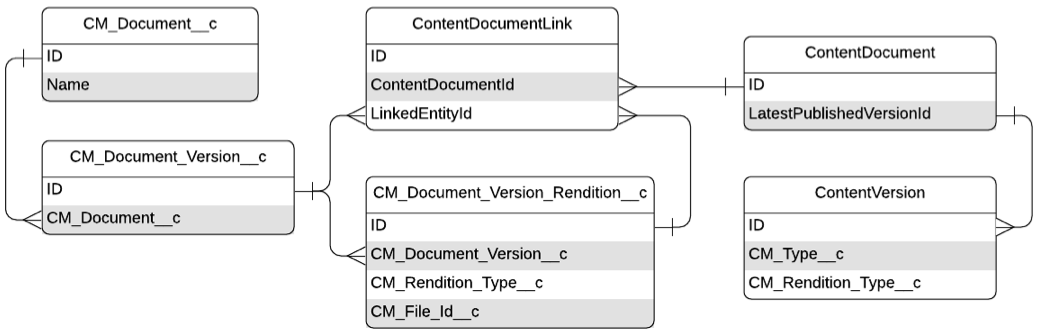
CM_Document_Version_Rendition__c schema
| Field label | API name | Data type | Description |
|---|---|---|---|
| Document Version | CM_Document_Version__c | Master-Detail(Document Version) | Document version record to associate the document rendition. |
| Document Version Rendition Name | Name | Auto Number | Autogenerated number of the document version rendition. |
| File Id | CM_File_Id__c | Text(255) (External ID) | File ID associated with the rendition. |
| Type | CM_Type__c | Text(255) (External ID) | Developer name of the rendition type. Visit Rendition Type. |
Email Message
The Email Message standard object stores email messages.
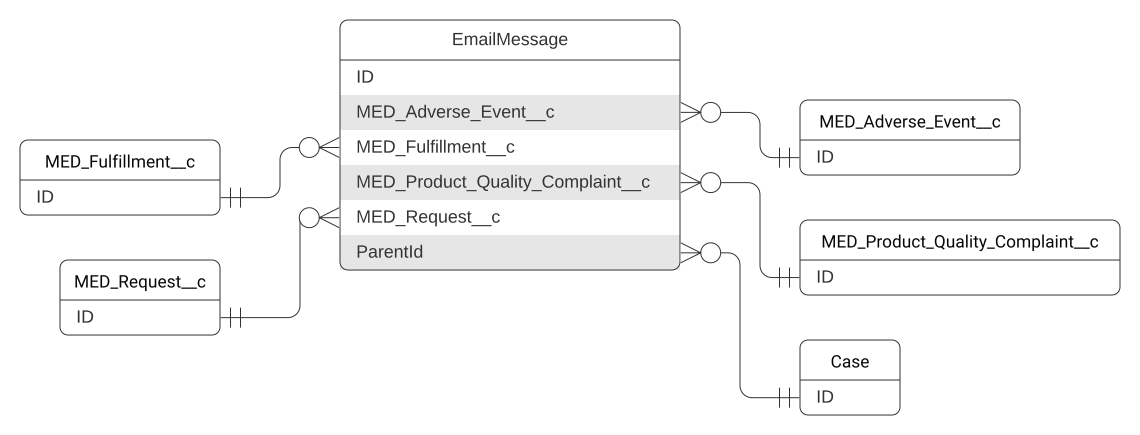
Email Message schema
| Field label | API name | Data type | Description |
|---|---|---|---|
| Adverse Event | MED_Adverse_Event__c | Lookup(Adverse Event) | Relates the email message to an Adverse Event record. |
| Fulfillment | MED_Fulfillment__c | Lookup(Fulfillment) | Relates the email message to a Fulfillment record. |
| Locked | mvn__MED_Locked__c | Formula (Checkbox) | Formula that determines if the record is locked (true) or unlocked (false). |
| Override Lock | mvn__MED_Override_Lock__c | Checkbox | Allows for this email message to be edited even when it is locked. |
| Parent Interaction | ParentId | Lookup(Interaction) | Relates the email message to the parent Interaction record. |
| Product Quality Complaint | MED_Product_Quality_Complaint__c | Lookup(Product Quality Complaint) | Relates the email message to a Product Quality Complaint record. |
| Request | MED_Request__c | Lookup(Request) | Relates the email message to a Request record. |
Fulfillment
The Fulfillment object stores written responses that agents send to accounts who submit medical inquiries. With a Fulfillment record, you can create package of information to send via email, fax, or mail. A Fulfillment Packages includes a cover letter and all the documents used to answer the account's questions. When you give an Account a verbal response, you do not create a Fulfillment record.
The Fulfillment object has a one-to-many lookup relationship with the Interaction object; a single Interaction record can be associated to multiple Fulfillment records.
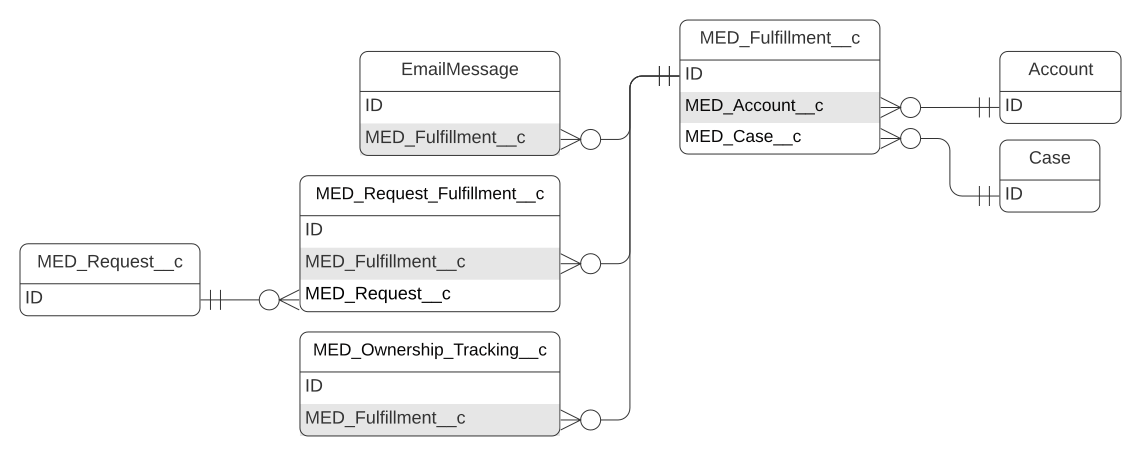
Fulfillment schema
| Field label | API name | Data type | Description |
|---|---|---|---|
| Account | MED_Account__c | Lookup(Account) | Account associated with the Fulfillment. When the Fulfillment record is created, this field is automatically populated with the same Account that was selected on the parent Interaction. |
| Address Line 1 | MED_Address_Line_1__c | Text(100) | First line of the shipping address for the Fulfillment. When the Fulfillment record is created, this field is automatically populated with the Address Line 1 of the selected requester on the parent Interaction. |
| Address Line 2 | MED_Address_Line_2__c | Text(100) | Second line of the shipping address for the Fulfillment. When the Fulfillment record is created, this field is automatically populated with the Address Line 2 of the selected requester on the parent Interaction. |
| Alerts | MED_Alerts__c | Formula (Text) | Shows a composite summary of different flags (urgent, roll up, escalated, locked, SLA). |
| Anonymize | MED_Anonymize__c | Checkbox | Indicates if the record should be anonymized. If True, a workflow removes personally identifiable information (PII) from the record. |
| Anonymous Key | MED_Anonymous_Key__c | Text(15) (External ID) (Unique Case Insensitive) | Stores a randomly generated key for use on anonymous Fulfillments. |
| Case Thread Token | MED_Case_Thread_Token__c | Formula (Text) | Copy of the related Case thread token that can be used for email merge fields. |
| CC Email | MED_CC_Email__c | Formula (Text) | Email address associated with the referrer. When the selected referrer on the parent Interaction is an HCP, this field is automatically populated with the email address associated with the selected referrer. |
| City | MED_City__c | Text(40) | Shipping city for the Fulfillment. When the Fulfillment record is created, this field is automatically populated with the City of the selected requester on the parent Interaction. |
| Country | MED_Country__c | Picklist | Country to fulfill to. |
| Credentials | MED_Credentials__c | Picklist | Medical credentials of the person receiving the Fulfillment Package. |
| Date/Time Closed | MED_Date_Time_Closed__c | Date/Time | Date and time the Fulfillment was closed. |
| Date/Time Opened | MED_Date_Time_Opened__c | Date/Time | Date and time the Fulfillment was opened. |
| Delivery Method | MED_Delivery_Method__c | Picklist | Method used to deliver the Fulfillment Package. |
| Display Name | MED_Display_Name__c | Formula (Text) | Resolved value becomes the Fulfillment tab label. |
| MED_Email__c | Email address associated with the fulfillment record. When the Fulfillment record is created, this field is automatically populated with the Email of the selected requester on the parent Interaction. This field is required when the Delivery Method for the Fulfillment is Email. | ||
| Escalated? | MED_Escalated__c | Formula (Text) | Displays icon if the Fulfillment is currently escalated. |
| Fax | MED_Fax__c | Phone | Fax number where the Fulfillment Package should be sent. This field is required when the Delivery Method for the Fulfillment is Fax. |
| First Name | MED_First_Name__c | Text(40) | First name of the person receiving the Fulfillment Package. |
| Fulfillment Number | Name | Auto Number | Number that is automatically assigned to the record upon the record's creation. |
| Fulfillment Owner | MED_Owner_HyperLink__c | Formula (Text) | Hyperlink to Owner record page. |
| Gender | MED_Gender__c | Picklist | Gender of the person receiving the Fulfillment Package. |
| Institution Name | MED_Institution_Name__c | Text(255) | Name of the institution associated with the person receiving the Fulfillment Package. |
| Interaction | MED_Case__c | Lookup(Interaction) | Lookup to the Interaction associated to this Fulfillment. |
| Interaction Account Id | MED_Interaction_Account_Id__c | Formula (Text) | Id of the Account selected on the parent Interaction. |
| Is Closed | MED_Is_Closed__c | Formula (Checkbox) | Indicates if the Fulfillment is closed. |
| Is Escalated | MED_Is_Escalated__c | Formula (Checkbox) | Indicates if the Fulfillment is currently escalated to another user. The field is marked as true if the Fulfillment Owner is different than the Interaction Owner. |
| Language | MED_Language__c | Picklist | Language of the Fulfillment content. |
| Last Name | MED_Last_Name__c | Text(80) | First name of the person receiving the Fulfillment Package. |
| Legal Hold | MED_Legal_Hold__c | Checkbox | Indicates if there is a legal hold on the record. If true, the record cannot be modified, anonymized, or deleted. |
| Letter Personalization | MED_Letter_Personalization__c | Rich Text Area(32768) | Personalized message that is added to the cover letter of the Fulfillment Package. |
| Locked | MED_Locked__c | Formula (Checkbox) | Indicates if the record is locked. When locked, a record cannot be modified, anonymized, or deleted. The record is locked if it is closed or cancelled or if a legal hold has been placed on it. |
| Locked Flag | MED_Locked_Flag__c | Formula (Text) | Displays icon when the record is locked. |
| Middle Name | MED_Middle_Name__c | Text(40) | Middle name of the person receiving the Fulfillment Package. |
| Owner | MED_Owner_Name_Formula__c | Formula (Text) | Calculates the owner name to use for tracking ownership. |
| Phone | MED_Phone__c | Phone | Phone number of the requester. |
| Postal Code | MED_Postal_Code__c | Text(20) | Shipping postal code for the Fulfillment Package. When the Fulfillment record is created, this field is automatically populated with the Postal Code of the selected requester on the parent Interaction. |
| Product List | MED_Product_List__c | Long Text Area(10000) | Comma separated list of unique products that are associated to the Request records that are being addressed with the Fulfillment record. The list contains the First Mention Display Names for the products. |
| QA Summary | MED_QA_Summary__c | Text Area(255) | Summary of the QA review of the Fulfillment record. |
| Recipient Name | MED_Recipient_Name__c | Text(255) | Full name of Fulfilment Package recipient, including salutation, suffix, and medical credentials. |
| Record Type | RecordTypeId | Record Type | Id of the record type. Record types include: - Fulfillment - Fulfillment - Closed |
| Reopen Reason | MED_Reopen_Reasons__c | Picklist | Reason the Fulfillment was reopened. |
| Reopen Reason | MED_Reopen_Reason__c | Picklist | Reason the Fulfillment was reopened. |
| Reset Fulfillment Line Items? | MED_Reset_Fulfillment_Line_Items__c | Checkbox | If checked, existing Fulfillment Line Items are deleted from the Fulfillment record and replaced with new ones. |
| Salutation | MED_Salutation__c | Picklist | Salutation of the requester. |
| State | MED_State__c | Picklist | Shipping state for the Fulfillment. When the Fulfillment record is created, this field is automatically populated with the State of the selected requester on the parent Interaction. |
| State Formula | MED_State_Formula__c | Formula (Text) | Formula field to pull State into the cover letter without the Country prefix. |
| Status | MED_Status__c | Picklist | Status of the Fulfillment. The record is locked when closed, and the record is locked and removed from reporting when cancelled. |
| Suffix | MED_Suffix__c | Text(40) | Suffix of the requester. |
| Title | MED_Title__c | Text(80) | Title of the requester. |
| Total Requests in Fulfillment | MED_Total_Fulfilments__c | Roll-Up Summary (COUNT Request Fulfillment) | Number of Request records that are being fulfilled. |
| Transfer Reason | MED_Transfer_Reason__c | Picklist | Reason the fulfillment was transferred/escalated. |
Inbound Form
The Inbound Form object provides a mechanism to capture medical inquiries from other systems electronically. It has a 1:1 lookup relationship with the Request object.
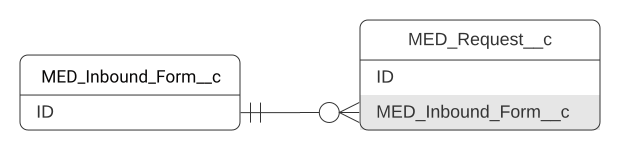
When an Inbound Form record is created, information from that record propagates to the appropriate locations within Inquiry Management, and a user can begin working on the medial inquiry. Visit Inbound Forms.
Inbound Form schema
| Field label | API name | Data type | Description |
|---|---|---|---|
| Address Line 1 | MED_Address_Line_1__c | Text(100) | First line of the Requester's shipping address. |
| Address Line 2 | MED_Address_Line_2__c | Text(100) | Second line of the Requester's shipping address. |
| Anonymize | MED_Anonymize__c | Checkbox | Flags the record to be anonymized. If true, a workflow removes personally identifiable information (PII) from the record. |
| Channel | MED_Channel__c | Picklist | Source of the Inbound Form, such as MIRF or chat. |
| Channel Details | MED_Channel_Details__c | Text(75) | Details about the inbound form channel. This field is used in conjunction with MED_Group_Identifier__c to ascertain whether a given record belongs to an Inbound Form Group. |
| City | MED_City__c | Text(40) | City of the Requester's shipping address. |
| Confirm Recreate Request | MED_Recreate_Request__c | Checkbox | Indicates whether to create a Request record from the Inbound Form (true) or not (false). The Request record that is created from an Inbound Form does not replace an existing Request record. When this value is set to true and then saved, a Request record is created, and the field's value is automatically changed back to false. |
| Country | MED_Country__c | Picklist | Country of the Requester's shipping address. |
| Date Submitted | MED_Date_Submitted__c | Date | Date the medical inquiry was created within the source system. |
| Datetime Submitted | MED_Datetime_Submitted__c | Date/Time | Date and time the medical inquiry was created within the source system. |
| Delivery Method | MED_Delivery_Method__c | Picklist | Delivery method that should be used to respond to the medical inquiry. |
| MED_Email__c | E-mail address of the Requester. | ||
| External ID | MED_External_ID__c | Text(50) (External ID) (Unique Case Sensitive) | Source system ID. All custom integrations or custom code creating Inbound Forms must populate MED_External_ID__c with a unique value. Integrations that do not fill out this required field will fail. If your source system is Veeva, the External ID is the MIRF Id. If you use a source system that is not Veeva, the External Id is the Id of the question used to track the sent question. |
| Fax Number | MED_Fax_Number__c | Phone | Fax number of the medical inquiry. |
| Federation Id | MED_Federation_Id__c | Text(200) | External ID of an Account to designate as the Referred By, typically an employee, e.g., a sales representative. |
| Group Identifier | MED_Group_Identifier__c | Text(100) (External ID) | Identifier that groups multiple medical inquiries together. Not every Inbound Form has a Group Identifier. |
| Has Signature | MED_Has_Signature__c | Checkbox | Indicates if the Inbound Form has a signature value (true) or not (false). |
| Inbound Form Number | Name | Auto Number | Number that is automatically assigned to the record upon the record's creation. |
| Inquiry Text | MED_Inquiry_Text__c | Long Text Area(32000) | Question being asked by the Account. |
| Interaction Notes | MED_Interaction_Notes__c | Long Text Area(32768) | Notes about the medical inquiry. This field maps and propagates Case.MED_Case_Notes__c. Note: The Interaction Notes field is only available in Inquiry Management Classic. |
| Language | MED_Language__c | Picklist | Preferred language for the medical inquiry response. |
| Legal Hold | MED_Legal_Hold__c | Checkbox | Indicates if there is a legal hold (true) or not (false). If true, the record cannot be modified, anonymized, or deleted. |
| Medical Inquiry IsClosed | MED_Inquiry_IsClosed__c | Checkbox | Indicates if the medical inquiry in the source system is closed (true) or not (false). |
| Phone Number | MED_Phone_Number__c | Phone | Phone Number of the medical inquiry. |
| Postal Code | MED_Postal_Code__c | Text(20) | Postal code where the Inbound Form originated. |
| Product | MED_Product__c | Text(100) | Product that the medical inquiry is about. |
| Referred By Company | MED_Referred_By_Company__c | Picklist | Name of the company associated with the Referred By. This field is typically used if there are JV partnerships. |
| Referred By Email | MED_Referred_By_Email__c | Email of the Referred By. | |
| Referred By Name | MED_Referred_By_Name__c | Text(255) | Name of the Referred By. This field is used if there is no external ID for the Referred By. Values should be concatenated into the field. |
| Referred By Phone | MED_Referred_By_Phone__c | Phone | Phone number of the Referred By. |
| Request Creation Log | MED_Request_Creation_Log__c | Long Text Area(32768) | Logs issues that occurred when the Inbound Form was inserted. |
| Requester External ID | MED_Requester_External_ID__c | Text(120) | External ID of the Requester. |
| Requester Gender | MED_Requester_Gender__c | Picklist | Gender of the Requester. |
| Requester Name | MED_Requester_Name__c | Text(255) | Name of the Requester. This field is used if there is no external ID for the Requester. Values should be concatenated into the field. |
| Signature | MED_Signature__c | Long Text Area(131072) | 64 bit encoded image data for an individual's signature. |
| State | MED_State__c | Picklist | State of the Requester's shipping address. |
| Status | MED_Status__c | Picklist | Current status of the medical inquiry. This field should be marked as Read-Only on all page layouts. |
| Suppress Request Creation | MED_Suppress_Request_Creation__c | Checkbox | When checked (true), the automatic creation of Requests and Notes and the linking of these records to the appropriate Interaction is suppressed and will not happen. |
| Updates Pending | MED_Updates_Pending__c | Checkbox | Indicates if there are pending updates that need to be synced back to the source system (true) or not (false). Veeva MIRF scheduled jobs use this field. |
Interaction
The Interaction object is the central object of Inquiry Management. An Interaction record stores a requester's contact information and information about how and when the requester reached out to the contact center. From an Interaction, you can create child records to record and address inquiries and record reported Adverse Events and Product Quality Complaints. An Interaction can have more than one child record of the same type.
The Interaction object is the Case standard object with a modified label, and as a result, references to Case exist in the application's code and declarative configuration.
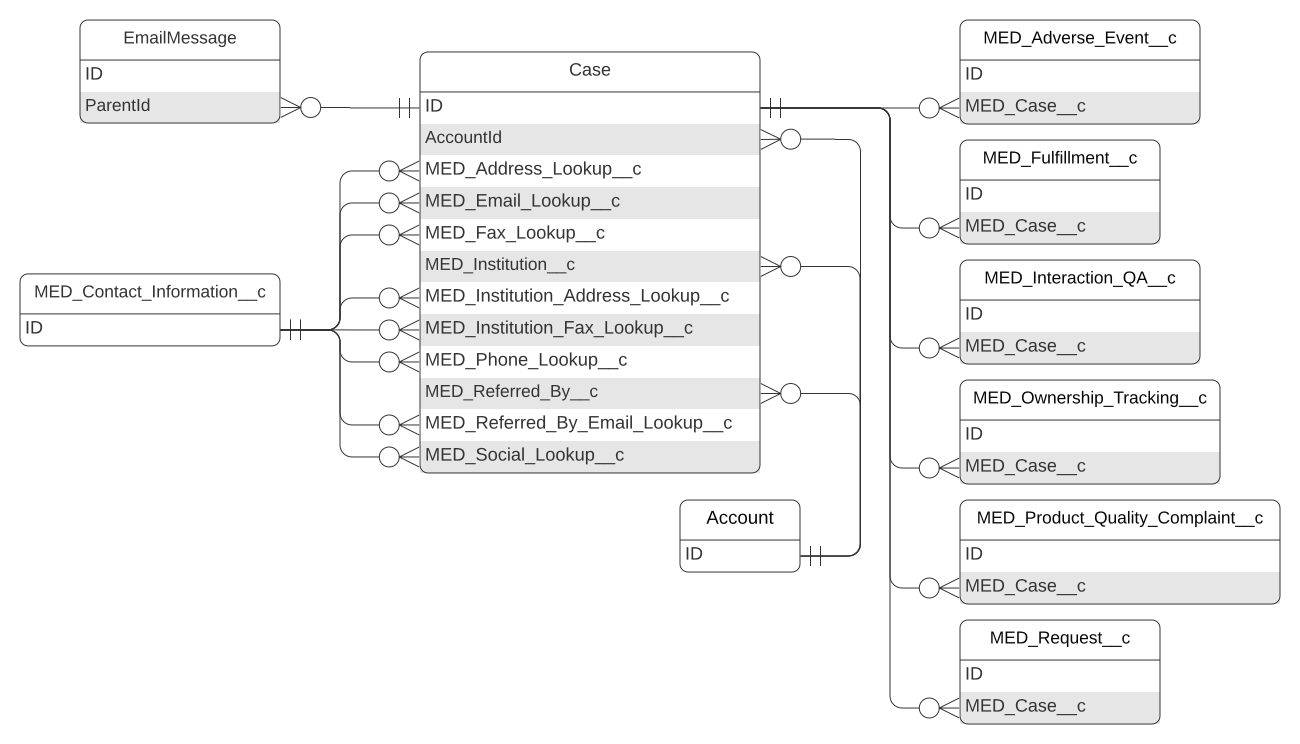
Interaction schema
| Field label | API name | Data type | Description |
|---|---|---|---|
| Account Name | AccountId | Lookup(Account) | ID of the associated Account record. |
| Address | MED_Address_Lookup__c | Lookup(Contact Information) | Lookup to the Contact Information record representing the chosen address for this case. |
| Address Line 1 | MED_Address_Line_1__c | Text(100) | Address line 1 of the address chosen for the requester on the Interaction. |
| Address Line 2 | MED_Address_Line_2__c | Text(100) | Address line 2 of the address chosen for the requester on the Interaction. |
| AE Identified? | MED_AE_Identified__c | Picklist | Indicates if an Adverse Event was identified as part of the Interaction. |
| Alerts | MED_Alerts__c | Formula (Text) | Shows a composite summary of different flags (urgent, roll up, escalated, locked, SLA). |
| ANI | MED_ANI__c | Phone | A historical record of the phone number that was used to call the contact center and is stamped on the case. |
| Anonymize | MED_Anonymize__c | Checkbox | Indicates if the record should be anonymized. If True, a workflow removes Personally Identifiable Information (PII) from the record. |
| Appropriate Selection of Content | MED_Appropriate_Selection_of_Content__c | Picklist | Result of the QA review of the content selected for response on the Interaction. |
| Business Hours | BusinessHoursId | Lookup(Business Hours) | ID of the Business Hours record associated with the Interaction record. |
| Case Notes | MED_Case_Notes__c | Long Text Area(32768) | Hidden field used to hold the custom Case Notes entered in the Visualforce page to the right of the Case Feed. |
| Channel | Origin | Picklist | Source of the case, such as phone or email. |
| Channel Details | MED_Channel_Details__c | Text(255) | Contains the channel details, such as the specific phone number or email address the customer used to contact the contact center. |
| City | MED_City__c | Text(40) | City value of the address chosen for the requester on the Interaction. |
| Concatenated Address | MED_Concatenated_Address__c | Formula (Text) | Combines the address fields into a single line of text for display and matching. |
| Consent Capture Type | MED_Consent_Capture_Type__c | Picklist | Type of consent captured, verbal or written. |
| Consent Status | MED_Consent_Status__c | Picklist | Indicates if the caller provided consent. |
| Country | MED_Country__c | Picklist | The country of the Interaction. This is required and it drives functionality and visibility of the Interaction. |
| Created Manually | MED_Created_Manually__c | Checkbox | Indicates if the Interaction was manually created by a user of the system. This field is used to determine if users are allowed to edit the Channel details. If True, users can edit the channel information. If False, channel information is locked. |
| Display Name | MED_Display_Name__c | Formula (Text) | Resolved value used as the Interaction tab label or quick identifier. |
| MED_Email_Lookup__c | Lookup(Contact Information) | Lookup to the Contact Information record representing the chosen email for this case. | |
| MED_Email__c | Email address to use for communications related to the Interaction. | ||
| Email Thread Token | mvn__MED_Email_Thread_Token__c | Text(120) | Stores the Lightning Threading token so it can be used from other objects. |
| Escalated | MED_Escalated2__c | Checkbox | Indicates if the Interaction was escalated by the Escalation Trigger on Ownership Transfer. |
| Escalated AEs | MED_Escalated_AEs__c | Number(2, 0) | Number of escalated Adverse Event records associated with the Interaction. |
| Escalated Fulfillments | MED_Escalated_Fulfillments__c | Number(2, 0) | Number of escalated Fulfillment records associated with the Interaction. |
| Escalated PQCs | MED_Escalated_PQCs__c | Number(2, 0) | Number of escalated Product Quality Complaint records associated with the Interaction. |
| Escalated Requests | MED_Escalated_Requests__c | Number(2, 0) | The number of escalated Request records associated with the Interaction. |
| Escalation Flag | MED_Escalation_Flag__c | Formula (Text) | Indicates if the Interaction or any child records are escalated in the Alerts field. |
| Escalations Outstanding | MED_Escalations_Outstanding__c | Formula (Number) | Total number of escalated records associated with the Interaction. |
| Fax | MED_Fax_Lookup__c | Lookup(Contact Information) | Lookup to the Contact Information record representing the chosen fax for this Interaction. |
| Fax | MED_Fax__c | Phone | Fax to use for communications on this Interaction. |
| Follow-up token | MED_Follow_Up_Token__c | Text(32) (External ID) | Temporary unique token value used for a request follow-up subscription. |
| Inquiry Routing Flag | mvn__MED_Inquiry_Routing_Flag__c | Formula (Text) | Displays an image specified by the Inquiry Routing Flag Icon if it has been set. |
| Inquiry Routing Flag Icon | mvn__MED_Inquiry_Routing_Flag_Icon__c | Text(255) | Image URL to use for the Inquiry Routing Alert Flag. |
| Institution | MED_Institution__c | Lookup(Account) | Business account that is associated to this Interaction. |
| Institution Address Lookup | MED_Institution_Address_Lookup__c | Lookup(Contact Information) | Selected address for the institution on the Interaction. |
| Institution Fax Lookup | MED_Institution_Fax_Lookup__c | Lookup(Contact Information) | Selected fax for the institution on the case. |
| Institution Name | MED_Institution_Name__c | Text(255) | Name of the institution associated to the Interaction. |
| Interaction Items Outstanding | MED_Outstanding_Interaction_Items__c | Formula (Number) | Total number of Items left to do on the Interaction. |
| Interaction Number | CaseNumber | Auto Number | Number that is automatically assigned to the record upon the record's creation. |
| Interaction Owner | MED_Owner_HyperLink__c | Formula (Text) | Hyperlink to the Owner record page. |
| Interaction Record Type | RecordTypeId | Record Type | ID of the record type assigned to the Interaction. Record types include: - Interaction - Interaction - Closed |
| Legal Hold | MED_Legal_Hold__c | Checkbox | Indicates that the record cannot be modified, anonymized, or deleted because a legal hold has been placed on the record. |
| Locked | MED_Locked__c | Formula (Checkbox) | Indicates if the record is locked. When locked, a record cannot be modified, anonymized, or deleted. The record is locked if it is closed or canceled or if a legal hold has been placed on it. |
| Locked Flag | MED_Locked_Flag__c | Formula (Text) | Indicates if any child records listed in the Alerts field are locked. |
| Medical Inquiry Group Identifier | MED_Incoming_Inquiry_Group_Identifier__c | Text(100) (External ID) (Unique Case Sensitive) | Group Identifier value from multiple Product Inquiries. This field is automatically populated when the Interaction is generated. |
| New Email Response | MED_New_Email_Response__c | Checkbox | Checkbox that is updated via workflow and used to generate an email notification to agents that a new email-to-case update has been made. |
| Next Due Date | MED_Next_Due_Date__c | Date/Time | Most imminent due date amongst all Interaction children. |
| Next Warning Date | MED_Next_Due_Date_Warning__c | Date/Time | Most imminent warning date among all child records listed in the Alerts field. |
| Open AEs | MED_Open_AEs__c | Number(2, 0) | Number of open Adverse Event records on the Interaction. The value for this field is calculated via flow on Adverse Event create/edit. |
| Open Fulfillments | MED_Open_Fulfillments__c | Number(2, 0) | Number of open Fulfillment records on the Interaction. The value for this field is calculated via flow on Fulfillments create/edit. |
| Open PQCs | MED_Open_PQCs__c | Number(2, 0) | Number of open Product Quality Complain records on the Interaction. The value for this field is calculated via flow on Product Quality Complaint create/edit. |
| Open Requests | MED_Open_Requests__c | Number(2, 0) | Number of open Request records on the Interaction. The value for this field is calculated via flow on Request create/edit. |
| Owner | MED_Owner_Name_Formula__c | Formula (Text) | Calculates the owner name to use for tracking ownership. |
| Owner Items Outstanding | MED_Outstanding_Owner_Items__c | Formula (Number) | Number of to do items for the owner. This number is calculated by adding together the number of open child records and then subtracting the number of Request records that are escalated. |
| Phone | MED_Phone_Lookup__c | Lookup(Contact Information) | Lookup to the Contact Information record representing the chosen phone number for this Interaction. |
| Phone | MED_Phone__c | Phone | Phone to use for communications on this Interaction. |
| Postal Code | MED_Postal_Code__c | Text(20) | Postal code of the requester's address that was selected during the Person Search. |
| PQC Identified? | MED_PQC_Identified__c | Picklist | Indicates if a Product Quality Complaint was identified during the Interaction. |
| QA Reason | MED_QA_Reason__c | Picklist | Reason the Interaction was flagged for QA review. Options include: - Automated - Interaction was selected as part of a monthly batch job. - Ad Hoc - Interaction was selected as part of a randomized Ad Hoc run. - Targeted - Interaction was explicitly and manually selected. |
| QA Status | MED_QA_Status__c | Picklist | Status of QA review for the Interaction. |
| Referred By | MED_Referred_By__c | Lookup(Account) | Lookup to the Person Account of the employee who referred the customer for this Interaction. |
| Referred By Email | MED_Referred_By_Email__c | Email address of the referred by. | |
| Referred By Email Lookup | MED_Referred_By_Email_Lookup__c | Lookup(Contact Information) | Selected email address for the referrer on the Interaction. |
| Referred By Name | MED_Referred_By_Name__c | Text(255) | Stamped name of the referred by on the Interaction. |
| Reopen Reason | MED_Reopen_Reason__c | Picklist | Reason the Interaction was reopened. |
| Requester Name | MED_Requester_Name__c | Text(255) | Stamped name of the requester on the Interaction. |
| Requester Type | MED_Requester_Type__c | Picklist | Type of requester that submitted the inquiry. The value is stamped based on the record type of the requester. The value can also be set manually if the requester is anonymous. This field is used to help categorize and report on anonymous Interactions. |
| SLA Flag | MED_SLA_Flag__c | Formula (Text) | Indicates if any child records listed in the Alerts field are past due. - A red flag displays if the SLA Flag value is 2. - An orange flag displays if the SLA Flag value is 1. - No flag displays if the SLA Flag value is not a 1 or 2. |
| Social Lookup | MED_Social_Lookup__c | Lookup(Contact Information) | Lookup to the Contact Information record representing the chosen social account for this case. |
| Social Profile | MED_Social_Profile__c | Text(255) | Social profile to use for communications on this case. |
| State | MED_State__c | Picklist | Stamped State value of the address chosen for the requester on the Interaction. |
| Status | Status | Picklist | Status of the Interaction. |
| To Do Summary | MED_To_Do_Summary__c | Formula (Text) | Summarizes the to do information in a list. |
| Total AEs | MED_Total_AE_s__c | Number(2, 0) | Number of Adverse Event records on the Interaction. The value for this field is calculated via flow on Adverse Event create/edit. |
| Total Fulfillments | MED_Total_Fulfillments__c | Number(2, 0) | Number of Fulfillment records on the Interaction. The value for this field is calculated via flow on Fulfillment create/edit. |
| Total PQCs | MED_Total_PQC_s__c | Number(2, 0) | Number of Product Quality Complaint records on the Interaction. The value for this field is calculated via flow on Product Quality Complaint create/edit. |
| Total Requests | MED_Total_Requests__c | Number(2, 0) | Number of Request records on the Interaction. The value for this field is calculated via flow on Request create/edit. |
| Transfer Reason | MED_Transfer_Reason__c | Picklist | Reason the Interaction and all child records owned by the Interaction owner were transferred. |
| Urgent | MED_Urgent__c | Checkbox | Indicates an Interaction is urgent per configured KHBI routing rules. |
| Urgent Flag | MED_Urgent_Flag__c | Formula (Text) | Indicates if any Requests listed in the Alerts field are marked as urgent. |
| Urgent Requests | MED_Urgent_Requests__c | Number(2, 0) | Rolls up Request records that are listed in the Alerts field and that are marked urgent. |
Interaction QA
The Interaction QA object stores QA review scores for how well the parent Interaction record was handled and documented and is on the detail side of a master-detail relationship with the Interaction object. Multiple Interaction QA records can be associated to the same Interaction record. Visit QA review.

Interaction QA schema
| Field label | API name | Data type | Description |
|---|---|---|---|
| Accuracy of Logging | MED_Accuracy_of_Logging__c | Picklist | Overall score of how well the Interaction was documented. A value of `4` indicates that the Interaction logging was accurate and complete. `1` is the lowest possible score. |
| Appropriate Documentation of AEs | MED_Appropriate_Documentation_of_AEs__c | Picklist | Score of how well the Interaction's Adverse Events were identified and documented. A value of `4` indicates that the Adverse Events were accurate and complete. `1` is the lowest possible score. |
| Appropriate Documentation of PQCs | MED_Appropriate_Documentation_of_PQCs__c | Picklist | Score of how well the Interaction's Product Quality Complaints were identified and documented. A value of `4` indicates that the Production Quality Complaints were accurate and complete. `1` is the lowest possible score. |
| Appropriate Selection of Content | MED_Appropriate_Selection_of_Content__c | Picklist | Score of how appropriate the selected content is. A value of `4` indicates that the selected content fully addressed the Requests. `1` is the lowest possible score. |
| Completed | MED_QA_Completed__c | Date/Time | Date and time that the QA review was completed. |
| Interaction | MED_Case__c | Master-Detail(Interaction) | The related Interaction record. |
| Interaction QA Name | Name | Auto Number | Record number for the QA Interaction record. |
| Overall Quality of Response(s) | MED_Quality_of_Response__c | Picklist | Score of how accurate, complete, and fair-balanced the responses are. A value of `4` indicates that the responses were correct. `1` is the lowest possible score. |
| Quality of Response Delivery | MED_Quality_of_Response_Delivery__c | Picklist | Score of how appropriate the selected response channel and the timeliness of the responses are. A value of `4` indicates that the response delivery channels were correct and the responses timely. `1` is the lowest possible score. Results of QA review of the Interaction based on the appropriate selection of response channel and timeliness of response. |
| Reason | MED_QA_Reason__c | Picklist | Defines the reason the case was flagged for QA review. Options include: - Automated - a monthly batch job selected the Interaction record for QA review - Ad Hoc - an ad hoc job randomly selected the Interaction record for QA review. - Targeted - a user manually selected the Interaction record for QA review. |
| Result | MED_QA_Result__c | Formula (Text) | Total score from the QA review. Inquiry Management automatically calculates this value by adding the values from these fields: - Accuracy of Logging - Appropriate Documentation of AEs - Appropriate Documentation of PQCs - Appropriate Selection of Content - Overall Quality of Response(s) - Quality of Response Delivery The best possible score is 24. |
| Reviewer | MED_QA_Reviewer__c | Lookup(User) | Captures the name of the person conducting the QA review |
| Status | MED_QA_Status__c | Picklist | Status of QA review for the Interaction. Status value picklist values include: - Cancelled - Review Required - Review in Progress - Review Completed |
| Summary | MED_QA_Summary__c | Text Area(255) | Summary of the QA review for the entire Interaction. |
List View
The List View custom object contains the custom list views built to view MCM records.
List View schema
| Field label | Field name | Data type | Description |
|---|---|---|---|
| Definition | mvn__CM_Definition__c | Long Text Area (32768) | JSON serialization of the list view - this field is automatically populated and should not be edited manually. |
| List View Name | Name | Auto Number | The name of the list view. |
| SObject Type | mvn__CM_SObject_Type__c | Text(255)(External ID) | API name of the list view's SObjectType. |
Ownership Tracking
The Ownership Tracking object tracks changes in record ownership for the Interaction, Request, Fulfillment, Adverse Event, and Product Quality Complaint objects. Tracking ownership transfer allows detailed ownership reporting.
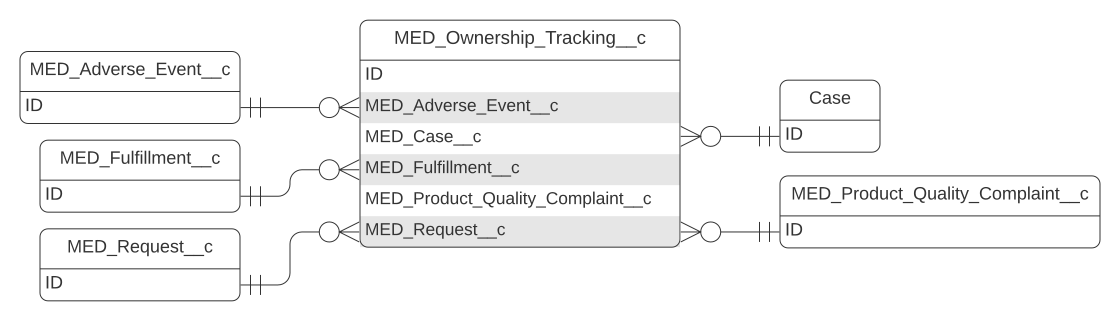
Ownership Tracking
| Field label | API name | Data type | Description |
|---|---|---|---|
| Adverse Event | MED_Adverse_Event__c | Lookup(Adverse Event) | Id of the Adverse Event record that is having ownership tracked. |
| Business Hours | MED_Business_Hours__c | Lookup(Business Hours) | Id of the Business Hours record used to calculate handle time. |
| End Time | MED_End_Time__c | Date/Time | Time that ownership was taken by another user/queue or the record was closed. |
| Fulfillment | MED_Fulfillment__c | Lookup(Fulfillment) | Id of the Fulfillment record that is having ownership tracked. |
| Handle Time (Days) | MED_Handle_Time_Days__c | Number(10, 2) | Calculates the time (in days) the record was with the owner, using the business hours assigned. |
| Handle Time (Hours) | MED_Handle_Time_Hours__c | Number(10, 2) | Calculates the time (in hours) the record was with the owner, using the business hours assigned. |
| Interaction | MED_Case__c | Lookup(Interaction) | Id of the interaction that ownership is being tracked. |
| Name | MED_Name__c | Text(255) | Name of the user or queue that owns the record being tracked. |
| Ownership Tracking Number | Name | Auto Number | Number that is automatically assigned to the record upon the record's creation. |
| Product Quality Complaint | MED_Product_Quality_Complaint__c | Lookup(Product Quality Complaint) | Id of the Product Quality Complaint record that is having ownership tracked. |
| Reason | MED_Change_Reason__c | Picklist | Reason that the owner changed. |
| Reopen Reason | MED_Reopen_Reason__c | Picklist | Reason the record was reopened. |
| Request | MED_Request__c | Lookup(Request) | Id of the Request that we are tracking ownership. |
| Start Time | MED_Start_Time__c | Date/Time | Date and time the user took ownership of the record. |
Package Job
The Package Job object facilitates Dynamic Document Package (DDP) processing.
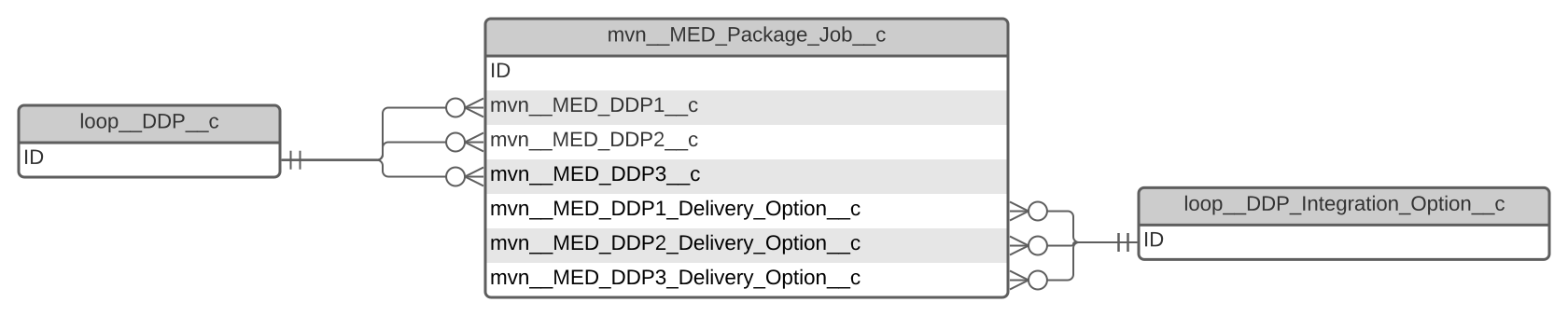
Package Job schema
| Field label | API name | Data type | Description |
|---|---|---|---|
| Case Id | mvn__MED_Case_Id__c | Text(18) | Id of associated Interaction (Case) record. |
| DDP1 Delete When Done | mvn__MED_DDP1_Delete_When_Done__c | Checkbox | Indicates whether the DDP is marked for deletion (true) or is not marked for deletion (false). |
| DDP1 Delivery Option | mvn__MED_DDP1_Delivery_Option__c | Lookup(Delivery Option) | Delivery option associated with the DDP1 record. |
| DDP1 Error Message | mvn__MED_DDP1_Error_Message__c | Long Text Area(1500) | Stores any available error messages that occur during the DDP process. |
| DDP1 Id | mvn__MED_DDP1__c | Lookup(DocGen Package) | First DocGen package that is generated by the package job. |
| DDP1 Status | mvn__MED_DDP1_Status__c | Picklist | Status of the first DDP package. Picklist values include: - None - Pending - Complete - Error |
| DDP2 Delete When Done | mvn__MED_DDP2_Delete_When_Done__c | Checkbox | Indicates whether the DDP is marked for deletion (true) or is not marked for deletion (false). |
| DDP2 Delivery Option | mvn__MED_DDP2_Delivery_Option__c | Lookup(Delivery Option) | Delivery option associated with the DDP2 record. |
| DDP2 Error Message | mvn__MED_DDP2_Error_Message__c | Long Text Area(1500) | Stores any available error messages that occur during the DDP process. |
| DDP2 Id | mvn__MED_DDP2__c | Lookup(DocGen Package) | Second DocGen package that is generated by the package job. |
| DDP2 Status | mvn__MED_DDP2_Status__c | Picklist | Status of the second DDP package. Picklist values include: - None - Pending - Complete - Error |
| DDP3 Delete When Done | mvn__MED_DDP3_Delete_When_Done__c | Checkbox | Indicates whether the DDP is marked for deletion (true) or is not marked for deletion (false). |
| DDP3 Delivery Option | mvn__MED_DDP3_Delivery_Option__c | Lookup(Delivery Option) | Delivery option associated with the DDP3 record. |
| DDP3 Error Message | mvn__MED_DDP3_Error_Message__c | Long Text Area(1500) | Stores any available error messages that occur during the DDP process. |
| DDP3 Id | mvn__MED_DDP3__c | Lookup(DocGen Package) | Third DocGen Package that is generated by the package job. |
| DDP3 Status | mvn__MED_DDP3_Status__c | Picklist | Status of the third DDP package. Picklist values include: - None - Pending - Complete - Error |
| Done | mvn__MED_is_Done__c | Formula (Checkbox) | Indicates that none of the DDPs have a status of pending (true) or is not pending (false). |
| Error | mvn__MED_Has_Error__c | Formula (Checkbox) | Indicates whether any of the DDPs resulted in an error (true) or did not result in an error (false). |
| Package Job Name | Name | Auto Number | Number that is automatically assigned to the Package Job Name upon creation. |
| Record Id | mvn__MED_Record_Id__c | Text(18) | Id of record for which the package job is running. |
| Record Name | mvn__MED_Record_Name__c | Text(80) | Name of the record for which the package job is running. This text displays in the queue and in the notifications. |
Product
The Product object contains the list of products used in Medical Information Cloud and has a lookup relationship with the AE Drug, Product Quality Complaint, Request, Document Relationship, and Request Document objects. The Request Document lookup makes it possible to render the Product field on content search.
Always set CM_Product_API_Name to MED_Product__c.
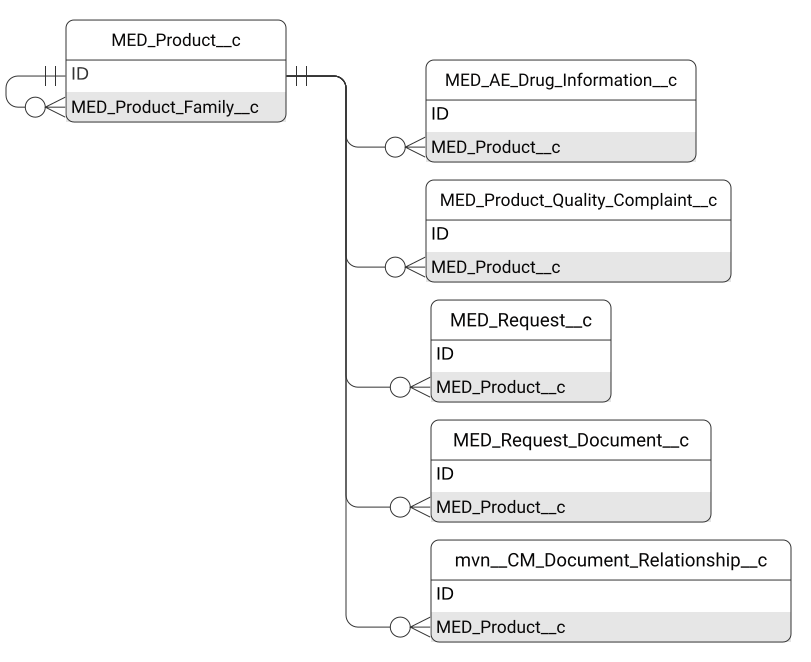
Product schema
| Field label | API name | Data type | Description |
|---|---|---|---|
| CMS ID Formula | MED_CMS_ID_Formula__c | Formula (Text) | Resolved value is the value of MED_CMS_Product_ID__c. If MED_CMS_Product_ID__c is blank, the resolved value is the ID of the MED_Product_Family__c in the content management system. |
| CMS Product ID | MED_CMS_Product_ID__c | Text(128) | ID of the product in the content management system. Medical Information Cloud uses this value to search content. |
| Country | MED_Country__c | Picklist | List of countries that are applicable to the product. The product lookup component uses this field to filter products that have MED_Product as their record type. General and Reporting Product record type products are not filtered by country. Agents may select this product on a Request if the selected country on the Request matches one of the countries specified in this field or if this field is set to Global (ZZ). When Global (ZZ) is set, the product is visible for all countries. |
| External ID | MED_External_ID__c | Text(25) (External ID) | Reference ID to an external system. This field is mainly used for dataloading. |
| First Mention Display Name | MED_First_Mention_Display_Name__c | Text(255) | Name of the product that should display when the product is first mentioned in cover letters and email templates. |
| Generic Name | MED_Generic_Name__c | Text(255) | Generic name of the product. |
| Investigational Drug Name | MED_Investigational_Drug_Name__c | Text(255) | Investigational drug name of the product. |
| Product Display Name | Name | Text(80) | Name of the product that displays in the user interface. |
| Record Type | RecordTypeId | Record Type | Id of the record type. Record types include: - General Product - contains values for non-therapy products or general products. The Simplified Product Catalogue feature does not affect when this record type is used. - Product - captures the region specific product variation that is shown to users and selected on Requests. This record type is used when the Simplified Product Catalogue feature is off. - Reporting Product - used to group products and designate them all as one product. This record type is used when the Simplified Product Catalogue feature is on. |
| Reporting Product | MED_Product_Family__c | Lookup(Product) | Lookup to the parent product in the product hierarchy. This field is used to roll-up country specific products to the reporting product for global reporting. |
| Status | MED_Status__c | Picklist | Indicates if the product is Active or Inactive. |
| Therapeutic Area | MED_Therapeutic_Area__c | Picklist (Multi-Select) | Therapeutic Area of the product. |
| Trade Name | MED_Trade_Name__c | Text(255) | Trade Name of the product. |
Product Quality Complaint
The Product Quality Complaint object stores information related to potential product quality issues. The issue may be related to manufacturing, stability and release testing, dose preparation, storage, or distribution.
The Product Quality Complaint object has a one-to-many lookup relationship with the Interaction object; a single Interaction record can be associated to multiple Product Quality Complaint records.
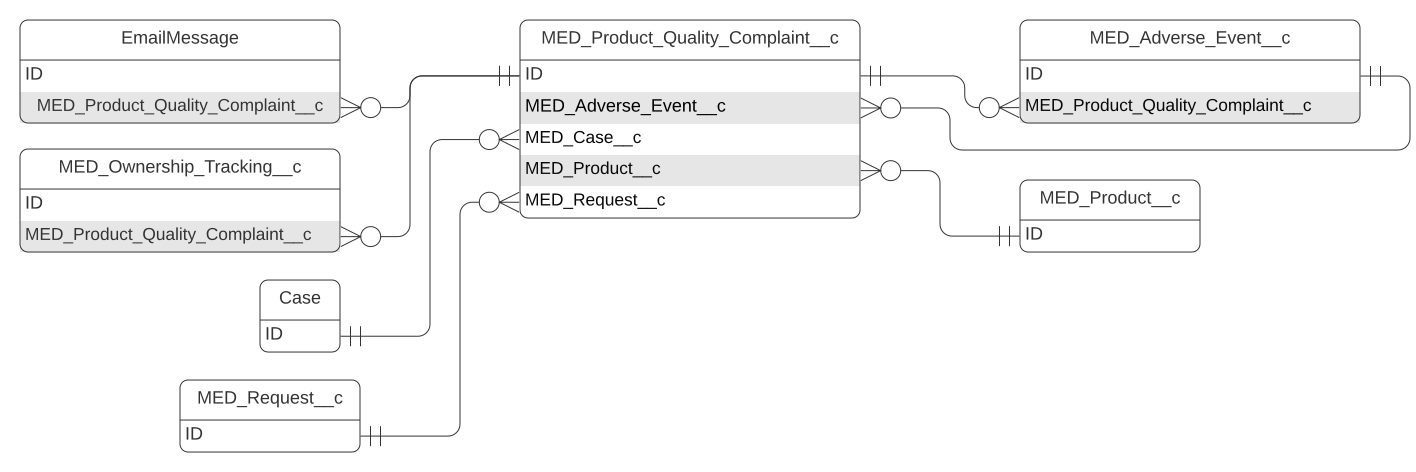
Product Quality Complaint schema
| Field label | API name | Data type | Description |
|---|---|---|---|
| Address Line 1 | MED_Address_Line_1__c | Text(100) | First line of the complainant's address. |
| Address Line 2 | MED_Address_Line_2__c | Text(100) | Second line of the complainant's address. |
| Alerts | MED_Alerts__c | Formula (Text) | Shows a composite summary of different flags (urgent, roll up, escalated, locked, SLA). |
| Anonymize | MED_Anonymize__c | Checkbox | Indicates if the record should be anonymized. If True, a workflow removes personally identifiable information (PII) from the record. |
| Case Thread Token | MED_Case_Thread_Token__c | Formula (Text) | Copy of the related Case thread token that can be used for email merge fields. |
| City | MED_City__c | Text(40) | City of the complainant's address. |
| Complainant Name | MED_Complainant_Name__c | Text(255) | Name of the complainant. The field concatenates the First Name, Middle Name, and Last Name field values, but this can be overridden. |
| Complainant Type | MED_Complainant_Type__c | Picklist | Professional role of the complainant. |
| Complaint | MED_Complaint__c | Long Text Area(32768) | Text description of the product issue. |
| Consent to Contact? | MED_Consent_to_Contact__c | Checkbox | Indicates if the complainant consents to being contacted. |
| Country | MED_Country__c | Picklist | Country where the complainant resides. |
| Credit/Refund Request? | MED_Credit_Refund_Request__c | Checkbox | Indicates if the reporter requested reimbursement. |
| Date of Complaint | MED_Date_of_Complaint__c | Date | Date the company first became aware of the complaint. |
| Date/Time Closed | MED_Date_Time_Closed__c | Date/Time | Date and time record was closed. |
| Date/Time Opened | MED_Date_Time_Opened__c | Date/Time | Date and time the record was created. |
| Date/Time Submitted | MED_Date_Time_Submitted__c | Date/Time | Date and time the Product Quality Complaint was submitted to the pharmacovigilance team. |
| Display Name | MED_Display_Name__c | Formula (Text) | Resolved value becomes the Product Quality Complaint tab label. |
| Due Date | MED_Due_Date__c | Date/Time | Date and time the record is due to be closed. |
| Due Date Warning | MED_Due_Date_Warning__c | Date/Time | Hidden field on the layout that is used as a formula helper to provide the time when the Alerts field should display the due date warning icon. |
| MED_Email__c | Email address of the complainant. | ||
| Email To Address | MED_Email_To_Address__c | Text Area(255) | List of email addresses for the local pharmacovigilance team that the Product Quality Complaint information should be emailed to. This list is based on the Local Setting custom metadata. |
| Escalated? | MED_Escalated__c | Formula (Text) | Displays icon if the Product Quality Complaint is escalated. |
| Expiration Date | MED_Expiration_Date__c | Date | Date the product responsible for the complaint expires. |
| Fax | MED_Fax__c | Phone | Fax number of the complainant. |
| First Name | MED_First_Name__c | Text(40) | First name of the complainant. |
| Formulation | MED_Formulation__c | Text(255) | Product formulation of the complaint, e.g., 20mg dissolvable tablets. |
| Interaction | MED_Case__c | Lookup(Interaction) | Lookup to the Interaction associated to the Product Quality Complaint. |
| Is Closed | MED_Is_Closed__c | Formula (Checkbox) | Indicates if the record is closed. |
| Is Escalated | MED_Is_Escalated__c | Formula (Checkbox) | Indicates if the Product Quality Complaint is currently escalated to another user. The field is marked as true if the Product Quality Complaint Owner is different than the Interaction Owner. |
| Last Name | MED_Last_Name__c | Text(80) | Last name of the complainant. |
| Legal Hold | MED_Legal_Hold__c | Checkbox | Indicates if there is a legal hold on the record. If true, the record cannot be modified, anonymized, or deleted. |
| Locked | MED_Locked__c | Formula (Checkbox) | Formula that determines if the record is locked (true) or unlocked (false). When locked, a record cannot be modified, anonymized, or deleted. The record is locked if it is closed or canceled or if a legal hold has been placed on it. |
| Locked Flag | MED_Locked_Flag__c | Formula (Text) | Displays icon when the record is locked. |
| Lot Number | MED_Lot_Number__c | Text(35) | Relevant lot number descriptor of the product responsible for the complaint. |
| Middle Name | MED_Middle_Name__c | Text(40) | Middle name of the complainant. |
| Missed SLA | MED_Missed_SLA__c | Formula (Checkbox) | Indicates if the SLA was missed. This field is used for reporting. |
| No. of Units Affected | MED_No_of_Units_Affected__c | Text(255) | Number of units affected by the issue in the complaint. |
| Owner | MED_Owner_Name_Formula__c | Formula (Text) | Calculates the owner name to use for tracking ownership. |
| Pharmacy/Wholesaler | MED_Pharmacy_Wholesaler__c | Text(255) | Name of the pharmacy or wholesaler that supplied the product in the complaint. |
| Phone | MED_Phone__c | Phone | Phone number of the complainant. |
| Postal Code | MED_Postal_Code__c | Text(20) | Postal code of the address of the complainant. |
| PQC Number | Name | Auto Number | Number that is automatically assigned to the record upon the record's creation. |
| PQC Owner | MED_Owner_HyperLink__c | Formula (Text) | Hyperlink to Owner record page. |
| Product | MED_Product__c | Lookup(Product) | Lookup to the Product record the complaint relates to. |
| QA Summary | MED_QA_Summary__c | Text Area(255) | Summary of the QA review of the Fulfillment record. |
| Reconciliation Number | MED_Reconciliation_Number__c | Text(25) (External ID) | External ID to the quality system that the Product Quality Complaint is submitted to. |
| Record Type | RecordTypeId | Record Type | Id of the record type. Record types include: - Product Quality Complaint - Product Quality Complaint - Closed |
| Related AE | MED_Adverse_Event__c | Lookup(Adverse Event) | Lookup to a related Adverse Event record. |
| Related Request | MED_Request__c | Lookup(Request) | Related Request record used to create the Product Quality Complaint. |
| Reopen Reason | MED_Reopen_Reason__c | Picklist | Reason the Product Quality Complaint record was reopened. This field uses the Reopen Reason Value set. |
| Sample Available? | MED_Sample_Available__c | Checkbox | Indicates if the complainant can provide a sample of the product for investigation. |
| SLA Flag | MED_SLA_Flag__c | Formula (Text) | Visual indicator for the service-level agreement (SLA) status of the Product Quality Complaint. |
| State | MED_State__c | Picklist | Indicates the state where the complainant resides. This field uses the State Value set. |
| Status | MED_Status__c | Picklist | Status of the record. The record is locked when closed, and the record is locked and removed from reporting when canceled. |
| Strength | MED_Strength__c | Text(10) | Dosage strength of the product responsible for the complaint. |
| Suffix | MED_Suffix__c | Text(40) | Suffix of the complainant's name. |
| Transfer Reason | MED_Transfer_Reason__c | Picklist | Reason the record was transferred or escalated. |
Region
Regions are customer-defined geographical areas that can be associated
to documents as metadata. Regions are configured with the Region
(mvn__Region__c) custom object and can be configured as a hierarchy
through associations to other regions and
countries (mvn__Country__mdt). For example, the North
America region might have three child regions: Canada, Mexico, and
United States.
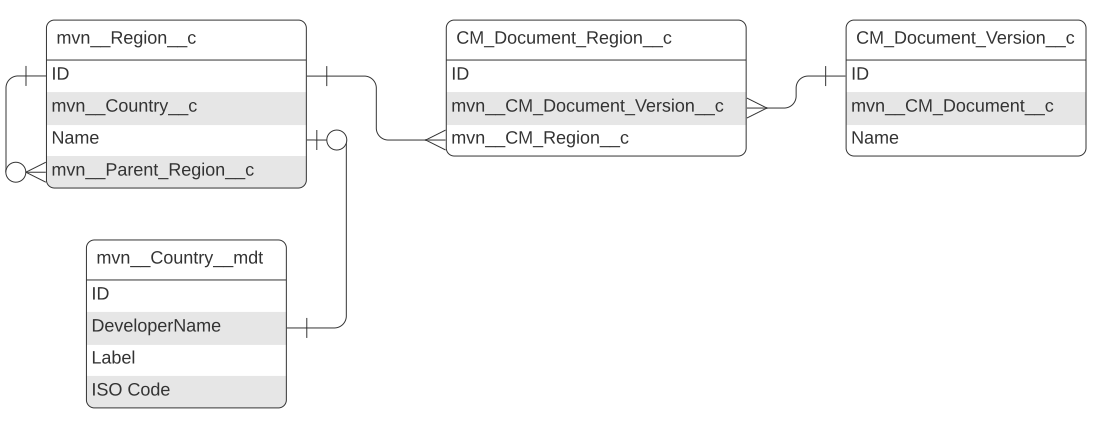
mvn__Region__c schema
| Field label | API name | Data type | Description |
|---|---|---|---|
| Country | mvn__Country__c | Text(255) (External ID) | DeveloperName of the mvn__Country__mdt record associated to this region. The value you enter must match an existing mvn__Country__mdt record, or an error will occur. |
| Country ISO Code | mvn__Country_ISO_Code__c | Text(2) (External ID) | mvn__ISO_Code__c of the mvn__Country__mdt record associated to this region. |
| Parent Region | mvn__Parent_Region__c | Lookup(Region) | Parent region. |
| Region Name | Name | Text(80) | Name of the region. |
| Type | mvn__Type__c | Picklist | Type of the region. |
Request
The Request object stores information about medical inquiries and provided responses. The Request object has a one-to-many lookup relationship with the Interaction object; a single Interaction record can be associated to multiple Request records.
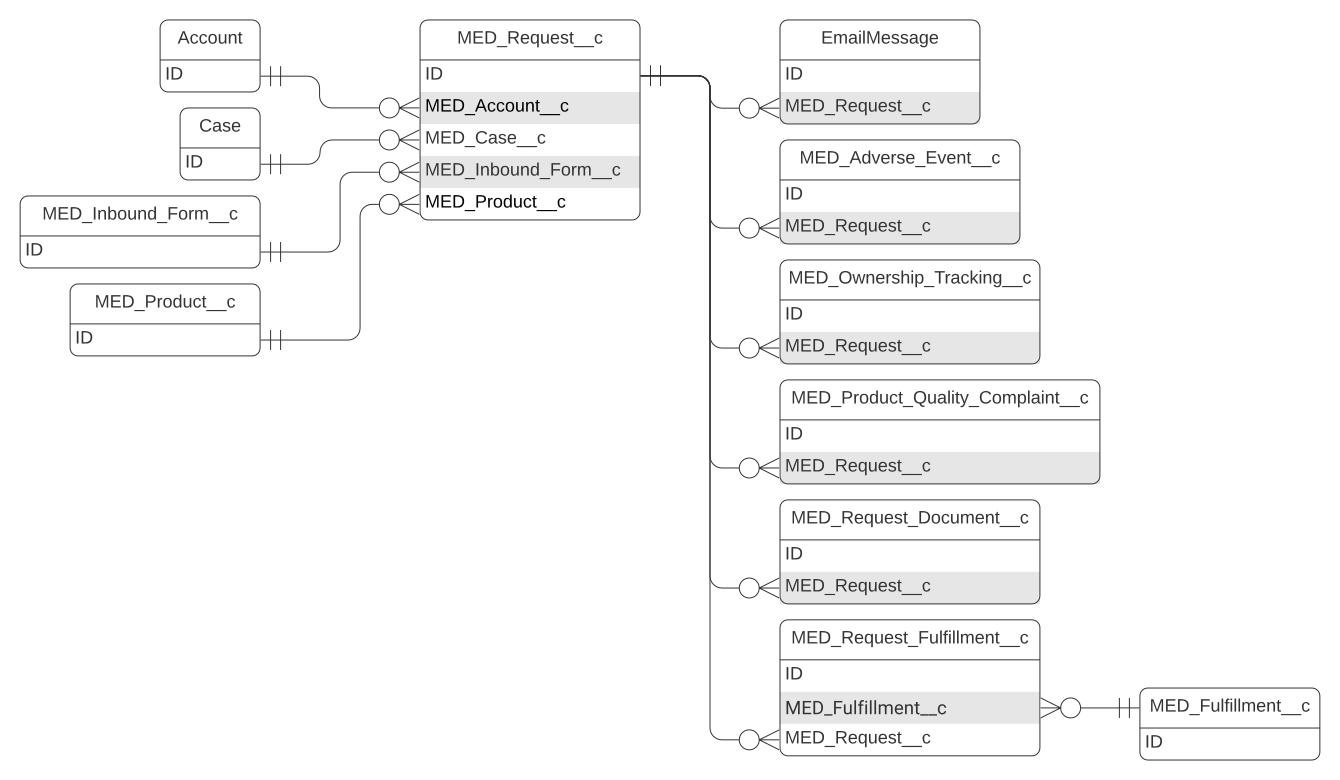
Request schema
| Field label | API name | Data type | Description |
|---|---|---|---|
| Account | MED_Account__c | Lookup(Account) | Copy of requester from related Interaction. Used for reporting and related lists on accounts. |
| Alerts | MED_Alerts__c | Formula (Text) | Composite field that shows a summary of different flags (urgent, roll up, escalated, locked, SLA) in the Alerts field. |
| Anonymize | MED_Anonymize__c | Checkbox | Flags the record to be anonymized. If True, removes personally identifiable information (PII) from the record. |
| Case Thread Token | MED_Case_Thread_Token__c | Formula (Text) | Copy of the related Case thread token that can be used for email merge fields. |
| Category | MED_Category__c | Picklist | Category of the Request. Available picklist values for this field depend on the selected value for Type. |
| Changed Due Date Reason | MED_Changed_Due_Date_Reason__c | Text Area(255) | Reason the record's due date from the local SLA was changed. This field is required if the due date was manually changed. |
| Cloned From | MED_Cloned_From__c | Lookup(Request) | Holds a lookup to the source Request if this Request was created by cloning a previous Request. |
| Consent Expiry Date | MED_Consent_Expiry_Date__c | Date | Date when the requester's consent expires. Any content updates pertaining to this Request will not be shared with the requester after this expiry date. |
| Contains Off Label Information? | MED_Contains_Off_Label_Information__c | Picklist | Indicates if the inquiry answer contains off-label information. |
| Country | MED_Country__c | Picklist | Country of the Request. Used for sharing. |
| Date/Time Closed | MED_Date_Time_Closed__c | Date/Time | The date and time when the Request is closed. |
| Date/Time Open | MED_Date_Time_Opened__c | Date/Time | The date and time when the Request is created. |
| Display Name | MED_Display_Name__c | Formula (Text) | Resolved value determines the Request tab label. |
| Due Date | MED_Due_Date__c | Date/Time | Date and time when the Request should be completed. The due date is based on the local SLA. |
| Due Date Warning | MED_Due_Date_Warning__c | Date/Time | Hidden field on the layout used as a formula helper to provide the time when the flag should be displayed. |
| Eligible for Follow-up | MED_Eligible_for_Follow_up__c | Formula (Checkbox) | Indicates that content updates are available to be shared with the requester pertaining to this Request. |
| Escalated | MED_Escalated2__c | Checkbox | Indicates if the Request was escalated by the Escalation Trigger during Ownership Transfer. Mavens recommends setting the value on the Is Escalated (MED_Is_Escalated__c) field to mirror this field value. |
| Escalated? | MED_Escalated__c | Formula (Text) | Displays an icon if the Request is currently escalated. |
| Follow-up Reason | MED_Follow_up_Reason__c | Long Text Area(1000) | Includes notes and/or rationale for why a follow-up request should be considered. |
| Inbound Form | MED_Inbound_Form__c | Lookup(Inbound Form) | Inbound form that is generated from the Request. |
| Interaction | MED_Case__c | Lookup(Interaction) | Lookup to the Interaction associated to this Request. |
| Is Closed | MED_Is_Closed__c | Formula (Checkbox) | Indicates if the Request is closed. |
| Is Escalated | MED_Is_Escalated__c | Formula (Checkbox) | Indicates if the Request is currently escalated to another user. |
| Urgent | MED_Is_Urgent__c | Checkbox | Indicates whether the Request is marked as urgent. |
| Legal Hold | MED_Legal_Hold__c | Checkbox | Indicates if there is a legal hold. If true, the record cannot be modified, anonymized, or deleted. |
| Locked | MED_Locked__c | Formula (Checkbox) | Indicates if the record is locked. When locked, a record cannot be modified, anonymized, or deleted. The record is locked if it is closed or canceled or if a legal hold has been placed on it. |
| Locked Flag | MED_Locked_Flag__c | Formula (Text) | Displays an icon when the record is locked. |
| Missed SLA | MED_Missed_SLA__c | Formula (Checkbox) | Indicates if the SLA for the Request was missed. This field is used for reporting Requests that missed SLA. |
| No Response Reason | MED_No_Response_Reason__c | Picklist | Reason that the Request was closed without providing a response. |
| Off Label? | MED_Off_Label__c | Checkbox | Indicates if off-label information was provided in the response. |
| Opt-Out Date | MED_Opt_Out_Date__c | Date | Date when a requester has requested to opt out of future content updates pertaining to a specific Request. |
| Owner | MED_Owner_Name_Formula__c | Formula (Text) | Calculates the owner name to use for tracking ownership. |
| Override Lock | MED_Override_Lock__c | Checkbox | Allows a locked Request to be edited. |
| Preferred Delivery Method | MED_Preferred_Delivery_Method__c | Picklist | Indicates the delivery method requested by the customer. |
| Product | MED_Product__c | Lookup(Product) | Product of the Request. |
| QA Summary | MED_QA_Summary__c | Text Area(255) | Summary of the QA review of the Request record. |
| Question | MED_Question__c | Long Text Area(32768) | Inquiry from the customer. |
| Question | MED_Question_Rich__c | Rich Text Area(32768) | Inquiry from the customer. |
| Record Type | RecordTypeId | Record Type | ID of the record type. Record types include: - Request - Request - Closed |
| Referred By Info | MED_Referred_By_Info__c | Formula (Text) | Summary of the referred by account. |
| Related to Off Label Use? | MED_Related_to_Off_Label_Use__c | Picklist | Indicates if the inquiry is related to an off-label use of the product. |
| Reopen Reason | MED_Reopen_Reason__c | Picklist | Reason the Request was reopened. |
| Request Number | Name | Auto Number | Number that is automatically assigned to the record upon the record's creation. |
| Request Owner | MED_Owner_HyperLink__c | Formula (Text) | Hyperlink to the Owner record page. |
| Requester Consent | MED_Requestor_Consent__c | Checkbox | If checked, indicates if the requester has consented to receiving updated information in response to this request. |
| Requester Info | MED_Requester_Info__c | Formula (Text) | Requester's name and record type. |
| Response Type | MED_Response_Type__c | Picklist | Categorizes how the response was provided to the requester. |
| Short Question | MED_Short_Question__c | Text(75) | Truncated value for the question that is used in the display name. |
| Signature | MED_Signature_HyperLink__c | Formula (Text) | Formula field that builds the hyperlink to the Signature Image that appears in a user interface component. |
| SLA Flag | MED_SLA_Flag__c | Formula (Text) | Displays an image to indicate the status of the Request based on the due date. - Red = Past Due - Orange = Due in 24 hours |
| Status | MED_Status__c | Picklist | Indicates the state of the Request. When the Request is closed or canceled, the record is locked. When the Request is canceled, the record is removed from reporting. |
| Sub-Category | MED_Sub_Category__c | Picklist | Subcategory of the main Request category. |
| Target Follow-up Date | MED_Target_Follow_up_Date__c | Date | Indicates when updated information for a particular Request may be available to share with the requester. |
| Transfer Reason | MED_Transfer_Reason__c | Picklist | Reason the record was transferred/escalated. |
| Type | MED_Type__c | Picklist | The type of inquiry from the requester. |
| Urgent Flag | MED_Urgent_Flag__c | Formula (Text) | Indicates if any Requests listed in the Alerts field are marked as urgent. |
| Verbal Response Details | MED_Verbal_Response_Details__c | Long Text Area(32768) | Details of the verbal response provided. |
| Verbal Response Details | MED_Answer_Rich__c | Rich Text Area(32768) | Details of the verbal response provided. |
Request Document
A Request Document record links a Request record to a document that is used to answer the Request. Fields on the Request Document object are mapped to document fields in the content management system(s) that your instance of Inquiry Management is integrated with. When a content management system field has a value, the value is automatically stamped to the Request Document field that the content management system field maps to. Visit Integrations.
The Request Document object has a one-to-many lookup relationship with the Request object. Multiple Request Document records can be associated to the same Request record.
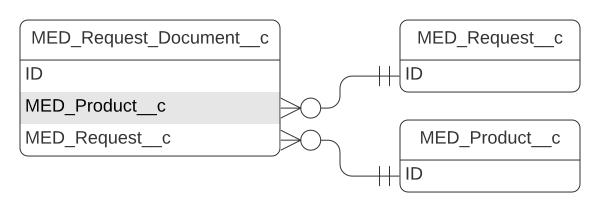
Request Document schema
| Field label | API name | Data type | Description |
|---|---|---|---|
| Allowed Audience | MED_Allowed_Audience__c | Picklist (Multi-Select) | Indicates who is allowed to view the content. |
| Answer | MED_Answer__c | Long Text Area(32768) | Answer to the question that the document addresses. |
| Answer | MED_Answer_Rich__c | Long Text Area(32768) | Answer to the question that the document addresses. |
| Classification | MED_Classification__c | Picklist | Classification of the document. Classification is the third level down in the document tree (Type->Subtype->Classification). |
| Country | MED_Search_Country__c | Picklist | Single select country field used in Lightning document search. Country values should be stamped to the multi-select MED_Country__c field. See Search Content. |
| Country | MED_Country__c | Picklist (Multi-Select) | Country or countries the document applies to. For Classic document search, MED_Document_Field_Setting__mdt.MED_Picklist_Rows__c makes the MED_Country__c field render as a single select picklist field on search layouts. Rather than using this multi-select field, Lightning document search uses MED_Search_Country__c, which is a single select field. See Search Content. |
| Custom Response | MED_Custom_Response__c | Checkbox | Indicates whether the document represents a custom response that is only intended for one particular Request (true) or not (false). |
| Delivery Option | MED_Delivery_Option__c | Picklist | Determines how a request document file is handled when a Fulfillment package is generated. |
| Document Number | MED_Document_Number__c | Text(255) | Document Number of the document. |
| External ID | MED_External_ID__c | Text(18) | ID from the content management system for the mapped document. |
| External Link | MED_External_Link__c | URL(255) | Link to the document that requesters can access. This link will be included in the Fulfillment cover letter. When this field is populated, uncheck MED_Include_in_Fulfillment__c, so the Fulfillment package will not include the full document. |
| Fair Market Value | MED_Fair_Market_Value__c | Currency(5, 2) | Fair market value of the document for transparency purposes. |
| File Extension | MED_File_Extension__c | Text(255) | File extension type of the document. |
| Include Full Doc in Letter | MED_Include_in_Fulfillment__c | Checkbox | Indicates whether the Fulfillment package should include the response document (true) or whether the Fulfillment cover letter should include an external link to the document (false). |
| Language | MED_Language__c | Picklist | Language of the document. |
| Location | MED_Location__c | Picklist | Location in Medical Information Cloud where the running user is currently active. The Work Instructions component uses this field to render a preview of relevant, internal documentation files. |
| Major Version | MED_Major_Version__c | Text(10) | Major version number of the document. |
| Minor Version | MED_Minor_Version__c | Text(10) | Minor version number of the document. |
| Name | MED_Name__c | Text(255) | Name of the document. |
| Preview | MED_Preview__c | Rich Text Area(32768) | Preview of the document. |
| Product | MED_Product__c | Lookup(Product) | Product associated with the document. Document search uses this field. |
| Product List | MED_Product_List__c | Long Text Area(32768) | Stamped list of products this document applies to. |
| Question | MED_Question__c | Long Text Area(32768) | Question that the document answers. |
| Question | MED_Question_Rich__c | Rich Text Area(32768) | Question that the document answers. |
| Related Request(s) | MED_Related_Requests__c | Long Text Area(1000) | Lists other Requests that are related to the document as a Custom Response (i.e. MED_Custom_Response__c equals true). |
| Request | MED_Request__c | Master-Detail(Request) | Id of the Request record that the content is related to. |
| Request Closed | MED_Request_Closed__c | Formula (Checkbox) | Indicates whether the parent Request record is closed (true) or not closed (false). |
| Request Document Number | Name | Auto Number | Number that is automatically assigned to the Request Document record upon the record's creation. |
| Request Locked | MED_Request_Locked__c | Formula (Checkbox) | Indicates whether the parent Request record is locked (true) or not locked (false). |
| Rich Text Content | MED_Rich_Text_Content__c | Rich Text Area(32768) | A rich text field. For documents without files, content in this field will appear in the document preview. Merge fields are supported. For more information, reference Salesforce's documentation on Merge Fields. |
| Size | MED_Size__c | Number(16, 2) | Size of the associated document. |
| Sort Order | MED_Sort_Order__c | Number(4, 0) | Order the document is sorted in the Work Instructions component. The document with the lowest number is displayed first. |
| Source | MED_Source__c | Picklist | Developer name of the MED_CMS_Connection__mdt that the mapped document is sourced from. |
| Subtype | MED_Subtype__c | Picklist | Subtype of the document. Subtype is the second level down in the document tree (Type->Subtype->Classification). |
| Summary | MED_Summary__c | Long Text Area(1000) | Summary of the document. |
| Type | MED_Type__c | Picklist | Type of the document. Type is the first level in the document tree (Type->Subtype->Classification). |
| Uploaded Manually | MED_Uploaded_Manually__c | Checkbox | Indicates whether the document was uploaded manually (true) or retrieved from a library of documents in a content management system (false). |
| Version | MED_Version__c | Formula (Text) | Resolved value represents the full version number of the document. The full version number includes the document's major and minor version numbers. |
Request Fulfillment
The Request Fulfillment object tracks which Request records were answered in a Fulfillment. Fields on the Request Fulfillment object are mapped to Request fields. When a Request field has a value, the value is automatically stamped to the Request Fulfillment field that the Request field maps to.
The Request Fulfillment object is a junction between the Fulfillment and Request objects and is on the detail side of master-detail relationships with both of the objects it connects.
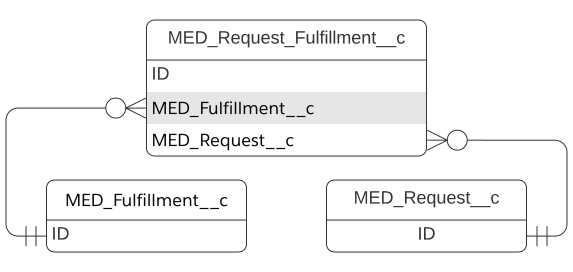
Request Fulfillment schema
| Field label | API name | Data type | Description |
|---|---|---|---|
| Category | MED_Category__c | Formula (Text) | Category of the associated Request record. |
| Fulfillment | MED_Fulfillment__c | Master-Detail(Fulfillment) | Lookup to the Fulfillment record that stores the written response to the associated Request record. |
| Off Label? | MED_Off_Label__c | Formula (Checkbox) | Indicates whether off-label information is provided (true) or not provided in the response (false). |
| Preferred Delivery Method | MED_Preferred_Delivery_Method__c | Formula (Text) | Delivery method of the associated Request record. |
| Product Display Name | MED_Product_Display_Name__c | Formula (Text) | Name of the product that will display in the associated Fulfillment Package. |
| Product First Mention Display Name | MED_Product_First_Mention_Display_Name__c | Formula (Text) | Name of the product that will display the first time it appears in the associated Fulfillment Package. |
| Question | MED_Question__c | Long Text Area(32768) | Inquiry from the customer on the associated Request record. |
| Question | MED_Question_Rich__c | Rich Text Area(32768) | Inquiry from the customer on the associated Request record. |
| Request | MED_Request__c | Master-Detail(Request) | Lookup to the Request record that will be answered via the associated Fulfillment record. |
| Request Fulfillment Number | Name | Auto Number | Number that is automatically assigned to the record upon the record's creation. |
| Status | MED_Status__c | Formula (Text) | Status of the associated Request record. |
| Type | MED_Type__c | Formula (Text) | Type of the associated Request record. |
| Verbal Response Details | MED_Verbal_Response_Details__c | Long Text Area(32768) | Details of the verbal response provided to the requester. |
| Verbal Response Details | MED_Answer_Rich__c | Rich Text Area(32768) | Details of the verbal response provided to the requester. |
System Event Staging
The System Event Staging object contains the settings for processing system events.
System Event Staging schema
| Field label | Field name | Data type | Description |
|---|---|---|---|
| External ID | mvn__SE_External_Id__c | Text (36) (External ID) | For Apex DML purposes. |
| New Records | mvn__SE_New_Records__c | Long Text Area (131072) | Serialized payload for the new records related with this system event. |
| Old Records Map | mvn__SE_Old_Records_Map__c | Long Text Area (131702) | Serialized payload for the old records related with this system event. |
| Order | mvn__SE_Order__c | Number (18, 0) | Order that system events are reported in the course of a transaction. |
| System Event Name | mvn__SE_System_Event_Name__c | Text (80) | The DeveloperName of the related SE_System_Event__mdt record. |
| System Event Staging Name | Name | Auto Number | Autogenerated name. |
| Transaction ID | mvn__SE_Transaction_ID__c | Text (36) (External ID) | Reference to the original transaction that fired the system event. |
Translation Request
The Translation Request (mvn__CT_Request__c) custom object stores the
information of each translation request and enables users to audit
records of translation processes.
mvn__CT_Request__c schema
| Field label | API name | Data type | Description |
|---|---|---|---|
| Data | mvn__CT_Data__c | Long Text Area(131072) | The data to be translated. |
| Error | mvn__CT_Error__c | Long Text Area(131072) | The error message, if any, that is generated by the translation vendor. |
| External Id | mvn__CT_ExternalId__c | Text(255) (External ID) | The related external ID. |
| Record Id | mvn__CT_RecordId__c | Text(18) | The related Salesforce record ID. |
| Request | Name | Auto Number | The auto-generated number for the Translation Request record. It is formatted as DTS-\{0000\}. |
| Requestor | mvn__CT_Requestor__c | Text(255) | The application that is requesting the translation. |
| Source Language | mvn__CT_SourceLanguage__c | Text(255) | The original language of the data or content to be translated. |
| Status | mvn__CT_Status__c | Picklist | The current status of the translation request. Picklist values are: - Requested - Submitted - Completed - Cancelled |
| Target Language | mvn__CT_TargetLanguage__c | Text(255) | The target language that the data or content is to be translated to. |
| Type | mvn__CT_Type__c | Picklist | The type of the translation request. Picklist values are: - Data - Content |
| Vendor | mvn__CT_Vendor__c | Text(255) | The vendor that is performing the translation. |
| Vendor Data | mvn__CT_VendorData__c | Long Text Area(131072) | The data used by the vendor to perform the translation. |
Vendor Region
The Vendor Region (mvn__CT_VendorRegion__c) custom object is a
junction object that links the
Region (mvn__Region__c) object and
the Translation Vendor (mvn__CT_Vendor__mdt)
metadata object. It enables translation requests to be routed to various
translation vendors based on the selected region(s).
mvn__CT_VendorRegion__c schema
| Field label | API name | Data type | Description |
|---|---|---|---|
| Is Content Translation Enabled | mvn__CT_IsContentTranslationEnabled__c | Checkbox | When true, content translation is enabled. |
| Is Data Translation Enabled | mvn__CT_IsDataTranslationEnabled__c | Checkbox | When true, data translation is enabled. |
| Priority | mvn__CT_Priority__c | Number(18, 0) | The order of priority that the vendor has for the given region. The lower the number, the higher the priority. |
| Region | mvn__CT_Region__c | Master-Detail(Region) | The parent Region (mvn__Region__c) record. This represents a region that the vendor provides translation services for. |
| Vendor Developer Name | mvn__CT_VendorDeveloperName__c | Text(40) (External ID) | The API name of the related Translation Vendor (mvn__CT_Vendor__mdt) metadata record. This represents a vendor that a translation request will be routed to given the selected region. |
| Vendor Region Name | Name | Auto Number | The auto-generated number for the Vendor Region record. It is formatted as VR-\{000000\}. |
Workflow Instance
When a workflow becomes active, a record is inserted to
CM_Workflow_Instance__c to track its progress.
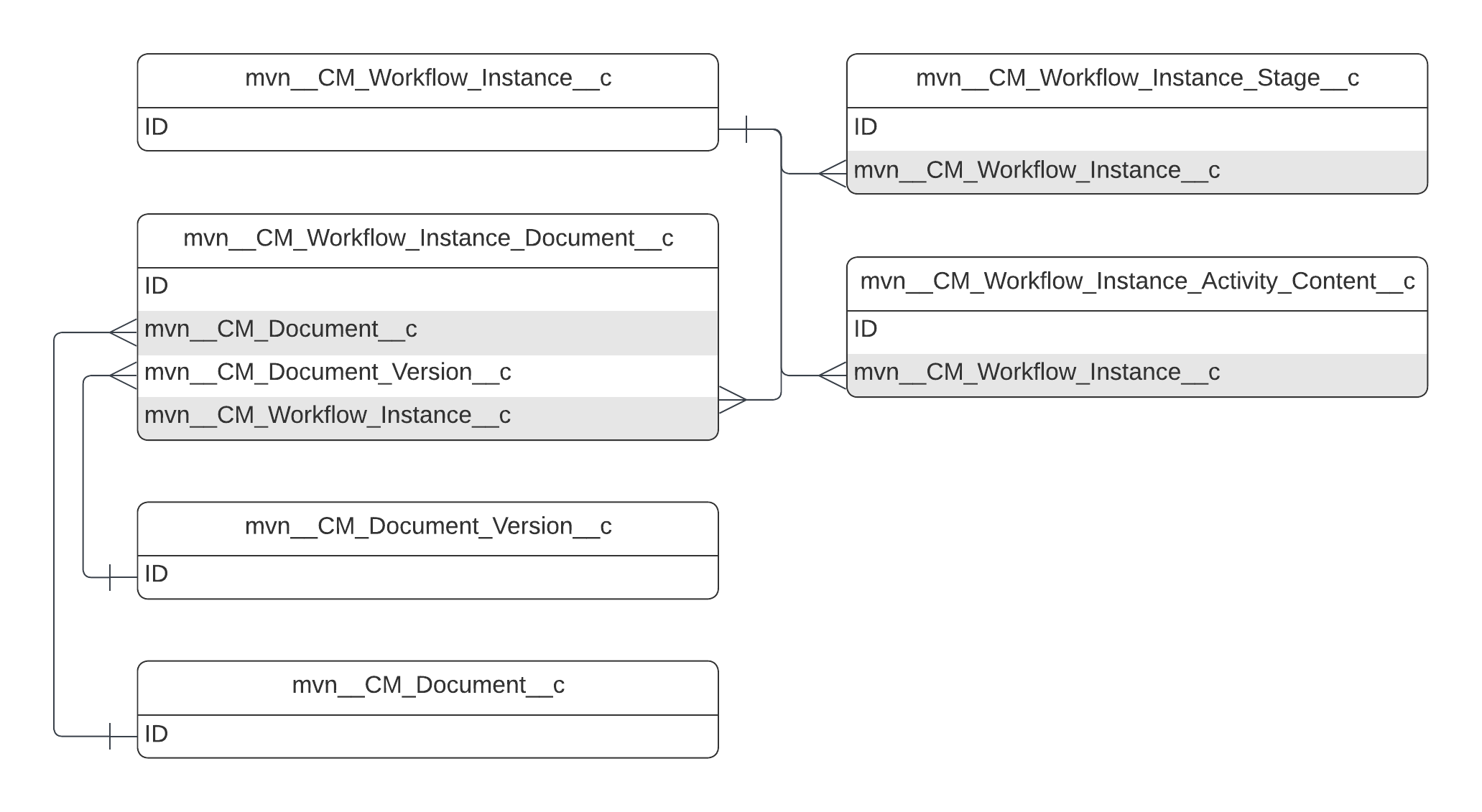
mvn__CM_Workflow_Instance__c schema
| Field label | API name | Data type | Description |
|---|---|---|---|
| Workflow Developer Name | mvn__CM_Workflow_Developer_Name__c | Text(40) | DeveloperName of the Workflow__mdt record associated to this instance. |
| Outcome | mvn__CM_Outcome__c | Picklist | The outcome of the workflow as defined by the final stage's CM_Final_Stage_Outcome__c value on CM_Workflow_Stage__mdt. |
| Status | mvn__CM_Status__c | Picklist | The status of the instance of the workflow. |
| Workflow Instance Name | Name | Auto Number | Autogenerated name. |
Workflow Instance Activity Content
The Workflow Instance Activity Content object serves as a junction to assist in including workflow instance content attachments as attachments to system event notifications.
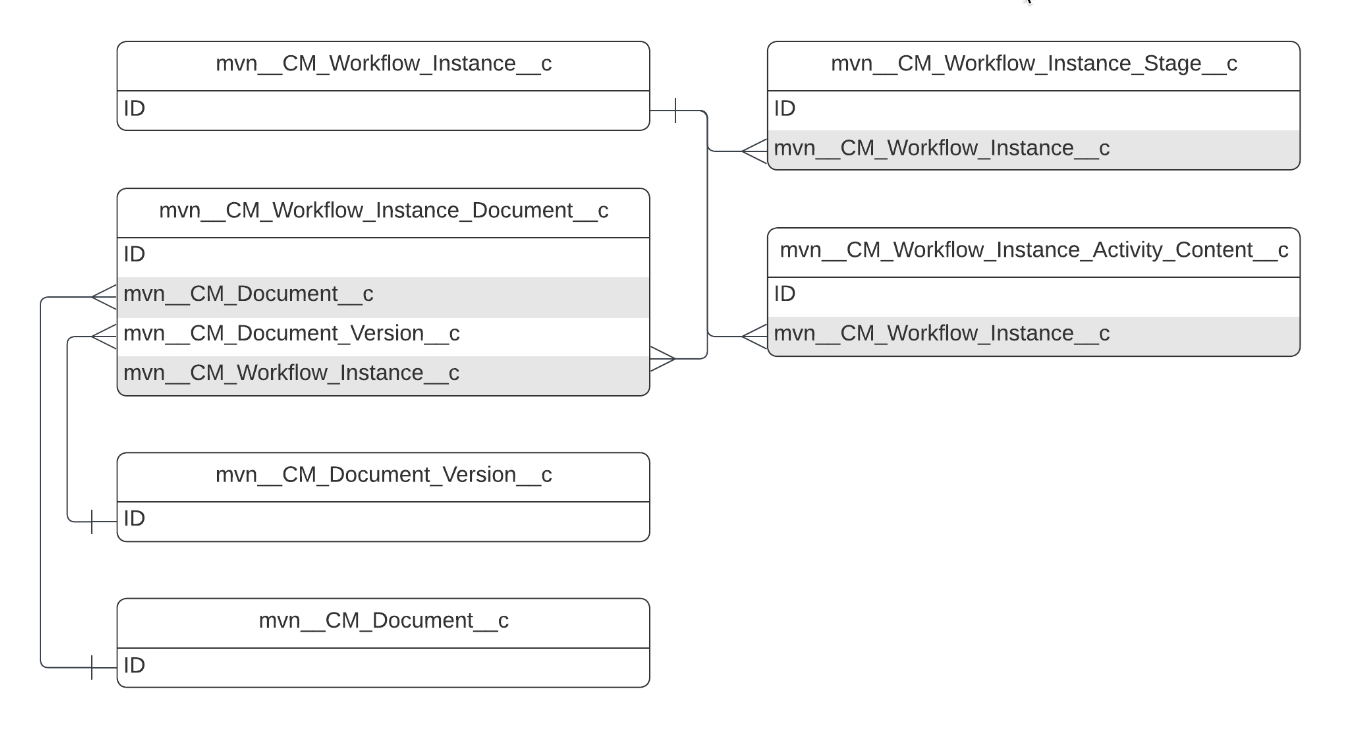
mvn__CM_Workflow_Instance_Activity_Content__c schema
| Field label | API name | Data type | Description |
|---|---|---|---|
| Content Version Id | mvn__CM_Content_Version_Id__c | Text(18) (External ID) | The ID of the Content Version (ContentVersion) record, or the file to be attached to a system event (e.g., email) notification. |
| Workflow Instance | mvn__CM_Workflow_Instance__c | Lookup(Workflow Instance) | The parent Workflow Instance (mvn__CM_Workflow_Instance__c) record. |
| Workflow Instance Activity Dev Name | Workflow Instance Activity Dev Name | Text(40) (External ID) | The API name of the related Workflow Stage Activity (mvn__CM_Workflow_Stage_Activity__mdt) metadata record, or the workflow stage for which a system (e.g., email) notification with content attachments may be sent out for. |
Workflow Instance Document
Workflow Instance Documents contain the list of documents associated to
Workflows. They connect Document Versions to Workflow Instances.
Workflow Instance Documents are defined in the
CM_Workflow_Instance_Documents__c custom object.
While the data model supports associating multiple documents to a workflow, multi-document workflows are not supported.
mvn__CM_Workflow_Instance_Document__c schema
| Field label | API name | Data type | Description |
|---|---|---|---|
| Document | mvn__CM_Document__c | Master-Detail(Document) | Document associated to this instance. |
| Document Version | mvn__CM_Document_Version__c | Lookup(Document Version) | Version associated to this instance. |
| Document Version Entry State | mvn__CM_Document_Version_Entry_State__c | Text(255) | State of the version when it entered the workflow. |
| Workflow Instance | mvn__CM_Workflow_Instance__c | Master-Detail(Workflow Instance) | Instance of a workflow. |
| Workflow Instance Document Name | Name | Auto Number | Autogenerated name. |
Workflow Instance Stage
A Workflow Instance Stage record is created every time a workflow
transitions to a new stage and is associated to a Workflow Instance.
Workflow Instance and Workflow Instance Stage are associated by a
one-to-many relationship. Workflow Instance Stages are defined in the
CM_Workflow_Instance_Stage__c custom object.
mvn__CM_Workflow_Instance_Stage__c schema
| Field label | API name | Data type | Description |
|---|---|---|---|
| Active | mvn__CM_Active__c | Text(40) | DeveloperName of the Workflow__mdt record associated to this instance. |
| Pending Activity Assignment | mvn__CM_Pending_Activity_Assignment__c | Checkbox | If checked, this stage requires manual intervention to assign activities. |
| Previous Stage | mvn__CM_Previous_Stage__c | Lookup(Workflow Instance Stage) | Pointer to the previous stage. |
| Transaction IDs | mvn__CM_Transaction_IDs__c | Long Text Area(32768) | Comma-separated list of Transaction IDs to associate to the stage for event orchestration purposes. |
| Workflow Instance | mvn__CM_Workflow_Instance__c | Lookup(Workflow Instance) | Workflow instance associated to this stage. |
| Workflow Instance Stage Name | Name | Auto Number | Autogenerated Name. |
| Workflow Stage Developer Name | mvn__CM_Workflow_Stage_Developer_Name__c | Text(255) | DeveloperName of the Workflow_Stage_mdt record associated to this instance. |