Custom metadata settings
The custom metadata objects listed below help define the Medical Information Cloud product framework and configure product behavior.
Account Field Contact Info Mapping
This metadata object maps Account Fields to Contact Information Records. When the specified field is edited a corresponding contact information record is created or updated as appropriate.
This configuration indicates the field on contact info to map to, the record type to set, and the type to set.
An example of how to use this would be if your org already makes use of the Account Phone field. Add a record to this configuration, which maps Account Phone to a contact info record with record Type MED_Phone and the appropriate type such as 'Work'. This will keep the contact info record in sync with the account. Data can also be initialized using Account Contact Information Synchronization.
MED_Account_Field_Contact_Info_Mapping__mdt schema
| Field label | API name | Data type | Description |
|---|---|---|---|
| Account Field | MED_Account_Field__c | Text(40) | The account field which is mapped to a contact information record. |
| Contact Info Field | MED_Contact_Info_Field__c | Text(40) | The field on the contact information record to map the account field value to. |
| Contact Info Record Type | MED_Contact_Info_Record_Type__c | Text(80) | The developer name of the contact information record type which should be created when the account field is mapped. |
| Contact Info Type | MED_Contact_Info_Type__c | Text(100) | The Type which should be set for the contact information record type when the account field is mapped. |
Account Field Setting
Controls various settings around Account and Contact Information fields.
This configuration is used throughout the application to drive things such as whether a field is used to search for accounts and if/where it shows up in the results.
MED_Account_Field_Setting__mdt schema
| Field label | API name | Type | Description |
|---|---|---|---|
| Account Create Order | MED_Account_Create_Order__c | Number(2,0) | The order that this field is displayed on the Account Create form. |
| Account Record Type | MED_Account_Record_Type__c | Text(57) | The Account Record Type that this field entry applies to. "All" means it applies to all person or institution record types depending on the MED_Is_Person_Record_Type__c setting. |
| Interaction Accounts Order | MED_Case_Accounts_Order__c | Number(2,0) | The order which the fields should appear on the interaction accounts screen once an account has been selected. Any fields configured will appear before those configured in Contact Info Case Mappings. |
| Contact Info Create Order | MED_Contact_Info_Create_Order__c | Number(2,0) | The order to display the field when creating a new contact information record on an existing account. |
| Contact Info Record Type | MED_Contact_Info_Record_Type__c | Text(57) | The record type this field should be associated with if it is a Contact Information field. |
| Field | MED_Field__c | Text(60) | The field that the settings are for. |
| Include in DCR | MED_Include_in_DCR__c | Picklist | Indicates when a field should be considered for DCR creation. |
| Is Person Record Type? | MED_Is_Person_Record_Type__c | Checkbox | Indicates the field belongs to a Person Account Configuration. |
| New Affiliation Order | MED_New_Affiliation_Order__c | Number(2,0) | The order fields should appear in when creating a new Affiliation. |
| Object | MED_Object__c | Picklist | The object that the field is on. Possible values are: * Account * Child_Account_vod__c * MED_Affiliation__c * MED_Contact_Information__c. |
| Quick Search Field Order | MED_Quick_Search_Field_Order__c | Number(2,0) | The order this field shows up on selected requester search fields. |
| Required for Save | MED_Required_for_Save__c | Checkbox | In order to create or edit a record with this field on it the user must provide a value for this field. |
| Search Field Order | MED_Search_Field_Order__c | Number(2,0) | Search field order. |
| Search Results Order | MED_Search_Results_Order__c | Number(3,0) | Indicates the order this field should appear in search results on the Account Search. |
| Segment | MED_Segment__c | Metadata Relationship (Segment) | The segment this setting belongs to. |
| Show in Primary Results | MED_Show_in_Primary_Results__c | Checkbox | Indicates that this field should be shown in the main row of the search results. |
| Show in Secondary Results | MED_Show_in_Secondary_Results__c | Checkbox | Indicates that this field should be shown in the expanded information when a row is clicked in the search results. |
Account Type Document Filter
Custom setting to add additional, account type specific filters to document search. Example: Non-HCP cannot see off label documents so if the account is a Non-HCP, document search will only show results where off_label__c = false.
MED_Account_Type_Document_Filter__mdt schema
| Field label | API name | Data type | Description |
|---|---|---|---|
| Account Record Type | MED_Account_Record_Type__c | Text(57) | The Account Record Type that this field entry applies to. "All" means it applies to all record types. |
| Custom Filter Logic | MED_Custom_Filter_Logic__c | Text(255) | Custom filter used for more sophisticated search logic (e.g., Date__c > 2013-04-24 and Date__c < today). If you use this field, there is no need to use the Case_Document_Field__c field. |
| Request Document Field | MED_Request_Document_Field__c | Text(60) | API name of the Request Document field filtered in the document search. |
| Search Filter Values | MED_Search_Filter_Values__c | Text(255) | Filter value in the document search. The search filter will pair with the corresponding Case_Document_Field in a single expression (e.g., MED_Product__c in {'Cholecap'}) if only one value is provided. |
| Segment | MED_Segment__c | Metadata Relationship(Segment) | The segment this setting belongs to. |
Account Type Setting
Settings for account record type. Includes various settings defining how Account Record Types are used throughout the application.
MED_Account_Type_Setting__mdt schema
| Field label | API name | Data type | Description |
|---|---|---|---|
| Account Record Type | MED_Account_Record_Type__c | Text(57) | The Account Record Type that this field entry applies to. "All" means it applies to all person or institution record types depending on the MED_Is_Person_Record_Type__c setting. |
| Account Search Order | MED_Account_Search_Order__c | Number(2, 0) | The order this record type should appear in the search parameters. |
| Allow Filter by Affiliation Search | MED_Allow_Filter_by_Affiliation_Search__c | Checkbox | If true, when searching for accounts, the user can filter to those affiliated with the selected account of this type. e.g. if an HCP is selected then filter institutions to those the hcp is. |
| Allow Referred By | MED_Allow_Referred_By__c | Checkbox | This record type can be added as the referred by account on the case. |
| Change Search Tab on Select | MED_Change_Search_Tab_on_Select__c | Checkbox | Change the search tab between Person and Institution automatically after selecting a result. |
| Default for Search | MED_Default_for_Search__c | Checkbox | The default record type to search. Only specify one per record type/Person Account. |
| Include in Create? | MED_Include_in_Create__c | Checkbox | Should this record type be included in the create modal on the account search screen? |
| Include in Search | MED_Include_in_Search__c | Checkbox | Indicates this record type should be included as a search parameter. |
| Is Person Record Type? | MED_Is_Person_Record_Type__c | Checkbox | Specifies if the record type is a person account record type. |
| Records Required for Create | MED_Records_Required_for_Create__c | Text(50) | Comma separated list of Contact information Record Types required to create this type of account. |
| Require Institution on Create | MED_Require_Institution_on_Create__c | Checkbox | This record type must have a related institution to create. |
| Segment | MED_Segment__c | Metadata Relationship(Segment) | The segment this account type is grouped under. |
Activity Action
The Activity Action (mvn__CM_Activity_Action__mdt) custom metadata
type defines an action or option that can be selected when completing or
closing a workflow task.
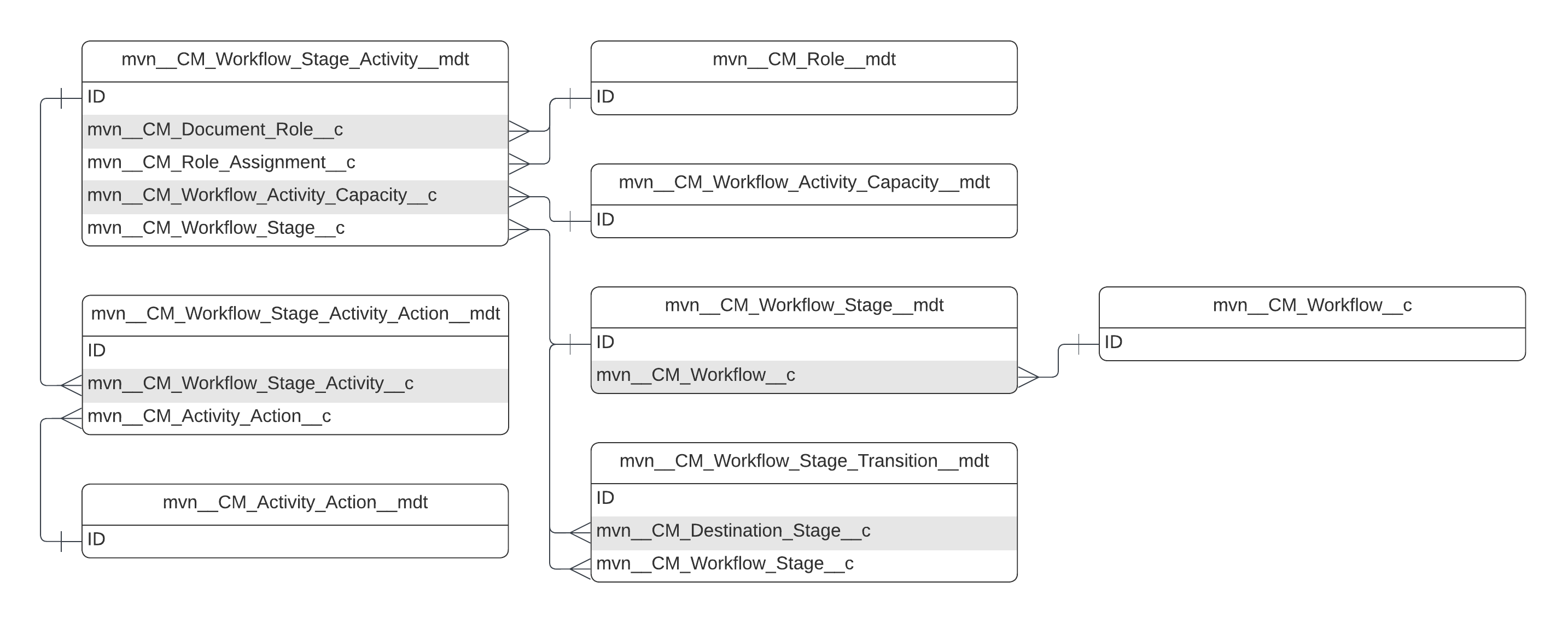
mvn__CM_Activity_Action__mdt schema
| Field label | API name | Data type | Description |
|---|---|---|---|
| Action Label API Name | mvn__CM_Action_Label__c | Text(56) | The API name of the custom label that should appear on the action button in the Mark Task Complete modal. |
| Button Variant | mvn__CM_Button_Variant__c | Text(20) | The lightning-button variant that should appear for the action button in the Mark Task Complete modal. For the list of available lightning-button variant options, visit Salesforce's documentation on lightning-button. |
| Completed Label API Name | mvn__CM_Completed_Label__c | Text(56) | The API name of the custom label to appear on the (disabled) action button in the Task Tile component when the task is completed or closed. |
| Event Name (All) | mvn__CM_Event_Name_All__c | Text(40) | The workflow event name to use when all of the tasks in a workflow have been set to the corresponding Task Status value. For the list of available workflow event type names, reference Workflow Event Types. |
| Event Name (Single) | mvn__CM_Event_Name_Single__c | Text(40) | The workflow event name to use when a single task in a workflow is set to the corresponding Task Status value. For the list of available workflow event type names, reference Workflow Event Types. |
| Icon Name | mvn__CM_Icon_Name__c | Text(30) | The Salesforce icon to display on the action button in the Mark Task Complete modal (e.g., , utility:check and utility:close). For the list of available icons, visit Salesforce's documentation on Icons. |
| Task Status | mvn__CM_Task_Status__c | Text(40) | The status to update on the task when a user performs an action on the workflow task. |
Ad Hoc QA Filter Field
Defines the fields and field order to display filter fields in the Ad Hoc QA interface.
MED_Ad_Hoc_QA_Filter__mdt schema
| Field label | API name | Data type | Description |
|---|---|---|---|
| Field | MED_Field__c | Text(60) | The field to display, null allows for a blank placeholder spot. |
| Object | MED_Object__c | Text(60) | Case or the object related list name. Should end in __r. |
| Order | MED_Order__c | Number(4,0) | The order to display the filter fields. |
| Segment | MED_Segment__c | Metadata Relationship(Segment) | The segment that this entry applies to. |
Address Field Contact Information Mapping
This metadata object maps Address_vod Fields to Contact Information
Records. When the specified field is edited, a corresponding contact
information record will be created or updated as appropriate. This
configuration indicates the field on contact info to map to, the record
type to set, and the type to set.
This custom metadata type is only used and installed for Medical Information Cloud orgs that are shared with Veeva CRM.
MED_Address_Field_Contact_Info_Mapping__mdt schema
| Field label | API name | Data type | Description |
|---|---|---|---|
| Address Field | MED_Address_Field__c | Text(40) | The address field which is mapped to a contact information record. |
| Contact Info Field | MED_Contact_Info_Field__c | Text(40) | The field on the contact information record to map the account field value to. |
| Contact Info Record Type | MED_Contact_Info_Record_Type__c | Text(40) | The developer name of the contact information record type which should be created when the account field is mapped. |
| Contact Info Type | MED_Contact_Info_Type__c | Text(100) | The Type which should be set for the contact information record type when the account field is mapped. Not used for Address Component Fields. |
| Is Address Component | MED_Is_Address_Component__c | Checkbox | Indicates that this field makes up part of the actual address, e.g., Address Line 2 or City. Used to keep all address field info on the same contact information record. |
Adverse Event Layout
Defines the fields and field order to display on the Adverse Event UI (Beta).
MED_Adverse_Event_Layout__mdt schema
| Field label | API name | Data type | Description |
|---|---|---|---|
| Field Name | MED_Field_Name__c | Text(255) | API Name of the AE Field. |
| Object Name | MED_Object_Name__c | Text(255) | API Name of the Object for the Field. |
| Position (Related List) | MED_Position_Related_List__c | Number(3,0) | The relative position this field should be shown on the related list column headers. |
| Position | MED_Position__c | Number(3,0) | Position of the field on the edit layout. |
| Section Name | MED_Section_Name | Text(60) | API Name of a Custom Label for the section. Keep empty if the field should not be grouped. |
| Segment | MED_Segment__c | Metadata Relationship(Segment) | The segment that this entry applies to. |
AIMI Prompt Option
The AIMI Prompt Option (MAI_AIMI_Prompt_Option__mdt) custom metadata
type represents an individual prompt template that can be selected in
and run from the AIMI Prompt Selection modal. For more information,
reference the Artificial Intelligence in Medical Information page.
MAI_AIMI_Prompt_Option__mdt schema
| Field label | API name | Data type | Description |
|---|---|---|---|
| Default Checked | MAI_Default_Checked__c | Checkbox | When true, the prompt is selected to be run by default in the AIMI Prompt Selection modal. |
| Description Label API Name | MAI_Description__c | Text(97) | The API name of the custom label that should appear as the description for the prompt in the AIMI Prompt Selection modal. |
| Flow Action Label API Name | MAI_Flow_Action_Label__c | Text(97) | The API name of the custom label that should appear as the label for the flow referenced on the Flow Action Name field. |
| Flow Action Name | MAI_Flow_Action_Name__c | Text(97) | The API name of the autolaunched flow that a user can select and run after a prompt returns a response in the AIMI Prompt Selection modal. |
| Input Reference Name | MAI_Input_Reference_Name__c | Text(70) | The reference name of the input variable for the prompt (e.g., Input:Interaction). |
| Prompt Developer Name | MAI_Prompt_Developer_Name__c | Text(97) | The API name of the prompt template associated with this prompt option. |
| Prompt Label API Name | MAI_Prompt_Label__c | Text(97) | The API name of the custom label that should appear as the label for the prompt template referenced on the Prompt Developer Name field. |
| SObject API Name | MAI_SObject_Name__c | Text(62) | The API name of the sObject associated with this prompt. This determines which prompt templates should be retrieved for the record page that the AIMI Prompt Selection modal is opened from. |
| Sort Order | MAI_Sort_Order__c | Number(18, 0) | The order in which the prompt should appear in the AIMI Prompt Selection modal. |
Anonymizable Object Settings
Settings for configuration of Object-specific treatments to be applied within the Anonymization Batch Job.
MED_Anonymizable_Object_Settings__mdt schema
| Field label | API name | Data type | Description |
|---|---|---|---|
| Anonymizable Field | MED_Anonymizable_Field__c | Text(62) | Checkbox field that will be set to true during the anonymize process. |
| Anonymizable Object API Name | MED_Anonymizable_Object_API_Name__c | Text(60) | The object, related to a case, to be anonymized when the related account is anonymized. Must be an API name. |
| Anonymize Lookup Fields | MED_Anonymize_Lookup_Fields__c | Long Text Area(630) | Comma-separated list that represents the lookup fields in the object to be updated with null value during the Anonymization process. |
| Delete Attachments and Files | MED_Delete_Attachments_and_Files__c | Checkbox | Checkbox field that will decide if the attachment and files related to the record are deleted or no. |
| Delete Emails | MED_Delete_Emails__c | Checkbox | Checkbox field that will decide if the emails related to the record are deleted or no. |
| Delete Notes | MED_Delete_Notes__c | Checkbox | Should related Enhanced Notes be deleted as part of the anonymization process. |
| Lookup Field Name To Case | MED_Case_Field__c | Text(62) | Field API name that is a lookup in the object to Case. It should be Id when the object is Case. |
| Lookup Field On Email | MED_Email_Field_MVN__c | Text(62) | The field API name on EmailMessage that relates the object with EmailMessaging. Should be ParentID for Case and can be RelatedTo or a custom field for all other objects. |
Anonymization Setting
Settings for configuration of the Anonymization Batch Job
MED_Anonymization_Setting__mdt schema
| Field label | API name | Data type | Description |
|---|---|---|---|
| Account Record Type | MED_Account_Record_Type__c | Text(57) | The Account Record Type that this field entry applies to. "All" means it applies to all person or institution record types depending on the MED_Is_Person_Record_Type__c setting. |
| Anonymize Records | MED_Anonymize_Records__c | Checkbox | Indicates whether cases and related info defined by the related segment should be anonymized. |
| Hold Days | MED_Hold_Days__c | Number(18,0) | The number of days after last closed Interaction before a record is eligible for anonymization. |
| Segment | MED_Segment__c | Metadata Relationship(Segment) | The segment this anonymization setting is configured for. |
API Endpoint
The API Endpoint (mvn__API_Endpoint__mdt) custom metadata type defines
the connection information for an external service. For example, this is
used by the Translation Service to define which Salesforce environment
an external vendor will provide translation services for.
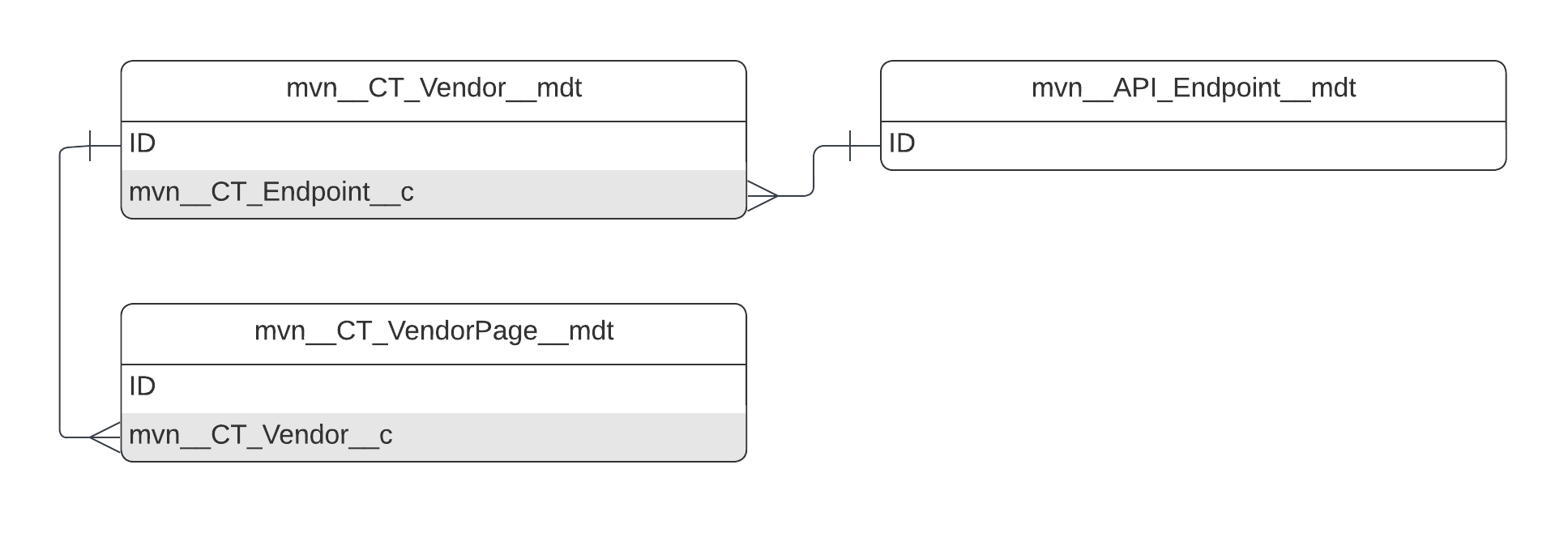
mvn__API_Endpoint__mdt schema
| Field label | API name | Data type | Description |
|---|---|---|---|
| Endpoint | mvn__Endpoint__c | Text(255) | The fully qualified domain name (FQDN) of the API endpoint. |
| Version | mvn__Version__c | Number(18, 0) | The version of the API to use. |
CMS Connection
Holds the connection information for a content management system and groups content management system field and value mappings by connection.
Two CMS Connections are only supported when the content management systems are Veeva Vault and Regulated Content Cloud.
MED_CMS_Connection__mdt schema
| Field label | API name | Data type | Description |
|---|---|---|---|
| Call Timeout | MED_Call_Timeout__c | Number(8, 0) | The timeout used for the web service call to the content management system. |
| Default Mapping | MED_Default_Mapping__c | Checkbox | Whether the CMS Connection record is the default record used for field and value mappings. Only one connection can be set as the default. If there two CMS Connections, search results from the default connection display first, followed by results from the other content management system. |
| Handler Class | MED_Handler_Class__c | Text(57) | The search handler class that the connection uses. |
| Named Credentials | MED_Named_Credentials__c | Text(80) | The named credentials that are used to call the custom content management system. |
| Segment | MED_Segment__c | Metadata Relationship(Segment) | The Segment this connection and mapping are used for. |
| Session Timeout | MED_Session_Timeout__c | Number(3, 0) | The time, in minutes, that a Veeva Vault session should be considered timed out. This time should be less than the Vault session timeout to ensure that Inquiry Management always has a valid session ID. This field is only used when authenticating via a named user. |
CMS Field Mapping
Maps the Interaction Document fields to fields in the content management system.
MED_Request_Document__c.MED_Name__c must be mapped to ensure users
have access to the appropriate documents.
MED_Document_Field_Mapping__mdt schema
| Field label | API name | Data type | Description |
|---|---|---|---|
| CMS Connection | MED_CMS_Connection__c | Metadata Relationship(CMS Connection) | The CMS Connection the mapping is for. |
| CMS Field | MED_Document_Field__c | Text(60) | API name of the field in the content management system that maps to the Request Document Field. |
| CMS Field Type | MED_CMS_Field_Type__c | Picklist | The field type of CMS Field. CMS Field Type is used to build queries and parse results correctly. If no value for CMS Field Type is provided, String is the assumed CMS Field Type. |
| Field to Stamp to | MED_Field_to_Stamp_to__c | Text(60) | API name of the Request Document field that the CMS Field maps to when special circumstances are met. Specifically, when there are incompatibilities and inbound and outbound mappings are different, outbound mappings remain the same, but when the content management system data returns, MED_Field_to_Stamp_to__c directs the data into a different field than the field that MED_Request_Document_Field__c specifies. |
| Request Document Field | MED_Request_Document_Field__c | Text(60) | API name of the Request Document field that the CMS Field maps to. |
| Request Document Related Field | MED_Request_Document_Related_Field__c | Text(60) | Use this field for outbound mapping (Inquiry Management → content management system) when MED_Request_Document_Field__c is a lookup and you do not want to send the lookup Salesforce ID to your content management system for searching. The value for this field must be on the looked up object. Note: Heavy use of this field could cause performance issues or result in hitting governor limits. Note: MED_Request_Document_Related_Field__c is usually used in conjunction with MED_Field_to_Stamp_to__c because if the lookup ID is not in the content management system, the lookup ID cannot be populated on the way back either, and the content management system data needs to be put somewhere other than the lookup field. |
CMS Value Mappings
Holds a list of value translations from the content management system to Inquiry Management. Each CMS Value Mapping must have an associated CMS Field Mapping.
MED_CMS_Value_Mapping__mdt schema
| Field label | API name | Data type | Description |
|---|---|---|---|
| CMS Field Mapping | MED_Document_Field_Mapping__c | Metadata Relationship(CMS Field Mapping) | The CMS Field Mapping that this applies to. |
| CMS Value | MED_CMS_Value__c | Text(255) | Value that the content management system uses. |
| Inbound | MED_Inbound__c | Checkbox | Indicates if the value mapping is used for inbound data (content management system → Inquiry Management). |
| Outbound | MED_Outbound__c | Checkbox | Indicates if the value mapping is used for outbound data (Inquiry Management → content management system). |
| Request Document Value | MED_Request_Document_Value__c | Text(255) | Value that the Request Document uses. |
Conditional Field Rule
Conditional Field Rule custom metadata records specify when to hide and show fields on a layout based on values in other fields. For example, the Request - Subcategory conditional field rule record that ships with Inquiry Management states that if the Category field has a value, the Subcategory field should display on the layout.
Conditional Field Rule records only work with the Enhanced Record Edit component.
When a page loads or automatically saves, all relevant rules are evaluated for the object being shown.
-
If a rule evaluates to true, the field displays.
-
If a rule evaluates to false, the field is hidden.
-
If there are multiple conditional field rule records for the same field and only one of the rules evaluates to true, the field displays.
-
If there is no rule for the field or the user does not have field level security to the Controlling field, the field displays.
If all fields in a row are hidden, the row is removed from the user interface, bringing everything below it up. If all fields in a section are hidden, the section header is also removed from the user interface.
Conditional Field Rule custom metadata supports formula fields, and all formulas are recalculated each time the layout saves.
Avoid using cross-object formula fields because they trigger additional SOQL queries and require additional processing time.
MED_Conditional_Field_Rule__mdt schema
| Field label | API name | Data type | Description |
|---|---|---|---|
| Clear When Hidden | MED_Clear_When_Hidden__c | Checkbox | When a field is hidden on a layout, the Clear When Hidden field determines if the value of the hidden field should be cleared. Special considerations include: - If the user does not have access to the Dependent field, field-level security is enforced, and the hiding rule is not applied. - If there are multiple rules for the same field, set "Clear when hidden" with the same value on all of the rules. If not, the clearing behavior appears random as the order the rules are returned from cache determines the behavior. - If the Conditional field is a checkbox, "Clear when Hidden" sets the Conditional field's value to false. |
| Conditional Field | MED_Conditional_Field__c | Text(62) | Field API Name that is rendering/not rendering. |
| Controlling Field | MED_Controlling_Field__c | Text(62) | Field API Name whose value controls the visibility of the Conditional field. It must be on the same object as the Conditional Field. |
| Controlling Field Criteria | MED_Controlling_Field_Criteria__c | Picklist | Type of check to make. Options include: - Value - Controlling field's value must match the specified value. - Blank - Controlling field must be blank. - Not Blank - Controlling field must have a value. - Checkbox - Controlling field must be a checkbox type. |
| Controlling Field Value | MED_Controlling_Field_Value__c | Text(255) | The Conditional field is rendered if the Controlling field value matches this value. Only set this value if you selected Value for Controlling Field Criteria. |
| Object | MED_Object__c | Text(60) | The object API Name this rule applies to. |
Contact Info Case Mapping
This custom metadata type establishes a mapping between Contact Information Record Types and Case Lookup Fields. This allows the stamping of case lookups with the proper contact information records.
MED_Contact_Info_Case_Mapping__mdt schema
| Field label | API name | Data type | Description |
|---|---|---|---|
| Account Type | MED_Account_Type__c | Picklist | The type of account this mapping should be used for. |
| Case Field | MED_Case_Field__c | Text(40) | The API name of the case field which is being mapped to. |
| Contact Info Field | MED_Contact_Info_Field__c | Text(40) | The API name of the field on the contact information object where the value is stored for this record type. |
| Copy CI to Case | MED_Copy_CI_to_Case__c | Checkbox | If checked, copy Existing Case Value Field into Contact Info Field from the related parent based on the lookup field specified in Case Field. |
| Existing Case Value Field | MED_Existing_Case_Value_Field__c | Text(62) | When defaulting contact information for case, will try to match the contact info field value to this value on case. If they match, will use the matching contact info instead of primary. |
| Record Type Developer Name | MED_Record_Type_Developer_Name__c | Text(40) | The developer name of the record type being mapped to the Case Lookup Field. |
Content Type
The Content Type (mvn__CT_Content_Type__mdt) custom metadata type
determines what types of content can be uploaded to Medical Information Cloud by defining the MIME
type associated with each file extension.
mvn__CT_Content_Type__mdt schema
| Field label | API name | Data type | Description |
|---|---|---|---|
| Description | mvn__CT_Description__c | Text(255) | A description of the permitted content type. |
| File Extension | mvn__CT_File_Extension__c | Text(255) | The file extension of the permitted content type. |
| MIME Type | mvn__CT_MIME_Type__c | Text(255) | The MIME type of the file extension. |
Country
You can use the Country custom metadata to configure countries. By
default, the custom metadata contains 201 records, and each record has a
distinct ISO 31661-1 country code. These records are not considered
system metadata, so you may alter them in any way.
mvn__Country__mdt schema
| Field label | API name | Data type | Description |
|---|---|---|---|
| ISO Code | mvn__ISO_Code__c | Text | ISO 3166-1 country code |
Document Field Setting
This custom metadata type allows for configuration of fields that should appear on the Document Search, Search Results, and the Attached Documents Component for a request.
MED_Document_Field_Setting__mdt schema
| Field label | API name | Data type | Description |
|---|---|---|---|
| Attachment List Order | MED_Attachment_List_Order__c | Number(2,0) | The order the field should show up on the attached documents list. 0/null means it will not be included. On the document search page, only the 1st column is shown. |
| Checkbox Filter Options | MED_Checkbox_Filter_Options__c | Picklist | Filter options for checkbox search fields (when ticked): Default Filter - Retrieves only the records that have this field ticked. Inclusion Filter - Retrieves the records that have this field ticked in addition to other records. |
| Default Value (Request) | MED_Default_Value_Request__c | Text(182) | The API name of the request field to pull the value from to default the search with. |
| Default Value (Static) | MED_Default_Value_Static__c | Text(100) | The value to default this field to. This value will not be used if Default Value (Request) is defined. |
| Hover for Value | MED_Hover_for_Value__c | Checkbox | If set to true, the value from this field will only be displayed when the agent hovers over the icon rendered. This is useful for fields which have a long value in them. |
| Link To Viewer | MED_Link_to_Viewer__c | Checkbox | If set to true this field will be interpreted as a url that directs the agent to the document view. It will be displayed using the value from MED_Name__c on the document. |
| Picklist Rows | MED_Picklist_Rows__c | Number(1,0) | Number or rows to show in the picklist. 1 indicates a single select picklist, >1 will be multi-select, and 0/null will render as defined in the field definition. Note, can be used to render picklist fields as multiselect or multiselect fields as picklists. WARNING: Using this will break dependent picklists. |
| Request Document Field | MED_Request_Document_Field__c | Text(60) | The referenced Request Document Field. |
| Restrict to Picklist Values | MED_Restrict_to_Picklist_Values__c | Checkbox | When set to true, for a picklist field, a search will be filtered to only values in the picklist if no value is chosen. |
| Search Field Label (Classic Only) | MED_Search_Field_Label__c | Text(100) | The label that this field should show up in the search section. |
| Search Field Order | MED_Search_Field_Order__c | Number(2,0) | The order that this field should show up in the search section. Populate to make it a search field. |
| Search Result Order | MED_Search_Result_Order__c | Number(2,0) | The result column order for this field. Populate to show this field in the results columns. |
| Segment | MED_Segment__c | Metadata Relationship (Segment) | The segment this setting is configured for. |
Document Lifecycle
Document lifecycles dictate the states and workflows available to a
document. To configure a document lifecycle, use
the CM_Document_Lifecycle__mdt custom metadata type.
mvn__CM_Document_Lifecycle__mdt schema
| Field label | API name | Data type | Description |
|---|---|---|---|
| Description | mvn__CM_Description__c | Text Area (255) | Description of the lifecycle. |
| Initial State | mvn__CM_Initial_State__c | Text(40) | The initial state in the document lifecycle. |
| Obsolete State | mvn__CM_Obsolete_State__c | Text(40) | The obsolete state in the document lifecycle. |
| Published State | mvn__CM_Published_State__c | Text(40) | The published state in the document lifecycle. |
| Rejected State | mvn__CM_Rejected_State__c | Text(40) | The rejected state in the document lifecycle. |
| Review State | mvn__CM_Review_State__c | Text(40) | The review state in the document lifecycle. |
| Superseded State | mvn__CM_Superseded_State__c | Text(40) | The superseded state in the document lifecycle. |
| Withdrawn State | mvn__CM_Withdrawn_State__c | Text(40) | The withdrawn state in the document lifecycle. A document is automatically placed in its lifecycle's withdrawn state when the document expires. |
Document Lifecycle Type
Document Lifecycle Type custom metadata type is a junction between Document Lifecycle and Document Type.
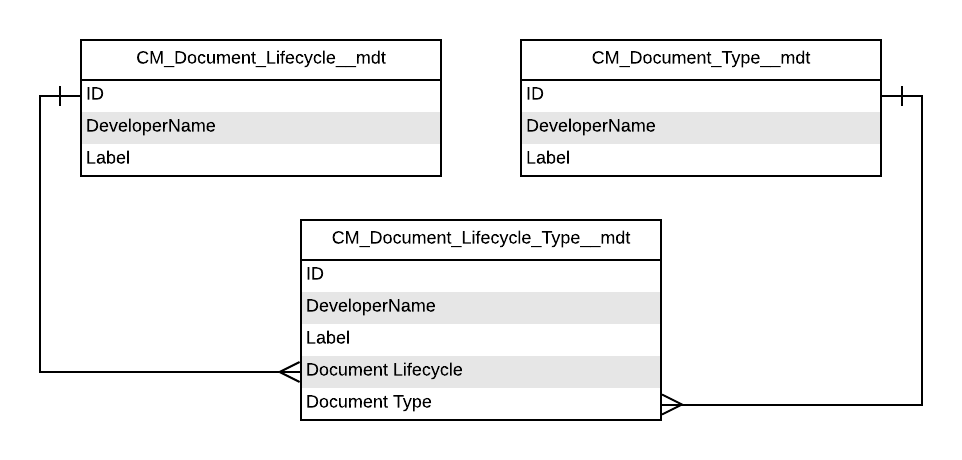
mvn__CM_Document_Lifecycle_Type__mdt schema
| Field label | API name | Data type | Description |
|---|---|---|---|
| Document Lifecycle | mvn__CM_Document_Lifecycle__c | Metadata Relationship(Document Lifecycle) | The Document Lifecycle associated to this Document Lifecycle Type. |
| Document Type | mvn__CM_Document_Type__c | Metadata Relationship(Document Type) | The Document Type associated to this Document Lifecycle Type. |
| Document Subtype | mvn__CM_Document_Subtype__c | Metadata Relationship(Document Subtype) | The Document Subtype associated to this Document Lifecycle Type. |
Document Notification Audience
The Document Notification Audience
(mvn__CM_Document_Notification_Audience__mdt) custom metadata object
defines target audiences for system event notifications. Target audience
can be based on a Document Role, Group, Salesforce user ID, or user
query filter. When defining a target audience based on Document Role,
you must specify the Document Context in which the document role is
notified.
Document Notification Audience is on the master side of a metadata
relationship with the Document System Event Notification
(mvn__CM_Document_System_Event_Notification__mdt) custom metadata
object and the detail side of metadata relationships with the Document
Relationship Type (mvn__CM_Document_Relationship_Group__mdt), Group
(mvn__CM_Group__mdt), and Role (mvn__CM_Role__mdt) custom metadata
objects.
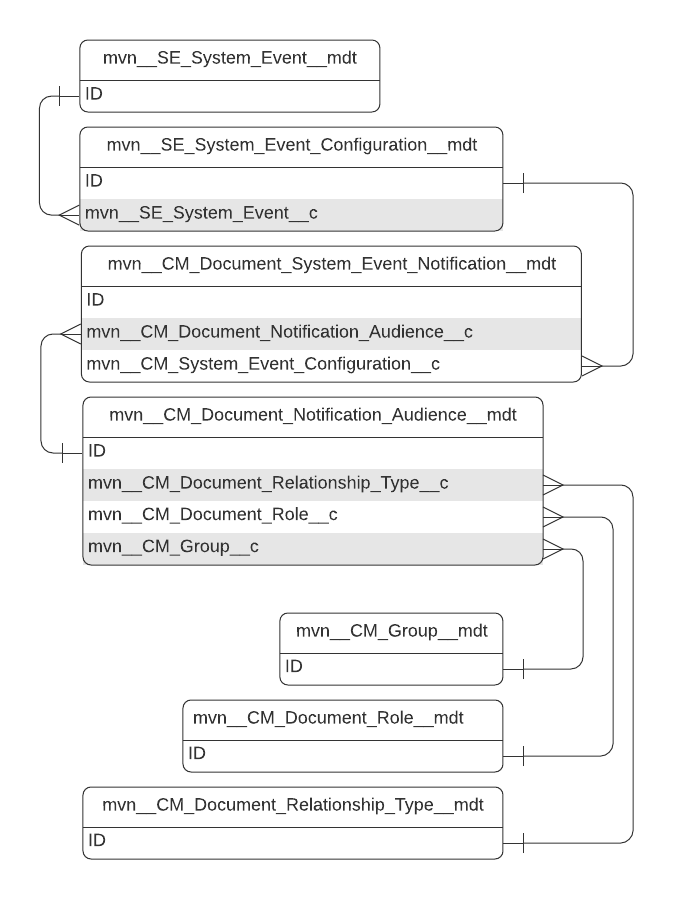
mvn__CM_Document_Notification_Audience__mdt schema
| Field label | API name | Data type | Description |
|---|---|---|---|
| Document Context | mvn__CM_Document_Context__c | Picklist | Defines the context of the document roles to notify. Picklist values include: - Working Document - Related Document Note: If you select Related Document, you must fill out the Document Relationship Direction and Document Relationship Type fields. |
| Document Relationship Direction | mvn__CM_Document_Relationship_Direction__c | Picklist | Defines the document relationship direction when the Document Context is set to Related Document. Picklist values include: - Outwards - Inwards - Both |
| Document Relationship Type | mvn__CM_Document_Relationship_Type__c | Metadata Relationship(Document Relationship Type) | Defines the type of document relationship (mvn__CM_Document_Relationship_Type__mdt) when the Document Context field is set to Related Document. |
| Document Role | mvn__CM_Document_Role__c | Metadata Relationship(Role) | Document Role associated with the Document Notification Audience. Users assigned the Document Role are sent system event notification. |
| Group | mvn__CM_Group__c | Metadata Relationship(Group) | Group (mvn__CM_Group__mdt) associated with the Document Notification Audience. Users who belong to the Group are sent system notifications. |
| User Id Matcher | mvn__CM_User_Id_Matcher__c | Text(255) | Id of the user who are sent the system event notifications. |
| User Query Filter | mvn__CM_User_Query_Filter__c | Long Text Area(32768) | Query filters that determine the users who are sent the system event notifications. |
Document Relationship Type
Document Relationship Type (mvn__CM_Document_Relationship_Type__mdt)
records specify the types of document relationships. Document
Relationship Type has a metadata relationship with Document Type
Relationship Type (mvn__CM_Document_Type_Relationship_Type__mdt),
which connects the Document Relationship Type and Document Type
(mvn__CM_Document_Type__mdt) custom metadata objects.
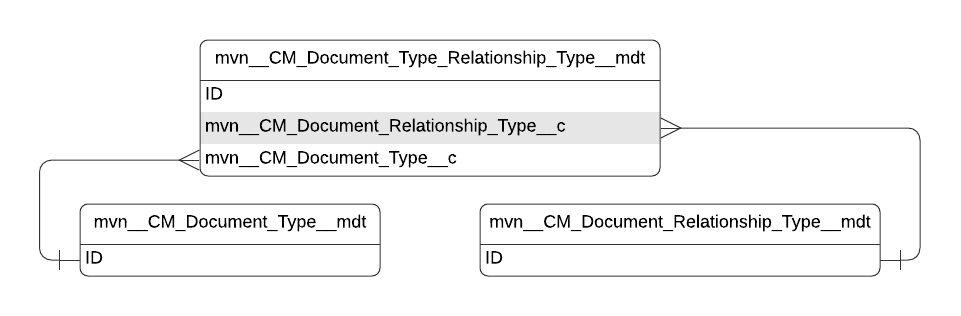
mvn__CM_Document_Relationship_Type__mdt schema
| Field label | API name | Data type | Description |
|---|---|---|---|
| Active | mvn__CM_Active__c | Checkbox | Indicates if the relationship type is active (checked) or not (unchecked). |
| Inward Description Label | mvn__CM_Inward_Description_Label__c | Text(255) | Custom Label API name describing the inward (destination document to source document) relationship. For example, a global document version has 3 translations. The 3 translated document versions have an inward relationship with the global document, and the global document has an outward relationship with the 3 translations. |
| Is Peer | mvn__CM_Is_Peer__c | Checkbox | When checked (i.e., true), the current document relationship type is considered to be a peer relationship and will appear as horizontal lines and nodes in the Relationship Visualizer. When unchecked (i.e., false), the current document relationship type is a parent-child relationship and will appear as vertical lines and nodes in the Relationship Visualizer. |
| Outward Description Label | mvn__CM_Outward_Description_Label__c | Text(255) | Custom Label API name describing the outward (source to destination) relationship. For example, a global document version has 3 translations. The global document has an outward relationship with the 3 translations, and the 3 translated document versions have an inward relationship with the global document. |
| Relationship Name Label | mvn__CM_Relationship_Name_Label__c | Text(255) | Custom Label API name for the relationship. |
Document Sharing Rule
Use the CM_Document_Sharing_Rule__mdt custom metadata type to set the
criteria for a document sharing rule.
mvn__CM_Document_Sharing_Rule__mdt schema
| Field label | API name | Data type | Description |
|---|---|---|---|
| Active | mvn__CM_Active__c | Checkbox | Indicates the Document Sharing Rule is active. |
| Criteria | mvn__CM_Criteria__c | Long Text Area(32768) | JSON criteria used to determine whether a role(s) has access to a document. You can base a sharing rule on any field that the running user can see as well as the document's relationship with products and regions. |
| Description | mvn__CM_Description__c | Text Area(255) | Description of the Document Sharing Rule. |
| Role | mvn__CM_Role__c | Metadata Relationship(Role) | Role associated to the Document Sharing Rule. |
Document Sharing Rule Group
CM_Document_Sharing_Rule_Group__mdt is a junction between
CM_Document_Sharing_Rule__mdt and CM_Group__mdt. A Document Sharing
Rule Group record applies a Document Sharing Rule to a group.
mvn__CM_Document_Sharing_Rule_Group__mdt schema
| Field label | API name | Data type | Description |
|---|---|---|---|
| Document Sharing Rule | mvn__CM_Document_Sharing_Rule__c | Metadata Relationship(Document Sharing Rule) | Document Sharing Rule associated to the Document Sharing Rule Group. |
| Group | mvn__CM_Group__c | Metadata Relationship(Group) | Group associated to the Document Sharing Rule Group. |
Document State
Document State (mvn__CM_Document_State__mdt) custom metadata type
contains the list of possible states that a document can be assigned as
the document progresses through its lifecycle.

mvn__CM_Document_State__mdt schema
| Field label | API name | Data type | Description |
|---|---|---|---|
| Color | mvn__CM_Color__c | Picklist | Color when depicting the Document State in the user interface. |
| Custom Label API Name | mvn__CM_Custom_Label_API_Name__c | Text(255) | Custom Label API Name used for translating the Document State. |
| Description | mvn__CM_Description__c | Text Area(255) | Description of the Document State. |
| Display in Path Component | mvn__CM_Display_in_Path_Component__c | Checkbox | Whether to display this Document State in the path component on the Document Detail Page. |
| Document Lifecycle | mvn__CM_Document_Lifecycle__c | Metadata Relationship (Document Lifecycle) | Document Lifecycle associated to this Document State. |
| Document State Grouping | mvn__PP_Document_State_Group__c | Metadata Relationship (Document State Grouping) | Adds the Document State to a Document State Group. Each group encapsulates the associated states with a label. This label is used in user interface displays, such as the document path, to prevent the displays from becoming overcrowded and hard for the user to process at a glance. |
| Notifications Muted by Default | mvn__CM_Notifications_Muted_by_Default__c | Checkbox | When checked (true), document notifications are muted by default according to the document's status or state. This can be overridden on the Document record. |
| Sort Order | mvn__CM_Sort_Order__c | Number (18, 0) | The order in which this Document State is displayed in the user interface. |
Document State Entry Action
mvn__CM_Document_State_Entry_Action__mdt schema
| Field label | API name | Data type | Description |
|---|---|---|---|
| Document State | mvn__CM_Document_State__c | Metadata Relationship(Document State) | Document State associated to this Document State Role. |
| Type | mvn__CM_Type__c | Picklist | Type of Document State Entry Action. |
Document State Role
Document State Role is a junction between Document State and Role.
Document State Roles are managed in the CM_Document_State_Role__mdt
custom metadata type.
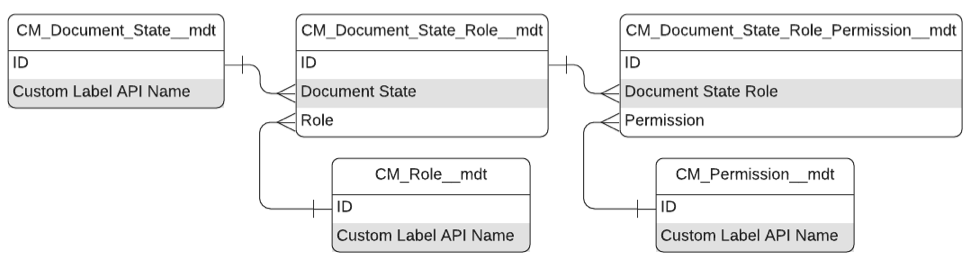
mvn__CM_Document_State_Role__mdt schema
| Field label | API name | Data type | Description |
|---|---|---|---|
| Document State | mvn__CM_Document_State__c | Metadata Relationship(Document State) | Document State associated to this Document State Role |
| Role | mvn__CM_Role__c | Metadata Relationship(Role) | Role associated to this Document State Role |
Document State Role Permission
Document State Role Permission is a junction between Document State Role
and Permission and grants a Role for a given Document State a specific
Permission. Document State Role Permissions are managed in the
CM_Document_State_Role_Permission__mdt custom metadata type.
mvn__CM_Document_State_Role_Permission__mdt schema
| Field label | API name | Data type | Description |
|---|---|---|---|
| Document State Role | mvn__CM_Document_State_Role__c | Metadata Relationship(Document State Role) | Document State Role associated to this Document State Role Permission. |
| Permission | mvn__CM_Permission__c | Metadata Relationship(Permission) | Permission associated to this Document State Role Permission. |
Document System Event Notification
The Document System Event Notification
(mvn__CM_Document_System_Event_Notification__mdt) custom metadata
object manages how system event notifications are sent to users via
Salesforce notifications and emails. Document System Event Notification
is on the detail side of metadata relationships with the Document
Notification Audience (mvn__CM_Document_Notification_Audience__mdt)
and System Event Configuration
(mvn__SE_System_Event_Configuration__mdt) custom metadata objects.
mvn__CM_Document_System_Event_Notification__mdt schema
| Field label | API name | Data type | Description |
|---|---|---|---|
| Active | mvn__CM_Active__c | Checkbox | Indicates if the configuration record is processed (true) or ignored (false). |
| Document Notification Audience | mvn__CM_Document_Notification_Audience__c | Metadata Relationship(Document Notification Audience) | Audience to receive the emails and notifications generated by this notification configuration. |
| Email Builder Name | mvn__CM_Email_Builder_Name__c | Text(40) | API name of the Apex class used to build the email. |
| Email Builder Namespace | mvn__CM_Email_Builder_Namespace__c | Text(15) | Namespace of the Apex class used to build the email. |
| Send Email | mvn__CM_Send_Email__c | Checkbox | Indicates if an email is sent to the configured audience (true) or not (false). |
| Send Salesforce Notification | mvn__CM_Send_Salesforce_Notification__c | Checkbox | Indicates if a Salesforce notification is sent to the configured audience (true) or not (false). |
| System Event Configuration | mvn__CM_System_Event_Configuration__c | Metadata Relationship(System Event Configuration) | System event configuration for this notification configuration. |
Document Type
CM_Document_Type__mdt is the highest level of classification for a
document and dictates the lifecycle, states, metadata, and workflows
that are available to the document once it is created. Document subtypes
are also managed using this custom metadata type.
mvn__CM_Document_Type__mdt schema
| Field label | API name | Data type | Description |
|---|---|---|---|
| Category | mvn__CM_Category__c | Picklist | Type or Subtype. Subtype allows further categorization of records and is based on Type. For instance, when creating a document, the Subtype values available for you to choose from depend on the Type value that was already selected for the document. Note: Subtype trumps Type. For example, if a document version is associated to a Document Subtype and a Document Type, the Document Subtype controls the document version's Default Expiration in Days. |
| Default Expiration in Days | mvn__CM_Default_Expiration_in_Days__c | Number(18,0) | The number of days after the document is published that the document expires. |
| Description | mvn__CM_Description__c | Text Area(255) | Description of the Document Type. |
| Disable Advanced Publish | mvn__CM_Disable_Advanced_Publish__c | Checkbox | Indicates if the Advanced Publish step of the Publish wizard is enabled (false) or if the step is disabled (true) when there are published dependent documents. When disabled, users are not able to use the Publish wizard to create tasks and notify owners of related documents that the document was published. |
| Disable Expiration Date Requiredness | mvn__CM_Disable_Expiration_Date_Requiredness__c | Checkbox | Indicates if the expiration date field on the Publish Document form is required (false) or not required (true). |
Document Type Relationship Type
Document Type Relationship Type
(CM_Document_Type_Relationship_Type__mdt) is a junction between
Document Relationship Type (CM_Document_Relationship_Type__mdt) and
Document Type (CM_Document_Type__mdt).
mvn__CM_Document_Type_Relationship_Type__mdt schema
| Field label | API name | Data type | Description |
|---|---|---|---|
| Document Relationship Type | mvn__CM_Document_Relationship_Type__c | Metadata Relationship(Document Relationship Type) | CM_Document_Relationship_Type__mdt record associated with this record. |
| Document Type | mvn__CM_Document_Type__c | Metadata Relationship(Document Type) | CM_Document_Type__mdt record associated with this record. |
Document Type Role Permission
The CM_Document_Type_Role_Permission_mdt custom metadata type manages
document-level permissions for a specific role.
mvn__CM_Document_Type_Role_Permission__mdt schema
| Field label | API name | Data type | Description |
|---|---|---|---|
| Document Type | mvn__CM_Document_Type__c | Metadata Relationship(Document Type) | Document Type associated to this Document Type Role Permission. |
| Permission | mvn__CM_Permission__c | Metadata Relationship(Permission) | Permission associated to this Document Type Role Permission. |
| Role | mvn__CM_Role__c | Metadata Relationship(Role) | Role associated to this Document Type Role Permission. |
Document Wizard Settings
The Document Wizard Settings (mvn__MED_Document_Wizard_Settings__mdt)
custom metadata sets the default values that pre-populate the document
creation wizard modal for creating custom responses and
FAQs.
mvn__MED_Document_Wizard_Settings__mdt schema
| Field label | API name | Data type | Description |
|---|---|---|---|
| Document Type | mvn__MED_Document_Type__c | Text(40) | The default document type selected in the document creation wizard modal. This should be a valid value from the Document Version Document Type pick list. Visit Document Version. |
| Document Subtype | mvn__MED_Document_Subtype__c | Text(40) | The default document subtype selected in the document creation wizard modal. This should be a valid value from the Document Version Document Subtype pick list. Visit Document Version. |
Dynamic Fulfillment Filter
Settings that control the filter criteria for documents pulled from the CMS into the DDP.
MED_Dynamic_Fulfillment_Filter__mdt schema
| Field label | API name | Data type | Description |
|---|---|---|---|
| Document Field | MED_Document_Field__c | Metadata Relationship(CMS Field Mapping) | The applicable field mapping for the documents to use in DDP creation. |
| Dynamic Fulfillment Setting | MED_Dynamic_Fulfillment_Setting__c | Metadata Relationship(Dynamic Fulfillment Setting) | The Fulfillment Config used in the DDP generation. |
| Fulfillment Field | MED_Fulfillment_Field__c | Text(60) | Field on the Fulfillment object for value match. |
Dynamic Fulfillment Setting
Settings that control the documents and sections pulled in and how they behave in the DDP.
MED_Dynamic_Fulfillment_Setting__mdt schema
| Field label | API name | Data type | Description |
|---|---|---|---|
| All required | MED_All_required__c | Checkbox | Should all documents in this section be required? |
| Document Subtype | MED_Document_Subtype__c | Text(200) | Documents attached to a request that have a subtype value of Case Documents are merged in the Fulfillment. |
| Include by Default | MED_Include_by_Default__c | Checkbox | Determines if the optional documents in the fulfillment package generation screen are included by default. When true, the optional documents are checked and included by default. When false, the optional documents are unchecked and not included by default. |
| Merge within Section | MED_Merge_within_Section__c | Picklist | Indicates the type of merging to use within a DDP section. |
| Merge with Previous Section | MED_Merge_with_Previous_Section__c | Picklist | Indicates the type of merging to use between DDP sections. |
| Order | MED_Order__c | Number(2, 0) | The section order that they should be placed in the final merged document. |
| Required Selections | MED_Required | Picklist | Required document selection for job based fulfillment generation. If not set, falls back to the value specified in MED_All_required. |
| MED_Section_Label__c | MED_Section_Label__c | Text(60) | Custom label API name to show for this section when selecting documents. It is used as a unique key. If duplicate, it is treated as one section. Note: This field is required if you are using the Running Job (MIC - Nintex Queue) utility bar item. |
| Segment | MED_Segment__c | Metadata Relationship(Segment) | The segment this dynamic fulfillment setting is designed for. |
E2B Custom Generator
Configuration to register custom generators for the E2B file generation process.
MED_E2B_Custom_Generator__mdt schema
| Field label | API name | Data type | Description |
|---|---|---|---|
| E2B Setting | MED_E2B_Setting__c | Metadata Relationship(E2B Setting) | The E2B_Setting under which this is active. |
| Extending Class | MED_Extending_Class__c | Text(57) | The Apex class name used to extend/customize product functionality. |
| Extension Point | MED_Extension_Point__c | Text(60) | The String value of an extension point in product code. |
E2B Field Mapping
Field mappings for E2B generation for Adverse Events and related child objects.
MED_E2B_Field_Mapping__mdt schema
| Field label | API name | Data type | Description |
|---|---|---|---|
| Field | MED_Field__c | Text(255) | AE Field to map. |
| Mapping Value | MED_Mapping_Value__c | Picklist | Determines if an element maps to a field or a static value. |
| Object | MED_Object__c | Picklist | AE Object for the field mapping. |
| Required | MED_Required__c | Checkbox | Determines if the field is required or not. |
| Value | MED_Value__c | Text(255) | Value to use for static value mappings. |
E2B Setting
Determines the type of acknowledgment requested for batch.
MED_E2B_Setting__mdt schema
| Field label | API name | Data type | Description |
|---|---|---|---|
| Acknowledgement Condition | MED_Acknowledgement_Condition__c | Picklist | Determines the type of acknowledgment requested for batch. |
| Include Files? | MED_Include_Files__c | Checkbox | If checked, files attached to the AE will be included in the E2B output. |
| MedDRA Version | MED_MedDRA_Version__c | Text(4) | The MedDRA version value that will be set on all MedDRA version elements in generated E2B files. E2B (R3): MedDRA Version Value Data Type: 4AN OID: None Value Allowed: Numeric and '. '(dot) |
| Processing Code | MED_Processing_Code__c | Picklist | Determines the processing code for the batch. |
| Processing Mode | MED_Processing_Mode__c | Picklist | Determines the processing mode for the batch. |
| Ready to Send Status | MED_Ready_to_Send_Status__c | Text(255) | Status on Adverse Event which indicates that the ICSR file is ready to be sent. |
| Sender City | MED_Sender_City__c | Text(35) | C.3.4.2: Sender's City |
| Sender Country Code | MED_Sender_Country_Code__c | Text(2) | Country code for sender. |
| Sender Department | MED_Sender_Department__c | Text(60) | C.3.3.1 Sender's Department. |
| Sender Email Address | MED_Sender_Email_Address__c | C.3.4.8 Sender's E-mail Address. | |
| Sender Fax | MED_Sender_Fax__c | Text(33) | C.3.4.7: Sender's Fax |
| Sender First Name | MED_Sender_First_Name__c | Text(60) | C.3.3.3 Sender's Given Name. |
| Sender Last Name | MED_Sender_Last_Name__c | Text(60) | C.3.3.5 Sender's Family Name. |
| Sender Middle Name | MED_Sender_Middle_Name__c | Text(60) | C.3.3.4 Sender's Middle Name. |
| Sender Organization | MED_Sender_Organization__c | Text(100) | C.3.2 Sender's Organisation User Guidance This data element captures the sender's organisation name (e.g. company name or regulatory authority name). Conformance Required if the 'Sender Type' (C.3.1) is not coded as 7 (Patient / Consumer). Data Type 100AN OID None Value Allowed Free text. |
| Sender Postal Code | MED_Sender_Postal_Code__c | Text(15) | C.3.4.4: Sender's Postcode. |
| Sender State or Province | MED_Sender_State_or_Province__c | Text(40) | C.3.4.3: Sender's State or Province. |
| Sender Street | MED_Sender_Street__c | Text(100) | C.3.4.1: Sender's Street Address. |
| Sender Telephone | MED_Sender_Telephone__c | Text(33) | C.3.4.6: Sender's Telephone. |
| Sender Title | MED_Sender_Title__c | Text(60) | C.3.3.2 Sender's Title. |
| Sender Type | MED_Sender_Type__c | Picklist | C.3.1: Sender Type. |
| Use Compression | MED_Use_Compression__c | Checkbox | If checked, use DF compression when attaching files to E2B output. |
| WWID Company Name | MED_WWID_Company_Name__c | Text(60) | Company name to use for WWID. |
Enterprise Framework Setting
The Enterprise Framework Setting custom metadata enables you to disable Regulated Content Cloud Apex triggers.
mvn__Enterprise_Framework_Settings__mdt schema
| Field label | API name | Data type | Description |
|---|---|---|---|
| Disable Triggers | mvn__Disable_Triggers__c | Checkbox | If true, Mavens triggers are disabled. Note: Disabling Apex triggers may result in records with invalid data as some automations may not run. |
Feature Activation
The Feature Activation (mvn__Feature_Activation__mdt) custom metadata
type controls which features are turned on and off. Each Feature
Activation metadata record represents a separate feature that can be
activated.
mvn__Feature_Activation__mdt schema
| Field label | API name | Data type | Description |
|---|---|---|---|
| Active | mvn__Active__c | Checkbox | When set to true, the feature is turned on and is active. Note: {wrapper="1" role="accordion"} For all Feature Activation metadata records that are provided out of the box, the Active field equals false and the feature is turned off. ::: ::::: |
Field
Fields are managed using the LY_Field__mdt custom metadata type. Each
record is a pointer to a custom field defined on
LY_Document_Version__c and can be displayed in a Layout.
Geolocation fields are not supported.
mvn__LY_Field__mdt schema
| Field label | API name | Data type | Description |
|---|---|---|---|
| Child Relationship Name | mvn__LY_Child_Relationship_Name__c | Text(255) | Name of the child relationship when the field to display comes from a related child object. Use this field only to display children related objects. |
| Component Configuration | mvn__LY_Component_Configuration__c | Long Text Area(32768) | JSON document used to configure the component override. JSON document fields include: - max - default value is 100. - min - default value is 0. - step - default value is 1. - size - defaults to viewport width. Accepted values include: - x-small - small - medium - large For example, if Slider is the component override, you can specify the component's properties with JSON: {"max": 100,"min":0,"step":2,"size":"x-small"} |
| Component Override | mvn__LY_Component_Override__c | Picklist | Component to be rendered in place of the default. Picklist values include: - Slider - renders an input range slider, which users can use to specify a value between two set numbers. Slider is only compatible with number fields. Note: For the slider to display a range field with start and end inputs: - Set LY_Field__mdt.LY_Component_Override__c to slider. - Set LY_Layout_Field__mdt.LY_Filter__c to true. The document wizard does not support a range slider. You can use the mvn__LY_Component_Configuration__c field to configure the selected component. |
| Field API Name | mvn__LY_Field_API_Name__c | Text(255) | API name of the field to be displayed in the layout. |
| Icon Name | mvn__LY_Icon_Name__c | Text(255) | Name of the Lightning Design System icon associated to this field. For example, standard:avatar. Visit Salesforce's Icons documentation. |
| Lookup Criteria | mvn__LY_Lookup_Criteria__c | Long Text Area(32768) | Lookup filter that restricts the valid values for the field. |
| Lookup Subtitle Field Set Name | mvn__LY_Lookup_Subtitle_Field_Set_Name__c | Text(255) | Field set lookup that sets the subtitle for the field. For example, if you create a field set on the Product object that contains the Country field and the Therapeutic Area field and then select that field set for the Lookup Subtitle Field Set Name, the Subtitle for the Product field would be Country - Therapeutic Area. Note: Only fields in the field set that are directly on the object and that have values display in the Subtitle. |
| SObject | mvn__LY_SObject__c | Text(255) | SObject from where to get the displayed field. |
Field Audit Settings
The Field_Audit_settings__mdt custom metadata type maintains the
settings for Field Audit Trail.
mvn__Field_Audit_Settings__mdt schema
| Field label | API name | Data type | Description |
|---|---|---|---|
| Capture Values | mvn__Capture_Values__c | Checkbox | Checkbox field that will decide if the field's value will be tracked or if is a protected field whose values should not be tracked. |
| Data Sensitivity | mvn__Data_Sensitivity__c | Picklist | Sensitivity of the field's data. |
| Field Name | mvn__Field_Name__c | Text(60) | The API name of the field to be tracked. |
| Object Type | mvn__Object_Type__c | Text(62) | The SObject API name for the object whose fields are to be tracked. |
Fulfillment PI Setting
Determines if a Country and Account Record Type will require Prescribing Information
MED_Fulfillment_PI_Setting__mdt schema
| Field label | API name | Data type | Description |
|---|---|---|---|
| Account Record Type Developer Name | MED_Account_Record_Type_Developer_Name__c | Text(50) | The Account Record Type Developer Name that this entry applies to. "All" means it applies to all person or institution record types. |
| Include PI Docs | MED_Include_PI_Docs__c | Checkbox | Determines if the Country Code and Account Record Type combination includes PI documents. |
| Segment | MED_Segment__c | Metadata Relationship(Segment) | The segment this fulfillment pi setting is configured for. |
Global List View
List views display queries of data. To configure global list views, use
the Global_List_View__mdt custom metadata type.
mvn__CM_Global_List_View__mdt schema
| Field label | API name | Data type | Description |
|---|---|---|---|
| Columns Field Set | mvn__CM_Columns_Field_Set__c | Text(255) | API name of the field set that defines the columns for this view. |
| Custom Label API Name | mvn__CM_Custom_Label_API_Name__c | Text(255) | API name of the associated Custom Label. |
| Filters | mvn__CM_Filters__c | Long Text Area(32768) | Filters used for this view. |
| Keyword | mvn__CM_Keyword__c | Text(255) | Keywords used for this view. |
| List View Object Setting | mvn__CM_List_View_Object_Setting__c | Metadata Relationship(List View Object Setting) | List View Object Setting associated to this view. |
| Order | mvn__CM_Order__c | Number(3, 0) | Display order of rows in this view. |
| Sort Direction | mvn__CM_Sort_Direction__c | Picklist | Ascending or descending sort for this view. |
| Sort Field API Name | mvn__CM_Sort_Field_API_Name__c | Text(255) | API name of the sort field used for this view. |
Global Setting
The global settings used to control the behavior of the system and also defines some configuration mappings.
MED_Global_Setting__mdt schema
| Field label | API name | Data type | Description |
|---|---|---|---|
| Account Name Field | MED_Account_Name_Field__c | Text(60) | Specifies what field to use when displaying the account name in these locations: - Name of selected accounts for case accounts - Dropdown option for creating new contact information for case accounts - Name of selected accounts in account search - Title of the Account affiliation modal The referenced field can include a formula for advanced formatting or additional information, such as salutation. If MED_Account_Name_Field__c is blank, the account name defaults to Account.MED_Account_Name_Formula__c and then Account.Name if MED_Account_Name_Formula__c does not exist. |
| Account Search Handler Classes | MED_Account_Search_Handler_Classes__c | Text(255) | Comma separated list of classes used in the Account Search. Results from each class are merged. The win order is the order they are listed (eg: A,B,C means A>B>C with A being the winner). |
| Account Search Max Results Note: For Account Search V2 only | MED_Account_Search_Max_Results__c | Number(3, 0) | Maximum number of search results returned by account search. When the number of account search results exceed the search results limit, the results up to the limit display, and a + sign indicates that not all of the results are shown. Note: The value for this field cannot exceed 200. |
| Account Search Results Per Page | MED_Account_Search_Results_Per_Page__c | Number(3, 0) | Number of results that should appear on each page in the Account Search. Note: This only applies to the Classic Account Search UI. |
| Account Search Results Per Page Options | MED_Account_Results_Per_Page_Options__c | Text(20) | A comma separated list of integers indicating the rows per page options that appear at the bottom of the account search results. It is highly recommended that the value for 'Account Search Results Per Page' appears in the list. |
| Alert Visible Duration - Info | MED_Alert_Visible_Duration_Info__c | Number(3, 0) | The amount of time, in seconds, to show an info alert when it is presented using the MED_SldsNotifications Visualforce Component. |
| Alert Visible Duration - Success | MED_Alert_Visible_Duration_Success__c | Number(3, 0) | The amount of time, in seconds, to show a success alert when it is presented using the MED_SldsNotifications Visualforce Component. |
| Alert Visible Duration - Warning | MED_Alert_Visible_Duration_Warning__c | Number(2, 0) | The amount of time, in seconds, to show a warning alert when it is presented using the MED_SldsNotifications Visualforce Component. |
| Allow Global Searches | MED_Allow_Global_Searches__c | Checkbox | If true, the null option will be presented for searches in the country drop down. |
| Auto Stamp Primary Source | MED_Auto_Stamp_Primary_Source__c | Checkbox | Controls whether primary source records are automatically created and associated with an Adverse Event record when an Adverse Event record is created. When the setting is enabled, Inquiry Management automatically creates and displays primary source records in the AE Primary Source related list on the Adverse Event record. The primary source records automatically populate with information from the Requester and Referred By accounts listed on the Interaction. For more information, see Adverse Event Primary Sources. |
| Component Document Type | MED_Component_Document_Type__c | Text(50) | The type as mapped through Document Field Mappings, for documents to be used in Dynamic Fulfillment DDP Generation. |
| DCR Create Handler Class | MED_DCR_Create_Handler_Class__c | Text(57) | The class used for creating Data Change Request records. Must implement the MED_DCRCreateIntf interface. If blank, DCR Process is disabled. |
| DCR Globally Active | MED_DCR_Globally_Active__c | Checkbox | If checked, the DCR integration is active. |
| Document Folder Name | MED_Document_Folder_Name__c | Text(255) | The Salesforce folder developer to be used to store generated DDP documents. |
| Document Search Max Results | MED_Document_Search_Max_Results__c | Number(5, 0) | Maximum number of results to return in document search. When the number of search results exceeds the limit, the results up to the limit display, and a + sign indicates that not all of the results are shown. |
| Enable Contact Info Mappings | MED_Enable_Contact_Info_Mappings__c | Checkbox | If true, edits to configured account fields (Account Field Contact Info Mapping) will be mapped to contact information records. |
| Key Affiliation Field | MED_Key_Affiliation_Field__c | Text(57) | The API name of the field which is used to display the "Key" value of an affiliation. This should be a text field as it will render on the InstitutionAccounts page when the Requester and Institution are affiliated. |
| Email Service Domain | MED_Email_Service_Domain__c | Text(60) | Domain to be used for email service email addresses configured in Email Services, when matched with the provided `Domain` in Global Settings, will be used for the Channel Details field on the Case record. |
| New Case Phone Param | MED_New_Case_Phone_Param__c | Text(30) | Name of the parameter passing in phone number from CTI. |
| Only Edit Log for Manually Created Cases | MED_Only_Edit_Log_Manually_Created_Cases__c | Checkbox | If true, the interaction log will only be editable for cases which are manually created. |
| PI Component Document Subtype | MED_PI_Component_Document_Subtype__c | Text(50) | Document Subtype for PI components. |
| PI Component Document Type | MED_PI_Component_Document_Type__c | Text(50) | Document type for PI Components. |
| Product Lookup Component Fields | MED_Product_Lookup_Component_Fields__c | Text(255) | List of comma separated fields on the Product object. These fields are displayed as the secondary fields under the main product name in the product lookup component. |
| Product Match Strategy | MED_Product_Match_Strategy__c | Picklist | The strategy employed when attempting to match product names on Inbound Forms to the local product catalog. Product Name (MED_Product__c.name) is the default and OOB strategy. Value maps leverage the MIC Value Mapping custom metadata type. |
| Show New Button on Standalone Search | MED_Show_New_Button_on_Standalone_Search__c | Checkbox | When checked, the new account button will show on the standalone Account Search page. |
| UI Layout | MED_UI_Layout__c | Picklist | Determines the default user interface density for displaying custom user interface components. For custom components' user interface display density to match the user interface display density used throughout the rest of the environment, set UI Layout to match the environment's default density setting. A user's density selection overrides this setting. |
| Use Account Search Version 3 | MED_Account_Search_V3_Enabled__c | Checkbox | When checked, Account Search will use the version 3 backend. When unchecked, it will use version 2. |
| Use Interaction QA Object | MED_Use_Interaction_QA_Object__c | Checkbox | When checked, QA information for an Interaction is stored in child Interaction QA record(s). |
| Use Simplified Product Catalog | MED_Use_Simplified_Product_Catalog__c | Checkbox | For a company with a smaller product catalog. Product Lookups will filter out products with record type of Product and use product family instead. |
| Work Instructions Classification | MED_Work_Instructions_Classification__c | Text(50) | Document classification where Work instruction documents are stored. |
| Work Instructions Subtype | MED_Work_Instructions_Subtype__c | Text(50) | Document Subtype that Work Instructions are tagged with. |
| Work Instructions Type | MED_Work_Instructions_Type__c | Text(50) | Document type for Work Instruction documents. |
Global Setting
The global settings used to control the behavior of the system and define some configuration mappings.
mvn__MED_Global_Setting__mdt schema
| Field label | API name | Data type | Description |
|---|---|---|---|
| Account Search Excluded Statuses | mvn__MED_Account_Search_Excluded_Statuses__c | Text(80) | A comma delimited list of account, contact information, and affiliation statuses to exclude from Account Search V3 search results. Setting a value on this field will override the default Account Search behavior of filtering out inactive records. For example, to exclude both inactive and pending records, set this field to equal Inactive,Pending, not Pending. |
| Account Search Max Results | mvn__MED_Account_Search_Max_Results__c | Number(3, 0) | The maximum number of search results returned by account search. Note: The value for this field cannot exceed 200. |
| Account Search Max Contact Results | mvn__MED_Account_Search_Max_Contact_Results__c | Number(3, 0) | The maximum number of contact records per record type to display in the account search results table. |
| Sort Contact Results by Recent First | mvn__MED_Sort_Contact_Results_By_Recent__c | Checkbox | If checked, contact information records in the search results table will be sorted by the most recently created first. By default, the primary contact record is shown first. |
Group
Groups define groups of Regulated Content Cloud users and are maintained in the CM_Group__mdt
custom metadata type.
mvn__CM_Group__mdt schema
| Field label | API name | Data type | Description |
|---|---|---|---|
| Custom Label API Name | mvn__CM_Custom_Label_API_Name__c | Text(255) | Custom label used to translate the name of the Group in the user interface. |
| Description | mvn__CM_Description__c | Text Area(255) | Description of the Group. |
Insights Routing Rule
Defines rule sets to mark interactions as urgent and/or place interactions to a specific queue or user based on Aperture response tags.
mvn__MED_Insights_Routing_Rules__mdt schema
| Field label | API name | Data type | Description |
|---|---|---|---|
| Active | mvn__MED_Active__c | Checkbox | Determines whether this routing rule is active or disabled. |
| Alert Icon | mvn__MED_Alert_Icon__c | Text(255) | Image URL of an icon to display as an alert on the Interaction. |
| Country Code | mvn__MED_Country_Code__c | Text(2) | The region in which this routing rule applies. |
| Insights Therapy Area | mvn__MED_Therapy_Area__c | Metadata Relationship(Insights Therapy Area) | A reference to an Insights Therapy Area custom metadata record that maps the Aperture TA to the Medical Information Cloud product TAs. |
| Interaction Queue | mvn__MED_Interaction_Queue__c | Text(80) | The API name of the queue to route this interaction to. |
| Interaction User | mvn__MED_Interaction_User__c | Text(80) | The username of the user to route this interaction to, found in the user's username field. |
| Mark as Urgent | mvn__MED_Mark_As_Urgent__c | Checkbox | Determines whether interaction records routed by this rule are flagged as urgent. |
| Rule Priority | mvn__MED_Priority__c | Number(3, 0) (Unique) | Indicates the priority of this rule, with lower numbers taking higher priority. |
| Tags | mvn__MED_Tags__c | Long Text Area(20000) | The relevant Product Therapy Area tags for this routing rule, delimited by new line or semicolons. |
Insights Routing Settings
General settings for Aperture based insights routing rules.
mvn__MED_Insights_Routing_Settings__mdt schema
| Field label | API name | Data type | Description |
|---|---|---|---|
| Insights Routing Account NPI Field | mvn__MED_Insights_Routing_Account_NPI_Field__c | Text(100) | The field on Account to use for the NPI number when making inquiry routing Aperture callouts. |
| Insights Routing Enabled | mvn__MED_Insights_Routing_Enabled__c | Checkbox | When checked, publishes an Inquiry Routing Event if an interaction or request is created or updated to be valid for KHBI Insights Routing. |
| Named Credentials | mvn__MED_Named_Credentials__c | Text(80) | The Named Credentials to use when making Aperture Callouts for routing rules processing. |
Insights Therapy Area
A representation of Aperture Therapy Area IDs to Product Therapeutic Areas.
mvn__MED_Insights_Therapy_Areas__mdt schema
| Field label | API name | Data type | Description |
|---|---|---|---|
| Product Therapy Areas | mvn__MED_Product_Therapy_Areas__c | Long Text Area(20000) | Mapped Product TAs, separated by a new line or semicolon. |
| Therapy Area ID | mvn__MED_Therapy_Area_Id__c | Text(80) (Unique Case Insensitive) | The identifier of the Therapy Area in Aperture. |
| Therapy Area Name | mvn__MED_Therapy_Area_Name__c | Text(80) | The name of the Therapy Area in Aperture. |
Installed Product
A list of all products installed in an org is maintained in the
mvn__Installed_Product__mdt custom metadata type.
mvn__Installed_Product__mdt schema
| Field label | API name | Data type | Description |
|---|---|---|---|
| Custom Handler Locations | mvn__Custom_Handler_Locations__c | Long Text Area(2000) | Comma separated list of custom metadata locations to query for configurable Apex handlers. |
| Custom Permission | mvn__Custom_Permission__c | Text(255) | Comma separated list of custom permission that designates the types of users of this product. |
| Product Version | mvn__Product_Version__c | Text(10) | Version of the product that is currently installed. |
Interface Handler
The Interface Handler (Interface_Handler__mdt) custom metadata type
defines the custom implementation of a given interface.
Interface_Handler__mdt schema
| Field label | API name | Data type | Description |
|---|---|---|---|
| Class | mvn__Class__c | Text(40) | The service class that will execute the interface implementation. |
| Class Namespace | mvn__Class_Namespace__c | Text(15) | The namespace of the service class. |
| Criteria | mvn__Criteria__c | Long Text Area(32768) | The criteria for when the interface implementation should be used (and when the service class should execute). |
| Interface | mvn__Interface__c | Text(40) | The API name of the interface that is being implemented. |
| Order | mvn__Order__c | Number(6, 0) | The order in which the service class should execute the interface implementation. If the order is empty (null), then the order is random. |
Layout
Layouts are managed using the Layout (LY_Layout__mdt) custom metadata
type. Each Layout record refers to a specific location in the
application.
LY_Layout__mdt records are considered internal system metadata and
should not be changed in any way.
mvn__LY_Layout__mdt schema
| Field label | API name | Data type | Description |
|---|---|---|---|
| Columns | mvn__LY_Columns__c | Picklist | Number of columns to use when rendering this layout. |
| Description | mvn__LY_Description__c | Text Area(255) | Layout details, e.g. a description of where the layout is used. |
| Read Only | mvn__LY_Read_Only__c | Checkbox | When true, the layout is rendered as read only. Otherwise, it is rendered as an editable form. |
Layout Fact
The LY_Layout_Fact__mdt object articulates how the rules engine should
process layout criteria (mvn__LY_Layout_Type__mdt.mvn__LY_Criteria__c)
for custom and standard objects.
mvn__LY_Layout_Fact__mdt
| Field label | API name | Data type | Description |
|---|---|---|---|
| Apex Class Name | mvn__LY_Apex_Class_Name__c | Text(80) | API name of a custom Apex class that tells the rules engine how to process layout criteria (mvn__LY_Layout_Type__mdt.mvn__LY_Criteria__c) for a custom or standard object. This class must implement the LY_ILayoutFact interface. |
| Apex Class Namespace | mvn__LY_Apex_Class_Namespace__c | Text(80) | Namespace of the Apex Class Name. |
| Priority | mvn__LY_Priority__c | Number(2, 0) | Priority in which LY_Layout_Fact__mdt records are used when more than one record exists for the same SObject Type. The Layout Fact record with the highest number is processed first. Note: To override a default LY_Layout_Fact__mdt record, create a LY_Layout_Fact__mdt record that has a higher LY_Priority__c. |
| SObject Type | mvn__LY_SObject_Type__c | Text(80) | API name of the SObject. |
Layout Field
Layout Field (LY_Layout_Field__mdt) is a junction between Layout Type
and Field. Layout Field records control which fields appear on a layout.
mvn__LY_Layout_Field__mdt schema
| Field label | API name | Data type | Description |
|---|---|---|---|
| Disabled | mvn__LY_Disabled__c | Checkbox | Whether the field is disabled. |
| Field | mvn__LY_Field__c | Metadata Relationship(Field) | Field to be included in the related Layout. A null value inserts a blank space in the layout. |
| Filter | mvn__LY_Filter__c | Checkbox | When true, the field is displayed as a filter. For example, picklist fields display with multiple selections, and date, datetime, and time fields display as a range with a start and end input. Note: The Document Wizard does not support displaying date, datetime, and time fields as a range. |
| Layout Section | mvn__LY_Layout_Section__c | Metadata Relationship(Layout Section) | Layout Section where the related field is included. |
| Layout Type | mvn__LY_Layout_Type__c | Metadata Relationship(Layout Type) | Layout where the related field will be included. |
| Order | mvn__LY_Order__c | Number(4, 0) | Order in which the Layout Field displays in the layout. Note: To enable easier re-ordering of Layout Fields, set Order values in increments of 100 up to a maximum Order value of 1,000. This enables you to insert a Layout Field into any position without having to edit Order values for existing Layout Fields. |
| Required | mvn__LY_Required__c | Checkbox | Whether the field is required in an editable form. |
Layout Section
The Layout Section (LY_Layout_Section__mdt) custom metadata object
groups fields on a layout into sections. Layout Section records are
associated to Layout Type (LY_Layout_Type__mdt) and Layout Field
(LY_Layout_Field__mdt) records. Associated Layout Type records
determines when a section should be used and connects the section to a
Layout (mvn__LY_Layout__mdt), and associated Layout Field records
define the fields that are part of a section. Layout Field records not
associated to a section are automatically placed in a section at the
bottom of the layout.
mvn__LY_Layout_Section__c schema
| Field label | API name | Data type | Description |
|---|---|---|---|
| Columns | mvn__LY_Columns__c | Picklist | Number of columns to use when rendering the section. |
| Custom Label API Name | mvn__LY_Custom_Label_API_Name__c | Text(255) | Custom label for the section's header text. |
| Layout Type | LY_Layout_Type__c | Metadata Relationship(Layout Type) | Layout Type (mvn__Layout_Type__mdt) custom metadata record associated with the section. The associated record determines where the section is included. |
| Order | LY_Order__c | Number(4, 0) | Order in which the section displays on the layout. Note: To enable easier re-ordering of Layout Section, set Order values in increments of 100 up to a maximum Order value of 1,000. This enables you to insert a Layout Section into any position without having to edit Order values for existing Layout Sections. |
Layout Type
Layout Types (LY_Layout_Type__mdt) are similar to Salesforce Record
Types in that they allow you to display and capture data specific to the
type of document or task being managed. For example, since FAQs and
Corporate documents have different metadata requirements, you can
configure the LY_Document_Edit_Metadata layout to render the
FAQ_Edit_Metadata layout type for FAQ document types and the
Corporate_Edit_Metadata layout type for Corporate document types. In
other words, LY_Layout_Type__mdt records determine when layout types
should be used.
mvn__LY_Layout_Type__mdt schema
| Field label | API name | Data type | Description |
|---|---|---|---|
| Columns | mvn__LY_Columns__c | Picklist | Number of columns to use when rendering the Layout. If you select a value, the selected value will override the value set on the associated LY_Layout__mdt record. |
| Criteria | mvn__LY_Criteria__c | Long Text Area(32768) | JSON criteria used to determine when the Layout Type should be used. For example, the criteria below states that the Document Type of the Document Version must be FAQ__c. Visit Criteria definition. {"path":"documentVersion.mvn__LY_Document_Type__c","operator":"Equals","value":"FAQ__c"} Note: To use criteria that is more complex and customizable than what this field supports, create LY_Layout_Fact__mdt records. LY_Layout_Fact__mdt records articulate how the rules engine should process layout criteria (mvn__LY_Layout_Type__mdt.mvn__LY_Criteria__c) for custom and standard objects. |
| Field Set Name | mvn__LY_Field_Set_Name__c | Text(80) | API name of the field set that contains the fields that should be part of the associated layout. Note: Field sets that include fields through a lookup or master-detail relationship are not supported. Only direct fields are supported. Note: If this field is populated, do not create a mvn__LY_Layout_Field__mdt record for each field that you want to include on the associated layout. |
| Layout | mvn__LY_Layout__c | Metadata Relationship(Layout) | The LY_Layout__mdt that will be used if the Criteria is met. |
| Priority | mvn__LY_Priority__c | Number(18, 0) | Priority of the Layout Type. If multiple layout types are found when evaluating layout type criteria, the layout type with the highest priority is used. |
List View Object Settings
List views display queries of data. To configure list views, use the List View Object Setting custom metadata type.
For performance reasons, the list view on the Home page of the MCM Console only displays the last 100 records the user viewed. This number is not configurable.
mvn__CM_List_View_Object_Setting__mdt schema
| Field label | API name | Data type | Description |
|---|---|---|---|
| Columns Field Set | mvn__CM_Columns_Field_Set__c | Text(255) | API name of the field set that controls which columns the user can add to a list view. |
| Most Recently Viewed Columns Field Set | mvn__CM_Recently_Viewed_Columns_Field_Set__c | Text(255) | The columns that will display when viewing the "Recently Viewed" documents list view. |
| Object API Name | mvn__CM_Object_API_Name__c | Text(255) | API name of the object that the list view configuration is related to. Note: Only the Document Version custom object is supported. Visit Document Version. |
| Search Result Columns Field Set | mvn__CM_Search_Result_Columns_Field_Set__c | Text(255) | API name of the field set that determines the document search result columns. |
Local Setting
Country specific settings. A record with no country specified will be the global default.
MED_Local_Setting__mdt schema
| Field label | API name | Data type | Description |
|---|---|---|---|
| Account Search Min Characters | MED_Account_Search_Min_Characters__c | Number(1, 0) | Minimum number of required characters for an account search. Default is 2, minimum is 1, and maximum is 4. When configuring MED_Account_Search_Min_Characters__c, the value must be set to 1, 2, 3, or 4. |
| Adverse Event SLA | MED_Adverse_Event_SLA__c | Number(3, 2) | SLA applied to Adverse Events in Business Hours before the due date. This sets the flag to red after the due date and stamps a date into the Due Date field. |
| AE Email List | MED_AE_Email_List__c | Text Area(255) | List of email addresses to send to Adverse Events. Emails should be separated by ";". |
| AE Long Form Intake | MED_AE_Long_Form__c | Checkbox | Currently unused. |
| Anonymization Deletable Account Sources | MED_AnonymizationDeletableAccountSources__c | Text Area(255) | Comma-separated list of sources to delete. Accounts will be deleted in Anonymize process if the source is specified here. |
| Anonymous Fulfillment Key Length | MED_Anonymous_Fulfillment_Key_Length__c | Number(2,0) | Determines the length of the key generated for anonymous fulfillments. Default is 6 and max is 15. |
| Business Hours Name | MED_Business_Hours_Name__c | Text(80) | Name of the associated Business Hours record. |
| CMS Custom Handler | MED_CMS_Custom_Handler__c | Text(57) | Custom CMS Handler to use for searching content. Must implement the MED_CMSIntfDefinition.MED_CMSIntf interface. |
| CMS Sources | MED_CMS_Sources__c | Picklist | CMS sources that are used to retrieve content. Picklist values include: - MIC - only Regulated Content Cloud files are retrieved when a Inquiry Management content search is executed. - Vault (Custom) - only Veeva Vault files are retrieved when a Inquiry Management content search is executed. - Custom - only files from a custom content management system are retrieved when a Inquiry Management content search is executed. - MIC & Vault - both Regulated Content Cloud and Veeva Vault files are retrieved when a Inquiry Management content search is executed. Regulated Content Cloud search results display first followed by Veeva Vault search results. - Vault & MIC - both Veeva Vault and Regulated Content Cloud files are retrieved when a Inquiry Management content search is executed. Veeva Vault search results display first followed by Regulated Content Cloud search results. |
| Default Language | MED_Default_Language__c | Text(5) | Sets the default Language on for this country. |
| Document Search on Load? (Classic only) | MED_Document_Search_on_Load__c | Checkbox | Should document search run a default search immediately on page load? |
| Email2Case Emails | MED_Email2Case_Emails__c | Text(255) (Unique Case Insensitive) | Comma separated list of inbound Email to Case emails for this Segment. Used to stamp country and channel details on case |
| Enable Institution Search | MED_Enable_Institution_Search__c | Checkbox | Indicates that Institution Search should be enabled when this setting is being used. |
| Escalated Request SLA | MED_Escalated_Request_SLA__c | Number(3, 2) | SLA applied to an escalated Request case (hours). |
| Escalation Reasons | MED_Escalation_Reasons__c | Long Text Area | List of escalation reasons that when selected during a record transfer operation, trigger the escalation of Case and Request records. When configuring MED_Escalation_Reasons__c, each escalation reason must be entered on a new line and must be an exact value match to a value in the Escalation/Transfer Reasons value set. |
| Finalize Attachment DDP Name | MED_Finalize_Attachment_DDP_Name__c | Text(80) | DDP name for the Attachment Finalize process. |
| Fulfillment Email Subject Label | MED_Fulfillment_Email_Subject_Label__c | Text(97) | The API name of the custom label to use as the default email subject for digital fulfillments. |
| Fulfillment Outbound Email | MED_Fulfillment_Outbound_Email__c | Text(100) | The default organization wide email address to use for outbound digital fulfillments. |
| PI and Originals DDP Name | MED_PI_and_Originals_DDP_Name__c | Text(80) | Name of the DDP record that runs in order to pull document originals and product inserts. |
| PQC Email List | MED_PQC_Email_List__c | Text Area(255) | List of email addresses to send to Product Quality Complaints. Emails should be separated by ";" |
| Product Quality Complaint SLA | MED_Product_Quality_Complaint_SLA__c | Number(3, 2) | SLA applied to Product Quality Complaints in Business Hours before due date. This sets the flag to red after the due date and stamps a date into the Due Date field. |
| QA Enabled | MED_QA_Enabled__c | Checkbox | Determines if the automated batch QA Process is enabled for this segment. |
| QA Minimum Quantity to Flag | MED_QA_Minimum_Quantity_to_Flag__c | Number(6,0) | The minimum quantity of Interactions to flag. The greater of the percentage and minimum quantity will be flagged. |
| QA Percent to Flag | MED_QA_Percent_to_Flag__c | Percent(3, 2) | The percentage of Interactions to flag. The greater of the percentage and minimum quantity will be flagged. |
| Request SLA | MED_Request_SLA__c | Number(3, 2) | SLA applied to Request cases in Business Hours before due date. This sets the flag to red after the due date and stamps a date into the Due Date field. By default, a Request SLA is 40 Business Hours. |
| Search Institutions First? | MED_Search_Institutions_First__c | Checkbox | Specifies whether to search for institutions first instead of people when doing an account search. |
| Segment | MED_Segment__c | Metadata Relationship(Segment) | The segment this setting belongs to. |
| SLA Warning | MED_SLA_Warning__c | Number(1, 3) | SLA Warning in Business Hours before the due date. This sets the flag to orange and stamps the Due Date warning field. |
| Template DDP Name | MED_Template_DDP_Name__c | Text(80) | Name of the DDP record to use as a template when generating Fulfillment packages. |
Logger Settings
The Logger Settings custom metadata enables you to set the debug log
level and whether logs written to CM_Logger publish platform events.
mvn__Logger_Settings__mdt schema
| Field label | API name | Data type | Description |
|---|---|---|---|
| Log Level | mvn__Log_Level__c | Picklist | The debug log level. Visit Debug logs. |
| Publish Log Events | mvn__Publish_Log_Events__c | Checkbox | When checked logs written to CM_Logger will publish platform events. Note: This value should only be checked for emergency debugging purposes as it risks consuming platform event deliveries in the org. |
Log Setting
With the Log Setting custom metadata, you can select the user whom you
want to collect logs for and set the date and time when you want to stop
capturing information about the selected user.
mvn__Log_Setting__mdt schema
| Field label | API name | Data type | Description |
|---|---|---|---|
| Log Until | mvn__Log_Until__c | Date/Time | The date and time that you want to stop generating logs. |
| User ID | mvn__User_ID__c | Text | The User ID of the user whom you want to generate logs for. |
MCM Global Setting
MCM Global Settings are stored using the static
CM_Global_Setting__mdt.CM_Default custom metadata type record.
You may modify CM_Global_Setting__mdt.CM_Default values; however, this
record is considered system metadata and should not be removed.
mvn__CM_Global_Setting__mdt schema
| Field label | API name | Data type | Description |
|---|---|---|---|
| Default Document Lifecycle | mvn__CM_Default_Document_Lifecycle__c | Metadata Relationship(Document Lifecycle) | The lifecycle a document goes in if a lifecycle cannot be automatically applied. |
| Default Document State | mvn__CM_Default_Document_State__c | Metadata Relationship(Document Lifecycle) | Default Document State for new Document records. |
| Default Search Rows Limit | mvn__CM_Default_Search_Rows_Limit__c | Number | Default page limit for document searches. |
| Document Clone Excluded Fields | mvn__CM_Document_Clone_Excluded_Fields__c | Number(18, 0) | Developer name of the field set containing the fields that are excluded when cloning a document version. |
| Document Expiration Reminder Days | mvn__CM_Document_Expiration_Reminder_Days__c | Number | Number of days before a document is expired to send a reminder notification. |
| Document Scheduled Publish Batch Size | mvn__CM_Publish_Batch_Size__c | Number(3, 0) | Number of records to be processed in each batch when publishing document versions scheduled to be published. The scheduled publishing batch size for document versions is a positive number less than 200. |
| Document Search Field Set Name | mvn__CM_Document_Search_Field_Set_Name__c | Text(255) | The API Name of the field set that contains the CM_Document_Version__c fields to be returned when using the Document Search API. |
| Enable Changelog Requirement | mvn__CM_Enable_Changelog_Requirement__c | Checkbox | Flag controlling whether or not a user is required to fill out a change log when creating a new document version or checking in a document. Defaulted to true. |
| Enable Edit Metadata on Check Out | mvn__CM_Enable_Edit_Metadata_Checkout | Checkbox | Allows users with the Edit Metadata document permission to modify document metadata while the document is checked out. |
| Enable External Files Connect Service | mvn__CM_Enable_External_Files_Connect__c | Checkbox | When true, the premium Files Connect integration and the external service are enabled for the org. |
| Enable Translation Requests | mvn__CM_Enable_Translation_Requests__c | Checkbox | When checked (true), the Translation Service via TransPerfect is enabled for the org. |
| Enhanced Viewer Extensions | mvn__CM_Enhanced_Viewer_Extensions__c | Text Area | Comma-separated list of file extensions (e.g. .docx, .pdf, .xlsx) to render in the enhanced document viewer. Note: The enhanced document viewer only supports the .pdf file extension. |
| Files Connect Environment | mvn__CM_Files_Connect_Environment__c | Picklist | The environment for the Files Connect service. Picklist values include: - Production - Staging - Dev |
| Files Connect Excel Template | mvn__CM_Files_Connect_Excel_Template__c | Text(80) | The name of the template static resource to use when creating a new Microsoft Excel file. |
| Files Connect PowerPoint Template | mvn__CM_Files_Connect_PowerPoint_Template__c | Text(80) | The name of the template static resource to use when creating a new Microsoft PowerPoint file. |
| Files Connect Word Template | mvn__CM_Files_Connect_Word_Template__c | Text(80) | The name of the template static resource to use when creating a new Microsoft Word file. |
| Hide External File Button | mvn__CM_Hide_External_File_Button__c | Checkbox | When checked (true), the External Link option in the New Document wizard will be hidden. |
| Hide Files Connect File Button | mvn__CM_Hide_Files_Connect_File_Button__c | Checkbox | When checked (true), the Files Connect option in the New Document wizard will be hidden. |
| Hide M365 File Button | mvn__CM_Hide_M365_File_Button__c | Checkbox | When checked (true), the Microsoft 365 option in the New Document wizard will be hidden. |
| Hide No File Button | mvn__CM_Hide_No_File_Button__c | Checkbox | When checked (true), the No File option in the New Document wizard will be hidden. |
| Hide Translation File Button | mvn__CM_Hide_Translation_File_Button__c | Checkbox | When checked (true), the No File option in the New Document wizard will be hidden. |
| Hide Upload File Button | mvn__CM_Hide_Upload_File_Button__c | Checkbox | When checked (true), the Translation File option in the New Document wizard will be hidden. |
| Ignore Permission on Document Publish | mvn__CM_Ignore_Permission_on_Document_Publish__c | Checkbox | When checked, a user can mark related documents as obsolete when publishing a document even if the user does not have access/permission for those records |
| Maximum Search Results | mvn__CM_Maximum_Search_Results__c | Number | Maximum number of results the document search service returns for keyword searches. |
| Product API Name | mvn__CM_Product__c | Picklist | Product Catalog API Name. This field should be set to MED_Product__c when Regulated Content Cloud is integrating with Inquiry Management, otherwise mvn__CM_Product__c. |
| Require Electronic Signatures | mvn__CM_Require_Electronic_Signatures__c | Checkbox | When checked, electronic signature is required when completing all workflow activities. Visit Electronic signatures. |
| Salesforce API Version | mvn__CM_Salesforce_API_Version__c | Number(4, 1) | Salesforce API Version used by MCM. |
| Snapshot file to current version | mvn__CM_Files_Connect_Snapshot_To_Current__c | Checkbox | When checked (true), the creation of a new snapshot saves the content from the Files Connect service into the current document version and a new document version will be created that references the external file in Google Drive. When unchecked (false), a new document version will be created with the content from the Files Connect service. |
| Strict Document Roles | mvn__CM_Strict_Document_Roles__c | Checkbox | When checked, if a user is deactivated an error will prevent this action if the user has open tasks. |
| Strict Document Roles | mvn__CM_Strict_Document_Roles__c | Checkbox | When checked, Document Roles will be removed when users have completed assigned workflow activities. |
| Stop User with Open Tasks Inactive | mvn__CM_Stop_User_With_Open_Tasks_Inactive__c | Checkbox | When checked, if a user is deactivated an error will prevent this action if the user has open tasks. |
| System Event Batch Size | mvn__CM_System_Event_Batch_Size__c | Number(4, 0) | Defines the maximum number of System Event Configuration records that are processed in a single transaction. The value must be greater than 0 and less than or equal to 4. |
| System Fields Field Set Name | mvn__CM_System_Fields_Field_Set_Name__c | Text | API Name of the Document Version field set that contains fields that are considered system fields. Fields in this field set are not copied when cloning a document. |
MDM Connection
Configure timeouts and named credentials for a connection to an external system such as Veeva Network. This is related to a particular Segment.
MED_MDM_Connection__mdt schema
| Field label | API name | Data type | Description |
|---|---|---|---|
| Custom Key Generator Class | MED_Custom_Key_Generator_Class__c | Text(57) | Class used to generate custom key for a Veeva Network Connection. |
| Default Mapping | MED_Default_Mapping__c | Checkbox | Only one connection will be set as default mapping. |
| Handler Class | MED_Handler_Class__c | Text(57) | The MDM Search Handler class that can use this type. |
| MDM Call Timeout | MED_MDM_Call_Timeout__c | Number(8, 0) | The timeout used for the web service call to Veeva Network. |
| MDM Named Credentials | MED_MDM_Named_Credentials__c | Text(80) | The Named Credentials are used to call Veeva Network API, be sure to provide the username and password of a user who can access API. It should not build an auth header and must allow merge fields. |
| MDM Session Timeout | MED_MDM_Session_Timeout__c | Number(3, 0) | The time in minutes that a network session should be considered timed out. This time should be less than the Veeva Network session timeout to ensure that we always have a valid session id. Only used if authenticating via a named user instead of delegated auth. |
| Network OpenData Search | MED_Network_OpenData_Search__c | Picklist | Determines if network search should include OpenData results. Default does not specify how to use OpenData and relies on the Veeva Network configuration to determine if it is included. |
| Network System Description | MED_Network_System_Description__c | Text(255) | The system interface description used in Network>Admin>System Interfaces>Systems that identifies the integration system. |
| Network System Name | MED_Network_System_Name__c | Text(40) | The system interface name used in Network>Admin>System Interfaces>Systems that identifies the integration system. |
| Segment | MED_Segment__c | Metadata Relationship(Segment) | Segment which this connection is related. |
| Supplemental HCOs | MED_Supplemental_Parent_HCOs__c | Picklist | Determines how many Parent HCOs to return for Veeva Network and corresponds with supplemental variable in Veeva Network search documentation. |
MDM Field Mapping
Field mapping between current Salesforce org and MDM system.
MED_MDM_Field_Mapping__mdt schema
| Field label | API name | Data type | Description |
|---|---|---|---|
| MDM Connection | MED_MDM_Connection__c | Metadata Relationship (MDM Connection) | MDM Connection where is used this field mapping. |
| MDM Field Name | MED_MDM_Field_Name__c | Text(255) | MDM Field name. |
| MDM Field Type | MED_MDM_Field_Type__c | Picklist | Provide the field type for the MDM Field. Used to properly handle building queries and parsing results. If not provided, assumes String is the type. |
| Record Type | MED_Record_Type__c | Text(255) | Record Type of the SObject where it is possible to use this field mapping. "All" applies for any Record Type. |
| SF Field Name | MED_SF_Field_Name__c | Text(255) | Salesforce Field name. |
| SObject API Name | MED_SObject_API_Name__c | Picklist | Salesforce Object API Name where this field mapping will be used. |
MDM Value Mapping
Values which will be converted for a specific MDM Field Mapping between Salesforce and the MDM system.
MED_MDM_Value_Mapping__mdt schema
| Field label | API name | Data type | Description |
|---|---|---|---|
| Inbound | MED_Inbound__c | Checkbox | Indicates if the value is converted to Salesforce value. |
| MDM Field Mapping | MED_MDM_Field_Mapping__c | Metadata Relationship(MDM Field Mapping) | MDM Field Mapping parent. |
| MDM Value | MED_MDM_Value__c | Text(255) | MDM Value which is translated for MDM system. |
| Outbound | MED_Outbound__c | Checkbox | Indicates if the value is converted to MDM value. |
| Salesforce value | MED_Salesforce_Value__c | Text(255) | Salesforce value which is translated for Salesforce. |
MIC Value Mapping
The MIC Value Mapping (MED_MIC_Value_Mapping__mdt) custom metadata
type defines value mappings used to swap inbound values with target
values in Inquiry Management.
MED_MIC_Value_Mapping__mdt schema
| Field label | API name | Data type | Description |
|---|---|---|---|
| Inbound | MED_Inbound__c | Checkbox | Indicates if the value mapping is used for inbound data (Regulated Content Cloud → Inquiry Management). |
| Outbound | MED_Outbound__c | Checkbox | Indicates if the value mapping is used for outbound data (Inquiry Management → Regulated Content Cloud). |
| Source Entity | MED_Source_Entity__c | Text (40) | The source system or entity that this map applies to. For example, in the case of a MIRF Product Value map, the value in this field should match the value contained within the Channel Details field on the Inbound Form (MED_Inbound_Form__c) object. For MIRF value mappings, the default value of this field is Remote. |
| Source Value | MED_Source_Value__c | Text (80) | The inbound value to be swapped with a target value. |
| Target Value | MED_Target_Value__c | Text (80) | The target value to be used in place of the source value. |
| Type | MED_Type__c | Text (40) | The type of value map. The value in this field must match one of the supported values: - MIRF.MED_Product__c - User.Language |
| Unique Key | MED_Unique_Key__c | Text (244) (Unique Case Insensitive) | A unique key value that should be the concatenated values of Type, Source Entity, & Source Value with a colon delimiter (i.e., Type:SourceEntity:SourceValue:TargetValue). |
Microsoft 365 Setting
The Microsoft 365 Setting (mvn__CA_Office_365_Setting__mdt) custom
metadata contains settings related to the Microsoft 365 integration.
With this metadata, you can enable Microsoft 365 for an org and declare
the subdomain of the Microsoft 365 instance that you want to use.
mvn__CA_Office_365_Setting__mdt schema
| Field label | API name | Data type | Description |
|---|---|---|---|
| API Version | mvn__CA_API_Version__c | Integer | API version used to build the Microsoft 365 endpoint URL. |
| Enabled | mvn__CA_Enabled__c | Checkbox | Whether the Microsoft 365 server is enabled for the org. |
| Environment | mvn__CA_Environment__c | String | The Microsoft 365 environment that the environment is integrating with. |
| Subdomain | mvn__CA_Subdomain__c | Text(255) | Subdomain of the Microsoft 365 instance. The production subdomain that all customers use is office, and the subdomain of the test instance that developers can use is office--test. |
| User Overrides Apex Class Name | mvn__CA_User_Overrides_Apex_Class__c | Text(255) | Apex class implementing the CA_IOffice365CheckoutUserOverrides interface. This interface customizes the Microsoft 365 user interface based on the type of user checking out the document to Microsoft 365. |
| User Overrides Apex Class Namespace | mvn__CA_User_Overrides_Apex_Namespace__c | Text(15) | Namespace of the Apex class defined in the CA_User_Override_Apex_Class__c field. |
Ownership History Tracking Setting
Object settings for Ownership History Tracking.
MED_Ownership_History_Tracking_Setting__mdt schema
| Field label | API name | Data type | Description |
|---|---|---|---|
| Object Developer Name | MED_Object_Developer_Name__c | Text(62) | Developer Name of the Object. |
| Ownership Tracking Lookup Name | MED_Ownership_Tracking_Lookup_Name__c | Text(60) | Lookup name on the Ownership Tracking object. |
| Reopen Reason Field | MED_Reopen_Reason_Field__c | Text(60) | Reopen field on the tracked object. Value is stamped on the Reopen Reason field on the Ownership Tracking. |
| Transfer Reason Field | MED_Transfer_Reason_Field__c | Text(60) | Transfer Reason field on the tracked object. Value is stamped on the Reason field on the Ownership Tracking. |
Permission
Regulated Content Cloud ships with eleven predefined permissions, which can be found in
the CM_Permission__mdt custom metadata type. Each permission grants a
user or group of users a system-defined action at either the document or
document version level. Once granted, document-level permissions give
users the ability to perform actions regardless of the document's
state. Document version-level permissions are governed by the matrix
model of state and permission.
mvn__CM_Permission__mdt schema
| Field label | API name | Data type | Description |
|---|---|---|---|
| Custom Label API Name | mvn__CM_Custom_Label_API_Name__c | Text Area (255) | API name of the associated Custom Label. |
| Description | mvn__CM_Description__c | Text Area(255) | Description of the permission. |
| SObject API Name | mvn__CM_SObject_API_Name__c | Text Area(255) | API name of the SObject from where to get the permission. |
Relationship Visualizer Configuration
The Relationship Visualizer Configuration
(mvn__RV_Relationship_Visualizer_Configuration__mdt) custom metadata
type configures the Relationship
Visualizer, including how document relationships are
visualized in and how users can interact with the component.
mvn__RV_Relationship_Visualizer_Configuration__mdt schema
| Field label | API name | Data type | Description |
|---|---|---|---|
| Apex Implementation Class | mvn__RV_Apex_Implementation_Class__c | Text(57) | The Apex service class that implements the non-global RV_IRelationshipVisualizer interface. |
| Card Styles Static Resource | mvn__RV_Card_Styles_Resource_Name__c | Text(35) | The static resource that styles the Relationship Visualizer. It should contain a card-styles.css file. If blank, the default styling will be used. |
| Default Legend Configuration | mvn__RV_Default_Legend_Configuration__c | Long Text Area(570) | A JSON array that defines the items in the legend. The "label" property should be the API name of a custom label. If blank, the default configuration will be used. Each legend item to be included in the JSON array should be formatted as follows: [ { "value": "anchor", "label": "<Custom_Label_API_Name>", "checked": true } ] |
| Default Zoom Level | mvn__RV_Default_Zoom_Level__c | Picklist | The initial zoom level, or starting zoom percentage, for the canvas. If blank, this will default to 100%. |
| Draggable | mvn__RV_Draggable__c | Checkbox | When checked (i.e., true), as it is by default, users can drag and pan the canvas. |
| Enable Drop Shadow | mvn__RV_Enable_Drop_Shadow__c | Checkbox | When checked (i.e., true), as it is by default, a drop shadow appears for each node and label. Note: Mavens recommends unchecking this (i.e., set to false) to improve the performance and load time of the canvas. |
| Field Set Name | mvn__RV_Field_Set_Name__c | Text(57) | The API name of the field set that contains the fields for the pop-up card that opens when a user clicks a node in the canvas. This field set must exist on the object that is set on the Object Name field below. |
| Max Nodes Per Group | mvn__RV_Max_Nodes_Per_Group__c | Number(6, 0) | The maximum number of nodes for each document relationship group (i.e., parent, related, and child node groups). If blank, there is no limit. Note: Mavens recommends setting a limit to improve the performance and load time of the canvas. |
| Max Zoom Level | mvn__RV_Max_Zoom_Level__c | Picklist | The maximum zoom level, or the highest zoom percentage, for the canvas. If blank, this will default to 100%. |
| Min Zoom Level | mvn__RV_Min_Zoom_Level__c | Picklist | The minimum zoom level, or the lowest zoom percentage, for the canvas. If blank, this will default to 10%. |
| Object Name | mvn__RV_Object_Name__c | Text(62) | The API name of the object whose fields should appear in the Relationship Visualizer. For fields that should appear in the pop-up card that opens when a user clicks a node in the canvas, create a field set and set the API name on the Field Set Name field above. |
| Popup Title | mvn__RV_Popup_Title__c | Text(30) | The custom title for the pop-up card that opens when a user clicks a node in the canvas. If blank, this defaults to "Item Details." |
| Relationship Label Max Length | mvn__RV_Relationship_Label_Max_Length__c | Number(3, 0) | The maximum number of characters that can appear for the relationship labels between two nodes. Additional characters will be truncated and replaced with an ellipsis. If blank, this defaults to 15. |
| Zoomable | mvn__RV_Zoomable__c | Checkbox | When checked (i.e., true), as it is by default, users can zoom in and out of the canvas. |
| Zoom Step | mvn__RV_Zoom_Step__c | Picklist | The zoom step percentage when a user zooms in or out of the canvas using the arrow keys in the top left corner. If blank, this defaults to 25%. |
Rendition Type
With the Rendition Type custom metadata, you can configure different types of renditions. Users are required to select a Rendition Type when adding a rendition to a Document Version record.
mvn__CM_Rendition_Type__mdt schema
| Field label | API name | Data type | Description |
|---|---|---|---|
| Custom Label API Name | mvn__CM_Custom_Label_API_Name__c | Text Area(255) | API name of the custom label to translate the name of this rendition in the user interface. |
| Description | mvn__CM_Description__c | Text Area(255) | Description of how the rendition is intended to be used. |
Request Document Create Field Setting
Field settings for Case Document. Used when creating a new Case Document.
MED_Request_Document_Create_Field__mdt schema
| Field label | API name | Data type | Description |
|---|---|---|---|
| Default Value | MED_Default_Value__c | Text(80) | Default value for field. |
| Order | MED_Order__c | Number(3, 0) | Order in which the field appears. |
| Read Only | MED_Read_Only__c | Checkbox | Determines if the field is read only. |
| Request Document Field | MED_Request_Document_Field__c | Text(60) | Developer Name of the Request Document Field this setting applies to. |
| Segment | MED_Segment__c | Metadata Relationship(Segment) | Lookup to the segment this setting is grouped by. |
Role
Roles define the function or capacity in which a user or group of users can act. By themselves, roles do not provide users or groups of users' permissions to perform actions. Only when they are combined with document states and permissions do they grant access to documents.
mvn__CM_Role__mdt schema
| Field label | API name | Data type | Description |
|---|---|---|---|
| Custom Label API Name | mvn__CM_Custom_Label_API_Name__c | Text(255) | Custom Label API Name used to translate the name of the role in the user interface. |
Role Notification Configuration
Role notifications are managed using the
CM_Role_Notification_Configuration__mdt custom metadata type. Each
record defines what notifications users in specific roles receive when
specific system events occur.
mvn__CM_Role_Notification_Configuration__mdt schema
| Field label | API name | Data type | Description |
|---|---|---|---|
| mvn__CM_Email__c | Checkbox | Whether to send an email. When checked, users assigned to a role receive an email. | |
| Notification | mvn__CM_Notification__c | Checkbox | Whether to send a notification. When checked, users assigned to a role receive a custom notification. |
| Relationship Type | mvn__CM_Relationship_Type__c | Text(255) | When populated, this configuration is associated to a specific relationship type, e.g. Bundle, Relevant, Sourced, Local Version, or Translation. Visit Relationships. |
| Role | mvn__CM_Role__c | Metadata Relationship(Role) | The associated role. Visit Roles. |
| System Event Name | mvn__CM_System_Event_Name__c | Text(255) | The system event that causes the notification. |
Segment
This object defines a grouping of certain metadata records. A segment could be a country or (future enhancement) a customer plus country.
MED_Segment__mdt schema
| Field label | API name | Data type | Description |
|---|---|---|---|
| Country Code | MED_Country_Code__c | Text(2) | A two letter country ISO code. |
Service Setting
The Service Setting custom metadata contains the settings specific to
individual services that rely on content authoring.
mvn__CA_Service_Setting__mdt schema
| Field label | API name | Data type | Description |
|---|---|---|---|
| Description | mvn__CA_Description__c | Text Area(255) | Description of the setting. |
| Permission Apex Class | mvn__CA_Permission_Apex_Class__c | Text(56) | Name of the Apex class that implements CA_IPermissionService. Include the namespace of the class if the class is outside of the mvn namespace, e.g. mynamespace.MyClass. |
Snapshot Configuration (in-house)
The Snapshot Configuration (MED_Snapshot_Config__mdt) custom metadata
contains settings related to Medical Information Cloud's in-house snapshot generation
functionality. With this metadata, you can configure the objects,
fields, and layout of the generated snapshots for the designated
records.
MED_Snapshot_Config__mdt schema
| Field label | API name | Data type | Description |
|---|---|---|---|
| Field Set Name | MED_Field_Set_Name__c | Text(42) | The API name of the field set that determines which fields are displayed in the generated snapshot. |
| Parent Snapshot | MED_Parent_Snapshot__c | Text(42) | The Snapshot Configuration Name of the parent snapshot object in which the current snapshot object is included. In-house snapshots can include records of parent, child, and grandchild objects. |
| Relationship Field | MED_Relationship_Field__c | Metadata Relationship(Field Definition) | The parent object that the current snapshot object looks up to. This is required if the Parent Snapshot field is populated. |
| Segment | MED_Segment__c | Metadata Relationship(Segment) | The country that has the snapshot configuration available for the object. |
| Snapshot Object | MED_Snapshot_Object__c | Metadata Relationship(Entity Definition) | The object of the record that the snapshot is being generated on. |
System Event
The System Event (mvn__SE_System_Event__mdt) custom metadata object
defines system wide events that can be listened and processed using a
configured custom Apex class. System Event is on the master side of a
master-detail relationship with the System Event Configuration
(mvn__SE_System_Event_Configuration__mdt) custom metadata object.

mvn__SE_System_Event__mdt schema
| Field label | API name | Data type | Description |
|---|---|---|---|
| Create Document Audit Log | mvn__CM_Create_Document_Audit_Log__c | Checkbox | Indicates if a Document Audit Log entry is created for the system event (true) or not created (false). |
| Create Document Chatter Post | mvn__CM_Create_Document_Chatter_Post__c | Checkbox | Indicates if a feed item entry is created in the document record for the system event (true) or not created (false). |
| Custom Label API Name | mvn__SE_Custom_Label_API_Name__c | Text(80) | API name for the custom label to use with the system event. |
| Payload Apex Class Name | mvn__SE_Payload_Apex_Class_Name__c | Text(255) | API name of the Apex class that implements the SE_ISystemEventApexClassPayload interface and defines the payload type for the system event. Leave this field blank if the system event uses a list of SObjects as the payload. |
| Payload Apex Class Namespace | mvn__SE_Payload_Apex_Class_Namespace__c | Text(15) | Namespace of the Apex class defined in the Payload Apex Class Name field. |
| Priority | mvn__SE_Priority__c | Number(18, 0) | Order in which the system event should be processed. A system event with a Priority of 1 is processed before a system event with a Priority of 2. |
System Event Configuration
The System Event Configuration
(mvn__SE_System_Event_Configuration__mdt) custom metadata object
configures handlers for system events. System Event Configuration is on
the detail side of a master-detail relationship with the System Event
(mvn__SE_System_Event__mdt) custom metadata object.
mvn__SE_System_Event_Configuration__mdt schema
| Field label | API name | Data type | Description |
|---|---|---|---|
| Active | mvn__SE_Active__c | Checkbox | Indicates if the system event configuration should be processed (true) or not processed (false). |
| Handler Name | mvn__SE_Handler_Name__c | Text(40) | API name of the Apex class used for this configuration. |
| Handler Namespace | mvn__SE_Handler_Namespace__c | Text(15) | Namespace of the Apex class handling the system event. |
| System Event | mvn__SE_System_Event__c | Metadata Relationship(System Event) | System Event (mvn__SE_System_Event__mdt) record listened by this configuration. |
System Event Setting
The System Event Setting (mvn__SE_System_Event_Setting__mdt) contains
configuration settings that affect all system events.
mvn__SE_System_Event_Setting__mdt schema
| Field label | API name | Data type | Description |
|---|---|---|---|
| Default Email Logo URL | mvn__SE_Default_Email_Logo_URL__c | Long Text Area(1000) | Email logo URL used by default in system event emails. |
| Disable Chatter Posts | mvn__SE_Disable_Chatter_Posts__c | Checkbox | Indicates if Chatter post notifications for systems events are disabled (true) or enabled (false). This setting is helpful during data loads. |
| Disable Notifications | mvn__SE_Disable_System_Event_Notifications__c | Checkbox | Indicates if all notification channels for system events are disabled (true) or enabled (false). |
Translation Setting
The Translation Setting (mvn__MED_Translation_Setting__mdt) custom
metadata type contains the configurations for a specific translation
vendor.
mvn__MED_Translation_Setting__mdt schema
| Field label | API name | Data type | Description |
|---|---|---|---|
| Automated Translation | mvn__MED_Automated_Translation__c | Checkbox | This checkbox indicates that the relevant record should automatically be submitted for translation upon closure. |
| Object Type | mvn__MED_Object_Type__c | Metadata Relationship(Entity Definition) | The MIC object for which a translation setting is configured. |
| Source Field | mvn__MED_Source_Field__c | Metadata Relationship(Field Definition) | The field that should be translated. |
| Source Language Field | mvn__MED_Source_Language_Field__c | Text(255) | The field that indicates the source language. |
| Source Region Field | mvn__MED_Source_Region_Field__c | Text(255) | The field that indicates the region that should be associated with the translation request. |
| Target Field | mvn__MED_Target_Field__c | Metadata Relationship(Field Definition) | The API name of the field to which the translated source field will be stored. |
| Target Language | mvn__MED_Target_Language__c | Text(10) | The language to which data should be translated. |
Translation Vendor
The Translation Vendor (mvn__CT_Vendor__mdt) custom metadata type
contains the configurations for a specific translation vendor.
mvn__CT_Vendor__mdt schema
| Field label | API name | Data type | Description |
|---|---|---|---|
| API Endpoint | mvn__CT_Endpoint__c | Metadata Relationship(API Endpoint) | The related API Endpoint (mvn__API_Endpoint__mdt) metadata record. This is the external API that the vendor uses for translations. |
| Enabled? | mvn__CT_IsEnabled__c | Checkbox | When true, the vendor is enabled. |
| Translator | mvn__CT_Translator__c | Text(255) | The name of the Apex class that implements the mvn.CT_ITranslator interface for the vendor. |
| Translator Namespace | mvn__CT_TranslatorNamespace__c | Text(255) | The namespace of the Apex class identified in the Translator field. |
Translation Vendor Page
The Translation Vendor Page (mvn__CT_VendorPage__mdt) custom metadata
type adds Lightning Web Components (LWCs) as pages to a custom user
interface to capture information and send translation requests to a
vendor.
The Request Translation Wizard (cmRequestTranslationWizardModal) is a
user interface provided out of the box for the TransPerfect Vendor.
Custom translation vendor pages are added to the wizard after the
default Select Locale (cmRequestTranslationWizardLocaleStep) and Edit
Document Details (cmRequestTranslationWizardDocumentStep) pages and
before the Confirm (cmRequestTranslationWizardConfirmStep) page.
mvn__CT_VendorPage__mdt schema
| Field label | API name | Data type | Description |
|---|---|---|---|
| Aura App | mvn__CT_Aura_App__c | Text(40) | The API name of the Aura Application that embeds the Lightning Web Component for this page. |
| Display Order | mvn__CT_Display_Order__c | Number(3, 0) | The order that this page appears in the Request Translation Wizard relative to other pages for the given vendor. All pages come after the Select Locale and Edit Document Details pages but before the Confirm page. |
| LWC Component | mvn__CT_LWC_Component__c | Text(40) | The API name of the Lightning Web Component to appear in this page of the Request Translation Wizard. |
| Namespace | mvn__CT_Namespace__c | Text(15) | The namespace of the Aura Application and Lightning Web Component for this page. |
| Vendor | mvn__CT_Vendor__c | Metadata Relationship(Translation Vendor) | The related Translation Vendor (mvn__CT_Vendor__mdt) metadata record. This represents the vendor that this page is used for to capture additional information in each translation request. |
Trigger Action
An individual trigger (Apex) or flow to run.
mvn__TAF_Trigger_Action__mdt schema
| Field label | API name | Data type | Description |
|---|---|---|---|
| After Delete | mvn__TAF_After_Delete__c | Metadata Relationship(Trigger sObject Setting) | Enter the name of the sObject you want to have this action execute on during the after delete context. |
| After Insert | mvn__TAF_After_Insert__c | Metadata Relationship(Trigger sObject Setting) | Enter the name of the sObject you want to have this action execute on during the after insert context. |
| After Undelete | mvn__TAF_After_Undelete__c | Metadata Relationship(Trigger sObject Setting) | Enter the name of the sObject you want to have this action execute on during the after undelete context. |
| After Update | mvn__TAF_After_Update__c | Metadata Relationship(Trigger sObject Setting) | Enter the name of the sObject you want to have this action execute on during the after update context. |
| Allow Flow Recursion? | mvn__TAF_Allow_Flow_Recursion__c | Checkbox | Check this box to allow the flow to execute recursively. |
| Apex Class Name | mvn__TAF_Apex_Class_Name__c | Text | Enter the name of the Apex Class which defines the action to be taken. |
| Apex Class Namespace | mvn__TAF_Apex_Class_Namespace__c | Text(15) | Enter the Apex class namespace. |
| Before Delete | mvn__TAF_Before_Delete__c | Metadata Relationship(Trigger sObject Setting) | Enter the name of the sObject you want to have this action execute on during the before delete context. |
| Before Insert | mvn__TAF_Before_Insert__c | Metadata Relationship(Trigger sObject Setting) | Enter the name of the sObject you want to have this action execute on during the before insert context. |
| Before Update | mvn__TAF_Before_Update__c | Metadata Relationship(Trigger sObject Setting) | Enter the name of the sObject you want to have this action execute on during the before update context. |
| Bypass Execution | mvn__TAF_Bypass_Execution__c | Checkbox | Set this to true to bypass this Trigger Action from being called. |
| Bypass Permission | mvn__TAF_Bypass_Permission__c | Text | Optional. Enter the API name of a custom permission. If this field has a value, then the triggers on this object will be bypassed if the running user has the custom permission identified. |
| Description | mvn__TAF_Description__c | Long Text Area | For informational purposes to see what a trigger is used for when viewing the custom metadata type records. |
| Flow Name | mvn__TAF_Flow_Name__c | Text | Enter the API name of the flow you would like to execute. |
| Order | mvn__TAF_Order__c | Number | The order in which the trigger should be executed. |
| Required Permission | mvn__TAF_Required_Permission__c | Text | Optional. Enter the API name of a custom permission. If this field has a value, then the triggers on this object will only execute if the running user has the custom permission identified. |
Trigger Finalizer
Defines a DML (Data Manipulation Language) finalizer. A DML finalizer is a piece of code that executes exactly one time at the very end of a DML operation.
mvn__TAF_DML_Finalizer__mdt schema
| Field label | API name | Data type | Description |
|---|---|---|---|
| Apex Class Name | mvn__TAF_Apex_Class_Name__c | Text | Enter the name of the Apex Class which defines the action to be taken. |
| Apex Class Namespace | mvn__TAF_Apex_Class_Namespace__c | Text | Enter the Apex class namespace. |
| Bypass Execution | mvn__TAF_Bypass_Execution__c | Checkbox | Set this to true to bypass this Trigger Action from being called. |
| Bypass Permission | mvn__TAF_Bypass_Permission__c | Text | Enter the name of the sObject you want to have this action execute on during the after undelete context. |
| Order | mvn__TAF_Order__c | Number | The order in which the trigger should be executed. |
| Required Permission | mvn__TAF_Required_Permission__c | Text | Optional. Enter the API name of a permission. If this field has a value, then the triggers on this object will only execute if the running user has the custom permission identified. |
Trigger sObject Setting
The custom metadata type that corresponds to the sObject that we want to enable usage of the framework onto. This custom metadata type has object wide settings and related lists for all triggers on the object.
mvn__TAF_sObject_Trigger_Setting__mdt schema
| Field label | API name | Data type | Description |
|---|---|---|---|
| Bypass Execution | mvn__TAF_Bypass_Execution__c | Checkbox | Set this to true to bypass this Trigger Action from being called. |
| Bypass Permission | mvn__TAF_Bypass_Permission__c | Text(255) | Enter the name of the sObject you want to have this action execute on during the after undelete context. |
| Object API Name | mvn__TAF_Object_API_Name__c | Text(255) | Enter the API Name of the object for this trigger. If this object is part of a managed package, do not include the prefix. |
| Object Namespace | mvn__TAF_Object_Namespace__c | Text(255) | Enter the namespace object for this trigger. |
| Required Permission | mvn__TAF_Required_Permission__c | Text(255) | Optional. Enter the API name of a permission. If this field has a value, then the triggers on this object will only execute if the running user has the custom permission identified. |
Vault Setting
Stores configuration around connecting to Veeva Vault.
MED_Vault_Setting__mdt schema
| Field label | API name | Data type | Description |
|---|---|---|---|
| Delegated Auth Source | MED_Delegated_Auth_Source__c | Text(50) | The delegated auth source that Salesforce reports itself as to Vault. |
| External Viewer Download Format | MED_External_Viewer_Download_Format__c | Picklist | Identify the document rendition a recipient of the external viewer link may download. |
| External Viewer Link Duration | MED_External_Viewer_Link_Duration__c | Number(4, 0) | The number of days a vault external viewer link is valid (1 - 3650). |
| Named Credentials | MED_Named_Credentials__c | Text(80) | The Named Credentials are used to create Vault External Viewer links, be sure to provide the credentials of a user who can view all documents and create External Viewer Links. Only needed if using external Viewer Links. |
| Relationship Includes | MED_Relationship_Includes__c | Text(255) | Comma separated list of document relationships to include when selecting a document. |
| Session Timeout | MED_Session_Timeout__c | Number(3, 0) | The time in minutes that a vault session should be considered timed out. This time should be less than the Session Timeout for Vault user. |
| Timeout | MED_Timeout__c | Number(8, 0) | The timeout used for the web service call to Vault. |
| Use Vault Viewer Links? | MED_Use_Vault_Viewer_Links__c | Checkbox | When checked, vault external viewer links are generated rather than attaching the vault document pdf to a case. |
| Viewer Doc Type Exclusion List | MED_Viewer_Doc_Type_Exclusion_List__c | Text(255) | This is a comma separated list of article types that do not get a viewer window. |
Veeva Org
Stores Veeva Org reference for VeevaCRM MIRF integration.
MasterLabel for each record must be unique. Non-unique values may cause errors or data to be crossed between Veeva CRM Orgs.
MED_Veeva_Org__mdt schema
| Field label | API name | Data type | Description |
|---|---|---|---|
| MIRF Query Provider | MED_MIRF_Query_Provider__c | Text(57) | Name of the Apex Class that has implemented the callable interface and can handle a BUILD_VEEVA_MIRF_QUERY action. |
| Named Credential | MED_Named_Credential__c | Text(40) | Named Credential for storing/connecting to external Veeva Orgs securely. |
| Type | MED_Type__c | Picklist | Veeva org type which will filter according to the functionality executed: Default will be used to store common data Remote will be used to sync MIRF and Inbound Forms. |
Veeva MIRF Field Mapping
Stores mappings for creating an Inbound Form from a VeevaCRM MIRF.
MED_Veeva_MIRF_Field_Mapping__mdt schema
| Field label | API name | Data type | Description |
|---|---|---|---|
| Inbound Copy? | MED_Inbound_Copy__c | Checkbox | Field used to connect from remote Veeva org to this org. |
| Local Value | MED_Local_Value__c | Text(255) | Field API name for this org. |
| Local Value Type | MED_Local_Value_Type__c | Picklist | Field type for this org. It could be Field (default) which is used to get the value from the field or Constant. |
| Outbound Copy? | MED_Outbound_Copy__c | Checkbox | Field used to connect from this org to remote Veeva org. |
| Remote Value | MED_Remote_Value__c | Text(255) | Field API name for the remote Veeva org. |
| Remote Value Type | MED_Remote_Value_Type__c | Picklist | Field type for remote Veeva org. It could be Field (default) which is used to get the value from the field or Constant. |
| Veeva Org | MED_Veeva_Org__c | Metadata Relationship | This is used to get all the fields linked to a Veeva org (MED_Veeva_Org__mdt). |
Workflow
A workflow or document process is defined in
the CM_Workflow__mdt custom metadata type. Each workflow is associated
with a single lifecycle and has entry criteria that determine
whether/when a document can enter the workflow. Only a single document
is supported per workflow.
mvn__CM_Workflow__mdt schema
| Field label | API name | Data type | Description |
|---|---|---|---|
| Active | mvn__CM_Active__C | Checkbox | Whether the Workflow is active. |
| Auto Start | mvn__CM_Auto_Start__c | Checkbox | Whether the Workflow should automatically start when a Document is created matching its entry criteria. |
| Custom Label API Name | mvn__CM_Custom_Label_API_Name__c | Text(255) | Custom Label used to translate the name of this Workflow in the user interface. |
| Description | mvn__CM_Description__c | Text Area(255) | Description of the workflow: how it's used, which document types it applies to, etc. |
| Document Lifecycle | mvn__CM_Document_Lifecycle__c | Metadata Relationship(Document Lifecycle) | Document Lifecycle associated to this Workflow. |
| Entry Criteria | mvn__CM_Entry_Criteria__c | Long Text Area(32768) | JSON representation of this workflow's entry criteria. Entry criteria determines whether the workflow is available for a document. Visit Criteria definition. |
| Sort Order | mvn__CM_Sort_Order__c | Number(18, 0) | Order in which the Workflow displays in the user interface. Note: To enable easier re-ordering of Workflows, set Sort Order values in increments of 100 up to a maximum Sort Order value of 1,000. This enables you to insert a Workflow into any position without having to edit Sort Order values for existing Workflows. |
Workflow Activity Capacity
The Workflow Activity Capacity
(CM_Workflow_Activity_Capacity__mdt) custom metadata type defines the
capacities in which users act when reviewing workflow activities.
To configure a custom capacity for a specific Workflow Stage Activity,
associate a Workflow Activity Capacity record to the appropriate
Workflow Stage Activity record via
the mvn__CM_Workflow_Stage_Activity__mdt.mvn__CM_Workflow_Activity_Capacity__c field.
CM_Workflow_Activity_Capacity__mdt schema
| Field label | API name | Data type | Description |
|---|---|---|---|
| Custom Label API Name | mvn__CM_Custom_Label_API_Name__c | Text(255) | API name of the custom label used to translate this record in the user interface. |
Workflow Stage
Workflow Stages are defined in the CM_Workflow_Stage__mdt custom
metadata type and represent the list of possible steps in a workflow.
Not every instance of a workflow will necessarily enter every defined
Workflow Stage. The stages that become activated in a workflow instance
depend on the outcome of workflow activities and the transitions
configured for the workflow.
mvn__CM_Workflow_Stage__mdt schema
| Field label | API name | Data type | Description |
|---|---|---|---|
| Custom Label API Name | mvn__CM_Custom_Label_API_Name__c | Text(255) | Custom label name for translating this stage in the UI. |
| Description | mvn__CM_Description__c | Text Area(255) | Description of the stage. |
| Document State | mvn__CM_Document_State__c | Metadata Relationship(Document State) | The document state to transition the document to when the workflow enters this stage. If null, the workflow will not update the document state when the workflow enters this stage. |
| Error Stage | mvn__CM_Error_Stage__c | Checkbox | Whether this is the error stage for the workflow. Workflows should have a single error stage. When a workflow encounters an error, it will transition to this stage. |
| Final Stage | mvn__CM_Final_Stage__c | Checkbox | Whether this is a final stage of the workflow. If true, when the workflow enters this stage it is considered complete. |
| Final Stage Outcome | mvn__CM_Final_Stage_Outcome__c | Picklist | If this is the final stage of the workflow, the value to stamp to the workflow instance's CM_Outcome__c field when the workflow enters this stage. |
| Initial Stage | mvn__CM_Initial_Stage__c | Checkbox | Whether this is the initial stage of the workflow. Workflows should have one initial stage. |
| Manual Stage | mvn__CM_Manual_Stage__c | Checkbox | Whether this stage requires manual intervention to assign activities. |
| Workflow | mvn__CM_Workflow__c | Metadata Relationship(Workflow) | The workflow associated to this stage. |
Workflow Stage Activity
Workflow Stage Activities are the types of activities or to-do items
that upon completion and when paired with transitions activate different
stages in a workflow and progress a document through the workflow.
Workflow Stage Activities are defined in
the CM_Workflow_Stage_Activity__mdt custom metadata type. You can
associate many Workflow Stage Activities to a single Workflow Stage.
mvn__CM_Workflow_Stage_Activity__mdt schema
| Field label | API name | Data type | Description |
|---|---|---|---|
| Assignment | mvn__CM_Assignment__c | Picklist | How to assign this activity. Manual means a user must manually assign the activity. |
| Days to Complete | mvn__CM_Days_To_Complete__c | Number(18,0) | The default number of days to complete the activity. Users may update this value if the activity is set to Manual assignment. |
| Day to Complete Calculation | mvn__CM_Days_To_Complete_Calculation__c | Picklist | Provides the option to set the due date based on business hours rather than actual days. |
| Directions | mvn__CM_Directions__c | Text Area(255) | Directions to the assignee. Users may update this value if the activity is set to Manual assignment. |
| Display Order | mvn__CM_Display_Order__c | Number(18, 0) | Adjusts the order in which activities and associated tasks are displayed in the user interface. If this value is not defined, order is determined by the Due Date (ActivityDate) of the task and then the Status (Status) of the task. Note: To enable easier re-ordering, set values in increments of 100 up to a maximum value of 1,000. This enables you to insert a stage into any position without having to edit Display Order values for existing records. |
| Document Role | mvn__CM_Document_Role__c | Metadata Relationship(Role) | The document role for which activities are created. Users manually select a Document Role when the mvn__CM_Assignment__c field is set to Document Role. |
| Role Assignment | mvn__CM_Role_Assignment__c | Picklist | The role to be applied to the Document Role when a specified workflow activity is assigned to a user. |
| Is Optional | mvn__CM_Is_Optional__c | Checkbox | Indicates if the workflow stage activity is optional (true) or not (false). When an activity is configured as optional, the Start Workflow modal displays a toggle button next to the activity. The user can use this toggle to specify whether to create an assignment for that activity or not. At least one activity must be assigned before the workflow can be started. |
| Subject | mvn__CM_Subject__c | Text(255) | Subject of the assigned activity. Users may update this value if the activity is set to Manual assignment. |
| Type | mvn__CM_Type__c | Picklist | Type of the activity: either Approve or General. Approve activities require users to enter an approval or rejection verdict. General activities are non-specific activities that can be marked as completed, e.g., peer reviews. |
| Workflow Activity Capacity | mvn__CM_Workflow_Activity_Capacity__c | Metadata Relationship(Workflow Activity Capacity) | The Workflow Activity Capacity record associated with this record Workflow Stage Activity. |
| Workflow Stage | mvn__CM_Workflow_Stage__c | Metadata Relationship(Workflow Stage) | The stage this activity is associated with. |
Workflow Stage Activity Action
The Workflow Stage Activity Action
(mvn__CM_Workflow_Stage_Activity_Action__mdt) custom metadata type is
a junction object relating Workflow Stage Activity
(mvn__CM_Workflow_Stage_Activity__mdt) and
Activity Action
(mvn__CM_Activity_Action__mdt) custom metadata records to configure
custom action buttons for specific workflow events.
mvn__CM_Workflow_Stage_Activity_Action__mdt schema
| Field label | API name | Data type | Description |
|---|---|---|---|
| Activity Action | mvn__CM_Activity_Action__c | Metadata Relationship(Activity Action) | The related Activity Action (mvn__CM_Activity_Action__mdt) custom metadata record. |
| Order | mvn__CM_Order__c | Number(4, 0) | The order in which the custom action button should appear in the Mark Task Complete modal. |
| Workflow Stage Activity | mvn__CM_Workflow_Stage_Activity__c | Metadata Relationship(Workflow Stage Activity) | The related Workflow Stage Activity (mvn__CM_Workflow_Stage_Activity__mdt) custom metadata record. |
Workflow Stage Transition
Workflow Stage Transitions are the criteria that must be met to move a
workflow to a different stage. Workflow Stage Transitions are defined in
the CM_Workflow_Stage_Transition__mdt custom metadata type. You can
associate many Workflow Stage Transitions to a single Workflow Stage.
mvn__CM_Workflow_Stage_Transition__mdt schema
| Field label | API name | Data type | Description |
|---|---|---|---|
| Condition | mvn__CM_Condition__c | Long Text Area(32768) | Condition that, when evaluated to true, transitions the workflow. |
| Destination Stage | mvn__CM_Destination_Stage__c | Metadata Relationship(Workflow Stage) | The stage to transition the workflow to when the condition evaluates to true. Note: The Destination Stage must be a stage under the same workflow as the current stage. |
| Order | mvn__CM_Order__c | Number(4, 0) | Order in which the transition is evaluated by the rules engine. Transitions are evaluated in ascending order, and the first matching transition is used to transition the workflow. Note: To enable easier re-ordering of transitions, set Order values in increments of 100 up to a maximum Order value of 1,000. This enables you to insert a transition into any position without having to edit Order values for existing transition records. |
| Workflow Stage | mvn__CM_Workflow_Stage__c | Metadata Relationship(Workflow Stage) | The stage associated to this transition. |